AI Home Design: Interior DecAI
- 486.00
- 3.9
- Installs
- 5.00M
- Price
- Free

Screenshots



Analysis by Reviewed
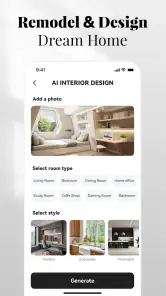
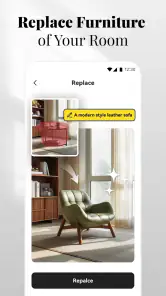
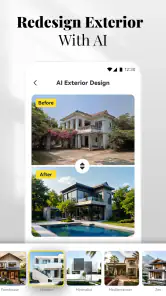
I like the idea of testing a room’s look before committing to paint, moving furniture, or buying anything. AI Home Design: Interior DecAI is an art and design app built around that kind of visual experiment: you provide a room photo, then explore possible design directions on screen. In my view, its real value is not that it can make decorating decisions for you, but that it can help you see alternatives when your own room feels difficult to imagine differently.
A quick visual starting point
The central capability is AI-assisted room redesign. Rather than starting with a blank floor plan or learning a detailed modelling tool, you work from a picture of the space you already have. That makes the process approachable: you can look at your actual room and consider how a different style or color direction might change its feel. It is best treated as a source of inspiration, not a precise promise of how a finished renovation will look.
A useful way to get more from this kind of preview is to take a clear photo that shows the parts of the room you want to rethink. For example, if the main question is whether a living room feels too dark, include the window, wall, and larger furnishings in the frame. Keep the first experiment focused on one broad idea, such as a lighter palette or a more minimal look. When you change too many things in your mind at once, it becomes harder to tell which direction actually suits the room.
From a room photo to a decision
In everyday use, the app’s appeal is that it gives you something concrete to react to. I would use it before buying paint or rearranging a room, then compare the visual concept with the space as it really is. A design image can help answer, “Do I want this room to feel calmer?” even if it cannot settle practical questions such as exact dimensions, whether a piece will fit, or how a color will look in changing daylight.
That difference matters when you compare it with familiar alternatives. Browsing decor pictures can spark ideas, but those images usually show somebody else’s home. A room-planning tool can be more useful when exact measurements and furniture placement are the priority. This app’s stronger role is quick, personalized visual exploration: it helps connect general inspiration to the room you are trying to improve, without turning the first step into a technical project.
Who will get the most from it
I can see it being especially handy for renters, first-time decorators, and anyone stuck between two broad looks. Imagine deciding on a weekend whether a spare room should become a work area or a quieter reading space. A photo-based redesign gives you a low-effort way to explore the mood before you spend time shifting furniture or buying accessories. It can also help a household discuss preferences: a visual example is often easier to react to than vague suggestions like “make it warmer.”
There are trade-offs. A generated concept should not be treated as a shopping specification or a construction plan, and visual appeal alone does not tell you whether a proposed arrangement works with your room’s measurements or everyday routines. I would use the results to narrow down a direction, then check dimensions and materials separately before making purchases. If you already know exactly what you want and need accurate plans, a dedicated room planner or advice from a design professional is likely the better next step.
More From Our News Desk

Weather by Xiaomi Review: Clear at a Glance, Less Clear Up Close

X Under Pressure: Can It Recover When Posting Goes Wrong?

Clash of Clans Is Won Between the Battles

Android Auto Makes the Case for Quieter Car Software

MobiOffice: Transforming Mobile Productivity with Seamless Integration

EA SPORTS FC™ Mobile Soccer: Redefining Mobile Sports Gaming
Using the app as a decorating aid
I find this section most useful when a room feels familiar enough that it is hard to imagine changing it. A photo-based redesign can give me a fresh angle, but I still treat the image as a prompt for choices rather than a finished plan. Next, I’ll look at how to make comparisons more informative by keeping the room and the question consistent.
Making a useful comparison
One detail that makes a photo-based design exercise more useful is consistency. I would keep the camera in roughly the same position for each attempt and avoid changing the room between photos. That way, if two concepts feel different, you have a better chance of attributing the difference to the design direction rather than to a new angle or a pile of clutter that has moved out of frame.
I would also write down the question before opening the app. “Would a softer, lighter room suit this space?” is easier to answer than “What should I do with everything?” A narrow question gives the image a job: perhaps it helps you decide whether to explore a calmer palette, or whether the room would benefit from a more open-looking style. This simple habit can keep browsing from turning into an endless search for a perfect picture.
A realistic weekend test
Picture a shared spare room that has slowly become a place for storage, occasional work, and guests. Before buying a desk or clearing out the whole room, I would take a photo that shows the walls and the existing larger pieces, then use the visual redesign to compare the feeling of a work-focused space with a more restful one. The result cannot settle where every item should go, but it can help the household agree on which purpose matters most.
That is a modest outcome, but it can prevent a common decorating mistake: shopping for individual items before agreeing on the room’s overall purpose. If the image makes a calm reading space more appealing, that gives you a direction for later choices. If it makes a brighter work area feel more appropriate, you can investigate that idea instead. Either way, you are using the preview to make a decision about priorities, not treating it as a ready-made renovation plan.
Where it sits among design tools
Compared with saving inspiration photos, the advantage here is the connection to your own room. A collection of beautiful interiors can leave you unsure whether the look would translate to your walls, flooring, or existing furniture. A room-photo redesign offers a more personal prompt, which is particularly helpful when you cannot picture a style from words alone.
The trade-off is precision. A dedicated planner is the more sensible choice when you need to test exact furniture dimensions, clearances, or a measured layout. A professional can help when structural work, wiring, or other technical decisions are involved. I would use this app earlier in the process, when the main task is choosing a visual direction; I would switch tools once the question becomes “Will this fit?” or “Can this be built safely?”
Small choices that improve the result
Before taking a photo, I would clear only the items that obscure the room’s main surfaces, rather than staging the space until it looks unlike everyday life. A tidy but recognizable room is a better reference for deciding whether a proposed look makes sense for your home. It also helps you remember what must remain, such as a large piece of furniture or a feature you are not planning to change.
It is worth treating the output as a conversation starter rather than a verdict. If someone else shares the room, show them the image and ask what they like about it: the color mood, the sense of space, or the overall style. Their answer can reveal the part of the concept that matters, even if the generated details are not practical. This is a more useful way to collaborate than asking whether everyone likes the entire image at once.
Your Personal Interior Designer
Imagine having an expert to guide you through the process of redecorating your home. That’s what AI Home Design: Interior Decor offers. The app uses cutting-edge AI technology to help you visualize how different styles, colors, and furniture would look in your space, without moving a single piece of furniture. It’s like magic! You can take a picture of your room, and the app will suggest design ideas tailored to your taste.
Easy to Use
Navigating through the app is as easy as pie. The user interface is super intuitive, making it accessible even for those who aren’t tech-savvy. You start by snapping a photo of your room, and the app does the rest. It’s perfect for anyone who wants to dip their toes into interior design without the hassle of hiring a professional.
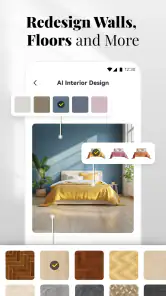
The app also provides a wide range of styles to choose from. Whether you're into minimalist spaces or love the cozy vibes of a rustic farmhouse, there’s something for everyone. Plus, it includes a palette of colors to experiment with, which can completely transform the ambiance of your space.
A Community of Creativity
One of the coolest features is the community aspect. You can share your designs with other users and get feedback. It’s a vibrant community full of creativity and inspiration. You might even find yourself inspired by someone else’s idea and incorporate that into your own home!
The app also includes a shopping feature where you can purchase items you love directly through the app. It’s convenient and ensures that the items fit perfectly with your design vision. No more guessing whether that couch you saw online will look good in your living room.
Cost, fit, and realistic expectations
AI Home Design is free to download, with optional in-app purchases priced from $5.99 to $99.99 per item. It is developed by Smart AI DEV, is rated for Everyone, and has a 3.9 average from around 35 thousand ratings, with over 5 million installs. Its current version is 1.4.1, and it runs on Android 6.0 or later. Those figures suggest it has found a sizeable audience, though the rating also makes me recommend trying the basic experience before paying for anything.
For a practical test, I would photograph the room in daylight, keep the camera angle consistent, and try one design direction at a time. That makes comparisons more useful than changing the lighting, viewpoint, and style between attempts. If the first result feels off, I would not assume the room itself is the problem; a cluttered frame or a photo that hides the main walls can make any visual concept harder to judge.
It is also worth separating inspiration from product selection. Even when a design suggests furniture that looks right in the image, check its real-world size, delivery details, and material before buying. The visual preview can help you decide what kind of sofa or color family to look for, but it should not replace measuring the doorway, checking the available floor space, or testing a paint sample at home.
When I would choose something else
The app is a better fit for “What could this room feel like?” than “Will this exact layout fit?” If you need a measured floor plan, a reliable renovation specification, or a detailed furniture plan, use a tool designed for those tasks instead. I would also skip an AI concept as the sole basis for a costly remodel: use it to clarify your taste, then verify technical decisions independently. That boundary keeps the quick visual exercise useful rather than misleading.
Who benefits, and who should pass
This is most appealing if you are at the early, uncertain stage of decorating: you have a room, a few competing ideas, and no clear picture of which one feels right. It is also useful if you need a visual aid to explain your taste to a partner, housemate, or family member. Someone who already has a precise plan, or who needs measured drawings for a contractor, is likely to get more value from a specialist planning tool.
For renters, the app can be a low-commitment way to explore changes in color and mood before deciding what is worth discussing with a landlord. For people with limited time, it can help narrow a broad search into a short list of styles to investigate. I would skip it if you expect an image to guarantee exact furniture placement, verify purchases, or resolve a technical renovation question; those jobs need real measurements and, sometimes, professional advice.
Final Thoughts
In a nutshell, AI Home Design: Interior Decor is a must-have for anyone looking to refresh their living space. It’s fun, easy to use, and brings out your inner designer. The AI technology is impressive and makes the process of redecorating less daunting. Whether you’re a design enthusiast or a newbie, this app has something to offer. So, go ahead and give your home the makeover it deserves!
My recommendation is to approach it as a creative first pass: use the room image to find a direction, discuss the idea with anyone who shares the space, and then confirm the practical details before spending money. That makes it most useful for people who want a visual nudge, not a substitute for careful planning. Its free entry point makes experimenting easy, while the optional purchases are a reason to decide what you need before paying.
AI Home Design: Interior DecAI Frequently Asked Questions
Can AI Home Design: Interior DecAI help me explore different looks for a room before decorating?
The app is presented as a home decoration and house-design tool for people who want to imagine a dream home. Its focus makes it a natural option for exploring design ideas and considering how a room might look before making changes in your actual space. Treat the results as inspiration, then compare them with your room’s dimensions, budget, and practical needs.
Is AI Home Design: Interior DecAI intended for professional designers or for personal home projects?
AI Home Design: Interior DecAI is an Art & Design app centered on home decoration and house design. That makes it relevant both to people who enjoy experimenting with interior ideas and to anyone planning changes at home. You do not need to approach it as a professional design tool to explore its purpose; it can be considered as a way to develop and visualize ideas for a dream home.
Is AI Home Design: Interior DecAI free to download, and are there optional purchases?
AI Home Design: Interior DecAI is free to download, so you can try the app without an upfront payment. It also offers in-app purchases, with prices ranging from $5.99 to $99.99 per item. The published questions below describe some features as available for free and others as optional premium additions, so check the purchase details in the app before confirming anything.
What devices can run AI Home Design: Interior DecAI, and is it suitable for all ages?
The app is available for Android devices running version 6.0 or later, and its content rating is Everyone. That makes it suitable for a broad audience, including people exploring home decoration for the first time. If you are using an iPhone or iPad, check its availability and compatibility in the relevant app store before downloading, as device requirements can vary by platform.
What features does AI Home Design: Interior Decor offer?
AI Home Design: Interior Decor offers a wide range of features, including AI-driven interior design suggestions, customizable room layouts, 3D visualization, and a vast library of furniture and decor items. Users can experiment with different styles, colors, and arrangements to create the perfect look for their home. Additionally, the app provides real-time updates and allows users to save and share their designs.
Pros
- Intuitive user interface for easy navigation
- Vast library of design templates and ideas
- Real-time 3D visualization of designs
- Integration with smart home devices
- Regular updates with new features
Cons
- Requires high-performance device for best experience
- Limited free features without subscription
- Occasional bugs in 3D rendering
- High data usage during design downloads
- Some features locked behind paywall
- Category
- Art & Design
- Version
- 1.4.1













