AI Art Photo Editor, Enhancer
- 1.21K
- 3.7
- Installs
- 10.00M
- Price
- Free

Screenshots
Analysis by Reviewed
I tend to get the most out of an AI photo editor when I treat it as a quick creative experiment, not a replacement for careful retouching. That distinction matters with AI Art Photo Editor, Enhancer: its appeal is turning a familiar image into something stylized, while the result may not suit a photo that needs precise, natural-looking corrections. If you’re curious about anime-inspired portraits, cartoon effects, or playful transformations, it gives you a low-commitment place to explore.
Where first-time edits can go sideways
The main source of frustration with apps like this is often expectation: an automatic effect can change the character of a face or image rather than simply polish it. I’d start with a photo where the subject is clear and the lighting is reasonably even, then compare the result with the original before deciding it is ready to share. A dramatic style can be fun, but it may be less flattering or less recognizable than you expect.
I also wouldn’t assume every tool is part of the free experience. The app is free to download, while in-app purchases range from $5.99 to $79.99 per item, so it’s sensible to check what an option costs before committing to it. For occasional edits, that distinction may be more important than the headline promise of an effect.
A simple setup and recovery routine
Before editing, choose a source image you’re comfortable using and make sure you can find the original again in your photo library. Keeping that untouched copy gives you an easy fallback if a transformation looks too strong or an edit doesn’t turn out as expected. I’d also begin with one image and one effect at a time; that makes it easier to tell whether the style, rather than the photo itself, is causing a disappointing result.
If an edit stalls or the app behaves unexpectedly, I’d first check the basics: confirm the image opens normally on the device, close and reopen the app, and try again with a different photo. If only one image causes trouble, its format or condition may be the issue rather than the editor as a whole. If several edits fail, checking that the app is current and restarting the device are reasonable general troubleshooting steps. These checks won’t fix every problem, but they help narrow down where it is occurring.
Unleashing Creativity with AI Art Photo Editor
At first glance, the AI Art Photo Editor, Enhancer seems like just another photo editing app, but trust me, it’s anything but ordinary. When I first downloaded the app, I was blown away by the simplicity of its interface. Even if you're not tech-savvy, navigating through its features feels like a walk in the park. The app offers a variety of filters and tools that are perfect for both beginners and seasoned photo editors.
Features That Make a Difference
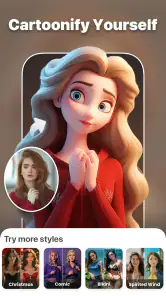
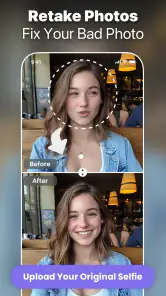
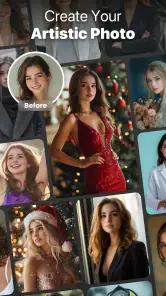
First off, the AI-driven filters are where the magic happens. These aren't your run-of-the-mill filters; they transform your photos into paintings, sketches, and even futuristic designs. It's like having a mini Picasso or Van Gogh in your pocket. What really caught my attention was the real-time preview feature. You can see the changes happening live, which means no more guessing games.
More From Our News Desk

Weather by Xiaomi Review: Clear at a Glance, Less Clear Up Close

X Under Pressure: Can It Recover When Posting Goes Wrong?

Clash of Clans Is Won Between the Battles

Android Auto Makes the Case for Quieter Car Software

MobiOffice: Transforming Mobile Productivity with Seamless Integration

EA SPORTS FC™ Mobile Soccer: Redefining Mobile Sports Gaming
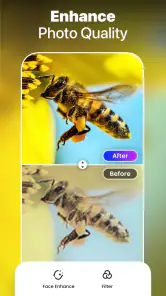
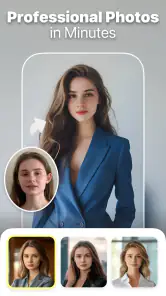
In addition to filters, the app has a powerful enhancement tool. It’s perfect for those days when your selfie game is a bit off. The enhancer sharpens details, brightens colors, and can even touch up blemishes. It’s like having a personal photo editor, ready to make you look your best with just a few taps.
The User Experience
Now, I know what you're thinking—an app with so many features must be a nightmare to use, right? Wrong! The design is intuitive and user-friendly. I was particularly impressed with the tutorial that guides you through each feature. It’s like having a friendly guide walking you through the wonders of photo editing, ensuring you get the most out of every tool.
Another thing worth mentioning is how seamlessly the app integrates with social media platforms. Sharing your newly enhanced photos is a breeze, and the quality is never compromised. Whether you're posting on Instagram, Facebook, or just sending a pic to a friend, the results are always top-notch.
Choosing it for the right kind of photo
For a quick everyday use, imagine taking a casual selfie before meeting friends and wanting a more playful profile image. I’d try a stylized treatment first, then compare it with the unedited shot and keep whichever still feels like me. That workflow is more useful than chasing the strongest effect: a recognizable face often makes a better avatar than a transformation that looks impressive but unfamiliar.
The app is a better fit for people who enjoy experimenting and want a fast route from a regular portrait to an illustration-like look. If you need detailed control over color, layers, masks, or precise blemish removal, a conventional editor is usually the better choice. Those tools are built for deliberate adjustments; AI transformations trade some control for speed and surprise. I’d use this app for a fun variation, then turn to a more manual editor when a photo needs exact correction.
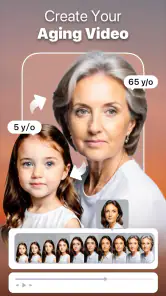
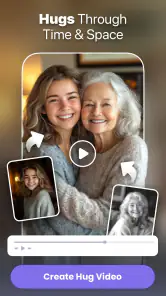
Its photography focus also makes it useful beyond selfies. A pet portrait or a clear picture from a day out can become a lighthearted share, while an aging-style video or AI hug effect may be better treated as a novelty than as a faithful depiction. I’d avoid relying on a generated transformation to communicate something factual about a person. The appeal is creative play, not documentary accuracy.
When the problem may be elsewhere
If an exported image seems different from the preview, I’d compare the saved file with the original before repeating the edit. A preview is useful for choosing a look, but the practical test is whether the finished image works at the size and on the screen where you plan to use it. For a social profile, check the crop in the profile frame; for a message, make sure the subject remains clear when viewed small. This simple check can prevent a good-looking edit from becoming an awkward share.
Not every disappointing result points to a broken app. A blurry source photo leaves less detail for an enhancement to work with, and harsh shadows or a busy background can compete with a stylized effect. When a result looks odd, I’d try a sharper, simpler image before deciding the tool itself is at fault. That’s a useful distinction for AI editing in general: the transformation can reinterpret what is already there, but it cannot guarantee that every source photo will suit every style.
Who should give it a try
Smart AI DEV’s photography app is free to install, rated for Everyone, and has an average rating of 3.7 from around 105,000 ratings, with more than 10 million installs. It was released on April 17, 2023, and version 1.5.0 requires Android 6.0 or later. Those details make it accessible to a broad range of Android users, though the purchase options are worth keeping in mind if you plan to explore beyond the free experience.
My practical verdict is that this is most appealing when you want quick, expressive edits and are happy to judge each result by eye. It’s less suited to someone who expects every portrait to come out natural, needs exact retouching controls, or doesn’t want to encounter optional purchases. I’d keep the original image, test effects on a low-stakes photo, and use a different editor when precision matters. For playful photo transformations, that’s a reasonable balance of convenience and creative possibility.
Final Thoughts
If you’re looking to up your photo game and explore the world of AI-enhanced editing, the AI Art Photo Editor, Enhancer is definitely worth checking out. Its blend of powerful features and ease of use makes it a standout choice for anyone looking to add a little magic to their photos. So next time you see a stunning image and wonder how they did it, you’ll know the secret—and you can do it too!
A low-pressure way to test the styles
I’d make the first session deliberately small: pick one portrait that is already in focus, try a single style, and pause to inspect the face, hair, and background separately. The overall thumbnail can look striking while a detail feels oddly changed when enlarged. This quick close-up check is especially useful before using a result as a profile image, where people who know you will notice changes more readily than casual viewers.
For a family group or a photo with several people, I’d be more cautious. A style that works well on one clear face may treat different faces unevenly, so test the effect on a copy and look at each person before sharing. If the transformation makes one subject look noticeably different from the rest, a simple crop around a single person—or a less stylized treatment—may be a better choice than trying to rescue the group image with repeated edits.
Making a result useful beyond the novelty
A practical use I can see is creating a set of informal images for different contexts: keep the original for a straightforward contact photo, and use a cartoon-like variation for a casual group chat or a playful social post. The advantage is not that the transformed picture replaces a good photograph; it gives you another tone to choose from. I’d avoid using a heavily altered portrait where someone needs to recognize you quickly, such as a work profile or an account used for important communication.
If you’re deciding between this and a standard photo editor, think about the kind of decision you want to make. A manual editor is better when you already know the change you want—lift shadows, correct a color cast, or remove a distracting object—and need control over how it is applied. This app makes more sense when you want to see what a particular AI treatment does to a photo and are open to an unexpected interpretation. They can complement each other: use the stylized result for fun, but keep a conventional editor for exact, restrained corrections.
Small checks that save time
When a result looks weak, I wouldn’t immediately try a string of different effects on the same image. First check whether the original is sharp enough, whether the face is well lit, and whether the subject occupies enough of the frame to be easy to read. Then change one thing at a time: choose a cleaner source image or a different style, rather than changing both at once. That gives you a clearer sense of what helped and avoids spending time on edits that were never a good match for the source.
If the app appears to stop during a task, I’d avoid repeatedly tapping controls or starting several edits at once. Let the current attempt finish, then close and reopen the app if it remains stuck. Afterward, test a different image so you can distinguish a one-photo issue from a wider problem. It’s a modest recovery routine, but it is more useful than assuming every delay means the photo has been lost or the whole app needs reinstalling.
Privacy and sharing choices
Because portraits can be personal, I’d choose images thoughtfully, especially when editing pictures of friends or family. Before posting a transformed image, consider whether the people shown would be comfortable with that version being shared. The same care applies to AI hug or aging-style results: they can be amusing as a private experiment, but the result may be mistaken for a realistic depiction if it is presented without context. I’d keep those effects clearly playful.
For a share-ready image, I’d also check the final crop and how much of the original scene remains visible. Stylized effects can draw attention to the face and make background details feel more prominent or distracting than before. A quick review at the size it will actually appear—rather than only zoomed in—helps answer the useful question: does this image communicate the mood I intended?
Who may prefer another approach
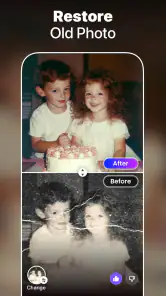
This is not the app I’d reach for when I need a consistent look across a batch of product photos, a careful restoration of an old picture, or a natural edit that must preserve every facial detail. Those jobs benefit from predictable controls and the ability to make small, reversible changes. Here, the appeal is the possibility of a distinctive transformation, which also means the output can be less predictable and may require a few rounds of choosing a better source or a different treatment.
It may also frustrate anyone who wants to explore every option without encountering paid choices. Since the app is free to install but includes purchases, I’d decide in advance whether I’m only testing the free experience and check the price shown for an option before proceeding. That keeps an entertaining experiment from turning into an unplanned purchase and makes the app’s value easier to judge for your own habits.
My recommendation in everyday use
For a relaxed evening or a quick update to a casual profile, I’d keep this editor in mind when I want a cartoon-like portrait, an anime-inspired look, or another visibly creative treatment. The most satisfying results are likely to come from a clear, well-lit source and a willingness to reject an effect that changes too much. I would not treat every output as an improvement; sometimes the original photo is simply better.
Overall, I see it as a playful addition to a photo toolkit rather than a complete editing solution. Its automatic transformations can make experimentation easy, while the need to judge likeness, source quality, and purchase prompts means a little patience pays off. If you want fast creative variations and can live with uneven results, it is worth trying. If accuracy, detailed retouching, or a reliably natural finish matters most, I’d choose a more traditional editor instead.
AI Art Photo Editor, Enhancer Frequently Asked Questions
What does AI Art Photo Editor, Enhancer do, and who might enjoy it?
AI Art Photo Editor, Enhancer is a photography app from Smart AI DEV for people interested in creative, AI-themed photo and video transformations. Its description highlights trying an anime version of a photo, turning yourself into a cartoon, and generating AI hug or aging videos. It may appeal to users looking for playful effects and stylized results rather than a conventional camera app.
Who developed AI Art Photo Editor, Enhancer, and when was it released?
AI Art Photo Editor, Enhancer is developed by Smart AI DEV and was released on April 17, 2023. It is a photography app focused on creative AI effects, including anime and cartoon-style transformations and AI-generated videos. If you are comparing editing apps, its release date and developer can help you identify the product, while its creative focus gives you a sense of the kind of experience it offers.
Is AI Art Photo Editor, Enhancer free to download, and what might cost extra?
AI Art Photo Editor, Enhancer is free to download, so you can try the app without paying upfront. It also offers in-app purchases, with items priced from $5.99 to $79.99, so check the purchase details before choosing any paid option. The app’s Everyone content rating describes its age classification, while purchases are a separate consideration.
What kinds of AI creations can I make with AI Art Photo Editor, Enhancer?
The app’s description highlights several creative options: trying an anime version of a photo, turning yourself into a cartoon, and generating AI hug or aging videos. These are aimed at users who want playful, stylized edits rather than only conventional photo adjustments. AI Art Photo Editor, Enhancer is a photography app from Smart AI DEV.
What should I check before installing AI Art Photo Editor, Enhancer on my device?
Before downloading, check that your device runs Android 6.0 or later, which is the stated minimum operating system. The app is free to install and has an Everyone content rating. Its current version is 1.5.0, so checking your device’s compatibility and available storage is a sensible first step before trying its photo and video effects.
Pros
- High-quality image enhancement
- User-friendly interface
- Wide range of art styles
- Fast processing times
- Regular updates with new features
Cons
- Requires internet connection
- Limited free features
- Occasional ads disrupt use
- High-quality exports need subscription
- Limited support for uncommon devices
- Category
- Photography
- Version
- 1.5.0












