AI Video Generator - ArtReel
- 145.00
- 4.6
- Installs
- 100.00K
- Price
- Free
Screenshots
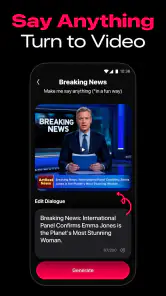
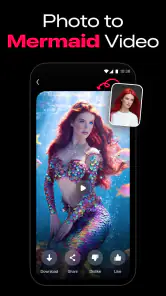
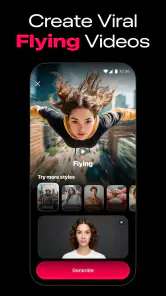
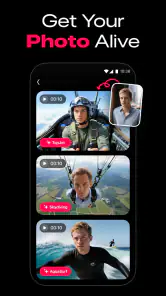
Analysis by Reviewed
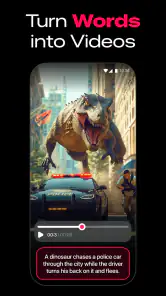
Making a short AI video can sound more complicated than it really is, especially if you are starting with a simple idea such as a funny dance clip for social media. AI Video Generator - ArtReel is built around that kind of quick experiment. It is a free photography app from Smart AI DEV that focuses on turning an idea into an AI-generated video, including the popular baby dance style that many people have seen online. After spending time with it, I found the appeal easy to understand: it gives curious beginners a more approachable way to try AI video creation without first learning a full editing program.
My overall impression is positive, but I would not treat it as a complete replacement for a professional video editor. Its strongest use is the fast, playful project: create something amusing from a photo or concept, see how the result looks, and decide whether it is worth sharing. The experience is more about getting to an entertaining result than controlling every frame. That distinction matters, because people who want precise timing, detailed motion direction, or a polished production workflow may eventually prefer a conventional editor or a more advanced AI tool.
What to expect before creating your first video
ArtReel belongs to the photography category, although its main attraction is moving images rather than ordinary photo adjustments. The store presents it as an AI video generator, and that is the right way to approach it: you provide the starting material or idea, choose the kind of result you want, and let the app handle much of the visual transformation. The experience is designed to feel more immediate than building an animation manually.
The app is free to install and is suitable for Everyone, which makes it easy to recommend for casual experimentation. It has a 4.6 average from around 13K ratings, and its audience has already grown beyond 100K installs. Those figures do not guarantee that every generated clip will be perfect, but they do suggest that the concept is reaching people who want a simple introduction to AI video effects rather than a complex studio environment.
The current version is 1.2.6, and the app runs on Android 5.0 or later. That broad operating-system support is useful if you are using an older phone, although the practical experience can still depend on the device, available storage, connection quality, and how demanding the generation request is. AI video creation is not the same as applying a basic filter, so patience is sometimes part of the process.
One thing I would keep in mind is the difference between a fun result and a controllable result. A generated person may move in an unexpected way, facial details can look unusual, and the rhythm of a dance may not match the exact moment you imagined. I see that unpredictability as part of the entertainment, but it can become frustrating if you need a specific gesture or a perfectly timed clip.
Who will enjoy the experience most
I think ArtReel is especially suitable for someone who wants to make a shareable joke, test an AI trend, or animate a memorable image without learning layers, keyframes, masks, and timeline editing. It can also be useful for a family group chat, a birthday idea, a playful profile post, or a quick visual experiment when the goal is to surprise someone rather than produce a professional campaign.
More From Our News Desk

Weather by Xiaomi Review: Clear at a Glance, Less Clear Up Close

X Under Pressure: Can It Recover When Posting Goes Wrong?

Clash of Clans Is Won Between the Battles

Android Auto Makes the Case for Quieter Car Software

MobiOffice: Transforming Mobile Productivity with Seamless Integration

EA SPORTS FC™ Mobile Soccer: Redefining Mobile Sports Gaming
It is less suitable for a filmmaker, social media manager, or creator who needs repeatable character movement and exact brand control. If your project depends on consistent colors, reliable lip movement, carefully chosen camera motion, or a precise duration, you may find the app too automatic. In those cases, a standard mobile editor gives you more control, while a specialized generative video platform may offer more detailed instructions.
How I approached the first setup
For a first attempt, I recommend beginning with one clear image and one simple idea. Do not start with a crowded group photo, a dark picture, or a scene where the subject is partly hidden. The generator has a better chance of producing a convincing result when the main person or object is easy to identify. A bright, front-facing image is a sensible starting point because it gives the animation a cleaner visual anchor.
Before tapping through the creation process, decide what you want the clip to do. “Make this funny” is a vague goal, while “turn this portrait into a playful dance clip” gives you a much clearer direction. The baby dance trend is a natural first theme because it is visually simple and immediately understandable. Starting with a familiar format also helps you judge the output: you can quickly tell whether the movement feels lively, awkward, or simply different from what you expected.
I would also prepare a few source images instead of relying on only one. This is not because every image will fail, but because small differences in pose, lighting, and facial visibility can change the final result. A photo that looks best in your gallery may not be the one that animates best. Treat the first generation as a test of the source image as much as a test of the app.
There is another practical point for first-time users: choose material you have permission to use. If you animate a friend, child, celebrity, or someone else’s artwork, think about whether sharing the result is appropriate. The app makes creation easy, but that convenience does not remove the need to respect the people and images involved.
The quickest route to a meaningful first result
My recommended first workflow is deliberately small. Open ArtReel, choose a clear image, select a recognizable AI video style, and begin with a short, playful concept rather than trying to tell a complete story. Watch the result as a whole before judging individual details. AI motion can look strange for a moment but still work well as a humorous clip, especially when viewed quickly in a social feed.
If the first result is not convincing, change one thing at a time. Use a different image before changing the concept, or simplify the idea before blaming the generator. This makes it easier to understand what is affecting the outcome. A common beginner mistake is to change the image, theme, and wording together, then have no idea why the second attempt looks different.
A useful trick is to frame the source image with the final viewing format in mind. If you expect people to watch it on a phone, keep the important subject near the center and avoid placing key details at the edges. Even when the generated motion is entertaining, a poorly framed subject can make the finished clip feel less successful. The app may create the animation, but the starting composition still matters.
For a realistic everyday scenario, imagine that you want to send a birthday greeting to a friend who enjoys internet trends. You could choose a suitable portrait, create a playful dance-style video, and send it privately instead of trying to build a long montage. That is where I think ArtReel makes the most sense: it turns a small personal idea into something visual with less effort than recording and editing a complete performance.
What can make the result feel better
The most useful improvement is often not a more elaborate prompt or a more dramatic image. It is choosing a source that already communicates the mood you want. A cheerful expression, clear clothing, and an uncluttered background give the generated movement a better chance of feeling intentional. When the source image is visually confusing, the animation can amplify that confusion rather than solve it.
I also suggest creating variations for different purposes. One version might be exaggerated and silly for friends, while another might use a calmer image for a personal post. Do not assume that the most technically realistic output is automatically the best one. With trend-based AI videos, a slightly odd movement can be the reason people find the clip memorable.
Another non-obvious trade-off is speed versus refinement. The point of ArtReel is to shorten the distance between an idea and a generated video, but quick creation can encourage people to publish the first attempt immediately. I get better results when I pause, replay the video, and check whether the face, hands, background, and overall motion still look acceptable. A few seconds of review can prevent an awkward clip from being shared accidentally.
Common confusion during use
New users may expect the app to behave like a traditional editor, where every action is visible on a timeline. That is not the mindset I would use here. ArtReel is closer to an automated creative assistant: you make the important choices at the beginning, then evaluate what the system produces. If you are searching for detailed controls over each movement, you may feel that the app is limiting even when the generation itself is entertaining.
It is also easy to confuse a successful generation with a perfect generation. A video can technically complete and still need another attempt because the motion is stiff, the subject changes appearance, or the joke does not read clearly. I would judge the output according to its purpose. For a private joke, a strange hand or unexpected step may be harmless. For a public post representing a business, the same issue could make the result unusable.
Another point worth understanding is that AI does not automatically know the personal context behind an image. If you upload a photo of two people and expect one particular person to dance, the visual result may not follow your intention as accurately as you imagine. Clearer source material and simpler compositions reduce that risk, but they do not turn the process into exact manual animation.
Because the app includes in-app purchases ranging from $3.99 to $59.99 per item, I would recommend checking what is included in the free experience before committing to repeated creation. The free entry point is useful for deciding whether the style suits you, but frequent experimentation can make paid options more relevant. I would only spend money after confirming that the app produces the kind of videos I actually want, rather than paying simply because the first result was amusing.
How it compares with ordinary photography and video apps
Compared with a normal photo editor, ArtReel offers a more dramatic transformation. A conventional editor is better when you want to crop, correct color, remove distractions, or make a polished still image. ArtReel is the more interesting choice when the point is movement and surprise. The trade-off is predictability: ordinary editing tools show you exactly what you are changing, while an AI generator interprets your request.
Compared with a standard mobile video editor, ArtReel saves time at the beginning but gives up detailed control. A timeline editor lets you choose clips, trim them precisely, add text, adjust audio, and arrange a story step by step. ArtReel is better for generating the central visual idea quickly. A practical workflow could use both: create the unusual AI clip in ArtReel, then use another editor if you need captions, music, transitions, or a carefully assembled final post.
Compared with more advanced AI video services, the attraction here is approachability. You do not need to begin with a complicated production plan. However, advanced services may be preferable when you need longer sequences, stronger consistency, or more precise direction. I would choose ArtReel for a quick personal experiment and a more specialized tool for a project where the generated visuals must follow a strict brief.
Who should skip it
I would skip ArtReel if your main reason for downloading is to edit existing footage manually. The app’s appeal is generative transformation, not the careful assembly of a conventional video. I would also look elsewhere if you need guaranteed results for a client, a school presentation with strict visual requirements, or a campaign that must use consistent characters across many clips.
People who dislike trial and error may not enjoy it either. The app reduces technical effort, but it cannot remove creative uncertainty. You may need to try a different source image or simplify the idea before the result feels right. That is normal for this type of tool, yet it is worth knowing before you expect a one-tap masterpiece.
Privacy-conscious users should also think carefully about the images they choose to process and share. I would begin with a non-sensitive image while learning the workflow. That lets you understand the creative side of the app without immediately involving private documents, personal identification images, or photographs that could cause problems if reused outside your intended audience.
My next-step advice after the first successful clip
Once you have a result you genuinely like, resist the urge to make the next project much more complicated. Instead, repeat the same successful structure with a new image or a slightly different mood. This teaches you which kinds of source material work best for your own style. You will learn more from comparing two simple attempts than from changing every setting at once.
After that, consider how the video will be used. A private message can tolerate more absurdity than a public profile post. A family greeting may benefit from a recognizable face and a short joke, while a creative portfolio needs cleaner visual consistency. ArtReel can support the first kind of project very well, but the more formal the purpose becomes, the more likely you are to need another editing stage.
It is also worth keeping your expectations realistic about the app’s role. It is not trying to replace your imagination; it gives your idea a quick visual form. The strongest results come from users who provide a clear subject, choose an appropriate image, review the output, and know when a funny imperfection adds character rather than when it makes the clip unusable.
For me, AI Video Generator - ArtReel is a worthwhile free download for curious beginners and anyone who wants to explore playful AI video trends without starting with a complicated editor. Smart AI DEV has made the basic idea accessible, and the Everyone rating, broad Android support, and simple creative focus make the first experiment feel approachable. Just remember that the app is strongest as a fast idea generator, not as a precision production suite.
My recommendation is to start with one clear portrait, one simple dance concept, and modest expectations. If the first clip makes you smile, ArtReel has probably found its place in your creative toolkit. If you need exact control, consistent characters, or a finished professional video in one pass, use it only for the initial idea and move the result into a more capable editor afterward.
AI Video Generator - ArtReel Frequently Asked Questions
Can I try AI Video Generator - ArtReel without paying upfront?
ArtReel is free to download, so you can install it without paying an upfront download price. Some features or continued use may involve in-app purchases, however, so check the costs shown in the app before committing to a particular creation workflow. If you are only curious about AI-generated video, start by exploring the available options and make sure you understand any purchase terms before proceeding.
Is AI Video Generator - ArtReel intended for social media creators?
The app’s description promotes making viral AI videos, including clips inspired by the baby dance trend, which makes it relevant to people creating content for social platforms. You can also use AI-generated video for personal creative experiments or other visual projects. Before sharing a finished clip, consider whether its style and quality fit the platform and audience you have in mind.
What does AI Video Generator - ArtReel create, and is it focused on a particular kind of video?
ArtReel is a photography app for making AI-generated videos, with its store description highlighting viral styles such as the baby dance trend. It may appeal to anyone looking to turn a creative idea into an eye-catching clip for social media or personal projects. The available style and results depend on the tools in the app, so it is worth exploring the options to see whether they suit the kind of video you want to make.
What is AI Video Generator - ArtReel and what can I use it for?
AI Video Generator - ArtReel is designed to help users create short videos and visual content with the assistance of artificial intelligence. Depending on the available tools, you can typically start from a text prompt, image, or creative idea and turn it into an animated clip. It may be useful for social media posts, concept videos, storytelling, marketing material, and experimenting with AI-generated visual effects.
Is AI Video Generator - ArtReel suitable for beginners without video-editing experience?
The app is aimed at making AI-assisted video creation more accessible, so beginners can usually explore its main features without advanced editing knowledge. You can begin with a simple prompt or source image, select a style, and adjust the result using the available controls. However, generating polished videos may require several attempts, especially when learning how to write precise prompts and choose suitable settings.
Pros
- Creates videos from text prompts with minimal editing skills required.
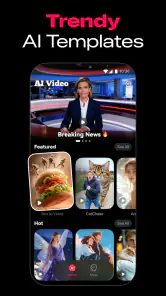
- Offers creative styles and effects for varied visual results.
- Useful for quickly producing content for social media platforms.
- Reduces the need for expensive filming equipment or software.
- Simple interface makes experimentation easy for beginners.
Cons
- Output quality can vary depending on the prompt and selected style.
- Some advanced features may require a paid subscription or credits.
- Generated clips may lack precise control over characters and motion.
- Rendering longer or more detailed videos can take considerable time.
- Results may need extra editing before they look fully professional.
- Category
- Photography
- Version
- 1.2.6












