Neon Love Theme
- 7.60K
- 4.6
- Installs
- 100.00M
- Price
- Free

Screenshots
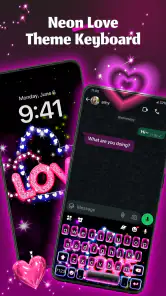
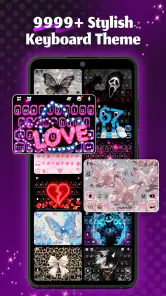
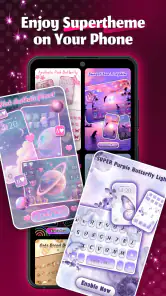
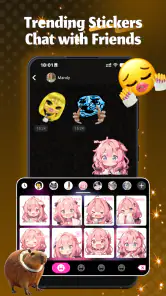
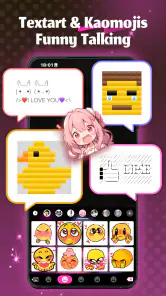
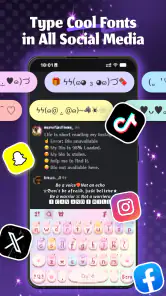
Analysis by Reviewed
I like the idea of a phone theme that makes a shared device feel more personal without asking everyone in the household to change how they use it. Neon Love Theme is a personalization app built around a bright neon-and-heart look, so it suits someone who wants their screen to feel playful and expressive rather than understated. I’d treat it as a visual choice, not a household-management tool: it can change the feel of a device, but it doesn’t replace separate accounts or an agreement about who is using the phone.
How it fits a shared phone
Picture a family tablet or a phone passed between relatives while someone waits for an appointment. A distinctive theme can make the device easier to recognize at a glance and give its owner a small way to make it feel like theirs. The trade-off is that neon colors and hearts are a strong style, not a neutral default. If several people rely on the same screen, it’s worth checking that the look remains comfortable for everyone who uses it, rather than assuming a personal theme will suit the whole household.
For example, if one person uses the phone mostly for messaging and another borrows it to check a calendar, the owner can show them where those familiar apps remain after the visual change. That quick handoff is more useful than expecting a visitor to explore a newly styled screen under time pressure. I’d also keep an eye on whether the theme makes the device easier to identify without suggesting that everyone who recognizes it has permission to open it.
Keep the setup personal
I’d make one change at a time and check how the screen looks in ordinary use, not just on the first launch. Bright artwork can make an appealing home screen while leaving icons or text less easy to pick out for another person. Before settling on the look, try the device in the lighting where it is usually used and make sure the important apps still stand out. This small check is more useful than choosing a theme based only on its preview.
That check can be practical rather than technical: open the apps the household uses most, then see whether their icons are still recognizable without stopping to read every label. If someone relies on familiar positions, avoid rearranging those apps at the same time as changing the visual style. Keeping one variable steady makes it easier to tell whether the theme itself feels comfortable, and it gives you a straightforward way to return to what worked if the new look causes confusion.
There’s also a practical boundary to keep in mind: a visual theme should not be mistaken for a privacy setting. If a phone is shared, each person should still use the device in line with the owner’s usual account and access arrangements. I would avoid handing over a device with personal messages or account details open just because its appearance has changed. The theme can make a screen recognizable; it does not establish who is allowed to read what.
Coordination without confusion
On a household device, a consistent look can help everyone identify it, but a highly distinctive screen may also make it less obvious which apps or settings belong to the person who normally uses it. I’d agree on who is responsible for changing the theme and restoring the familiar layout if another user finds the visual treatment distracting. That simple conversation prevents a cosmetic change from turning into a small argument about a device everyone depends on.
More From Our News Desk

Weather by Xiaomi Review: Clear at a Glance, Less Clear Up Close

X Under Pressure: Can It Recover When Posting Goes Wrong?

Clash of Clans Is Won Between the Battles

Android Auto Makes the Case for Quieter Car Software

MobiOffice: Transforming Mobile Productivity with Seamless Integration

EA SPORTS FC™ Mobile Soccer: Redefining Mobile Sports Gaming
When several people take turns with one phone, I’d treat the owner as the person who decides whether a theme change stays. That does not mean every borrower needs to like the design; it means there is a clear point of contact if someone cannot find an app or wants the old appearance back. For a device shared only occasionally, showing the usual app locations before handing it over can be enough. If the household needs separate personal spaces, a theme is not a substitute for whatever account boundaries the device already uses.
For an individual phone, the same vivid design can be a useful visual cue when switching between work and personal use: the screen looks unmistakably like your own space. If you need a calmer appearance for meetings, reading, or accessibility, though, a restrained wallpaper or the phone’s standard theme may be a better everyday choice. The appeal here is commitment to a bold mood, not subtlety.
First Impressions
Downloading the Neon Love Theme was a breeze, as it's available for both Android and iOS. Once installed, the theme instantly transformed my home screen into a glowing wonderland. The neon lights, paired with heart motifs, create a lively atmosphere that's both eye-catching and heartwarming. It's like having a mini Las Vegas right on your phone, minus the gambling, of course.
My practical first step with a look this vivid would be to give it a normal day before deciding whether it earns a permanent place on the device. A design that feels fun while browsing the home screen may feel busy when checking a message quickly or trying to locate an app one-handed. I’d judge it by those routine moments, not only by how striking it looks when the phone is sitting still.
Customization Galore
One of the standout features of this app is the sheer amount of customization options it offers. You can tweak the color schemes, adjust icon sizes, and even choose from different widget styles to suit your personal taste. For someone like me who loves to personalize every inch of their device, this was a dream come true. The ability to mix and match different elements made my phone feel uniquely mine.
With several visual controls available, I’d avoid changing everything at once. Try a single adjustment, use the phone as usual, and then decide whether another change would help. This makes it easier to keep the parts you like without losing track of which choice made the screen harder to read. It is also a sensible approach on a shared device: the owner can test a personal style while keeping the household’s everyday app habits recognizable.
Moreover, the theme doesn’t just stop at the home screen. It extends its neon charm to the lock screen, app icons, and even the notification panel. Each element is meticulously designed to keep the theme cohesive, which shows the developers’ attention to detail.
A coordinated look is most useful when the different parts of the phone still feel easy to scan. If a lock screen catches your eye but notifications become harder to distinguish, the unified appearance may not be worth the trade-off for your routine. I’d pay special attention to the places you check quickly—such as the lock screen when a message arrives—rather than judging the design only by its home-screen effect.
Performance and Usability
I was pleasantly surprised by how smoothly Neon Love Theme ran on my phone. There was no noticeable lag, and the battery consumption remained stable even after prolonged use. This is often a concern with visually intensive themes, but it seems like the developers have done their homework here. Everything from opening apps to navigating menus was seamless.
Usability is another area where this app shines. The interface is intuitive, making it easy for anyone to dive in and start customizing without a steep learning curve. Whether you’re a tech newbie or a seasoned pro, you’ll find the navigation straightforward and user-friendly.
Even with a straightforward setup, I’d separate “easy to customize” from “right for every user.” A person who enjoys tuning the look may find the choices rewarding, while someone who only wants to open a messaging app or make a call may prefer not to adjust a theme at all. If you are setting up a phone for another person, let them decide whether the visual change is useful instead of assuming that a more decorated screen is automatically an improvement.
A household-friendly choice?
I’d be more comfortable recommending this for one person’s phone than for a device used equally by adults and children. Its Teen content rating is worth considering when a younger user shares the device, and I would discuss the look and intended use with them rather than treating an age label as a substitute for supervision. The app is free to install, though in-app purchases range from $9.99 to $49.99 per item, so I’d check any purchase prompt before continuing and make sure the device owner is the one deciding whether to spend.
In a household, I’d also make the purchase boundary part of the setup conversation. Free installation does not mean every optional purchase is free, so the person responsible for the device should handle any decision about spending. If a younger user is borrowing the phone, it helps to explain that a purchase prompt is a reason to stop and ask rather than tap through. That is simple coordination, not a feature of the theme.
For comparison, a standard wallpaper change is the simpler route if you only want a new background. A full theme is more appealing when you want the icons and other screen elements to follow the same visual direction, but that broader makeover may not be worth it if you prefer your existing layout or need a neutral screen for shared use. The app is from Delicate theme for Android App, has a 4.6 average from around 437,000 ratings, and has passed 100 million installs. It runs on Android 7.0 and later, with version 10.5.1121 current; its release date is April 22, 2019.
That comparison gives me a useful rule of thumb: choose a wallpaper if the goal is simply to change the background, and choose a coordinated theme only if you genuinely want the surrounding screen elements to share the same mood. A wallpaper is less of a commitment for a shared device because it leaves the familiar icons and arrangement alone. The fuller treatment makes more sense for someone who enjoys a coherent look and is willing to spend a little time checking how it works in daily use.
Age, trust, and everyday use
The Teen rating is a useful prompt for a conversation, not a replacement for one. If a teenager is the main user, I’d let them decide whether the hearts and bright colors suit their taste while still keeping ordinary household rules about device use in place. If the phone belongs to an adult and is occasionally borrowed by a younger relative, I’d explain that changing the appearance does not change whose accounts or messages are on the phone. That distinction matters more than whether the design feels playful.
A realistic shared-device moment might be a parent handing over a phone so a teenager can check a pickup time. The bright theme may make the phone instantly recognizable, but the borrower still needs to know which app to open and what information is appropriate to access. I’d keep the handoff narrow and explicit, especially if personal messages or accounts are visible. The visual style can support recognition; it cannot create a separate profile or decide what another person may see.
Who will enjoy it, and who may not
I’d recommend trying it if you enjoy romantic motifs, want your phone to stand out, and like adjusting several parts of the screen rather than changing only the wallpaper. It is less suitable if you want a quiet, low-contrast interface, are setting up a device for several people with different tastes, or would rather avoid purchase prompts altogether. Before committing to a shared device, check that the people who use it can still find the apps they need and are comfortable with the brighter presentation.
It is also a better fit for someone who sees the phone as a personal object than for a household that expects one neutral screen to work equally well for everyone. If you value consistency and quick recognition over decoration, the standard theme may be the more comfortable choice. If you are curious but unsure, a limited trial of the visual changes—followed by ordinary use in your usual lighting—is a more reliable test than deciding from the theme’s initial impression.
The Final Verdict
In a world where first impressions matter, Neon Love Theme is sure to leave a lasting one. Its vibrant visuals and extensive customization options make it a standout choice for anyone looking to inject some life into their phone. Plus, with its smooth performance and easy-to-use interface, it's not just a pretty face.
If you’re ready to give your device a neon makeover, I’d say go for it. The Neon Love Theme is a delightful blend of style and functionality that’s hard to resist. So, why not let your phone reflect a bit of that glowing personality you’ve got?
My household verdict is more measured: I’d happily consider it for one person’s phone, especially if they enjoy a bold, coordinated screen, but I would not choose it as a way to manage a shared device. Keep the owner’s account boundaries clear, agree who can change the look, and check that the people borrowing the phone can still find what they need. If those basics are already settled, the neon style can be an enjoyable personal touch; if the priority is a calm, neutral interface for everyone, a simpler alternative is likely the better fit.
Neon Love Theme Frequently Asked Questions
Who developed Neon Love Theme, and what kind of app is it?
Neon Love Theme is a personalization app from Delicate theme for Android App. Its short description is “Neon Love,” and its store summary invites users to install a stylish keyboard with the Neon Love Theme. That makes it worth considering if you want to give your Android keyboard a themed appearance rather than download a game or a general-purpose utility.
Does Neon Love Theme have many users and positive feedback?
Neon Love Theme has more than 100 million installs, with an average rating of 4.6 from around 437,000 ratings and 7,600 reviews. Those figures suggest that many people have tried it and that user feedback is generally positive. Individual preferences still vary, so consider whether a neon love-themed keyboard suits your taste before installing.
What Android version do I need to use Neon Love Theme?
Neon Love Theme is a personalization app for Android, and it requires Android 7.0 or later. Check your device’s software version before downloading to avoid compatibility issues. If your phone meets that requirement, you can explore the app’s neon-inspired look and decide whether it suits the style you want for your device.
Is Neon Love Theme free to download?
Yes, Neon Love Theme is free to download. The app also offers in-app purchases priced from $9.99 to $49.99 per item, so review any purchase details shown in the app before confirming a transaction. You can install it without paying upfront, then decide whether any optional paid content is worthwhile for your needs.
What is the Neon Love Theme app?
The Neon Love Theme app is a customizable mobile theme designed to give your Android device a vibrant, glowing look with romantic neon-colored elements. It enhances your user interface with neon-styled icons, wallpapers, and widgets, bringing a visually appealing and lively atmosphere to your smartphone.
Pros
- Vibrant and eye-catching design
- Smooth and responsive user interface
- Customizable widget options
- Low battery consumption
- Regular updates with new features
Cons
- Limited free features
- In-app ads can be intrusive
- May not suit all user preferences
- Requires Android 5.0 or higher
- Some themes are paid
- Category
- Personalization
- Version
- 10.5.1121