Photo Lock App - Hide Pictures
- 4.54K
- 4.6
- Installs
- 100.00M
- Price
- Free

Screenshots
Analysis by Reviewed
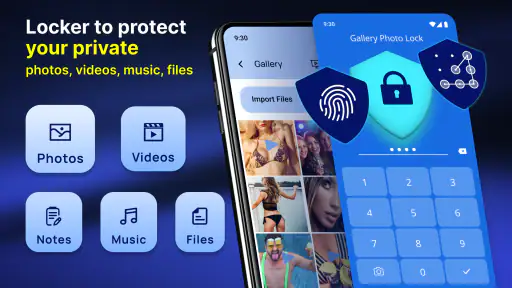
I often look at a photo-locking app as a practical buffer between my everyday camera roll and the moments I’d rather not show when someone borrows my phone. Photo Lock App - Hide Pictures is made for that personal-privacy job: it focuses on keeping selected pictures and videos out of casual view, rather than replacing a full photo library. That distinction matters. I’d use it to reduce accidental exposure, not as my only copy of irreplaceable files.
What the free option is worth
The app is free to install, with optional in-app purchases listed from $0.99 to $99.99 per item. That gives you a way to try the basic experience before deciding whether any paid option is worthwhile. I wouldn’t assume that every feature requires a purchase, or that paying guarantees a particular level of protection; I’d check the current in-app details before spending.
It comes from Battery Stats Saver and sits in the personalization category. The listing shows a 4.6 average from around 1.1 million ratings, with over 100 million installs, so it has reached a broad audience. Those figures suggest plenty of people have tried it, but they don’t tell me whether its approach fits my habits or whether I’ll remember to maintain a separate private collection.
Why Choose the Photo Lock App?
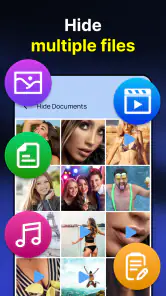
Let me tell you, the Photo Lock App isn't just another run-of-the-mill photo vault. It offers a seamless experience with a super intuitive interface. From the moment you download it, you'll see how easy it is to navigate and set up. The app supports a variety of file formats, so whether it's a photo, video, or even a GIF, you can rest assured it's safe and sound.
Features That Stand Out
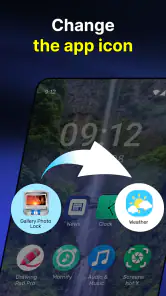
One of the coolest features I found is the fake cover. Imagine someone insists on snooping? You can activate a fake cover that makes the app look like a completely different tool. It's like having a secret identity for your gallery!
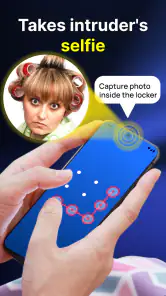
Security is a top priority with this app. It offers PIN, pattern, and fingerprint protection. So, if you're like me and have a habit of forgetting passwords, using your fingerprint is a lifesaver. Plus, it even snaps a photo of anyone who tries to break in with the wrong password. Talk about a watchdog!
Easy Backup and Recovery
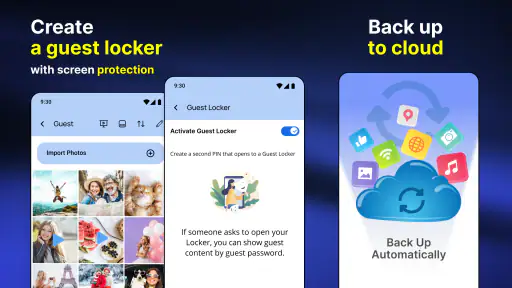
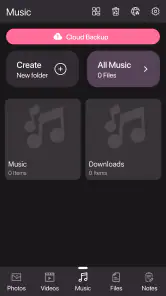
Another thing I love about this app is the backup feature. With just a few taps, your media can be backed up to your Google Drive. It's reassuring to know that your cherished memories are safe even if you switch phones or accidentally delete something.
More From Our News Desk

Clash of Clans Is Won Between the Battles

Android Auto Makes the Case for Quieter Car Software

MobiOffice: Transforming Mobile Productivity with Seamless Integration

EA SPORTS FC™ Mobile Soccer: Redefining Mobile Sports Gaming

How Microsoft OneDrive Became a Mobile Productivity Giant

How Google Translate Breaks Language Barriers Effortlessly
And let's talk about recovery. We've all been there – accidentally deleting something important. The Photo Lock App has a built-in recovery feature to help restore those lost files. No more panicking!
Making privacy useful in daily life
A realistic use is letting a friend choose a song or look at one vacation photo without handing over the rest of your camera roll. I’d move only the items I actually want private, then check that they no longer appear in the ordinary gallery before passing the phone over. That small verification step is useful because a vault only helps if the files have been moved or hidden as intended.
There’s a trade-off between convenience and caution: biometric access is quick, while a PIN or pattern can be useful when I don’t want to unlock something in front of another person. I’d also avoid treating a hidden album as a secure backup. Before changing phones or removing the app, I’d confirm that important files are backed up and that I can still access the relevant account or recovery method.
Where it fits among privacy options
Compared with relying on a phone’s built-in hidden folder, a dedicated locker can feel more focused and may offer extra controls such as a decoy cover and failed-attempt capture. The built-in option may be simpler if I only need to tuck away a few images and prefer not to manage another app. For stronger protection of sensitive documents or a whole device, I’d look at a broader security solution rather than assuming a photo vault covers every privacy need.
The app is aimed at everyday privacy, not at making someone’s files impossible to find. A fake cover can discourage casual curiosity, but it shouldn’t be mistaken for a guarantee against a determined person with access to the phone. I’d keep the app updated, choose a lock method I can reliably remember, and avoid storing the only copy of anything important inside any single app.
Planning a low-risk first try
If I were setting it up for the first time, I’d begin with a few unimportant pictures rather than moving a whole folder at once. That gives me a chance to learn how the private collection behaves, how items return to the normal gallery, and what the backup and recovery steps actually look like on my phone. It also makes a mistake easier to correct: I can test the routine without putting a large batch of personal files at risk.
I’d do that test before I’m in a hurry to lend the phone to someone. A rushed setup often leads to uncertainty about whether a file was transferred, copied, or simply selected. Once I understand the process, I’d move only the media that needs extra privacy and leave ordinary photos where I already expect to find them. That keeps the vault useful rather than turning it into a second, confusing camera roll.
Another practical point is to decide what “private” means in the situation I’m trying to manage. Hiding a couple of personal images from casual browsing is a different need from protecting sensitive records or keeping files inaccessible to someone who knows the device well. I’d use the app for the first kind of boundary, and choose a stronger, more comprehensive approach for the second. The right tool depends on who may handle the phone and what they can already access.
Everyday sharing without handing over the whole gallery
Picture a family gathering where someone asks to see a photo from a recent trip and then starts swiping. I can prepare by moving private shots out of the regular gallery ahead of time, check that the intended images are still easy to find, and hand over the phone with less worry about an accidental detour. The useful part is not simply hiding files; it is shaping what appears when another person is casually browsing.
For a quick one-off share, I’d still consider whether handing over the phone is necessary at all. Showing a single image myself may be simpler and avoids relying on someone else to stop at the right point. A locker helps most when I regularly share the device or keep media that I don’t want appearing among everyday photos. It is less useful if I rarely lend my phone and already have a simple sharing habit that works.
There is also a small maintenance cost in attention. After importing new pictures, I’d need to remember which ones belong in the private collection; after restoring or changing a device, I’d need to check that the expected files are present and accessible. If I know I won’t keep up with that routine, I’d rather use a simpler arrangement than assume the app is quietly protecting everything automatically.
Questions I would settle before trusting it
Would I use it as my only backup? No. The backup and recovery options are useful, but I’d verify them with a nonessential file and keep another dependable copy of anything irreplaceable. A privacy locker and a backup system solve related but different problems: one helps control ordinary access on the phone, while the other helps me recover from loss or a device change.
Would I pay for an upgrade immediately? I wouldn’t. The free installation gives me a way to judge whether the workflow suits me, and optional purchases vary widely in price. I’d first identify the exact feature I need, check what the app says that purchase includes, and decide whether that benefit is worth it to me. A higher price by itself would not persuade me that my files receive stronger protection.
Is the fake cover enough to stop anyone determined to inspect the phone? I would not count on it for that. It can make casual snooping less straightforward, but a person with access to the device may still have other ways to explore it. I’d think of the feature as a privacy convenience, not a promise of invisibility or a substitute for device-level security.
Does it make sense for a child or a less technical relative? It can, if the phone’s owner understands the lock and knows where the hidden media went. I’d help them choose an access method they can remember, then practice retrieving and restoring one harmless file. If that extra step is likely to cause confusion or lost access, the phone’s built-in option—or no separate vault at all—may be a better fit.
Personal Experience
Using the Photo Lock App has been a game-changer for me. I used to be nervous about letting others use my phone, but now I can hand it over without a second thought. The peace of mind it offers is unparalleled.
Setting it up was a breeze, and I've never felt more secure about my private media. The app runs smoothly without any glitches, and I appreciate how it doesn't drain my battery, which is a big win!
The current version is 2.1.11 and it requires Android 6.0 or later. Its Everyone age rating makes it broadly accessible, though I’d still set it up with the person who owns the phone in mind: a child or less technical family member may need help remembering the lock and understanding where moved photos now live. I’d also test the backup and recovery flow with a nonessential file before relying on it for memories I can’t replace.
Who should choose it—and who should skip it
I think it suits someone who regularly lends out a phone, shares pictures in person, or wants a separate place for selected media without reorganizing their entire library. If I needed only basic concealment, the phone’s built-in tools might be enough; if I needed dependable long-term preservation, I’d prioritize a backup system I can verify independently. The app’s free access makes trying it low-commitment, but the wide purchase range means I’d judge any paid upgrade by the exact benefit shown in the app, not by price alone.
I’d skip it if I want every photo to stay in one familiar place, rarely share my phone, or don’t want to remember a second access routine. That is not a flaw so much as a mismatch: moving selected media into a separate space adds a step whenever I want to view or manage those files. Someone who values simplicity more than a dedicated lock may be happier with the phone’s built-in hidden-folder tools.
On the other hand, someone who shares a device with family or frequently passes it around may find that a focused private collection is easier to manage than constantly worrying about which thumbnail is visible. I’d still keep the collection selective. Using it for a clearly defined group of personal pictures and videos makes it easier to maintain, while trying to hide an entire library can create more work and make normal browsing less convenient.
The app’s high average rating and large audience are reassuring signs that it has been widely used, but I wouldn’t treat popularity as proof that it suits every phone or every privacy concern. The meaningful test is whether I can move files in and out reliably, remember the lock, and feel comfortable with the backup routine. Those are personal workflow questions, so I’d answer them with a small trial before making the app part of my regular routine.
In conclusion, if privacy is a concern for you, the Photo Lock App is a no-brainer. It's packed with features that not only protect your media but also make the whole process enjoyable. So go ahead, give it a try, and keep your memories safe!
My recommendation is to try it if your main goal is to keep personal photos and videos away from casual browsing, then decide whether its workflow feels dependable in your hands. I wouldn’t choose it as a substitute for careful backups or as a promise of absolute secrecy. For everyday phone-sharing, though, the extra layer can be worthwhile; if that’s not a situation you face, a simpler built-in option may be the better fit.
Photo Lock App - Hide Pictures Frequently Asked Questions
What can I hide with Photo Lock App - Hide Pictures?
Photo Lock App - Hide Pictures is presented as a gallery-lock app for keeping pictures and videos private, and its summary also mentions locking apps. If you want a single tool for personal media and app access, those are the main uses to consider. Before moving files into a private area, check how the app handles access and recovery so you know what to expect.
Is Photo Lock App - Hide Pictures compatible with my device?
Photo Lock App - Hide Pictures requires Android 6.0 or later, so check your phone’s operating system before downloading. The app is listed for Android, and its age rating is Everyone. If your device meets the Android requirement, you can consider it for keeping personal pictures and videos behind a lock. Make sure your operating system is current enough to install and run it.
Does Photo Lock App - Hide Pictures cost anything to use?
Photo Lock App - Hide Pictures is free to download, so you can try its photo-locking features without an upfront payment. It also offers in-app purchases, with prices ranging from $0.99 to $99.99 per item. Check the purchase details shown in the app before confirming anything, especially if you only want to use the free option.
Is Photo Lock App - Hide Pictures free to download, and does it include purchases?
Photo Lock App - Hide Pictures is free to download, so you can try its photo-locking features without an upfront payment. It also offers in-app purchases, with prices ranging from $0.99 to $99.99 per item. Check the purchase details shown in the app before confirming anything, especially if you only want to use the free option.
What is Photo Lock App - Hide Pictures and how does it work?
Photo Lock App - Hide Pictures is a privacy-focused application designed to help users secure their personal photos and videos on their devices. It works by encrypting your media files and storing them in a secure vault, accessible only through a passcode or biometric authentication. This ensures that even if someone gains access to your phone, they cannot view your hidden media files without the correct credentials.
Pros
- User-friendly interface
- Strong encryption for privacy
- Supports multiple file formats
- Backup feature available
- Disguised app icon option
Cons
- Free version has ads
- Limited cloud support
- No fingerprint unlock
- Occasional bugs reported
- Requires in-app purchases

- Category
- Personalization
- Version
- 2.1.11