Ringtone Maker:create ringtone
- 35.60K
- 4.6
- Installs
- 100.00M
- Price
- Free

Screenshots
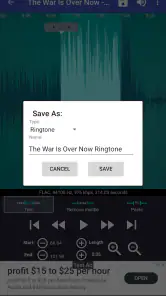
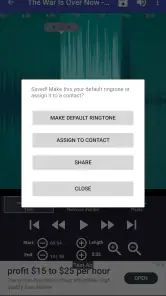
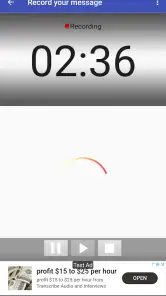
Analysis by Reviewed
I think the best reason to try a ringtone editor is simple: you already have a sound in mind, but the useful part is buried in a longer recording. Ringtone Maker: create ringtone is aimed at that small, practical job rather than replacing a full audio workstation. If you want to turn a music file or a recording into a phone alert, it gives you a direct route from source audio to a personalized ringtone.
Decide what you need before you start
Before opening any editor, I’d choose the moment I want to hear and make sure the source audio is available on the phone. A short, recognizable phrase often works better than a long musical build-up: it identifies the call quickly and is less likely to feel tiring after repeated use. For a voice recording, I’d listen through once first and pick a section without background conversation or a long pause.
There is also a useful distinction between a ringtone and a notification sound. A call alert can benefit from a distinctive musical snippet, while a brief everyday notification is usually better kept unobtrusive. I wouldn’t use a favorite song’s most dramatic section for every alert; hearing it many times can wear out its appeal.
The Latest on Ringtone Maker:create ringtone
Where this editor earns its place
The app is a free personalization tool from Big Bang Inc., and its focus is easy to understand: make a custom ringtone from audio you have or record a sound for the same purpose. It has a 4.6 average from around 666,000 ratings, with more than 100 million installs, so it is a familiar option for people who want this kind of hands-on customization. It is rated for Everyone.
The practical advantage is keeping the edit and the ringtone-making task together instead of opening a larger audio editor and then figuring out how to move the result into phone settings. That can be especially convenient when all you need is a short, personal alert, not multitrack editing or a polished music export. The key trade-off is that the result depends on the quality and format of the source file; an editor can trim audio, but it cannot make a noisy recording sound clean.
When another approach makes more sense
Compared with using a full audio editor, a dedicated ringtone tool is the simpler choice for quick trimming and setting. A full editor is more suitable if you want detailed processing, layered sounds, or broader control over a finished audio file. The built-in ringtone choices on a phone are easier still if you don’t care about using a particular song or recording. In other words, this app is most useful when personal selection matters more than elaborate production.
There can be a little friction when moving from an edit to a specific phone setting, especially if you want different sounds for individual contacts. I’d test the finished clip before relying on it: check that the opening is clear, the level is comfortable, and the sound works in the situation where you expect to hear it. If a track is protected or unavailable as a local audio file, choosing another accessible recording is the more practical route.
More From Our News Desk

Clash of Clans Is Won Between the Battles

Android Auto Makes the Case for Quieter Car Software

MobiOffice: Transforming Mobile Productivity with Seamless Integration

EA SPORTS FC™ Mobile Soccer: Redefining Mobile Sports Gaming

How Microsoft OneDrive Became a Mobile Productivity Giant

How Google Translate Breaks Language Barriers Effortlessly
For a realistic example, imagine wanting to recognize a family member’s call while your phone is across the room. I’d make a short cut from a familiar tune, listen to it at a normal volume, and use a sound that stands apart from the general alerts I hear all day. If it feels too abrupt, I’d choose a different starting point rather than making the clip longer by default. That small listening check can save you from a ringtone that is technically personalized but irritating in daily use.
A small workflow that avoids common annoyances
I’d treat the first edit as a draft, not a final decision. Keep the original recording intact, create a short candidate, and listen to it from the beginning rather than judging it only by the waveform or selection handles. A crop can look neat while starting on a sharp consonant, a breath, or a beat that sounds awkward when it repeats. Listening to the actual exported clip is the useful test.
If the source is a long song, I’d first find a passage with a clear start and a recognizable identity, then trim around that phrase instead of choosing the loudest section automatically. A ringtone often needs to announce itself in a noisy room, but excessive volume or a sudden peak can be unpleasant when the phone is nearby. The trade-off is personal: a distinctive alert should be audible without making every incoming call startling.
For recordings, the microphone’s surroundings matter as much as the edit. A quiet room and a brief test recording can help reveal whether the sound is clean enough before you spend time selecting a segment. I’d avoid recording near traffic, a television, or other voices if the goal is a clear alert. This is one place where a familiar music file may be more reliable than capturing a new sound on the spot.
How it fits different phone habits
This kind of tool is especially useful if you like to identify calls without looking at the screen. A distinct clip for a close family member can be practical when you are cooking, working with your hands, or keeping the phone out of sight. I would reserve the most recognizable sounds for a small number of people, though; assigning a different tune to everyone can turn a simple system into something hard to remember.
It can also suit someone who wants a personal sound but does not want to spend time learning a full editing suite. The decision is less compelling if you rarely hear calls, keep the phone on silent, or are already happy with its built-in tones. In those situations, the extra customization may not change your day enough to justify creating and testing clips.
Before choosing a sound for work or shared spaces, I’d consider how it will come across to other people. A private joke or a loud musical hook may be amusing at home but distracting in a quiet office or waiting room. A softer, shorter option can still help you recognize the call without making the ringtone a performance for everyone nearby.
What to expect from the editing process
For most people, the main decision is not how to produce a complicated audio mix; it is where to start and stop a usable excerpt. That makes the app’s focused purpose a strength, but it also means expectations should stay modest. It is a way to shape an alert from an available source, not a replacement for recording software when you need to repair, layer, or carefully master audio.
One question people often have is whether they can use any song they hear online. The practical distinction is whether the audio is accessible as a file or recording that the app can work with. If it is not available locally, I would not assume a ringtone editor can retrieve or convert it; I’d choose an audio source I can legitimately access instead.
Another useful question is whether the clip will work for every alert on the phone. I’d think of the ringtone as the sound for calls and use a shorter, quieter choice for routine notifications when possible. Reusing one dramatic excerpt for calls, messages, and every other prompt quickly makes it less special and can create unnecessary noise through the day.
Choosing between a quick tool and a full editor
Compared with the usual alternatives, this app sits between doing nothing and taking on a larger editing workflow. Phone-provided tones are the fastest route when a standard sound is fine. A full audio editor is the better fit when you need precise processing or want to create a finished piece with several elements. A dedicated ringtone maker is the middle ground for people who already know the sound they want and mainly need to select a usable portion.
That middle ground is valuable when the task is occasional: make a call sound, test it, and move on. If you expect to edit audio regularly for projects beyond phone alerts, learning a broader tool may be worth the time. Conversely, if you only want a preset tone, the built-in choices avoid the extra steps of finding a source, trimming it, and checking the result.
There is also a switching cost to consider. If you have already created clips and assigned them to contacts, moving to another method means recreating or locating those audio files and setting them again. I’d keep clear names for finished clips so it is easy to remember which sound belongs to which person. That simple organization matters more once you have several personal alerts.
A sensible recommendation by use case
Ringtone Maker is a sensible pick for someone who has a local song or recording in mind and wants a straightforward way to turn a selected moment into a call alert. Big Bang Inc.’s app has been around since 2010, is free, and is rated for Everyone, which makes it approachable for casual experimentation. Its 4.6 average across around 666,000 ratings and over 100 million installs also show that ringtone customization is a familiar use for many people, though popularity does not replace checking whether its workflow suits you.
I would skip it if you want detailed sound restoration, a complex arrangement, or a source that is not available to you as usable audio. I would also skip the editing step entirely if standard phone tones already do the job. The best reason to choose it is specific: you want a sound that means something to you, and you are happy to spend a few minutes choosing and listening to the right excerpt.
Released in 2010, the app has had a long life in a category where people often want a quick result, not a new hobby. I’d still approach it as a focused utility: make one edit, check how it sounds, and keep the original audio unchanged so you can try another selection later. That workflow is more forgiving than repeatedly altering the only copy of a recording.
Have you ever wanted to create your own personalized ringtone and stand out from the crowd? Well, let me introduce you to Ringtone Maker: create ringtone. This nifty app is a game-changer for anyone who’s tired of the same old default ringtones. I’ve spent some time with it, and let me tell you, it’s a total gem for customizing your device’s alerts.
Getting Started with the App
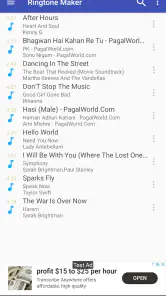
The first thing you’ll notice about Ringtone Maker: create ringtone is how straightforward it is to use. You don’t have to be a tech wizard to navigate through it. As I opened the app, I was greeted with a simple and intuitive interface. Right off the bat, you can start slicing and dicing your favorite tracks or even record new sounds to use as ringtones. It’s as easy as pie!
Features Worth Exploring
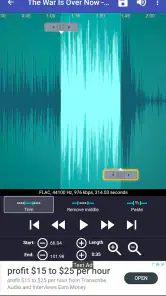
One of the coolest features that caught my eye is the app's ability to support a wide range of audio formats. Whether it’s MP3, WAV, AAC, or AMR, this app has you covered. I tried trimming a couple of my favorite songs, and the process was smooth and quick. Just select the part of the song you love, and voila, you have a new ringtone!
Another feature that stood out is the option to set your customized ringtone directly from the app. No need to go through your phone settings and fumble around. Just create, set, and you’re good to go.
Perfect for Personalization
If you’re like me and love having a distinct ringtone for different contacts, this app is a lifesaver. I had a blast assigning unique ringtones to my family and friends, all created from snippets of our favorite songs or funny sound bites. It adds a personal touch that makes each call a bit more special.
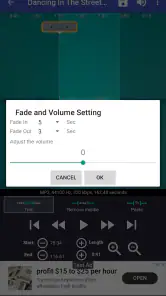
Additionally, the app allows you to adjust volume levels and fade effects. This means you can make sure your ringtone starts and ends just the way you like it. It’s all about making your ringtone truly yours.
Wrap Up
In conclusion, Ringtone Maker: create ringtone is a must-have app for anyone looking to add a personal touch to their phone. It’s user-friendly, packed with features, and incredibly fun to use. Whether you’re a tech-savvy individual or someone who just wants an easy way to create ringtones, this app won’t disappoint. So go ahead, give it a try, and let your creativity run wild!
Ringtone Maker:create ringtone Frequently Asked Questions
Can I use Ringtone Maker without connecting to the internet?
If you already have an audio file or recording available on your device, creating a ringtone from that source is a personal audio-editing task. Whether every part of the app works offline can depend on the feature you use, but the core idea is to shape music or a recording into a ringtone. Consider your usual connection needs before downloading if you expect to use it while offline.
Can I choose only a short section of a song for my ringtone?
Yes. Ringtone Maker is intended to let you select a specific part of an audio file rather than use the entire track, so you can focus on the moment you want to hear when your phone rings. Being able to preview and adjust the selection is useful for avoiding a long or awkward opening before the sound you actually want.
Is Ringtone Maker suitable for someone who has never edited audio before?
The app is designed around making a ringtone from music files or a recording, so its purpose is straightforward even if you have not used audio-editing tools before. You can choose a source, identify the portion you want, and shape it into a personal alert. As with any editing app, taking a moment to explore the controls can help you get a result you like.
Can I create a ringtone from a voice recording instead of a music file?
Yes. Ringtone Maker can create ringtones from music files or from your own recording, which is useful if you want a spoken message, a sound you captured, or another personal audio clip as your alert. You can work with the recording as the source audio and shape the ringtone around the part you want to hear.
What features does Ringtone Maker offer for creating custom ringtones?
Ringtone Maker provides a user-friendly interface that allows users to easily create custom ringtones from their favorite songs or audio files. The app supports various audio formats, including MP3, WAV, AAC, and more. Users can select specific parts of the audio file, apply fade-in and fade-out effects, and even adjust the volume to ensure the ringtone sounds perfect on their device.
Pros
- User-friendly interface.
- Wide variety of sound formats.
- Precision editing tools.
- No internet required.
- Free to use with minimal ads.
Cons
- Limited sound effects.
- Occasional crashes.
- Ads can be intrusive.
- Requires storage permissions.
- Lacks advanced editing features.
- Category
- Personalization
- Version
- Varies with device