Wallpaper 4K HD – Wallcraft
- 10.11K
- 4.6
- Installs
- 100.00M
- Price
- Free

Screenshots
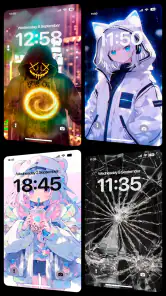
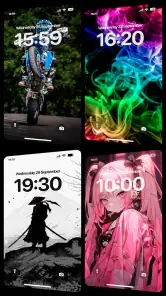
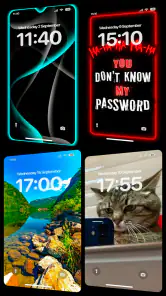
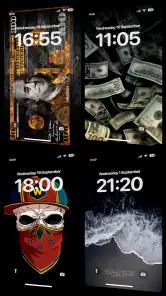
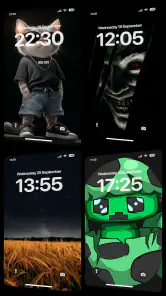
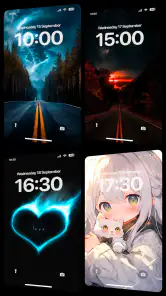
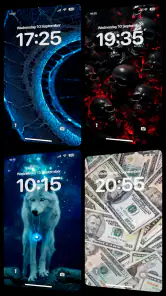
Analysis by Reviewed
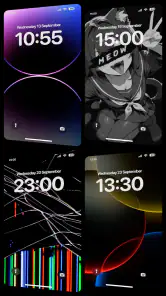
I tend to notice a wallpaper most when it makes my home screen feel calmer or easier to read, not just more colorful. Wallpaper 4K HD – Wallcraft is a personalization app from Nebuchadnezzar DOO, and its large image library makes it appealing if you like changing the look of your phone without hunting through unrelated websites. I’d treat it as a visual browsing tool first: the best result comes from choosing an image that suits your icons and daily use, not simply the most dramatic one.
Choosing a background that works day to day
The most useful way to approach a large wallpaper collection is to start with the job the image needs to do. I might want something vivid for a lock screen, where the artwork can take center stage, and a quieter background for a home screen full of widgets. Thinking about those two screens separately prevents a striking image from becoming a daily distraction.
There is also a practical question of how often you want to change things. If I am setting up a new phone or refreshing a familiar layout, I can spend a few minutes browsing and shortlist a handful of images rather than applying the first attractive option. A small shortlist makes it easier to compare composition and contrast against my actual icons, and helps me avoid an endless scroll when I only need one good background.
Wallcraft is best suited to people who enjoy browsing visual collections and are comfortable making a choice from many options. If your priority is a particular personal photo, a very plain color, or a precisely matched design for a carefully arranged home screen, a gallery app or the phone’s built-in wallpaper controls may be more direct. The specialist collection is the appeal here, but it is not automatically the best route for every customization task.
How it fits into today’s wallpaper routine
The app is free to install and has a 4.6 average from around 1.1 million ratings, with over 100 million installs. That scale suggests it has become a familiar option for people who want a dedicated wallpaper collection rather than a folder of saved pictures. I’d still judge it by whether its selection and editing flow match your taste; popularity cannot guarantee that every category will feel equally useful to you.
Wallpapers are easy to overlook as a small customization choice, but they sit behind every glance at your phone. Wallcraft’s focus on high-resolution and 3D-style backgrounds gives it a more polished, image-led feel than simply setting a photo from your gallery. The trade-off is that elaborate artwork can compete with app icons and text. Before applying a design, I’d preview it against the screen you use most and check whether the important parts remain visible.
Discovering a World of Wallpapers
When I first opened Wallpaper 4K HD – Wallcraft, I was immediately struck by the sheer volume of options available. We're talking thousands of high-quality images, all neatly categorized for easy browsing. Whether you're into nature, abstract art, or even something a bit quirky, there's something here for everyone. The app interface is super intuitive, making it a breeze to scroll through and find the perfect match for your mood or style.
More From Our News Desk

Weather by Xiaomi Review: Clear at a Glance, Less Clear Up Close

X Under Pressure: Can It Recover When Posting Goes Wrong?

Clash of Clans Is Won Between the Battles

Android Auto Makes the Case for Quieter Car Software

MobiOffice: Transforming Mobile Productivity with Seamless Integration

EA SPORTS FC™ Mobile Soccer: Redefining Mobile Sports Gaming
High-Definition Quality
One of the standout features for me is the 4K quality of these wallpapers. Each image is crystal clear, ensuring that your screen looks sharp and vibrant. It's like having a mini art gallery right in your pocket. I especially love how these high-resolution images look on larger screens, like tablets, where every detail can be appreciated.
Resolution is only part of the decision. On a phone, a busy image may look impressive full-screen but make notification labels or widgets harder to pick out. I usually compare a detailed wallpaper with a quieter one before settling on a background, especially for the home screen. A crisp source image gives you room to crop, but it does not automatically make every crop look balanced on every device.
Making a crop feel intentional
One small but useful check is to consider what will cover the image after you set it: the clock, notification previews, shortcuts, and any widgets you keep in the same place. A subject that looks perfectly centered in a browsing preview may feel off once those elements appear. I would move the crop until the image has visual breathing room, rather than trying to preserve every detail at the expense of a clean layout.
This matters especially with artwork that has a strong focal point. If the subject is close to an edge, a slight crop can make it feel cramped; if the image has open space, that space may be exactly what keeps icons readable. I also find it useful to judge the wallpaper at normal brightness, not only while browsing: a very bright image can feel harsher in a dim room, while a darker one may make the screen feel more settled.
Personalization at Its Best
Another aspect that I found incredibly appealing is the level of personalization available. The app allows you to not only choose from a wide array of backgrounds but also customize them to fit your needs. Need to crop or adjust the image for your home screen? No problem! The built-in tools make it easy to tweak the wallpapers until they're just right.
A useful habit is to frame the subject around the parts of your screen that stay fixed. If a face, horizon, or bright focal point lands beneath the clock or a cluster of icons, try a different crop before applying it. This small check can make a wallpaper feel deliberately composed rather than like an image squeezed into a screen. People who enjoy fine control over layouts may still prefer editing their own photos elsewhere; Wallcraft is more convenient when the source artwork is already close to what they want.
Live effects and the battery of visual attention
Live and 3D-style imagery can make a screen feel more dimensional than a static photograph, but I would choose it for the right situation rather than assume movement is always an improvement. A subtle effect can add character when the phone is unlocked; a busy or dramatic scene may pull attention away from the task I picked the phone up to do. For a device I use heavily for messages and work, I would favor an image whose composition still feels calm after repeated glances.
It is also sensible to check the appearance in the context where you actually use the phone. A wallpaper that looks rich in a bright room may feel different at night, and a preview cannot fully substitute for seeing the result behind your usual widgets. I would apply one candidate, live with it through a normal day, and only then decide whether to keep it. That approach is less impulsive than swapping backgrounds every time a new design catches my eye.
Keeping It Fresh
What really sets Wallcraft apart from other wallpaper apps is the constant updates. New images are added frequently, so there's always something fresh to check out. It's perfect for someone like me who loves to change things up and keep my phone looking new. Plus, the app sends notifications for new collections, ensuring you never miss out on the latest trends.
For an everyday routine, I’d browse when I have a few spare minutes, save a small shortlist, then choose after seeing how each option sits behind my usual icons. That is more practical than changing the screen every time a new image catches my eye. If notifications interrupt more than they help, you can simply treat discovery as something to do when you open the app, rather than letting wallpaper suggestions dictate when you look at your phone.
A realistic refresh without overdoing it
Imagine having a few minutes before a commute and wanting your phone to feel less cluttered. I would open the collection with a clear preference—perhaps a subdued landscape or a dark abstract design—rather than browsing without a goal. After finding a candidate, I would check the crop, set it, and use the phone normally through the day. If the clock is hard to read or the icons blend in, I would switch to a simpler option instead of trying to make a poor fit work.
That workflow also helps keep personalization from becoming a chore. A new image can be a nice seasonal change, but a background does not need constant attention to make a phone feel personal. For people who enjoy frequent visual refreshes, the stream of additions gives a reason to return; for everyone else, it is perfectly reasonable to find a few favorites and stop browsing until the mood changes.
Who will get the most from it
I’d recommend Wallcraft to people who enjoy visual variety, want polished backgrounds without collecting images manually, and are happy to spend a little time choosing and cropping. It also makes sense if you like seasonal changes or want separate moods for a workday and a weekend. Someone who already has a personal photo they love, needs a very plain background for readability, or rarely changes their screen may get more value from the phone’s built-in wallpaper picker or their own gallery.
Compared with a basic system wallpaper menu, a specialist app gives you a broader stream of artwork and a more focused way to browse it. Compared with using a search engine or social feed, the dedicated collection is less scattered, though those sources may be better when you want one very specific subject or an image from a particular creator. Wallcraft’s Teen content rating is worth noting for families choosing apps together. The app is free, with optional in-app purchases ranging from $0.49 to $64.99 per item, so I’d check what is included before paying rather than assuming every appealing item is part of the free experience.
What to consider before paying or settling in
Because the app is free to install, I would first explore how far the free experience meets my needs before considering an optional purchase. If a particular image or collection appears to involve a payment, I would pause and check the purchase details on that screen rather than treating all content as included. That is a useful habit in any free personalization app, especially when a polished preview makes it easy to decide quickly.
It is also worth matching the app to your household’s expectations. The Teen rating gives families a clear reason to review whether it is suitable for the person using the device, rather than assuming a wallpaper catalog is automatically appropriate for every age. For an individual choosing their own background, the main decision is simpler: does the library offer images you genuinely want to see every day, and does the browsing experience feel worth returning to?
What to keep in mind over time
The app was released on April 1, 2017, and its continued presence alongside a 4.6 average and roughly 10,000 written reviews points to a well-established wallpaper destination. Those figures describe its broad reception, not whether a particular collection will suit your screen or taste. I would also avoid treating frequent additions as a reason to keep browsing indefinitely: a wallpaper app is most useful when it helps you settle on a background, not when it turns customization into another feed to check.
For existing users, the practical question is whether new artwork and the current selection keep earning space on the phone. I’d watch for collections that fit real needs—such as a darker, less busy look for evening use—rather than change for novelty alone. If you care about precise control over how a background behaves, compare the preview and crop on your own device before committing; the visual effect matters more than a category label or a high-resolution claim.
What I would watch as an existing user
When I return to a wallpaper app, I care less about how many fresh thumbnails appear than whether I can find a design that suits the way I use the phone now. My screen layout may change, I may add a widget, or I may simply grow tired of a high-contrast image. A useful collection should make that next decision easy without making me feel that I need to replace a background just because something new has appeared.
For someone who has already used Wallcraft for a while, I would keep an eye on whether its newer selections continue to match personal taste and whether the browsing process remains comfortable. The app’s release history establishes that it has been around for years, but it does not by itself tell me what future additions will look like. I would treat new collections as possibilities, not promises, and judge them by how well they work on my own screen.
My take after weighing the trade-offs
In conclusion, Wallpaper 4K HD – Wallcraft has truly transformed the way I customize my devices. It's not just about aesthetics; it's about expressing yourself and keeping your digital space as dynamic and exciting as you are. Whether you're a casual user or a wallpaper enthusiast, this app is a must-try. So go ahead, download it, and let your screen shine like never before!
My recommendation is a little more specific: try it if you like exploring artwork and want a dedicated place to find a new look, but be selective about what you apply. A wallpaper should work with the screen you actually use, not just look impressive in a thumbnail. If you prefer a personal image, a plain background, or fine-grained control over every part of your layout, the built-in picker or your own editing workflow may suit you better. For people who enjoy visual discovery and take a moment to check readability, Wallcraft is an easy app to consider.
Wallpaper 4K HD – Wallcraft Frequently Asked Questions
Is Wallpaper 4K HD – Wallcraft free to download, and are there optional purchases?
Wallpaper 4K HD – Wallcraft is free to download, so you can explore the app without paying upfront. It also offers in-app purchases, with prices ranging from $0.49 to $64.99 per item. Consider whether you are comfortable with optional purchases before downloading, particularly if a younger person will use the app. The app is rated Teen.
Who makes Wallpaper 4K HD – Wallcraft, and what kind of app is it?
Wallpaper 4K HD – Wallcraft is a personalization app developed by Nebuchadnezzar DOO. Its purpose is to help you change the look of your device with wallpaper choices, including 4K HD images, live 4D wallpaper, and 3D backgrounds. It has a Teen age rating, which is useful to keep in mind when deciding whether it is suitable for a younger user.
Does Wallpaper 4K HD – Wallcraft offer live or 3D wallpapers?
Wallcraft’s collection includes 4K HD wallpapers as well as live 4D wallpaper and striking 3D backgrounds. These options give you more than one way to personalize your screen, whether you prefer a still image or a more dynamic look. You can browse the available designs and choose the style that suits your device and personal taste.
What features does the Wallpaper 4K HD – Wallcraft app offer?
The Wallpaper 4K HD – Wallcraft app offers a vast collection of high-quality wallpapers in 4K resolution, catering to diverse themes and styles. Users can easily browse and download wallpapers that suit their preferences. The app also provides curated collections and daily updates to ensure fresh content. Additionally, it supports automatic wallpaper changes at set intervals, enhancing user personalization.
Is the Wallpaper 4K HD – Wallcraft app free to use?
Yes, the Wallpaper 4K HD – Wallcraft app is free to download and use. However, it offers in-app purchases and a premium subscription for users who wish to access exclusive content, remove ads, and unlock additional features. The free version still provides a wide range of wallpapers, but some premium content is behind a paywall. In-app purchases range from $0.49 to $64.99 per item.
Pros
- High-resolution 4K wallpapers for stunning visuals.
- Extensive collection with frequent updates.
- Easy to navigate user interface.
- Option to save wallpapers to favorites.
- Offers both static and live wallpapers.
Cons
- Some wallpapers require a premium subscription.
- Contains in-app advertisements.
- Limited customization options.
- Requires internet for updates.
- Large app size may affect storage.
- Category
- Personalization
- Version
- Varies with device