Facemoji AI Emoji Keyboard
- 77.09K
- 4.7
- Installs
- 100.00M
- Price
- Free

Screenshots


Analysis by Reviewed
I see Facemoji AI Emoji Keyboard as a playful personalization app with a clear purpose: making everyday typing feel more expressive without asking you to leave the chat you’re in. Its appeal is the mix of visual customization and quick access to emojis, stickers, and fonts. That combination can make routine messages more fun, though it suits people who enjoy decorating their chats better than anyone seeking a quiet, minimal keyboard.
What the extra choice is useful for
What makes this keyboard interesting to me is not simply the number of things it offers, but the way those extras can support different kinds of conversation. A sticker can soften a blunt reply, while an emoji can make a short answer feel warmer. Decorative fonts are more of a special-purpose choice: they can give a profile update or playful message a distinct look, but I would not use them for every sentence. The best results come from treating the visual tools as accents rather than replacing clear writing.
A useful first-day workflow is to change one thing at a time. I’d try the keyboard in its ordinary layout, then choose a theme that is easy to read, and only after that explore fonts and stickers. If I changed everything at once, I might enjoy the novelty but have a harder time identifying which part actually made typing better. This gradual approach also makes it easier to return to a simpler appearance if the decorative elements start competing with the keys.
The Latest on Facemoji AI Emoji Keyboard
Express Yourself Like Never Before
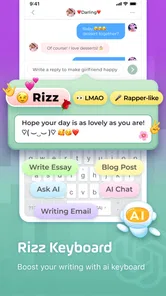
The standout feature of the Facemoji AI Emoji Keyboard is, without a doubt, its vast collection of emojis. But wait, there's more! This isn't just any emoji keyboard; it's powered by AI, which means it learns from your typing style and suggests emojis that fit your mood and conversation context. Imagine having a keyboard that not only understands your words but also your emotions! It's like having a friend who always knows what you're trying to say, even when words fail you.
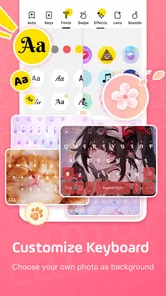
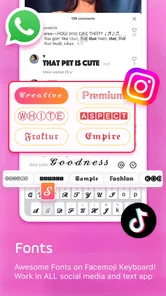
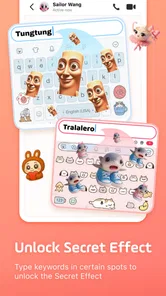
Aside from the smart emoji suggestions, the keyboard also offers a plethora of customization options. You can change themes, colors, and even the font style, making your keyboard as unique as your personality. If you're someone who loves to stand out, this feature is a dream come true.
Swipe, Type, and Customize
Typing on the Facemoji AI Emoji Keyboard is a breeze, thanks to its intuitive swipe-to-type feature. It's fast, responsive, and makes texting on the go incredibly convenient. Plus, with the built-in GIF and sticker search, you can find the perfect visual to accompany your messages without leaving the keyboard. It's all about efficiency and fun, right at your fingertips.
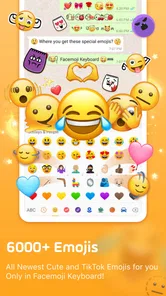
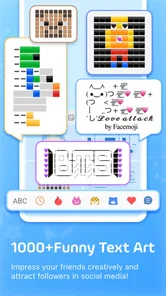
The app lists more than 6,000 items across its emoji, font, theme, and sticker collection, but I wouldn’t treat that breadth as a reason to use every option. A practical approach is to pick one readable theme, keep a small set of favorite stickers, and let the rest stay in the background. That keeps the keyboard quick to use when you’re answering messages rather than browsing for decoration.
More From Our News Desk

Android Auto Makes the Case for Quieter Car Software

MobiOffice: Transforming Mobile Productivity with Seamless Integration

EA SPORTS FC™ Mobile Soccer: Redefining Mobile Sports Gaming

How Microsoft OneDrive Became a Mobile Productivity Giant

How Google Translate Breaks Language Barriers Effortlessly

Why Google Sheets Is the Ultimate Mobile Productivity Tool
Customization doesn't stop at themes and fonts. The app also allows you to create your own emojis and stickers. Yes, you heard that right! With a few taps, you can design your own set of emojis that reflect your unique expressions and share them with friends. It's a creative playground where your imagination is the only limit.
Using it in a real conversation
Imagine checking messages between errands, with a friend asking whether you are still on your way. A quick swipe-typed reply is enough, and a single sticker can make the answer sound cheerful rather than abrupt. Later, when the same phone is used to send a practical note, plain text is likely clearer. That switch between expressive and ordinary communication is where I see the strongest everyday case for Facemoji: it lets the user choose the level of decoration to match the moment.
There is a small but useful distinction between browsing for a sticker and having a few favorites ready. Searching is enjoyable when you have time, but it can interrupt the flow of a quick exchange. I’d save or reuse a compact set that fits my usual tone, then browse the broader collection only when I’m in the mood to personalize a message. This makes the keyboard feel more like a practical tool and less like a catalog that asks for attention every time I type.
Everyday Use, With a Few Trade-Offs
A realistic test is a busy group chat: I might swipe out a short reply, add one sticker to make the tone clear, then switch back to plain text for a work message. Facemoji’s strength is that these expressive choices sit beside ordinary typing instead of requiring a separate editing app. My tip is to use stickers when they add tone, not as a default; in a fast-moving conversation, too many visuals can make a simple answer harder to scan.
For someone choosing between this and the keyboard already on their phone, the difference is mainly emphasis. A standard keyboard is usually the simpler choice when predictable typing and a restrained layout matter most. Facemoji is more appealing if you actively want themes, decorative fonts, and visual replies in everyday chats. If you rarely use stickers or change your keyboard’s appearance, those extras may feel like clutter rather than an upgrade.
One trade-off is the setup decision: making a third-party keyboard your everyday input method means taking time to choose it, personalize it, and get used to its layout. I’d start with the default look and test it in low-stakes conversations before changing several settings at once. That makes it easier to tell whether swipe typing and the suggestions genuinely suit your habits, instead of mistaking a busy theme for better typing.
Where it fits among keyboard choices
Compared with a basic built-in keyboard, Facemoji’s clearest difference is its focus on visual expression. The phone’s default option is often the more sensible pick for someone who wants familiar keys and does not care about themed layouts or stickers. A dedicated sticker app may make more sense for a person who only occasionally sends elaborate visuals and would rather keep their everyday typing setup unchanged. Facemoji sits between those approaches: its creative tools are available in the keyboard, but they matter only if the user reaches for them regularly.
I would also separate “more options” from “better typing.” A large collection can be enjoyable to explore, yet it does not automatically make composing a sentence faster or more accurate. If your priority is writing long notes or work messages, try the keyboard for ordinary typing first and judge it on comfort, not on how many decorations are available. If you mostly chat casually and like tailoring the appearance of your phone, the extras are more likely to earn their place.
Seamless Integration and User Experience
One of the most impressive aspects of this app is its seamless integration with other apps. Whether you're updating your status on social media, sending a quick text, or writing an email, the Facemoji AI Emoji Keyboard works flawlessly across all platforms. There's no lag, no glitches, just smooth, uninterrupted communication.
The user interface is straightforward, making it easy for anyone to navigate and utilize its features. Even if you're not tech-savvy, you'll find yourself breezing through the setup and customization process. The developers have clearly put a lot of thought into making this app accessible to everyone.
As with any third-party keyboard, I’d make a deliberate choice about when I use it. I would keep especially sensitive writing simple and use the keyboard only where its personalization is useful, rather than enabling every option just because it is available. That’s a sensible habit for anyone comparing a feature-rich keyboard with the one that came with their device.
Who Should Make the Switch?
Facemoji is a strong fit for people who spend much of their day in casual chats, enjoy changing their phone’s look, or like using stickers to convey tone. It can also suit someone who wants one place to browse expressive extras instead of hopping between separate emoji and sticker tools. If you mostly write notes, passwords, or long work messages, though, a simpler keyboard may be more comfortable and less distracting.
The app is free to download, with optional in-app purchases ranging from about fifty cents to around thirty dollars per item. It is made by EKATOX APPS, is rated for teens, and runs on Android devices with version 5.0 or later. Its current release is version 3.5.9.2. I’d treat the optional purchases as a reason to browse carefully: decide whether a particular extra is worth paying for before buying, rather than assuming the free keyboard requires a purchase.
Questions worth settling before switching
Does it make sense to install Facemoji if I only want occasional stickers? I’d say probably not if you are happy with your current keyboard and rarely personalize messages; a separate tool used now and then may involve less adjustment. But if you already spend time adding emojis and stickers to casual chats, having those expressive choices in the keyboard can make them easier to reach.
Will the keyboard suit someone who types mostly for work? It may, but the deciding factor is whether the layout remains comfortable when the novelty wears off. I’d test it with ordinary sentences and longer messages before settling on it as the default. The visual features are a bonus, not a substitute for keys and suggestions that feel dependable for your own habits.
Is it worth paying for an extra? Since the app can be used for free and purchases are optional, I would first work out which specific addition I would use repeatedly. A one-off curiosity is a weak reason to spend; something that genuinely fits your regular chats may be easier to justify. I’d also avoid buying anything just because the collection is large—the useful question is whether that item improves the way you communicate.
Final Thoughts
In a world where communication is key, the Facemoji AI Emoji Keyboard stands out as a tool that enhances how we express ourselves. It's not just about typing; it's about creating a richer, more personalized communication experience. Whether you're an emoji enthusiast or someone looking for a reliable, customizable keyboard, this app has something for everyone. So why settle for a basic keyboard when you can have one that understands and evolves with you?
In conclusion, if you're looking to add a splash of personality to your digital conversations, the Facemoji AI Emoji Keyboard is definitely worth checking out. It's more than just a keyboard—it's a revolution in digital expression.
Its popularity is substantial: it has passed 100 million installs, with a 4.7 average from around 1.4 million ratings and roughly 75,000 written reviews. I take that as evidence that many people find the idea appealing, not as proof that every feature will suit every typing style. My verdict is simple: try it if visual self-expression is part of how you chat, but stick with a basic keyboard if speed, familiarity, and minimal distractions matter more.
Facemoji AI Emoji Keyboard Frequently Asked Questions
Is Facemoji AI Emoji Keyboard free to download, and what should I know about purchases?
Facemoji AI Emoji Keyboard is free to download and use. It may also offer in-app purchases for premium features, additional themes, or an ad-free experience. You can use the basic features without paying, while optional purchases can add to the experience. In-app purchases range from $0.49 to $29.99 per item, so review any purchase prompt before proceeding.
What age rating does Facemoji AI Emoji Keyboard have?
Facemoji AI Emoji Keyboard has a Teen content rating, which is useful to keep in mind if you are choosing a keyboard for a younger family member. The rating is one part of deciding whether the app is appropriate; it is also sensible to look over its features and settings together before making it the device’s active keyboard.
Which devices can run Facemoji AI Emoji Keyboard?
Facemoji AI Emoji Keyboard is an Android app that requires Android 5.0 or later. Before downloading, check your device’s Android version in its settings to make sure it meets that requirement. The app is free to download, and its Teen content rating is worth considering if the keyboard will be used by a younger family member.
Does Facemoji AI Emoji Keyboard work with the messaging apps I already use?
Facemoji is designed as a keyboard for making chats more expressive, and its features can be used while typing in messaging apps that accept third-party keyboards. Once installed, you can select it as your active keyboard through your device’s keyboard settings. The exact appearance and availability of emoji, stickers, or other options can vary depending on the app you are typing in.
What features does the Facemoji AI Emoji Keyboard offer?
Facemoji AI Emoji Keyboard is packed with a plethora of features that enhance typing and messaging experiences. It offers a wide variety of emojis, GIFs, stickers, and customizable themes. Additionally, it supports AI-powered emoji predictions and suggestions, enabling users to express themselves more creatively and efficiently. The app also supports multiple languages and seamless integration with popular messaging apps.
Pros
- Highly customizable keyboard themes.
- Wide range of emojis and stickers.
- Supports multiple languages.
- Offers AI-powered emoji suggestions.
- Smooth and responsive typing experience.
Cons
- Consumes significant device memory.
- Contains in-app advertisements.
- Occasional lag on older devices.
- Requires internet for full functionality.
- Privacy concerns with data permissions.











