Yandex Browser with Protect
- 5.57K
- 4.4
- Installs
- 100.00M
- Price
- Free

Screenshots





Analysis by Reviewed
I judge a browser’s trustworthiness less by reassuring language than by what I can actually see and control while using it. Yandex Browser with Protect brings together ordinary browsing, security prompts, and tools for reading and slower connections. That makes it worth considering, but I would not treat the word “Protect” as a guarantee or assume that a security feature tells me everything about how an app handles information. My practical test is whether the browser’s visible choices suit my habits and whether I can make informed decisions before I browse, download, or sign in.
Trust Starts with Choices I Can See
The browser is a free personalization app developed by Direct Cursus Computer Systems Trading LLC. Its 4.4 average from around 2.9 million ratings and more than 100 million installs show that many people use it, but popularity does not settle the trust question for me. I focus instead on what appears in the app: prompts, settings, account-related options, and permission requests. I would review those choices during setup and again if I change how I use the browser, rather than treating a first-run decision as permanent.
That approach is especially useful when a browser offers a mix of services and convenience features. Before making any browser my default, I ask myself whether I need its suggested shortcuts and whether I want to use any connected services. I also pay attention to requests that appear when I try a particular action. A request that makes sense for a task is different from one I do not understand; if I am unsure, I can pause and decide whether that feature is important enough to enable.
Security Warnings Are a Checkpoint, Not a Verdict
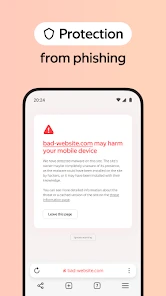
Protect’s warnings about dangerous websites and fraudulent pages can give me a reason to stop before continuing. That interruption is useful because rushed browsing is when I am most likely to tap a convincing-looking link without checking it. Still, a warning system is only one part of my decision. I look at the address and how I arrived at a page, especially before entering a password or personal details. If something feels off, I leave rather than trying to make the browser’s warning do all the thinking for me.
The same caution applies to downloads. A file check can add a helpful checkpoint, but I would not use it as permission to open every file that passes through. When I need a document, I try to get it from a source I recognize, check that I expected the download, and avoid opening unexpected attachments. On a small screen, it is easy to lose the context of a link after a few taps, so I find it useful to slow down and confirm what I am downloading before I open it.
Permissions, Accounts, and Everyday Privacy Decisions
I would not assume that a security feature explains an app’s full data practices. Those are separate questions, and I prefer to inspect the current permission requests and account controls directly. If I only want to read public pages, I can consider whether I need to sign in or connect additional services at all. If I do use an account, I would review the controls that are visible to me and keep only the options that support a real part of my routine.
My rule is simple: decide feature by feature. A browser may ask for access or offer an account-related choice when I try to use something, but I do not need to accept every prompt just to read a page. I can decline a request that does not fit what I am doing and see whether the basic task still works. That small habit makes it easier to separate useful convenience from settings I would rather leave off.
More From Our News Desk

Weather by Xiaomi Review: Clear at a Glance, Less Clear Up Close

X Under Pressure: Can It Recover When Posting Goes Wrong?

Clash of Clans Is Won Between the Battles

Android Auto Makes the Case for Quieter Car Software

MobiOffice: Transforming Mobile Productivity with Seamless Integration

EA SPORTS FC™ Mobile Soccer: Redefining Mobile Sports Gaming
First Impressions and User Interface
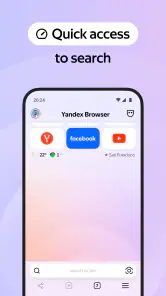
Upon launching the Yandex Browser with Protect, I was greeted by a sleek and modern interface. It's like stepping into a well-organized digital workspace where everything is just a click away. The design is not only visually appealing but also highly intuitive, making it a breeze to navigate. The browser offers a customizable start screen, which I found particularly useful because it allows me to access my favorite websites in no time.
What Protect Means in Everyday Browsing
One of the standout features of this browser is its security capabilities. In a world where online threats are as common as cat videos, having an extra layer of protection is crucial. The app comes with a built-in security system that warns you about dangerous websites and blocks fraudulent pages. Plus, there's a cool feature called "Protect" that checks downloaded files for viruses. It's like having a personal bodyguard for your online adventures!
I see these safeguards as helpful warnings, not a reason to stop thinking critically. A warning can prompt me to reconsider a suspicious link, but it cannot tell me whether every page is trustworthy or whether a download is appropriate for my situation. When I need a file, I try to reach it from the publisher’s own page rather than a random result, and I pause before opening anything unexpected. That habit matters especially on a phone, where a quick tap can make it easy to lose track of where a file came from.
Speed, Compression, and the Trade-Off
Speed is another area where the Yandex Browser shines. It uses the Blink engine, which is known for its fast page loading times. Whether I'm browsing through multiple tabs or streaming videos, the browser handles it all without breaking a sweat. It's smooth, it's fast, and it doesn't hog my device's resources, which is a win-win in my book.
The browser’s compression option is most relevant when a connection is slow or inconsistent: lighter page loading can make a quick search less frustrating. I would not treat it as a universal setting, though. If I am comparing a complicated page or checking how a site looks in full, I prefer to see the page as intended rather than prioritize compression. A practical routine is to use the quicker, data-conscious approach for text-heavy browsing on a weak connection, then switch back when a page’s full layout or media matters.
Reader Mode and Useful Workflows
Aside from security and speed, Yandex Browser brings some unique features to the table. For instance, the "Turbo Mode" is a lifesaver when you're on a slow internet connection. It compresses data and boosts loading times, making sure you're not stuck twiddling your thumbs while waiting for a page to load. There's also a "Reader Mode" that strips away all the clutter from web pages, giving you a clean and distraction-free reading experience.
Reader Mode is especially handy when I find a long article while waiting for an appointment or riding the bus: I can focus on the text instead of wrestling with a busy page. It is less useful when the information depends on a chart, embedded media, or interactive controls, so I return to the regular page in those cases. That small distinction makes the feature more than a cosmetic extra; it gives me a simple way to choose between a page’s full experience and a calmer reading view.
Services, Choices, and Trust
The browser also integrates seamlessly with other Yandex services, which is a plus if you're already in their ecosystem. From mail to maps, everything is just a tap away.
That convenience is most valuable if I already use those services; it is not a compelling reason by itself to move my whole browsing life into one company’s ecosystem. I would start with the basics: decide which shortcuts I actually want on the start screen, use the browser for ordinary searches and reading, and notice which prompts or settings affect my experience. If I prefer another search provider or do not want service shortcuts, I would check the visible browser settings rather than assume the default arrangement is fixed. I also avoid entering sensitive details on a page reached through an unfamiliar message, even when a browser provides security warnings.
For an everyday example, imagine I am checking a transit update on a patchy connection, then opening a longer article while I wait. Compression can make the first task feel less sluggish, while Reader Mode can make the second easier to follow. If I then download a document, Protect’s file check adds a useful checkpoint. None of those steps replaces my own judgement, but together they make a coherent routine for someone who wants browsing, reading, and basic caution in one app.
Where It Fits Among Browser Alternatives
Compared with the browser that comes preinstalled on a phone, Yandex Browser is worth considering if its start-screen customization, reading view, compression, and built-in warnings match what I want in one place. The trade-off is that another browser may feel more natural if I already rely on its account syncing, established settings, or familiar interface. I would not switch just because a browser has a longer feature list; I would compare the everyday tasks I actually do and keep the one that makes them easiest.
Yandex Browser has been available since June 17, 2013, and has passed 100 million installs. It is rated for Everyone, which makes it accessible to a broad audience, while parents should still guide younger users around downloads, links, and personal information. The app is free, so it is easy to try without making a purchase, but I would still take a moment to review its visible choices before making it my default. I cannot infer a service’s privacy practices from a security feature alone; for trust-sensitive browsing, I look directly at the app’s current permission requests and account controls and choose only what I am comfortable enabling.
Making It Work for Your Own Routine
For a fair trial, I would not move every bookmark or browsing habit on day one. I would first use it for a handful of regular tasks: searching for a place, reading a news article, and opening a site I visit often. That makes it easier to judge the start screen and navigation based on actual use rather than first impressions. I would also try Reader Mode on a page where the main value is text, then return to the ordinary view for a page with controls or visuals. Those small comparisons reveal whether its tools solve problems I really have.
Another useful test is to browse on both a reliable connection and a weaker one. Compression may be most valuable when pages are slow to load, while its trade-offs matter less when I am simply reading plain text. On a page where layout or media is important, I would check that the full view is available and use it when needed. This keeps the feature in its proper role: an option for a particular situation, not a setting I have to leave on regardless of what I am doing.
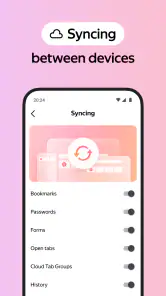
If I rely on browser-specific syncing or a carefully arranged setup elsewhere, switching can cost more time than the new features save. I would check how my everyday workflow carries over before making it the default, and keep my familiar browser available while I decide. That is not a criticism unique to Yandex; it is a practical reason to avoid turning a quick experiment into an all-at-once migration. A browser that feels slightly less familiar can still be a good choice, but only if its advantages matter often enough to justify the adjustment.
Who Is Likely to Appreciate It
I think this browser is a good fit for someone who wants useful reading and connection tools alongside visible warnings, without assembling several separate apps for those tasks. It may also suit people who like changing their start screen and already make use of Yandex services. The appeal is not that it removes every risk from browsing; it is that several everyday conveniences are close at hand, while the user can still pause, inspect a page, and decide what to enable.
I would be less inclined to recommend it to someone who is satisfied with a preinstalled browser and values continuity more than another set of features. It is also not the right choice for anyone expecting a security warning to certify every site or download, or someone unwilling to look at settings and prompts before using a browser for sensitive tasks. If an existing browser already handles reading, navigation, and account workflows comfortably, changing simply for the sake of trying something new may not be worthwhile.
Final Thoughts
After spending some quality time with Yandex Browser with Protect, I can confidently say that it's a solid choice for anyone looking to enhance their browsing experience. It's fast, secure, and packed with features that cater to both casual users and power users alike. If you're in the market for a new browser, give Yandex Browser a try. You might just find that it's exactly what you've been looking for!
My recommendation is more specific: I would try it if I want a customizable start page, a simplified way to read articles, and security prompts that fit into my normal browsing routine. I would skip it if I am already happy with another browser’s ecosystem or if I do not want to spend time checking a new browser’s settings and adapting to its layout. For me, the strongest reason to keep it is the combination of practical tools, not any single promise of safety or speed. A browser can help me make better choices, but the final call about what I open and share remains mine.
The simplest way to decide is to try it on ordinary, low-stakes browsing first. Notice whether the interface feels comfortable, whether the start screen helps you reach the pages you use, and whether Reader Mode and compression prove useful in your actual day. Then review the prompts and settings before relying on it for more sensitive activity. If those visible controls feel understandable and the tools earn a place in your routine, it is a reasonable alternative to keep; if not, returning to a browser you already trust and know well is a perfectly sensible choice.
Yandex Browser with Protect Frequently Asked Questions
Is Yandex Browser easy to set as my default browser?
Yandex Browser is a general-purpose app for browsing the web, so it can be considered as an alternative to the browser already on your phone. If you want it to open links by default, check your device’s browser settings after installation and select Yandex Browser where that option is available. You can also try it first without changing your default settings.
Can I use Yandex Browser for everyday web browsing?
Yes. Yandex Browser is designed for everyday web use, with a stylish interface, voice search, data compression, and built-in security tools. It can be used to visit websites and search the web from a mobile device. Whether it fits your routine depends on the features and browsing experience you prefer, so exploring its interface after installation is a sensible way to decide.
Is Yandex Browser with Protect free to download, and what is its age rating?
Yandex Browser is free to download and is suitable for everyone. Its Personalization category reflects its focus on tailoring the browsing experience, while its stylish design, voice search, and data compression make it an option for everyday web use. Before installing, consider whether you want a browser with these features and built-in security tools.
What makes Yandex Browser with Protect stand out from other browsers?
Yandex Browser with Protect distinguishes itself by integrating advanced security features designed to safeguard your online experience. This includes DNS spoofing protection, HTTPS support, and a built-in security system against malicious websites. Moreover, it offers a Turbo mode for faster page loading on slow networks, making it both secure and efficient.
Is Yandex Browser with Protect available for both Android and iOS devices?
Yes, Yandex Browser with Protect is available for download on both Android and iOS platforms. Users can easily find it on the Google Play Store and the Apple App Store, ensuring accessibility for a wide range of smartphones and tablets, regardless of the operating system.
Pros
- Fast browsing experience
- Built-in voice search
- Customizable interface
- Efficient ad-blocker
- Secure data protection
Cons
- Limited extension support
- Occasional site compatibility issues
- High battery consumption
- Confusing settings menu
- Privacy concerns on data collection
- Category
- Personalization
- Version
- Varies with device