Parallel Space - app cloning
- 35.58K
- 4.2
- Installs
- 100.00M
- Price
- Free

Screenshots
Analysis by Reviewed
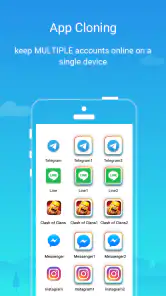
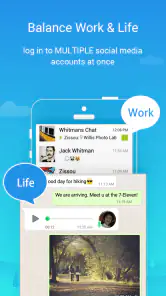
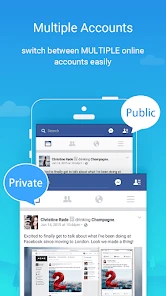
I’ve found that the real appeal of running a second account is not having to sign out of one profile every time I need the other. That can be handy for keeping work and personal messages apart, or for separating a game profile from the account I use casually. Parallel Space is a personalization app from LBE Tech built around that kind of separation: it creates another place to open a supported app on the same device. The idea is simple, though how well it fits your routine depends on the apps you want to use and how reliably they behave inside a cloned space.
What is Parallel Space?
Imagine having a virtual twin of an app on your phone. That’s the basic idea behind Parallel Space: it lets you open another instance of selected apps, so you can use separate accounts without constantly signing out of the original. It can be useful for social profiles, messaging, or games, but I wouldn’t treat “clone” as a guarantee that every app works identically in both places. Apps can handle sign-ins and notifications differently, so I’d test the second account before relying on it for anything time-sensitive.
Where setup can get frustrating
The first practical question is whether your particular app appears as an option and accepts its usual sign-in inside the parallel environment. If it does, start with one account and check that you can open it again after closing the space. That small test is more useful than adding several apps at once: if something goes wrong, you’ll know which app or account needs attention rather than having to untangle a whole batch.
A second copy also doesn’t create a second phone number, account, or independent internet connection. You still need valid credentials for the account you want to add, and any verification step belongs to the service you’re signing into. I’d keep recovery details current and avoid assuming that a successful first login means the account will never ask you to verify again.
Easy setup, with a sensible first check
Setting up Parallel Space is straightforward: choose an app to add, then sign into the other account within its separate instance. I’d begin with the app you use most and check the basics before moving on—can you switch between the original and the cloned version, does each open the intended account, and do you understand which icon launches which one? Clear labels or a consistent home-screen arrangement can prevent an easy-to-make mistake when you’re in a hurry.
If an app fails to launch or sign-in stalls, I’d first close and reopen the relevant copy, then check that the original app still works normally. Try one change at a time rather than repeatedly removing accounts or reinstalling everything. Keeping the original instance intact gives you a fallback while you work out whether the issue is limited to the cloned copy.
Performance, compatibility, and the trade-off
I wouldn’t assume that every installed app will behave perfectly in a separate instance. Cloned apps can be more sensitive to sign-in checks, updates, or background activity than the original, and running two active accounts may add to the phone’s workload. For an account you check occasionally, that may be a fair trade. For a service where instant alerts or uninterrupted access are essential, I’d test notifications and reopening behavior over a normal day before making the clone your only dependable route.
More From Our News Desk

Weather by Xiaomi Review: Clear at a Glance, Less Clear Up Close

X Under Pressure: Can It Recover When Posting Goes Wrong?

Clash of Clans Is Won Between the Battles

Android Auto Makes the Case for Quieter Car Software

MobiOffice: Transforming Mobile Productivity with Seamless Integration

EA SPORTS FC™ Mobile Soccer: Redefining Mobile Sports Gaming
Compared with signing out and back in, a parallel copy saves repeated account switching but adds another place to maintain. If an app already offers a built-in account switcher, that is usually simpler and may be less confusing. If your phone itself has a dependable way to create a separate user or work profile, that may suit someone who wants broader separation; Parallel Space makes more sense when the need is specifically another instance of selected apps. It is a convenience layer, not a replacement for an app’s own account tools.
Privacy and account boundaries
Keeping accounts in separate instances can help me avoid posting from the wrong profile, but I wouldn’t mistake that convenience for a complete privacy barrier. A cloned app still needs access to the account you sign into, and anyone who can use an unlocked phone may be able to reach the space. The original article describes options for hiding or locking apps, but I’d check what is available on my own installation rather than treating a lock as a substitute for a strong device passcode or careful account security.
For a practical routine, I’d give the second account a clear purpose—say, a small business inbox checked after lunch—then open that copy deliberately and verify the account name before replying. This is a simple way to reduce mix-ups without pretending the app can enforce boundaries for you. I’d also avoid placing an account in the clone if the service’s rules or security prompts make the arrangement unsuitable.
Battery, storage, and troubleshooting expectations
Two instances can mean more than one set of app data and more background activity, so the effect on storage and battery can vary with what you clone and how often you use it. If space becomes tight, check the cloned app’s stored data and downloads before clearing anything; removing data can sign you out or erase content held only on the device. For battery concerns, compare your normal use with a day when the second account is closed, rather than guessing from the number of icons on screen.
If notifications stop arriving, I’d check the cloned app’s own notification settings and the phone’s general background restrictions, then send a test message from another device or account. If the original app also misses alerts, the problem may be the phone or the service rather than the parallel copy. If only the clone is affected, reopening it and signing in again may help, but I’d keep the original available until the cloned account is working reliably.
Who should try it—and who should pass
I’d recommend trying Parallel Space if you regularly use two accounts in an app that supports this arrangement and you’re comfortable checking both instances now and then. It is especially useful when switching accounts is tedious but a full separate phone is unnecessary. It may be less suitable if you depend on flawless background alerts, want a system-wide work/personal separation, or prefer to keep account access inside the app’s official switching tools.
It is free to install, with in-app purchases listed from under a dollar to just under ten dollars per item, and it is rated for Everyone. The app has an average rating of 4.2 from around five million ratings, with roughly thirty-six thousand written reviews and over one hundred million installs. Those figures suggest a widely used tool, not a promise that every device or app combination will behave the same way. Version 4.0.9548 requires Android 7.0 or later, so I’d check device compatibility before planning a setup around it.
A routine that makes two accounts easier to manage
One useful way to decide whether a clone earns a place on your phone is to attach it to a specific task rather than treating it as another copy to check constantly. For example, I might use the original messaging app for family conversations and open the parallel account only when I’m handling a volunteer group. That deliberate separation cuts down on accidental replies and also makes it easier to notice when the second instance has stopped behaving normally.
I’d avoid putting both icons next to each other if they look alike or if I tend to tap quickly. A distinct home-screen position, a label that reminds me which profile is inside, and a brief account-name check before sending are small habits with real value. They don’t change the app’s technical limits, but they address one of the most common risks of having two copies: sending a message or post from the wrong identity.
When a separate instance is worth the maintenance
The strongest case for this kind of tool is a regular, low-friction task: perhaps checking a shop’s social account during business hours while leaving a personal profile alone, or keeping a second game account available without repeatedly signing out. The gain is convenience, not full isolation. If the second account is rarely used, or if the service’s own account switcher is quick and dependable, the extra instance may create more upkeep than it saves.
There is also a practical difference between separating access and separating the whole phone. Parallel Space is aimed at selected apps, so it can be a better fit when only one or two accounts need a second home. A separate user or work profile is generally the more coherent choice when you want a broader boundary across multiple apps and settings. I’d choose the narrowest arrangement that solves the problem, rather than adding a layer simply because it is available.
What to check before depending on it
Before moving an important conversation or routine into the cloned copy, I’d confirm three things over ordinary use: the account stays signed in after closing the space, the alerts arrive when expected, and the account remains accessible through the original app or another recovery route if the clone has a problem. This is especially sensible for work, sales, or community accounts where missing one message could matter more than the convenience of avoiding a sign-out.
If a login prompt appears repeatedly, I’d treat it as a sign to pause rather than keep submitting credentials. Check that the account details are correct and follow the service’s own verification steps. A cloning tool can provide a separate place to run an app, but it cannot resolve an account restriction or replace the service’s recovery process. Keeping that distinction in mind prevents a small setup snag from becoming a bigger account-access headache.
Easy Setup and User-Friendly Interface
Setting up Parallel Space is a breeze. Once you download it from your app store, the installation takes only a few minutes. The interface is intuitive, with a neat and tidy layout that makes navigation a piece of cake. You don’t need to be a tech wizard to get it going. Simply select the app you want to clone, and voila, you’re ready to go!
Performance and Compatibility
One of the things I love about Parallel Space is its seamless performance. The app runs smoothly without any noticeable lag, which is a big plus when you’re switching between accounts. It supports almost all the apps available on your device, meaning you can clone anything from Facebook to Clash of Clans without a hitch. Plus, it’s compatible with both Android and iOS, so no one’s left out!
Privacy and Security
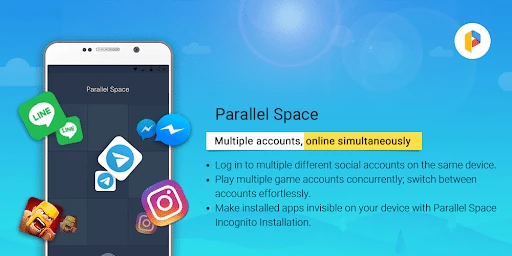
Concerned about privacy? Parallel Space has got you covered. It comes with a built-in incognito installation feature, ensuring that your cloned apps remain hidden from prying eyes. You can also lock apps with a security PIN or pattern, adding an extra layer of security to your sensitive data. It’s like having a personal vault for your private apps!
Battery and Storage Usage
Now, you might be wondering how this app affects your phone’s battery and storage. Well, you’ll be pleased to know that Parallel Space is designed to be lightweight. It doesn’t hog your storage, and the battery consumption is minimal, allowing you to keep your phone running smoothly throughout the day.
In conclusion, Parallel Space is a must-have app for anyone looking to manage multiple accounts efficiently. It’s user-friendly, secure, and doesn’t demand a lot from your device. So, why not give it a try and see how it can simplify your digital life? Whether you’re a social media guru or a mobile gamer, this app has something for everyone. Happy cloning!
Parallel Space - app cloning Frequently Asked Questions
Can I use Parallel Space on a tablet as well as a phone?
Parallel Space is intended for Android devices, and its usefulness on a tablet depends on whether the tablet meets the operating-system requirement and runs the apps you want to clone. Before installing, check the tablet’s Android version and consider how you plan to use the separate app instances. Compatibility can also vary from one app to another.
Does Parallel Space create a new account for me?
No. Parallel Space provides a way to run separate instances of apps, but you still need to create or already have the accounts you plan to use. Sign in to each cloned app with the appropriate credentials and follow its usual registration process. The apps’ own account requirements and policies still apply.
Can I choose which apps to clone?
You can use Parallel Space for apps you want to run with another account, rather than cloning every app on your device. It is sensible to add only the apps you need, then check that each one works properly in its separate instance. App compatibility and account rules can differ, so test the important features before relying on a clone.
Will I have to sign in again after adding an app to Parallel Space?
A cloned app runs as a separate instance, so you should expect to sign in to the account you want to use in that instance. Your existing session in the original app does not necessarily carry over. Keep your login details available, and make sure you can distinguish the cloned app from the original before entering account information.
Can I use Parallel Space to keep two accounts open at the same time?
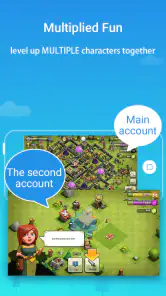
That is the central purpose of Parallel Space: it lets you run multiple accounts of the same app on a single device. You can keep an original app and a cloned instance available, with each signed in to a different account. Whether both work as expected depends on the app being cloned and its own rules for multiple accounts.
Pros
- Allows multiple accounts on one device
- Supports most social and gaming apps
- Easy to switch between cloned apps
- Minimal impact on device performance
- User-friendly interface
Cons
- Contains in-app ads
- May drain battery faster
- Limited features in the free version
- Some apps may not support cloning
- Occasional app crashes
- Category
- Personalization
- Version
- 4.0.9548