White Noise: Baby Sleep Sounds
- 512.00
- 4.6
- Installs
- 1.00M
- Price
- Free

Screenshots

Analysis by Reviewed
I find a white-noise app most useful at the moment a household needs one familiar sound, quickly: a baby is nearly asleep, a sibling is still moving around, and nobody wants to rummage for a separate machine. White Noise: Baby Sleep Sounds gives parents a phone-based way to try rain, fan-like noise and other steady sounds. In my experience, that convenience matters most when the routine travels from bedroom to stroller or when another caregiver takes over.
One phone, several caregivers
A realistic use is a parent settling the baby while a partner prepares for bed in the same room. I would choose a sound before the routine begins, start it at a modest volume, and leave the phone somewhere stable rather than handling it over the crib. If someone else needs the device, the background audio option lets the sound continue while they switch apps. That makes the phone more practical than a sound machine in a pinch, though it also means the household is sharing one device and its battery, audio and attention.
For grandparents or a babysitter, I’d keep the handoff simple: agree on the sound and when to stop it, then show them the timer rather than expecting them to explore the app while caring for a baby. That small bit of coordination can prevent a familiar bedtime cue from changing between caregivers. It is not a substitute for a shared family schedule or dedicated nursery equipment, but it can help everyone follow the same basic routine.
Keep the routine and device boundaries clear
Before relying on the app overnight, I’d test the chosen sound and timer while awake. Check that the phone is plugged in if needed, that the audio is coming from the intended speaker, and that notifications or a call will not create an unwelcome surprise. These are practical phone-use considerations, not special controls offered by the app. A dedicated sound machine may be a better fit if you want a device that does one job and does not compete with family members’ phone use.
The mix-and-match option invites experimentation, but I would change only one part of a soundscape at a time. If a baby settles more easily with rain than fan noise, keeping that choice consistent makes it easier to notice what seems helpful. Likewise, the timer is useful when you want playback to end, while background audio suits a caregiver who must keep using the phone. Those choices are more valuable than building an elaborate mix just because the option exists.
Why White Noise?
First off, let’s talk about why white noise is such a hit. Imagine being in the womb—it's not exactly silent in there, with the constant whoosh of blood flow, heartbeat, and other bodily sounds. Babies find comfort in a similar ambient noise, which is where our hero, White Noise: Baby Sleep Sounds, steps in.
User-Friendly Interface
Right from the start, the app greets you with a clean, intuitive interface that even sleep-deprived parents can navigate with ease. The design is straightforward, ensuring you spend less time fiddling with settings and more time enjoying its benefits.
More From Our News Desk

 Remini - AI Photo Enhancer
Remini Is Our App of the Week for Bringing Old Photos Back to Life
A quick AI restoration tool earns its place by making faded portraits and soft, older photos feel vivid again—provided you know where its polish ends.

 PayPal - Pay, Send, Save
PayPal Reviewed: Who Benefits from Its Reach, and Who Should Skip It
PayPal is most useful when its reach and familiar checkout solve a real payment problem. These reader-by-reader recommendations show where it earns a place—and where friction wins.

 Millionaire 2026 Quiz & Trivia
 Makes Every Answer Count
A familiar quiz-show format succeeds or falters on tiny design decisions: how clearly the game guides a first answer, handles hesitation, and invites one more round.

 Decor Life - Home Design Game
Decor Life Turns Short Breaks Into Bite-Sized Decorating Jobs
A room-by-room decorating game built for quick sessions gains from modern phone habits, but its gentle pace still depends on patience, repetition, and a steady stream of design jobs.

 Sniper 3D:Gun Shooting Games
Sniper 3D’s Quick-Shot Appeal Faces the Upgrade Treadmill
The appeal is immediate: line up a target, steady your aim, and fire. The harder question is whether Sniper 3D can keep players returning after the first rush.

 Blockudoku®: Block Puzzle Game
Blockudoku vs. the Puzzle Pack: A Quick Puzzle With a Repetitive Edge
Blockudoku turns a clean grid into a quiet test of foresight. Against match-three polish and head-to-head simplicity, its lasting appeal is also its biggest limitation.
Latest News



A Symphony of Sounds
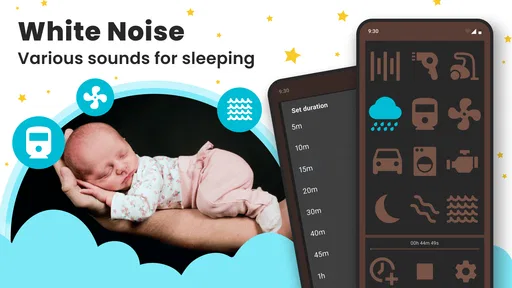
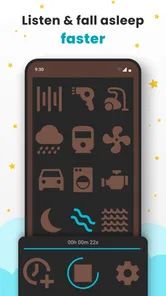
What sets this app apart is its diverse library of sounds. We’re talking about everything from the gentle patter of rain to rhythmic ocean waves and even the hum of a fan. Each sound is crafted to perfection, offering a realistic experience that can soothe even the fussiest of babies.
One of the coolest features is the ability to mix and match sounds. Fancy a little rain with your ocean waves? No problem! The app lets you customize soundscapes to suit your baby's preferences, which is pretty neat if you ask me.
Handy Features Galore
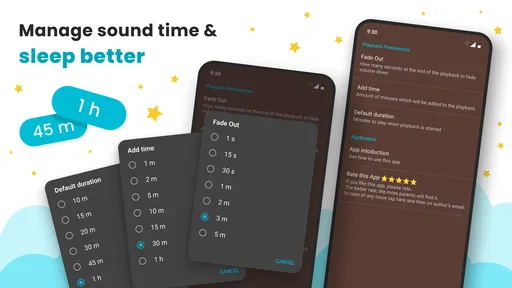
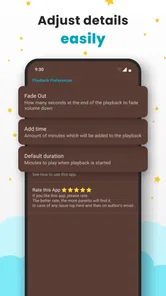
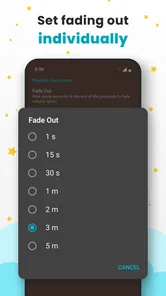
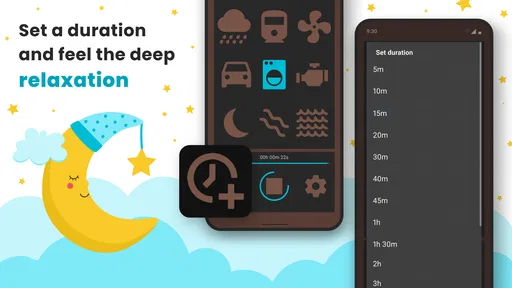
Beyond the sounds, the app is packed with features that make it a must-have. The sleep timer is a lifesaver, allowing you to set the sounds to play for a specific duration. This means you can set it up and then forget about it, focusing on getting some rest yourself.
There’s also a background audio option, so the soothing sounds continue to play even if you need to use other apps on your phone. It’s like having a sound machine in your pocket, ready to work its magic wherever you go.
Choosing a sound without turning bedtime into a test
For a first session, I would keep the choice deliberately simple: try one steady sound, leave the mix alone, and give the routine a fair chance before deciding whether it belongs in the rotation. A new sound can become one more variable in an already tiring evening, so I would not switch among several options every few minutes. If the baby is unsettled, the app cannot tell you why; the useful question is whether a consistent background sound makes the room feel calmer for your family.
There is also a practical difference between using the app to discover a preference and relying on it as permanent nursery equipment. During the discovery stage, being able to compare rain, fan-like noise and other ambient choices on the same phone is convenient. Once the household has settled on a favorite, the phone’s other duties may become a nuisance. At that point, a separate machine can be a sensible alternative, even if the app helped you find the sound you wanted.
Age, trust and expectations
DOSA Apps makes this free parenting app, which is rated for Everyone. It has a 4.7 average from around 24,000 ratings, and more than a million installs; that suggests many people have tried it, but it does not guarantee it will suit your child. The app first appeared in December 2016, and version 1.8.11.3 lists Android 5.0 as its minimum requirement. I’d check that your device can run it before building it into bedtime.
The app can be a useful sound source, but I would treat it as a routine aid, not a promise that a baby will sleep or a replacement for attentive care. The usual alternatives are a standalone sound machine, a household fan, or audio played from another app. A physical machine keeps the phone free and may be simpler for a shared bedroom; this app is easier to carry and offers mixing and a timer. If you prefer music, stories or guided sleep routines rather than steady ambient sound, a different kind of audio app is likely a better match.
Shared-device habits that make a difference
When a phone is also the household’s alarm, camera, messaging device and source of bedtime sound, small decisions matter. I would settle the sound and timer before putting the baby down, then avoid making the phone the only way another caregiver can reach essential information. Background playback is handy, but it does not turn a personal phone into a dedicated nursery device or solve the question of who needs it next.
For a household with more than one caregiver, agree on a simple default rather than trying to coordinate every detail through the app. One person can show the other which sound has been working and how long it should play. If the usual caregiver is away, that quick verbal handoff is more dependable than assuming the next person will remember a custom mix. I would also keep the phone out of the baby’s reach and place it where the speaker can be heard without making the device part of the sleep space.
Who will get the most from it?
I’d recommend trying it if you want a portable way to compare familiar noises and settle on one that works for your household. It is particularly handy during travel, naps away from home, or a caregiver handoff, when carrying a dedicated machine is inconvenient. It is less suitable if you need a device independent of your phone, expect extensive family coordination features, or want a sleep tracker rather than sound playback.
It is also a reasonable option for parents who already keep a phone nearby and want a straightforward sound source instead of adding another object to pack. I would be more cautious about making it the household default if the phone is routinely needed by another adult, if overnight battery use is a concern, or if you want every caregiver to operate a device without using their own phone. In those situations, a dedicated machine or a simple, familiar household sound may involve less coordination.
Cost, purchases and everyday expectations
The app is free to install, with optional in-app purchases ranging from $0.99 to $99.99 per item. I’d explore the basic listening experience before paying for anything and check the purchase choice carefully, especially if a child can use the phone. The practical question is not how many sounds you can combine, but whether one gentle, repeatable setup fits your baby and your bedtime routine.
That purchase range is broad enough that I would not treat every option as an automatic add-on. First decide whether the available sound choices and playback controls already meet your needs; only consider a purchase if you can identify a specific reason for it. This is especially useful on a shared device, where a curious child or a tired adult might tap through screens without thinking about the household’s spending preferences. Keeping the phone’s purchase settings and bedtime routine in mind is a sensible boundary, not a feature to expect the app itself to manage.
When another kind of sleep aid is better
This is a focused sound app, so I would skip it if what you really need is help tracking naps, planning a bedtime routine, or playing stories and lullabies. It also cannot replace the convenience of a physical device when the phone must stay with another family member. A regular fan may suit someone who already likes its steady noise and does not need a timer or sound selection, while a dedicated sound machine can be simpler for a bedroom that needs the same audio every night.
On the other hand, those alternatives are not automatically more useful. A fan is less portable and offers less choice; a separate machine is another item to carry and maintain. The app’s strongest case is flexibility: it can travel with the phone and gives caregivers ways to choose a sound and end playback. I would weigh that flexibility against the very ordinary inconvenience of sharing a device, rather than assuming that more options always make bedtime easier.
Final Thoughts
If you’re on the hunt for a reliable, easy-to-use app that’ll help your baby sleep soundly, look no further than White Noise: Baby Sleep Sounds. It’s more than just an app; it’s a sanity-saver. With its wide array of sounds and user-friendly features, you’ll find yourself wondering how you ever managed without it. So go ahead, give it a whirl, and enjoy some well-deserved peace and quiet. Sweet dreams!
My more measured recommendation is to try it as a practical tool, not a guaranteed fix. It makes sense for a family that wants portable ambient sound, can agree on a simple shared routine, and is comfortable using a phone near bedtime. If you need a completely independent device or more than sound playback, choose something designed for that job. For everyone else, starting with one sound, a modest volume and a clear plan for the timer is a low-fuss way to see whether it earns a place in the household routine.
White Noise: Baby Sleep Sounds Frequently Asked Questions
Can I use White Noise: Baby Sleep Sounds as part of a regular bedtime routine?
Yes. White Noise: Baby Sleep Sounds is a parenting app centered on audio that can help make bedtime feel calmer. Its selection includes rain sounds, fan noise, and other soothing options, so you can try using a familiar sound as part of your child's wind-down routine. The app can complement a routine, but it is not a substitute for other healthy sleep habits.
Is White Noise: Baby Sleep Sounds suitable for parents who want a simple bedtime sound app?
White Noise: Baby Sleep Sounds is a parenting app focused on helping create a calmer sleep environment with audio. Its short description is simply “White Noise,” while the app summary highlights rain sounds, fan noise, and other options. That makes it relevant for parents looking for soothing background sound, as well as adults who want a sleep-focused listening option.
What does it cost to download and use White Noise: Baby Sleep Sounds?
The app is free to download, so you can try it without paying upfront. It also offers in-app purchases, with prices ranging from $0.99 to $99.99 per item, so some content or features may require payment. Check the purchase details shown in the app before confirming anything, especially if you only want to use the free options.
What is White Noise: Baby Sleep Sounds and how does it work?
White Noise: Baby Sleep Sounds is an app designed to help infants and even adults fall asleep and stay asleep. It plays soothing sounds like white noise, lullabies, and nature sounds to create a calming environment. The app utilizes sound masking techniques to block out disruptive noises, mimicking the comforting sounds babies hear in the womb, which helps them relax and sleep better.
Is White Noise: Baby Sleep Sounds free to use or does it require a subscription?
The app offers a free version with a selection of basic sounds to help your baby sleep. However, for access to the full library of sounds and additional features, users may need to purchase a subscription or one-time payment within the app. Pricing details are available in the app store description, so users can decide which version suits their needs.
Pros
- Wide variety of soothing sounds.
- User-friendly interface.
- Customizable sound duration.
- Offline usage available.
- No intrusive ads.
Cons
- Limited free sound options.
- Basic features in free version.
- Occasional app crashes reported.
- Sound looping issues.
- No sleep tracking feature.