FamilyAlbum - Photo Sharing
- 5.97K
- 4.8
- Installs
- 10.00M
- Price
- Free

Screenshots



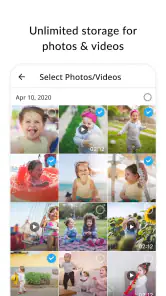



Analysis by Reviewed
I find FamilyAlbum most useful when family photos are scattered across phones and relatives want a shared place to follow a child’s growing-up years. It is a parenting app from MIXI, Inc., built around collecting and sharing family moments rather than turning them into a public-facing social feed. Its 4.8 average from around 326,000 ratings and over 10 million installs suggest it has found a broad audience, but what matters day to day is whether its simple, family-centred approach suits the way you share.
Readable enough for different generations
The appeal is that the central task is easy to understand: put family photos and videos in one place, then invite the people who should see them. I would expect that focused purpose to feel less confusing for a relative who finds general social networks busy or hard to follow. Comments and reactions also give grandparents a way to respond to a moment without needing to master a separate messaging routine.
That simplicity has a trade-off. If you already organize pictures with elaborate folders, labels, or a carefully curated cloud library, a month-based family timeline may feel less flexible than your own system. I’d use it as a shared family album, not assume it replaces every photo-management tool on my phone.
Comfort, control, and the people in the pictures
For motor or sensory needs, I would judge the experience by trying the everyday actions that matter most: locating a recent picture, opening a video, and responding to a relative. A straightforward flow can reduce the number of decisions involved, but people who need larger text, screen-reader support, or particular contrast settings should check how the app works with their device’s accessibility settings before relying on it. I wouldn’t treat a simple-looking interface as proof that every need is covered.
Privacy also calls for a little family coordination. The album is intended for invited viewers, which is more contained than posting a child’s picture to a public social account. Still, invitations should go only to people the family trusts, and it helps to agree on what relatives may save or share elsewhere. Private access lowers exposure; it does not remove the need to think carefully about a child’s digital footprint.
When a shared album fits—and when it doesn’t
A realistic use is a parent adding a few photos after bedtime so a grandparent in another town can catch up the next morning, leave a reaction, and feel included without a flurry of group-chat messages. That workflow is particularly handy when several relatives want to see the same updates. By contrast, a family that prefers not to upload children’s images to a dedicated service may be happier sharing selected pictures face-to-face or through a system they already use and understand.
Compared with a group chat, a dedicated album gives photos a more lasting, browsable home instead of letting them disappear between unrelated messages. Compared with a general cloud gallery, its family focus may make sharing feel more personal, while a broader gallery can be preferable if you need one place for every kind of photo or more control over a large personal archive. I’d decide based on whether the priority is family participation or comprehensive photo management.
More From Our News Desk

Weather by Xiaomi Review: Clear at a Glance, Less Clear Up Close

X Under Pressure: Can It Recover When Posting Goes Wrong?

Clash of Clans Is Won Between the Battles

Android Auto Makes the Case for Quieter Car Software

MobiOffice: Transforming Mobile Productivity with Seamless Integration

EA SPORTS FC™ Mobile Soccer: Redefining Mobile Sports Gaming
Why FamilyAlbum Stands Out
When it comes to sharing family photos, FamilyAlbum is like that reliable friend who always has your back. The app offers a seamless way to share photos and videos with your family, no matter where they are in the world. What makes it truly stand out is its user-friendly interface. You don't need to be a tech wizard to use it; even my grandma could navigate it like a pro!
Features You’ll Love
One of the coolest features is the automatic organization of photos. Imagine having your photos neatly arranged by month, making it super easy to find that adorable picture of your toddler taking their first steps. Plus, the app creates photo books automatically! Yes, you heard me right. You can order these physical photo books, and they are surprisingly affordable.
Another feature that’s worth mentioning is the app’s privacy controls. Sharing family moments is great, but not when the whole world can see them. FamilyAlbum ensures that only the people you invite can view your albums. It’s like having your very own private social media platform.
Connecting Families Like Never Before
What I love most about FamilyAlbum is how it bridges the gap between generations. My parents live miles away, and yet, they feel like they are right here with us, watching the kids grow up. The app allows comments and reactions, which adds a personal touch to the shared moments. It's heartwarming to see my mom’s comments on each new picture and know she’s involved in our lives.
A small habit makes the timeline more useful: add pictures regularly rather than waiting until a month’s worth of camera-roll photos piles up. That makes it easier for relatives to follow along and for you to find a particular milestone later. I’d also treat the automatic photo-book option as a prompt to choose meaningful memories, not as a reason to assume every image belongs in a keepsake. For families who take many near-identical pictures, a quick personal selection can make a printed collection feel more intentional.
Cost and expectations
The app is free to download, and it is rated Teen. Optional in-app purchases range from $0.99 to $109.00 per item, so I would check the purchase details before ordering anything rather than assume every physical keepsake or extra is included at no cost. FamilyAlbum has been available since April 14, 2015, which gives it a long-running presence in this category, but I would still make a small trial of the family workflow before asking every relative to move over.
One practical question is whether all invited relatives will actually use another app. If a grandparent is comfortable tapping a notification and leaving a short reaction, the shared space can become a pleasant routine. If they avoid installing apps or prefer receiving a few pictures directly, maintaining two sharing habits may create extra work. I’d invite the people who will genuinely participate first, then decide whether the album is worth expanding to the wider family.
Making the album work in a busy household
I would not treat the album as a second camera roll that needs every image copied into it. A more sustainable approach is to choose a handful of photos that tell the story of a day: a new drawing, a first taste of a food, or a quiet moment with a sibling. That keeps the timeline meaningful for relatives and avoids turning family sharing into another chore. When several adults take pictures, agreeing who will add updates can also prevent a flood of near-duplicates.
For a family gathering, the shared space can be useful after the event: each parent can contribute their own favorite snapshots rather than sending separate batches to every relative. I’d still keep important originals organized in the phone or cloud service I already rely on. A family album is most valuable as a place for shared viewing and conversation, not necessarily as the sole backup for irreplaceable pictures.
There is also a small but meaningful choice around what to post. A photo that feels harmless among close relatives may show a child’s school uniform, a home interior, or a location clue. I’d pause before sharing images that reveal more than the moment itself, and talk with other caregivers about what should stay private. The invitation-based setup makes the audience narrower, but thoughtful selection is still part of using any child-focused sharing service responsibly.
Who is likely to enjoy it
I think the best fit is a parent or caregiver who takes lots of pictures, has relatives who want regular updates, and would rather share one selected album than repeat the same messages in several chats. It can also suit families living apart, where small everyday updates help people feel involved between visits. A relative who mainly wants to watch and respond may appreciate having a clear destination for new moments instead of searching through a busy conversation thread.
I would hesitate if your family has no shared agreement about who may see or redistribute a child’s photos, or if uploading them to an online service feels wrong to you. It may also be a poor match for someone who wants advanced tagging, highly customized folders, or one universal archive covering every subject in their life. In those cases, a familiar cloud gallery, a private device-based collection, or simply sharing a few chosen images directly may be less friction.
Ending Thoughts: Is FamilyAlbum Worth It?
In a world where staying connected is more important than ever, FamilyAlbum is a game-changer. It's not just an app; it's a family bridge. Whether you’re a tech-savvy parent or someone who’s just looking for an easy way to share memories, this app is definitely worth trying out. It has made sharing moments a joyous and hassle-free experience for my family, and I bet it will do the same for yours.
For me, its strongest case is a family that wants an approachable, private-feeling place for child-centred updates and welcomes comments from relatives. It is less compelling if you need a highly customizable archive, want to avoid another account-based routine, or are uncomfortable storing children’s images in a shared app. Those are sensible reasons to choose a different method; the best option is the one your family can use consistently and thoughtfully.
So, if you're ready to take your family photo sharing to the next level, give FamilyAlbum a shot. Trust me, your memories deserve it!
FamilyAlbum - Photo Sharing Frequently Asked Questions
Can I use FamilyAlbum to collect photos from several family members in one place?
FamilyAlbum is built around sharing a child’s special moments with family, so it can help relatives contribute to a shared collection rather than keeping every photo in separate conversations. Invited family members can follow along and add memories, making it easier to revisit moments together. It’s a useful approach for families who want one shared space for their photos and videos.
Does FamilyAlbum support videos as well as photos?
Yes. FamilyAlbum is intended for sharing both photos and videos, so families can preserve different kinds of moments in their shared albums. This can be handy when a quick clip captures something a still image cannot. Once content is added, invited relatives can view the shared memories, helping everyone stay connected to a child’s milestones and everyday moments.
Can I decide which relatives are invited to view a FamilyAlbum?
FamilyAlbum is designed for sharing with selected family members rather than making a child’s moments public. You can invite relatives to the shared albums, allowing your family to choose who participates and sees the content. Before uploading, it’s sensible to think about who should have access and to review the available sharing controls so the album suits your family’s preferences.
Is FamilyAlbum suitable for sharing a child’s photos with relatives who live far away?
FamilyAlbum is designed for families who want to share and revisit a child’s special moments. You can upload photos and videos to shared albums and invite selected family members, so relatives can follow along even when they are not nearby. Its focus on family sharing makes it a practical option for keeping memories together in one place.
Who makes FamilyAlbum, and what kind of app is it?
FamilyAlbum is a parenting app developed by MIXI, Inc. Its purpose is to help families share, save, and remember a child’s special moments through photos and videos. It has an average rating of 4.8 from around 326,000 ratings, and more than 10 million installs, making it a widely used option for families looking for a dedicated place to collect and share memories.
Pros
- User-friendly interface for easy navigation
- Secure storage with unlimited photo uploads
- Memories and videos easily shareable
- Custom photo books available for order
- No ads interrupting the user experience
Cons
- Limited editing tools for photos
- No options for collaborative albums
- Requires internet for most functions
- Lacks integration with other social media
- No advanced search features
- Category
- Parenting
- Version
- Varies with device











