Pregnancy and Due Date Tracker
- 631.00
- 4.5
- Installs
- 10.00M
- Price
- Free

Screenshots



Analysis by Reviewed
Pregnancy dates can be hard to keep straight, especially when appointments, questions and changing symptoms start to fill the week. I like having a single place to orient myself, but I also want a tracker to be clear about what it can—and cannot—do. Pregnancy and Due Date Tracker is a free parenting app from Wachanga, with a 4.4 average from around 198,000 ratings and over 10 million installs. It is rated for Everyone, though its in-app purchases range from $0.99 to $89.99 per item, so I would check what is included before treating every tool as free.
Where people can get stuck
A pregnancy tracker is only useful when its starting details are right. If the date entered during setup is off, the week-by-week guidance and due-date estimate can feel out of step with a clinician’s timeline. I’d make a quick note of the date and dating method used, then compare the app’s estimate with the one shared at an appointment. The app can help organize a pregnancy; it shouldn’t settle a medical disagreement.
Another source of friction is expecting a tracker to interpret symptoms. Logging how you feel may help you notice a pattern or explain it clearly later, but an app cannot assess an urgent concern. I would use it as a record, not as a substitute for a midwife, doctor or local medical advice—particularly if a symptom worries me or changes suddenly.
Setup checks that save time later
Before relying on reminders or progress views, I’d confirm the pregnancy dates and review which parts of the app are available without a purchase. The app is free to download, but optional purchases can be substantial at the upper end; that makes it sensible to explore the free experience first rather than assume a feature is included. Its current version is 3.146.2 and it requires OS 9 or later, so an older device may need an update before installation.
I also recommend deciding what you want the app to do for you. If the main goal is keeping a due-date estimate and following weekly changes, a few minutes of setup may be enough. If you plan to record personal health details, consider whether you are comfortable keeping that information in an app and check its current settings before adding anything you do not need.
Your Personal Pregnancy Guru
The first thing you'll notice about the Pregnancy and Due Date Tracker app is its user-friendly interface. It's like the developers knew exactly what you'd want when you're juggling excitement, anxiety, and a whole lot of hormones. The app welcomes you with a personalized dashboard that tracks everything from your baby's growth to your own health stats. It's honestly like having a pregnancy guru right at your fingertips.
Weekly Updates and Tips
Every week, the app provides updates on your baby's development, making you feel like you're witnessing a little miracle unfold. You get to see how your baby is growing, with comparisons to fruits and vegetables that make it all the more relatable. Plus, the app throws in some handy tips for each stage of your pregnancy. It's like having a friend who's been through it all and knows exactly what you need to hear.
More From Our News Desk

Weather by Xiaomi Review: Clear at a Glance, Less Clear Up Close

X Under Pressure: Can It Recover When Posting Goes Wrong?

Clash of Clans Is Won Between the Battles

Android Auto Makes the Case for Quieter Car Software

MobiOffice: Transforming Mobile Productivity with Seamless Integration

EA SPORTS FC™ Mobile Soccer: Redefining Mobile Sports Gaming
One useful way to handle those updates is to turn them into a short question list for your next appointment. I wouldn’t treat a weekly note as a diagnosis or a promise about what should happen on a particular day; pregnancy varies, and general guidance cannot account for an individual history. If a comparison or tip makes you curious, save the question and ask your care provider rather than trying to draw a medical conclusion from it.
Health Tracking Features
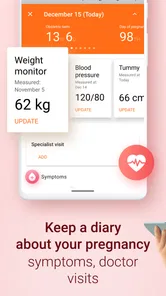
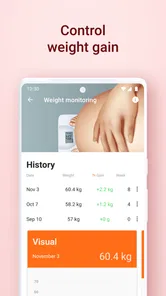
Let's talk about the health tracking features. This app makes it super easy to log your daily symptoms, track your weight, and even monitor your blood pressure. It's like having a mini healthcare hub that helps you keep tabs on your well-being. And for those moments when you're unsure about a symptom, the app offers insights and advice, putting your mind at ease.
For a practical routine, I’d keep entries brief and consistent instead of trying to record every sensation. A simple note about what changed and when can be easier to review later than a long, irregular diary. If a clinician has asked you to monitor something, follow their instructions for how and when to measure it; an app entry is a convenient record, not a replacement for properly taken measurements or professional interpretation.
Community Support
Pregnancy can sometimes feel a bit isolating, but the app's community features are a game-changer. You can connect with other moms-to-be, share your experiences, and get advice from those who are riding the same rollercoaster. It's like having a pregnancy support group right in your pocket, ready to offer a comforting word whenever you need it.
Community discussion can be reassuring, but I’d treat other people’s stories as personal experiences, not guidance tailored to me. If reading birth stories or symptom discussions makes anxiety worse, it is reasonable to step back and use the tracker for dates and practical notes instead. People who prefer private, clinician-led support may find a basic calendar paired with appointments more comfortable than a social layer.
Making the tools work in everyday life
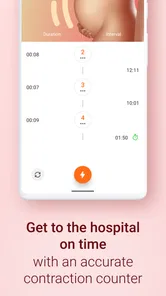
The app’s practical appeal is that pregnancy timing and labor-related tools sit within the same general experience: its store summary highlights a contraction timer, kick counter and due-date calculator. Those tools are most useful when opened for a clear reason, rather than checked repeatedly out of habit. For example, someone nearing a care provider’s recommended window for monitoring movement could use a counter as a prompt to pay attention, while still following the provider’s instructions about what to do if movement concerns arise.
A realistic routine might be to check the weekly update over breakfast, jot down one question for an upcoming visit, then leave the app alone for the rest of the day. Later, if contractions begin, a timer can help keep track of their timing while the user follows the care team’s advice about when to call. This is a more grounded role for a phone tool than expecting it to decide whether labor is progressing normally.
Compared with using a general calendar, the app brings pregnancy-focused context together with tracking tools, which can save a little switching between separate resources. A calendar may still be better for someone who only needs appointment reminders and wants fewer personal details in an app. Likewise, a clinician’s portal or direct advice is the better option for medical questions; this tracker’s convenience does not make it a care service.
When a problem may be elsewhere
If a screen or calculation seems unexpected, I would first revisit the dates entered and check that the device meets the minimum OS requirement. If the app is slow or stops responding, closing and reopening it and checking for an available app or system update are sensible general first steps. I would avoid deleting it before considering whether any notes need to be kept, since I would not assume that personal entries are backed up or recoverable.
Sometimes the issue is not a technical fault at all: a due date can be an estimate, and different dating information can produce a result that does not match a previous calculation. For a mismatch, bring the dates and the question to a healthcare professional rather than repeatedly changing entries until the app shows a preferred answer. That keeps the tracker useful without giving it authority it does not have.
A calmer way to use the tracker
I would treat the app as a reference I visit with a purpose, not something I need to check every time a new worry crosses my mind. That distinction matters because pregnancy information is easy to overconsume: one symptom search can lead to many more, while a tracker’s week-based material is necessarily broad. A useful boundary is to open it for a task—checking timing, recording a note, or preparing a question—and close it once that task is done.
For someone sharing care with a partner, the most helpful output may be a simple reminder to talk through dates or questions together, rather than expecting both people to monitor every screen. If the pregnant person prefers to keep entries private, that is equally reasonable. The app should support the user’s routine, not create a new expectation to report or document every detail.
Choosing between one app and separate tools
Pregnancy apps commonly compete on how much they gather in one place versus how narrowly they focus. This one’s appeal is the combination of pregnancy-oriented guidance with labor-related timing and movement tools, so it may suit someone who wants fewer separate apps to manage. A dedicated calendar can be simpler for appointments, while a paper notebook can be easier for people who prefer not to put personal observations into a phone. Neither alternative gives the same pregnancy-focused bundle, but either may fit better if the extra content feels distracting.
There is also a trade-off between convenience and clutter. A broad app can make a new tool easy to find when circumstances change, but a user who only wants a due-date reminder may not benefit from exploring every section. I’d start with the one or two functions that solve an actual problem and ignore the rest unless a need arises. That keeps the experience focused and makes it easier to notice whether the app is genuinely helping.
Questions worth settling before relying on it
One practical question is whether the app can replace appointment records or clinician instructions. I would say no: it can help me keep my own notes and orient myself around an estimate, but medical records and advice should remain the reference for care decisions. If the dates disagree, I would not try to make the app match by guessing; I’d ask the provider which date to use and then enter the appropriate information.
Another question is whether the purchase options are necessary. I’d use the free download first and decide only after seeing whether its available tools meet my needs; the presence of optional purchases does not mean I should buy something just to feel prepared. If a feature is locked, I would weigh its specific value against the cost before proceeding, rather than assuming that every pregnancy tracker requires an upgrade.
Finally, what should I do if I forget to log something or the app behaves unexpectedly? I would not try to reconstruct a detailed history from memory if accuracy matters. I’d record what I know, mark uncertainty plainly in my own notes, and ask a care professional how to handle any monitoring they requested. For technical trouble, basic restart and update checks are reasonable, but I would keep important information elsewhere if losing access would create a problem.
In conclusion, the Pregnancy and Due Date Tracker app is more than just a tool—it's a companion that walks with you every step of the way. Whether you're a first-time mom or a seasoned pro, this app offers something valuable for everyone. So, if you're embarking on this beautiful journey, why not take along a guide that makes the ride a little smoother and a lot more fun?
Who I’d recommend it to
I’d recommend trying it if you want pregnancy-specific updates and a place to keep useful tracking in reach, especially if you are comfortable checking dates and treating health content as general support. I’d skip it if you want only a simple calendar, dislike community features, or expect an app to replace professional advice. With its release dating back to Aug 16, 2016, and ongoing version 3.146.2, it has a long-running presence, but the deciding question is whether its mix of guidance and tools fits your own routine.
My practical verdict is to start with the free experience, enter dates carefully, and use only the tracking tools that genuinely help. The most valuable habit is not logging everything; it is knowing what you want to remember and bringing meaningful questions to your care provider. Used that way, this parenting app can make pregnancy information easier to organize without asking it to do more than a phone app should.
Pregnancy and Due Date Tracker Frequently Asked Questions
Can my partner or another family member use the app alongside me?
Pregnancy and Due Date Tracker is focused on pregnancy, so its tools may also be useful to a partner or family member who wants to follow updates and help with tracking. The app has an Everyone age rating, but the experience is designed around expectant parents. You can decide whether its pregnancy information and the details you choose to enter are appropriate for anyone sharing access to your device.
Can I use the app to track contractions and my baby’s movements?
Yes. Pregnancy and Due Date Tracker includes a contraction timer and a kick counter, two practical tools for logging activity as pregnancy progresses. These features can help you keep track of information for your own reference and discussions with your healthcare professional. They do not replace medical guidance, so contact a qualified professional if you have concerns about contractions or your baby’s movements.
Is Pregnancy and Due Date Tracker available for my device, and what does it cost to get started?
Pregnancy and Due Date Tracker is a free-to-download parenting app from Wachanga, with in-app purchases available for people who want to explore paid options. It is intended for users whose device runs Android 9 or later. The free starting point makes it possible to try the app before deciding whether any optional purchases fit your needs.
What features does the Pregnancy and Due Date Tracker app offer?
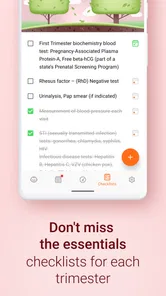
The Pregnancy and Due Date Tracker app offers a variety of features to assist expectant mothers. It includes a due date calculator, weekly updates on the baby's growth, health tips, reminders for doctor appointments, and a kick counter to track fetal movements. Additionally, users can access a community forum to connect with other expectant parents for support and advice. The app also includes a contraction timer, which can be useful for logging contractions as labor approaches.
Is the Pregnancy and Due Date Tracker app free to use?
The Pregnancy and Due Date Tracker app is free to download with basic features available at no cost. However, it also offers in-app purchases that range from $0.99 to $89.99 per item. Users can choose whether to make a purchase for a more comprehensive experience, while the app remains free to download.
Pros
- Comprehensive tracking features.
- User-friendly interface.
- Customizable notifications.
- Educational resources included.
- Integration with health apps.
Cons
- Ads can be intrusive.
- Limited free features.
- Occasional syncing issues.
- Requires internet connection.
- Some features need manual input.












