AirDroid Parental Control
- 1.52K
- 4.5
- Installs
- 10.00M
- Price
- Free

Screenshots






Analysis by Reviewed
Before choosing a parental-control app, I think it helps to be clear about what “control” should mean in your family. Location checks and limits can be reassuring, but they work best when they support a conversation rather than replace one. AirDroid Parental Control is aimed at parents who want several kinds of oversight in one place, and that breadth makes it worth considering—but it also makes it important to agree on expectations with your child before switching anything on.
Trust starts with setup and clear expectations
AirDroid Parental Control is a parenting app from SAND STUDIO. It is free to install, rated for Everyone, and has optional in-app purchases priced from $9.99 to $89.99 per item. Its 4.5 average from around 120,000 ratings and more than 10 million installs suggest that many families have tried it, but popularity alone is not a reason to grant broad access. I would treat setup as a family decision: explain which tools you plan to use, why, and when you will revisit those choices.
One practical question is whether you need every kind of monitoring the app offers. If your main concern is getting a child to put a phone away at bedtime, screen-time rules may be the relevant starting point; location tools and communication monitoring may be unnecessary. Beginning with the smallest set of controls that addresses a real concern can make the arrangement easier to explain and less likely to feel like surveillance.
Use controls for specific, everyday needs
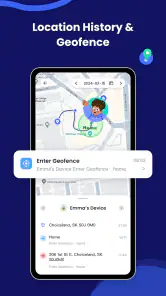
A location check can be useful when a child is travelling to an activity or meeting you after school. Geofencing alerts may help with agreed boundaries, but I would not treat them as proof that a child is safe or as a substitute for calling them when plans change. For a crowded event, for example, location information can help you find one another, while a simple meeting point and a backup plan remain more dependable if a phone is off or unavailable.
Screen-time scheduling also works better when it reflects a routine instead of becoming a punishment. I would set expectations together—such as when device use should pause for homework or sleep—and explain what happens when the limit takes effect. That conversation matters because a technical block can stop access, but it cannot resolve a disagreement about what is fair.
Monitoring calls for restraint
The app’s tools for viewing app use and blocking selected apps can help a parent respond to a specific concern, rather than relying only on a child’s total screen time. Still, seeing which apps are used does not tell the whole story of what a child is doing in them. Call and SMS monitoring is more sensitive still: I would use it only when there is a clear safety reason, and be open with an older child about what is being checked. Trust can be harder to rebuild if monitoring is hidden or applied without a clear purpose.
Before relying on location, app restrictions, or communication oversight, review the permissions and choices shown during setup on both devices. I would also check that the child’s device is paired to the intended parent account and revisit the arrangement as the child’s needs change. These are sensible safeguards for any monitoring tool; they are not a claim about the app’s data practices or a substitute for reading its current privacy information.
More From Our News Desk

Weather by Xiaomi Review: Clear at a Glance, Less Clear Up Close

X Under Pressure: Can It Recover When Posting Goes Wrong?

Clash of Clans Is Won Between the Battles

Android Auto Makes the Case for Quieter Car Software

MobiOffice: Transforming Mobile Productivity with Seamless Integration

EA SPORTS FC™ Mobile Soccer: Redefining Mobile Sports Gaming
For parents who want location features, screen-time scheduling, app blocking, and activity oversight together, AirDroid Parental Control brings a broad toolkit into one app. Families who only need a basic bedtime limit may find built-in device controls simpler, while parents who prefer a conversation-first approach may not want monitoring at all. On Android, the current version is 2.6.3.0 and requires Android 7.0 or later; it is not the right fit if your family uses iOS exclusively or if you want a tool that makes parenting decisions for you.
Getting Started with AirDroid Parental Control
The first thing you'll notice when you download AirDroid Parental Control is its user-friendly interface. It's like the app knows we're busy parents who don't have time to fumble around with complicated settings. Setting it up is a breeze – just install the app on your child's device and pair it with your own. Within minutes, you're the captain of the ship, ready to steer your child's digital journey.
Features That Stand Out
One of the coolest features is the real-time location tracking. Ever had that heart-stopping moment when you can't find your child in a crowded place? With this app, you can breathe easy knowing exactly where they are. Plus, there's the geofencing feature that sends you alerts when your child steps out of a designated area. It's like having a digital leash, but way less creepy.
Another feature worth a mention is the screen time management. We all know how easy it is for kids to get glued to their screens. With this app, you can set specific times for when your child can use their device. No more battles over screen time – the app does the heavy lifting for you.
Keeping an Eye on Online Activities
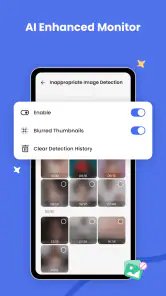
Now, I don't know about you, but the internet can be a bit of a wild west. The app's monitoring tools allow you to keep tabs on your child's online activities. You can see which apps they're using and even block the ones you deem inappropriate. It's like having a bouncer for your child's digital world.
And let's not forget the call and SMS monitoring. This feature lets you see who your child is communicating with, ensuring they're not getting into any unsavory situations. It's all about keeping them safe while giving you peace of mind.
Planning limits that survive a normal family week
A useful way to judge any rule-based parental tool is to ask how it will behave on an ordinary Tuesday, not just during a crisis. A child may need a device for a school message, a travel change, or a family call even when entertainment apps are meant to be paused. I would write down the household’s “must remain available” situations first, then test the schedule around them while your child is present. That makes it easier to catch a rule that is too broad before it turns into a rushed argument.
It also helps to agree on a review point rather than treating the first configuration as permanent. A schedule that fits a school week may not fit a holiday or a new activity. When a limit causes friction, ask whether the rule is unclear, poorly timed, or solving the wrong problem before adding another restriction. The practical advantage of having controls in one place is only worthwhile if you still adjust them thoughtfully.
How it compares with simpler options
Compared with the built-in family settings on a phone, AirDroid’s appeal is the combination of location, scheduling, app blocking, and activity oversight in one parental-control app. That can be convenient for a parent who would otherwise check several places, but it also creates more decisions about permissions and boundaries. If you only want a bedtime downtime rule or a basic app limit, the device’s own controls may be easier to understand and maintain.
Compared with a location-only tracker, this app reaches further into device use, which is useful when the concern is not just where a child is but how they are using the phone. That wider scope is not automatically better. A family that values privacy above detailed oversight may prefer a narrower tool, or no monitoring app at all. I would choose based on the specific problem you are trying to solve, rather than assuming that more visibility always means more safety.
A realistic routine, not a substitute for parenting
Imagine a child who takes the bus to an after-school club and often forgets to message when they arrive. A parent could use location information as one reassurance, agree on a check-in habit, and set a quiet-time schedule for later in the evening. If the bus is delayed or the child’s phone battery runs down, the app cannot replace a call, a backup contact, or a plan for what to do next. The strongest routine uses technology as one layer, with clear human arrangements behind it.
For a younger child, app blocking may help keep a shared device focused on a few agreed activities. For an older child, the same block can feel intrusive if there has been no discussion or if it prevents a legitimate task. I would explain the reason for each restriction and give the child a way to raise exceptions. That does not mean every request should change the rule; it means the rule should be understandable rather than mysterious.
Costs, compatibility, and practical expectations
The app is free to install, while optional purchases range from $9.99 to $89.99 per item, so I would check the purchase screen carefully before committing to any paid option. The listed current Android release is version 2.6.3.0 and the stated minimum is Android 7.0. Those details matter if an older handset is being used as the child’s device, but compatibility alone does not guarantee that every control will behave exactly as your family expects. I would test the features you intend to rely on before making them part of a safety routine.
Parents often wonder whether the app can make a location alert completely dependable, whether every app restriction will suit a particular child, or whether a monitoring feature is appropriate for an older teenager. My answer is to treat each tool as a prompt for a plan, not a guarantee. Keep a phone-call or agreed check-in alternative, explain what is visible, and revisit the arrangement when circumstances change. If you are not comfortable reviewing permissions and account pairing on both devices, a simpler built-in option may be a better fit.
Final Thoughts
All in all, AirDroid Parental Control is a powerhouse app for parents looking to keep their kids safe in the digital realm. It's packed with features that make monitoring and managing your child's device a walk in the park. With its easy setup and comprehensive tools, it's like having an extra pair of eyes on your child's digital adventures.
So, if you're looking to take control of your child's screen time and online safety, give this app a whirl. Trust me, it's a parenting win!
My cautious verdict
I see this as a flexible option for families who have a clear reason to combine location checks with screen rules and app oversight. Its breadth can save effort when those needs genuinely belong together, but it asks parents to be deliberate about what they enable and how they explain it. I would not install it simply because monitoring sounds reassuring, and I would not use call or SMS oversight as a routine substitute for talking with a child.
For a family that wants a few practical guardrails and is willing to discuss them openly, it is worth exploring. For a family that needs only one simple limit, dislikes device monitoring, or expects an app to settle disagreements on its own, a narrower tool—or a direct conversation—will likely serve better. My recommendation is conditional: start small, test the controls, keep alternatives for important contact, and let trust remain part of the plan.
AirDroid Parental Control Frequently Asked Questions
Can AirDroid Parental Control help me locate my child?
AirDroid Parental Control includes location tracking, which can help parents check a child’s location from the parent’s device. Its store summary also describes it as a GPS tracker. As with any location feature, it works best as part of an agreed family safety plan: talk with your child about when and why location sharing is used, and check the app’s setup instructions on both devices.
Can I set screen-time limits or block apps with AirDroid Parental Control?
Yes. AirDroid Parental Control is designed to let parents set screen-time limits and block apps, alongside tools for managing children’s device use. These controls can help families establish routines, such as limiting device use during homework or bedtime. The exact options available may depend on your setup, so review the app’s controls after installation and choose rules that fit your household.
Does AirDroid Parental Control work on a child’s device without installing anything on the parent’s device?
The app is intended to be installed on both the parent’s and child’s devices so the parent can manage settings and view activity from the parent’s device. Before downloading, plan to configure both devices and follow the app’s pairing and setup steps. This two-device arrangement is central to its monitoring approach, rather than a way to manage a child’s device solely from that device.
Is AirDroid Parental Control free to download, and are there in-app purchases?
AirDroid Parental Control is free to download, so parents can install it and explore the app before deciding whether its paid options suit their needs. It also offers in-app purchases, with individual items priced from $9.99 to $89.99. Check the purchase details in the app before confirming anything, and consider whether the available features match what you want to manage.
What is AirDroid Parental Control and how does it work?
AirDroid Parental Control is a comprehensive app designed to help parents manage and monitor their children's device usage. Once installed on both the parent's and child's devices, it allows parents to track real-time location, set screen time limits, and block inappropriate content. The app provides detailed reports on app usage and online activity, making it easier to ensure a safe digital environment for children.
Pros
- User-friendly interface.
- Comprehensive monitoring features.
- Real-time alerts and notifications.
- Cross-platform compatibility.
- Customizable app usage limits.
Cons
- Requires Internet connection.
- Subscription-based service.
- Limited offline functionality.
- Initial setup can be complex.
- May drain device battery.
- Category
- Parenting
- Version
- 2.6.3.0