Microphone Amplifier
- 319.00
- 4.4
- Installs
- 10.00M
- Price
- Free

Screenshots
Analysis by Reviewed
A phone microphone booster sounds like a simple fix, but louder audio is not automatically clearer audio. I think Microphone Amplifier is most useful when you need a quick way to make a nearby voice easier to hear through headphones, rather than a replacement for a proper recorder or a hearing device. Its appeal is the directness of the idea; the important caveat is that amplification also makes unwanted sounds more noticeable.
What it is best suited to
Made by DOSA Apps, this free medical app has an average rating of 4.4 from around 54,000 ratings and has been installed over 10 million times. It is rated for Everyone, and optional in-app purchases range from $0.99 to $99.99 per item. Those figures suggest a widely used tool, but they do not guarantee that it will suit every phone, microphone, or listening situation. I would approach it as a practical audio aid, not as a diagnosis or treatment for hearing loss.
A useful way to judge it is to ask what you want to hear and where. If you are trying to follow a conversation across a quiet room, raising the input may help. In a busy café, traffic or clattering dishes can be amplified along with speech, so simply turning everything up may not improve understanding. Keeping the phone closer to the person speaking is often a better first move than pushing the gain higher.
Getting Started with Microphone Amplifier
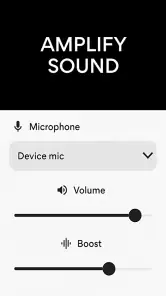
First things first, downloading and installing Microphone Amplifier is a breeze. It’s available on both Android and iOS platforms, so no matter your device, you're covered. Once installed, the app has a simple and user-friendly interface that gets you up and running in no time. You’re greeted with a straightforward dashboard with all the main controls right at your fingertips.
The Amplification Magic
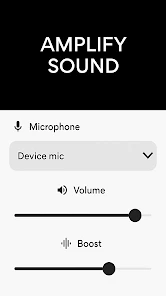
Now, onto the main event—amplification. The app allows you to adjust the gain level of your microphone, which is particularly handy during calls or when recording audio in a bustling environment. You can easily slide the gain control to increase or decrease the amplification based on your needs. I tested it in a crowded café, and it was impressive how much clearer my voice sounded during a call.
For a more controlled everyday test, I would start at a modest gain in a quiet room, then raise it in small steps while listening through headphones. This makes it easier to notice when the sound becomes harsh or starts emphasizing room noise. If you are using the phone to pick up someone else’s voice, place it nearer to them and point the microphone toward the conversation; distance and orientation can matter as much as the slider. Keep the volume comfortable, since a sudden loud sound can be unpleasant or unsafe.
There is also a practical distinction between listening through an amplifier and improving a recording. A boosted live signal may make a moment easier to follow, but it does not guarantee a cleaner saved file or better call quality: those depend on how the phone and the other app handle audio. If your goal is a polished interview, a dedicated recorder and an external microphone are usually more dependable. For a quick spoken reminder or casual listening, a phone-based setup is more convenient.
More From Our News Desk

Clash of Clans Is Won Between the Battles

Android Auto Makes the Case for Quieter Car Software

MobiOffice: Transforming Mobile Productivity with Seamless Integration

EA SPORTS FC™ Mobile Soccer: Redefining Mobile Sports Gaming

How Microsoft OneDrive Became a Mobile Productivity Giant

How Google Translate Breaks Language Barriers Effortlessly
Additional Features Worth Noting
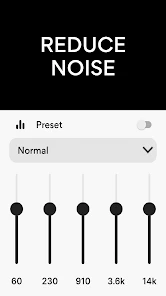
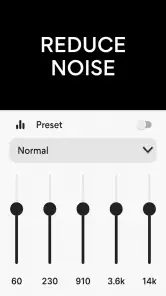
Aside from the basic amplification, Microphone Amplifier includes several other neat features. For instance, there's a noise suppression option that reduces background noise, ensuring your recordings are noise-free. I found this feature to be particularly useful when capturing voice notes outdoors. There’s also an equalizer to tweak the audio frequencies to your liking, which is a bonus for those who want a bit more control over their audio output.
These controls are best treated as adjustments, not magic cleanup. Noise suppression may help make steady background sound less distracting, but it cannot reliably separate every voice from overlapping conversation. I would compare settings with the same short sample rather than changing several things at once: keep the speaker and phone in place, alter one control, and listen again. For spoken voices, modest equalizer changes are generally easier to judge than dramatic ones, which can make speech sound unnatural.
A realistic use is listening to a family member read a recipe aloud while you work in another part of the kitchen. Put the phone near the speaker, connect a headset mic if that is the setup you intend to use, and adjust only until the words are comfortable to hear. That is a more favorable situation than placing the phone far away in a noisy room. If you need dependable accessibility support throughout the day, a purpose-built assistive listening device may be a better choice than relying on a phone and its microphone.
Performance and Usability
In terms of performance, the app runs smoothly without any noticeable lag or crashes. It doesn’t drain your battery significantly, which is always a plus for apps that run in the background. The settings are pretty intuitive, and even if you're not tech-savvy, you'll find navigating through the app to be quite straightforward. I also appreciate the fact that it doesn’t bombard you with ads, letting you focus solely on your audio tasks.
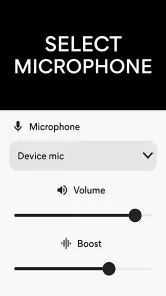
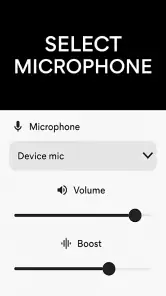
One point I would check early is which microphone is actually feeding the app. The phone’s built-in mic and a headset microphone can pick up sound from different positions, so a headset is not automatically the better choice when you are trying to hear a person across a room. Try both arrangements briefly in the same place, then keep the one that captures the intended voice most clearly. Also test your setup before an important call or recording; audio routing can vary between apps, and a quick rehearsal avoids discovering that a control affects a different input than you expected.
The app’s current version is 13.1.0, and its Android minimum is 5.0. That makes it relevant to a broad range of Android devices, though actual sound quality still depends on the handset’s microphone and the listening equipment. If the result is distorted even at a low setting, the limitation may be the source or hardware rather than something a slider can repair. I would stop increasing gain at that point instead of mistaking louder playback for better capture.
Choosing it over familiar alternatives
Compared with simply turning up your headphones or television, a microphone amplifier has a different job: it brings a live sound picked up by a microphone into your listening setup. That can be handy when the speaker is nearby and you can place the phone sensibly. It is not the same as raising playback volume on a recording you already have, and it cannot restore details that were never captured clearly in the first place. If you only need a saved clip to sound louder, the playback controls or an audio editor may be the more direct route.
For occasional conversations, the phone is appealing because it is already at hand and the setup can be tested quickly. For regular use in a classroom, meeting room, or public venue, a dedicated assistive listening system is generally the stronger option: it is designed around that purpose and may offer more predictable positioning and listening comfort. Likewise, someone making interviews or music recordings should prioritize a suitable external microphone and recorder rather than trying to solve every capture problem with amplification. I see this app as a convenient middle ground, not a substitute for specialized gear.
There is also a privacy and etiquette angle to using any microphone-based tool. Before placing a phone near a conversation, consider whether the people involved are comfortable with it and whether you are listening live or saving audio. I would use it openly for a conversation I am part of, rather than treating it as a way to capture people without their knowledge. That small bit of care matters more than a particular setting or adjustment.
Small tests that make a difference
To find a useful setup without guesswork, choose one short sentence spoken at a normal volume and test it from the distance you expect to use. Keep the phone and listener in the same positions while adjusting gain; then repeat the sentence with a headset mic, if you plan to use one. This makes the comparison fair and helps separate a genuine improvement from the effect of simply moving closer. A quiet room is a good starting point, but a final check in the actual environment is worthwhile because room acoustics can change what sounds clear.
When you are listening to another person, avoid placing the microphone right beside a speaker or other source of steady noise. A nearby fan, running tap, or appliance can dominate the input even if the person’s voice is audible to you. Moving the phone a little, changing its orientation, or asking the speaker to face it may help more than increasing the level. These are low-effort adjustments, but they can prevent the common mistake of amplifying the whole room and expecting speech to stand out.
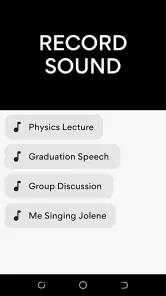
If you are using it for your own voice, remember that speaking directly into a phone microphone can produce a different result from wearing a headset mic. Check for handling noise and avoid covering the microphone with your hand or a case edge. For an important voice note, record a brief test and listen back before making the full recording; monitoring live sound does not necessarily tell you exactly how a saved clip will turn out. This quick check is especially useful when the recording matters more than the convenience of capturing it immediately.
Who should give it a try
I would recommend it to someone who wants a straightforward microphone-level adjustment for occasional listening or voice capture and is willing to test it in the place they plan to use it. It is less suitable if you need studio-quality recordings, reliable separation of speech from a crowd, or a medical solution for persistent hearing difficulty. In those cases, a dedicated microphone, a recorder designed for the task, or advice from a hearing professional is a more sensible next step. The key question is not whether the app can make sound louder, but whether it makes the particular voice you care about easier to understand.
It may also be a poor fit if you cannot comfortably use headphones, need hands-free support for long stretches, or expect a phone to work like a hearing aid. The app’s usefulness depends on a workable combination of microphone placement, listening equipment, and surroundings; a weak link in that chain can make the result frustrating. People who already have a hearing device should follow its intended settings and professional guidance rather than assume that an extra amplification app will improve matters. For a temporary, specific listening task, though, experimenting with a phone can be a sensible low-commitment first step.
For a practical day-to-day example, imagine trying to hear a quiet announcement from a family member while sorting papers at the kitchen table. I would place the phone closer to that person, use headphones at a comfortable level, and check whether the voice becomes easier to follow before adjusting anything else. If the room is noisy, I would reduce the competing sound or move to a quieter spot instead of turning the gain up indefinitely. That approach makes the app useful as part of a setup, rather than expecting it to overcome every acoustic problem on its own.
A measured verdict
Overall, Microphone Amplifier does a fantastic job at enhancing your phone’s audio recording capabilities. Whether you’re making calls in noisy areas, recording voice notes, or even trying to capture clearer audio in your videos, this app has got you covered. The combination of its amplification prowess, additional features, and user-friendly design makes it a worthy app to have on your phone. If you're looking to boost your audio experience, this app is definitely worth checking out!
My recommendation is more cautious than that closing praise: try it for a specific, nearby voice, begin with low amplification, and judge clarity rather than loudness. The simple controls and optional tuning can be useful for casual situations, while noise, microphone placement, and device differences set real limits. If you need consistent hearing support or clean recordings for important work, choose equipment built for that purpose; if you want an accessible phone-based experiment, this is a reasonable place to start.
Microphone Amplifier Frequently Asked Questions
Can Microphone Amplifier help me hear conversations in a noisy place?
Microphone Amplifier is intended to make sound louder by using your phone’s microphone or a headset microphone. That may help bring nearby audio forward, but a louder signal is not necessarily clearer in every environment, especially when other sounds are competing for attention. Try it in a quiet setting first, then adjust your position and volume carefully before relying on it in a busier place.
Can I use Microphone Amplifier with a headset microphone?
Yes. Microphone Amplifier is described as working with either the phone microphone or a headset mic, so you can try the input that best suits how you listen. The results may vary with the headset and device you use. Before depending on it, connect your headset, check that the phone recognizes its microphone, and test the sound at a comfortable level.
What kind of app is Microphone Amplifier, and who is it for?
Microphone Amplifier is a medical-category app from DOSA Apps that uses a phone microphone or headset mic as a sound amplifier for louder hearing. It may suit people who want to make nearby sounds easier to hear through their device, though it should not be treated as a substitute for professional medical advice or hearing care. The app is rated for Everyone.
Is Microphone Amplifier free to download, and does it offer in-app purchases?
Microphone Amplifier is free to download, so you can try its basic sound-amplifying function without paying upfront. The app also offers in-app purchases, with listed item prices ranging from $0.99 to $99.99. Check the purchase details shown in the app before confirming anything, and use your device’s purchase controls if you want to prevent accidental spending.
How does the Microphone Amplifier app improve sound quality?
The Microphone Amplifier app enhances audio input by boosting the microphone's volume and clarity. It uses advanced algorithms to filter out background noise and adjust sound frequencies, providing a clearer and louder output. This is particularly beneficial in noisy environments or when using external microphones, ensuring better audio capture for calls or recordings.
Pros
- Enhances microphone volume effectively
- User-friendly interface for easy navigation
- Customizable settings for different needs
- Low battery consumption
- Supports various audio formats
Cons
- May cause distortion at high volumes
- Limited free features available
- Ads can be intrusive at times
- Requires microphone permissions
- Not compatible with all devices
- Category
- Medical
- Version
- 13.1.0