Findmykids: Parental Control
- 12.82K
- 4.6
- Installs
- 50.00M
- Price
- Free

Screenshots
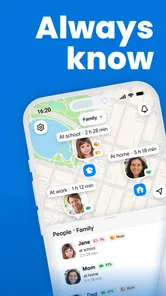
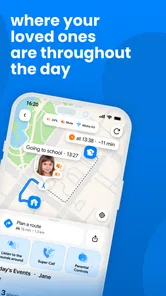
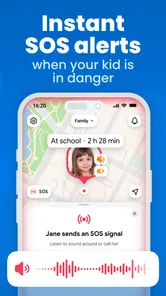
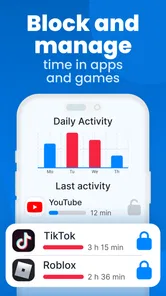
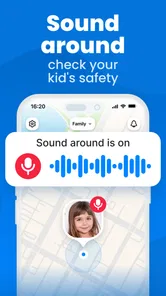
Analysis by Reviewed
I see Findmykids: Kids GPS Tracker as a practical way for a family to coordinate around a child’s location, rather than a substitute for checking in and talking. That distinction matters: location tools can ease the “Did they get there?” worry, but they work best when the child understands why the family uses them. If you want a parent-focused tracker with a way to reach a child when calls go unanswered, it’s worth considering.
What location tracking is useful for in everyday life
The clearest use case is a routine with predictable transitions: a child leaves school, walks to an activity, or travels between home and a relative’s place. Instead of sending repeated messages, I can check the map and decide whether a quick call is actually needed. Location history can also help clarify a practical mix-up, such as whether a child went straight home or stopped somewhere on the way.
For example, if pickup plans change and a child is heading to a familiar after-school activity, a parent can use the location view to get context before calling. That can make coordination calmer, though it should not become a reason to assume that a map always tells the whole story. A location point is useful information, not a conversation or a guarantee of safety.
Small habits that make it work better
I’d agree on a simple family routine before relying on tracking: explain when parents will check, when the child should message, and what to do if the phone is unavailable. That avoids turning every location check into a test of trust. It also gives the child a clear role in the arrangement rather than making them feel monitored without explanation.
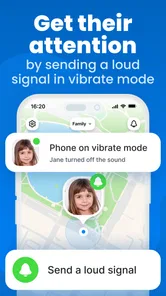
The Loud Signal is most useful as a backup when a child has a phone but cannot hear an ordinary call, such as when it is set to silent. I would treat it as a way to get attention, not as an emergency service. Similarly, location history is best used to answer a specific coordination question rather than to scrutinize every stop. Those limits keep the app focused on safety and logistics.
How it compares with simpler options
Compared with calling or texting, a location tracker can reduce the number of check-ins needed during a busy afternoon. Compared with relying only on a phone’s built-in location-sharing tools, Findmykids is framed specifically around a parent-and-child setup, and its loud alert and in-app chat bring communication into the same experience. The trade-off is that a dedicated family app asks everyone to adopt another tool and agree on how it will be used.
If your family already shares locations comfortably through tools on your phones and only needs occasional coordination, that simpler approach may be enough. Findmykids makes more sense when parents want a child-centered tracking arrangement and a direct way to prompt a response. It is less suitable for families who are uncomfortable with location monitoring or whose main need is a child’s independence without ongoing digital check-ins.
More From Our News Desk

Weather by Xiaomi Review: Clear at a Glance, Less Clear Up Close

X Under Pressure: Can It Recover When Posting Goes Wrong?

Clash of Clans Is Won Between the Battles

Android Auto Makes the Case for Quieter Car Software

MobiOffice: Transforming Mobile Productivity with Seamless Integration

EA SPORTS FC™ Mobile Soccer: Redefining Mobile Sports Gaming
One practical question is what to do when the map does not match what you expect. I would treat an unexpected or stale-looking location as a cue to check in, not as proof that a child has gone somewhere concerning. Buildings, a device that is not with the child, or a phone that is unavailable can all complicate what a map appears to show. The useful habit is to verify through a calm message or call before drawing conclusions.
That distinction also matters when plans change quickly. If a child is taking a different route or staying longer at an activity, the app can provide context, but a short message still explains the reason. I would agree on a simple exception rule in advance: if plans change, the child sends a note when practical, and the parent uses the location view only to fill gaps. This makes the tracker a coordination aid rather than the sole source of truth.
Making location checks useful rather than constant
A small workflow can prevent the app from becoming a source of needless checking. I would pick a few moments that matter, such as the end of the school day or arrival at a regular activity, and avoid refreshing the map throughout the afternoon without a reason. That keeps attention on the transitions that actually affect pickup and safety, and gives the child room to get on with their day.
It is also worth agreeing on what counts as a useful alert. A parent who checks every pause may misread ordinary stops, while a child may feel pressured to explain harmless delays. For families using the app, I would make the goal explicit: confirm arrival or resolve a coordination problem, not build a minute-by-minute account of a child’s movements. That boundary is more important than any convenience feature.
Where a dedicated family app earns its place
The strongest case for using Findmykids rather than only texting is when location and contact solve different parts of the same problem. A map can answer where a child appears to be; the chat can ask whether plans changed; and the Loud Signal can help get attention when a standard call is missed. Keeping those tools together can be handy for parents who otherwise switch between a map, messages, and calls during a busy day.
That convenience is not automatically better for every household. Built-in phone location sharing may be preferable when everyone already knows how to use it, wants a lightweight arrangement, and does not need a parent-focused setup. A call or text is also better when the actual question is about how a child feels or what happened; location alone cannot answer either. I would choose the least complicated option that fits the family’s real routine, rather than installing a tracker simply because it offers more ways to check.
Why Consider Findmykids?
In today's fast-paced world, keeping an eye on your kids can be a daunting task. This is where the Findmykids: GPS family tracker steps in. It's an app designed to give parents peace of mind by allowing them to track their child's location in real-time. I mean, how cool is that?
Features That Stand Out
So, what's the deal with this app? First off, it’s available on both Android and iOS, making it super accessible. The app offers real-time GPS tracking, which means you can see where your child is at any given moment. Imagine not having to call or text repeatedly just to check where they are! Plus, it provides detailed location history, so you can look back and see where your kids have been throughout the day.
Another feature that caught my eye is the "Loud Signal" function. If your child doesn’t answer their phone, you can send a loud alert to their device, even if it's on silent. It's like having a little superpower in your pocket.
Setting It Up
Getting started with Findmykids is a breeze. You just download the app, set up a profile, and connect it to your kid’s device. The app even has an integrated chat feature, which means you can text them straight from the app without switching platforms. It’s all about convenience, right?
For a smoother start, I’d set it up together rather than treat it as something parents quietly add in the background. Let the child see how the location view, chat, and alert are used, then agree on when each one is appropriate. That practical walk-through can prevent confusion later, especially if a child is unsure why a parent is checking in or what the loud alert means.
Before relying on it for a school run, I would also test the family’s routine on an ordinary day: make sure the child knows how to respond in the app and that the parent knows where to look for the information they need. This is not about testing a child; it is about finding small points of friction while there is no pressure. A tracker is only useful if both sides can use it comfortably when plans get busy.
What I Really Think
Honestly, the Findmykids: GPS family tracker feels like a lifesaver for any parent. It's intuitive, reliable, and offers features that genuinely enhance parental control. The most reassuring part is the real-time tracking, which honestly feels like a must-have in this digital age.
I would soften that enthusiasm with one important caveat: no tracker should be treated as a guarantee. A location display can support a decision, but a parent still needs to use judgement, communicate directly, and have a non-app plan for a child who cannot reach their phone. The app is most convincing as a practical layer in a family routine, not as a replacement for supervision or trust.
But here’s a little heads up: it’s essential to have an open conversation with your kids about privacy and why you’re using the app. Communication is key to ensuring they don’t feel like you're constantly watching over their shoulder.
Who should try it, and what to weigh up
Findmykids is a parenting app from LETEM LTD, released on June 17, 2015. It is free to install, rated for Everyone, and its current version is 2.10.32-google, with Android 8.0 as the minimum system requirement. Optional in-app purchases range from $0.39 to $349.99 per item, so I’d review the purchase screens with care before deciding whether any extras are useful for your family.
Its 4.6 average from around 1.9 million ratings, roughly 12,000 written reviews, and over 50 million installs suggest that many families have tried it. Those figures are context, not a promise that location will always be precise or that every child will be comfortable with the arrangement. A tracker depends on the child having access to their device and on the family agreeing to use it sensibly.
For a household weighing the cost of trying it, the free starting point makes it possible to explore the basic fit before considering optional purchases. I would not assume that a paid item is necessary just because it appears in the app; first identify the specific problem you want to solve and see whether the features already available cover it. That keeps a family decision grounded in routine rather than in a purchase prompt.
The broad age rating should not be confused with a recommendation that every child should be tracked. The right age depends on whether the child can carry and manage a phone, understand the arrangement, and take part in the family’s agreed check-in routine. For a younger child without a suitable device, or for a teenager who sees continuous location checks as an invasion, a different approach may work better.
I’d recommend it most to parents managing school commutes, changing pickup plans, or several regular destinations, especially when a child is old enough to carry a phone but still benefits from check-ins. It is not the right fit if your priority is avoiding digital monitoring, if the child does not have a compatible device, or if your family already has a location-sharing setup that does everything you need. In those cases, a phone call or existing tools may be simpler and less intrusive.
It can be especially useful when responsibility is shared between adults. If one parent handles the morning trip and another is collecting after an activity, a common location view and a message thread can reduce the need to relay every update by hand. I would still make sure both adults follow the same expectations, so the child is not receiving repeated checks from different people or being asked to explain the same delay twice.
For a realistic weekday, imagine school finishing while a parent is stuck in traffic and a planned pickup needs to change. The parent can check whether the child appears to be at the familiar activity, send a message through the app, and use the alert if a call is missed and getting attention matters. The child can then confirm the plan directly. That is a genuinely useful sequence because the map gives context, while the conversation settles what to do next.
There are limits to that scenario: it assumes the child has the phone, can use it, and is somewhere the family recognizes. If the phone is left in a bag or its battery is unavailable, a location reading may not describe the child’s current situation. I would keep a backup plan for pickups, including who to contact and where to wait, rather than letting a tracker become the only arrangement.
A sensible way to decide
Before installing a family tracker, I would ask whether location uncertainty is a recurring problem or just an occasional worry. If it is mainly a one-off, a text or call is likely enough. If regular journeys, handoffs, and missed calls create repeated friction, the combined map, chat, and alert may earn its place. That simple test helps avoid adding another app to the family’s phones without a clear purpose.
I would also revisit the arrangement as the child gains independence. A setup that feels reassuring during a new school commute may become unnecessary once the route and routine are familiar. Parents can reduce how often they check, or stop using tracking, as trust and confidence grow. Treating the app as adjustable rather than permanent makes it easier to preserve its practical value without letting it define the relationship.
So, if you’re a parent like me who wants to ensure their child’s safety without being too intrusive, give Findmykids a shot. It’s not just an app; it’s a tool that adds a layer of security and peace of mind to your family dynamics.
My recommendation is therefore specific: I would try it when location questions are part of ordinary family logistics and the child is willing to participate in a clear agreement. I would skip it when the household needs a true emergency response, when there is no suitable child’s device, or when a built-in sharing option already answers the same questions with less friction. Used with sensible boundaries, it can make everyday handoffs easier; used as a substitute for conversation, it offers much less than its map suggests.
Findmykids: Parental Control Frequently Asked Questions
What should I check before installing Findmykids on my phone?
Findmykids is a parenting app from LETEM LTD, and its current Android version requires Android 8.0 or later. Check your phone’s operating system before downloading so you know it meets that requirement. The app is also available for iOS devices. It is free to download, but in-app purchases are offered, so review the options and costs shown for your device before choosing any extras.
Is Findmykids free to download?
Yes, Findmykids is free to download. The app also offers in-app purchases, with prices ranging from $0.39 to $349.99 per item, so some options may involve an additional cost. Before making a purchase, look through the choices in the app and decide whether they fit your family’s needs. You can install it without paying upfront, then consider any paid options separately.
Who is Findmykids designed for?
Findmykids is a parenting app for families who want a way to check a child’s location. Its GPS phone-tracking focus makes it useful for parents who want location information in one place while their child is away from home. Before installing it, consider whether your family is comfortable with location sharing and discuss with your child how and why you plan to use the app.
Can Findmykids be used on an older Android phone?
Findmykids is compatible with Android devices running Android 8.0 or later, so some older phones may be able to run it if they meet that requirement. Check the phone’s Android version before downloading, and consider whether the device can be carried by your child and used for location tracking. The app is also available for iOS devices, giving families another phone option.
What is Findmykids and how does it work?
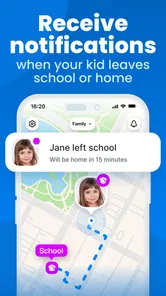
Findmykids is a GPS family tracker designed to help parents keep an eye on their children's whereabouts in real-time. The app uses GPS technology to provide location details, so parents can check their kids' movements and receive notifications about their location. It also includes features like geofencing, which alerts you when your child enters or leaves designated areas, making it a tool for child safety.
Pros
- Real-time location tracking for peace of mind.
- Easy-to-use interface ideal for all ages.
- Customizable alerts for various activities.
- Battery-friendly
- doesn't drain phone quickly.
- Supports multiple devices for family tracking.
Cons
- Requires internet connection for tracking.
- Limited features in free version.
- Potential privacy concerns with data sharing.
- May not work in areas with poor GPS signal.
- Ads can be intrusive in free version.












