Family Space
- 1.49K
- 3.6
- Installs
- 100.00M
- Price
- Free

Screenshots

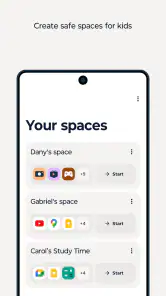
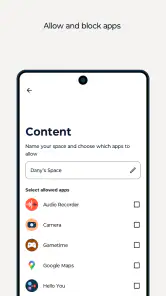
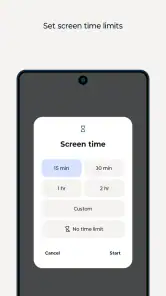
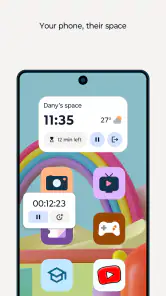
Analysis by Reviewed
I look at Family Space as a family-focused tool from Motorola Mobility LLC., rather than a general calendar or messaging app. That distinction matters: it is most appealing when the goal is to keep household routines and family communication together, not to replace every app each person already uses. I’d consider it for a family that wants a shared place to coordinate, while keeping expectations practical and checking that its tools fit everyone’s phones and habits.
Who is likely to get the most from it?
Family Space makes the most sense for parents coordinating school-day routines, relatives who want a common place for family plans, or households trying to make chores and errands visible to everyone. A useful approach is to agree on what belongs in the app before inviting the family: recurring plans, changes that affect others, and tasks that need an owner. That small bit of setup can prevent a shared space from becoming another stream of notifications people ignore.
Picture a weekday when a pickup plan changes while one parent is at work. A shared calendar can make the new arrangement easier to see, while a family message can explain the change and a task list can keep the next household job from being forgotten. The benefit is not that the app makes decisions for you; it gives the family a place to record them. I’d still confirm an urgent change directly with the person responsible rather than assume they have seen an app update.
How I would fit it into a family’s routine
For a smoother start, I’d add only the next few important events and a short list of real household tasks, then ask each person to check the app at a time they already have a phone in hand. That is more likely to stick than moving every old reminder and grocery note on day one. I’d also agree on which conversations belong in family chat and which are better handled privately, especially when a message is intended for only one person.
Location sharing needs a different conversation from calendars or chores. Before using it with children, I’d explain who can see a location and when the family expects to use that information. It can help with a specific pickup or a trip home, but it should not become a substitute for trust or a way to monitor every movement. Families who are uncomfortable with location sharing can still judge the app by its coordination tools instead.
Where it sits among the alternatives
Compared with keeping plans in separate calendar apps, a family-oriented space can make shared routines easier to find in one place. Compared with a group chat, its calendar and task tools give plans a more durable home than a message thread that keeps moving. The trade-off is that an all-in-one approach works only if the family actually adopts it. If everyone already has a reliable calendar and prefers a familiar messaging app, adding another destination may create more friction than value.
I would also avoid treating a family app as a replacement for a dedicated emergency service or a child’s device-safety settings. Its role is everyday coordination, not guaranteed urgent contact or a complete parental-control system. Families looking mainly for screen-time limits, content filtering, or detailed device supervision should compare tools designed specifically for those jobs rather than assume that a parenting label covers them.
More From Our News Desk

Clash of Clans Is Won Between the Battles

Android Auto Makes the Case for Quieter Car Software

MobiOffice: Transforming Mobile Productivity with Seamless Integration

EA SPORTS FC™ Mobile Soccer: Redefining Mobile Sports Gaming

How Microsoft OneDrive Became a Mobile Productivity Giant

How Google Translate Breaks Language Barriers Effortlessly
A practical trial before you move the whole household
I’d give the app a limited job for the first week rather than asking it to become the family’s command center overnight. Choose one recurring routine, such as the weekly activity schedule, and one task that genuinely needs a shared owner. If that information is easier to retrieve here than in scattered messages, the app is earning its place. If people still ask the same questions because they do not open it, the problem may be adoption rather than a missing feature.
One useful habit is to make each shared entry understandable without extra explanation. “Pick up” is easy to misread; adding who is responsible and the relevant time makes the calendar or task more actionable. I’d also avoid duplicating every personal appointment. Shared tools work best when they contain what other family members need to know, not a complete record of each person’s private day.
How to keep coordination from becoming noise
Family coordination apps can create a new kind of clutter: several people add reminders, chat about minor changes, and eventually important information gets buried. I’d use a simple rule that only events affecting someone else go into the shared calendar, while personal reminders stay in each person’s own system. For tasks, assigning a clear person is more helpful than leaving a general list that everyone assumes somebody else will handle.
It is also worth agreeing how the family will treat an update that has not been acknowledged. A shared entry is a useful record, but it does not prove that a person saw it. For an important change, send a direct message or make a call, then use the app to keep the revised plan visible. That division of labor makes the tool useful without asking it to provide certainty it cannot promise.
For younger children, an adult can help keep entries simple and explain what the app is for. Older children may be more willing to participate if the shared space includes their plans and responsibilities rather than functioning only as a way for parents to check on them. I would make the rules transparent and age-appropriate; a family app is easier to trust when its purpose is openly discussed.
First impressions and the app’s role
Hey there, fellow app enthusiasts! Today, I want to chat with you about an app that's all about keeping your family tightly knit in this digital age. If you're like me, juggling multiple responsibilities and keeping everyone on the same page can be a bit of a hassle. Enter Family Space. This app promises to be a one-stop solution for family coordination, and I took it for a spin to see if it lives up to the hype.
First Impressions Matter
Upon launching Family Space, you're greeted with a friendly and intuitive user interface. It’s got this warm, inviting color scheme that makes you feel right at home. The layout is super straightforward, allowing even the least tech-savvy family members to navigate with ease. From the get-go, you can tell this app is designed with every family member in mind, from young kids to the elderly.
Features That Stand Out
Now, let's dive into the features because that's where the magic happens. One of the standout features is the shared calendar. It’s like having a digital family bulletin board. You can easily add events, set reminders, and sync everyone's schedules. No more "I forgot about the dentist appointment" excuses! The family chat feature is another gem. It’s a secure space where you can share updates, photos, and even funny memes. It keeps everyone connected, even if you’re miles apart.
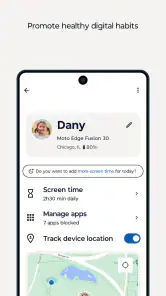
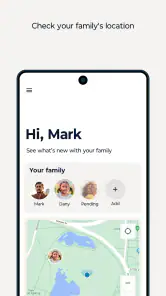
Another nifty feature is the location sharing. It’s perfect for keeping tabs on the kids when they’re out and about. But don’t worry, privacy settings are robust, so you can control who sees what. Plus, there’s a task manager to assign chores or grocery lists. It’s a great way to instill responsibility in the little ones while keeping track of what needs to be done around the house.
Performance and Usability
In terms of performance, Family Space runs smoothly without any noticeable hitches. The app doesn’t hog your phone's resources, which is a huge plus. It’s available for both Android and iOS, making it accessible for everyone. The developers seem to have hit the sweet spot between functionality and simplicity, ensuring that you’re not overwhelmed with too many options.
Installation is a breeze. You download, sign up, and within minutes, you’re ready to start coordinating your family life like a pro. The app also offers helpful tooltips and a FAQ section for any bumps you might encounter along the way.
Current version and what it means
Family Space is a free parenting app, rated Everyone, with a 3.6 average from around 17,000 ratings and more than 100 million installs. It was released on January 11, 2023, and its current version is 3.1.28.13, with Android 12 as the minimum OS. Those details give me useful context, but a version number alone does not tell me which features changed or how the experience has evolved. I’d check that the version available for my device is current before inviting relatives, especially if the family uses a mix of phones.
The app includes in-app purchases priced from $0.49 to $4.99 per item. Since the basic download is free, I’d first try the everyday workflow the household actually needs, then decide whether any optional purchase is worth it. I wouldn’t pay simply because a feature sounds useful in theory; the real test is whether everyone uses the shared routine consistently. For a family that mainly needs a calendar and occasional updates, a free existing calendar or chat service may already be enough.
What to check before committing
Motorola’s large install base suggests that many people have tried the app, but an average rating is not a guarantee that it will suit a particular family. With around 1,500 reviews, opinions can also reflect different expectations and devices. I’d make a small trial group first: one or two adults, a shared event, and a simple task. If the setup feels clear and the updates are easy to notice, then expand it to the rest of the household instead of asking everyone to switch at once.
Compatibility is worth checking early. The stated Android requirement is version 12, so an older Android phone may not be a fit; families with iPhones should confirm availability and current compatibility for each device before planning around it. For children, I’d also decide in advance which features are appropriate for their age and how location sharing will be used. The Everyone content rating describes the app’s rating, not a family’s own rules for privacy or phone use.
What I would watch next
For existing users, the practical question is whether updates keep the experience dependable across the phones in the household and whether the core tools remain easy to use. I’d pay attention to whether relatives can find schedule changes, whether task ownership stays clear, and whether location sharing matches the family’s agreed boundaries. Those everyday outcomes matter more to me than a version number by itself. If an update changes how the family’s usual routine works, I’d review the settings together before relying on it for time-sensitive plans.
Questions I would settle as a family
Before inviting everyone, I’d decide who is responsible for creating shared events and whether children can add or edit them. A consistent owner can prevent duplicate entries and make the calendar easier to trust. If more than one adult manages the space, agree on a simple convention for titles and task ownership so that a plan does not depend on guessing what a short note means.
Families may also wonder whether a location feature should stay enabled all the time. I would treat that as a choice for the household, not a default assumption. Use it only when it serves a clear purpose, explain the arrangement to the people involved, and revisit it as children grow or routines change. The app’s other coordination tools can still be useful without making location visibility the center of family life.
Another practical question is whether this can replace a family’s existing group chat. I would not move every conversation at once. Try using it for plans that need to remain easy to find, while keeping casual or sensitive conversations where the family is already comfortable having them. If relatives repeatedly miss messages in the new space, keep the familiar channel for time-critical contact and avoid splitting an urgent conversation across apps.
Final Thoughts
So, what’s the verdict? Well, Family Space is a delightful app that truly caters to the needs of a modern family. It’s not just about scheduling and reminders; it’s about fostering communication and ensuring everyone stays connected. Whether you’re a parent trying to keep up with your kids' activities or a family member living far away, this app brings everyone closer together.
To wrap it up, if you're in the market for an app that simplifies family coordination and enhances communication, give Family Space a whirl. It's like having a personal family assistant in your pocket. Trust me, once you start using it, you’ll wonder how you ever managed without it!
Family Space Frequently Asked Questions
What does Family Space’s “digital caretaking” approach mean for a family’s everyday routine?
Family Space is described as a parenting app for making digital caretaking easier, with tools intended to help families coordinate and stay connected. Before downloading, think about which routines you would actually manage through an app, such as keeping track of shared plans or responsibilities. It works best as a tool that supports family conversations and organization, rather than a substitute for agreeing on household expectations.
Can every family member use Family Space in the same way?
Family Space is aimed at families, but the way each person uses it can depend on their role and what the household wants to coordinate. Parents may be interested in family organization and communication, while children should understand which information or activities are shared. Before installing it for the family, discuss how you intend to use the app and make sure its approach suits everyone involved.
Who is Family Space intended for, and is it suitable for children?
Family Space is a parenting app intended for families who want a shared place to coordinate everyday activities. Its content rating is Everyone, making it suitable for a broad audience. Parents can consider whether its features fit their household’s routines and talk with children about how the family uses shared information and communication tools.
What is Family Space and how does it work?
Family Space is a mobile application designed to help families stay connected and organized. It offers features such as shared calendars, task lists, and location tracking, which allow family members to coordinate schedules and responsibilities. The app also provides a safe platform for communication, ensuring that everyone in the family can stay in touch and manage their daily activities efficiently.
Is Family Space available for both Android and iOS devices?
Yes, Family Space is available for download on both Android and iOS devices. Users can find the app on the Google Play Store for Android devices and the Apple App Store for iOS devices. This cross-platform availability ensures that family members using different types of devices can still access and use the app's features seamlessly. On Android, the current version is 3.1.28.13 and the minimum operating system requirement is Android 12.
Pros
- User-friendly interface suitable for all ages.
- Customizable parental controls.
- Supports multiple child profiles.
- Real-time location tracking feature.
- Comprehensive activity reports.
Cons
- Some features require premium subscription.
- Occasional app crashes reported.
- Limited social media monitoring.
- Battery consumption can be high.
- Not compatible with all devices.
- Category
- Parenting
- Version
- 3.1.28.13