Wallpapers HD - Backgrounds 4K
- 2.92K
- 4.8
- Installs
- 50.00M
- Price
- Free

Screenshots







Analysis by Reviewed
I tend to notice my phone’s wallpaper most when it gets in the way: a bright patch behind the clock, or a detailed scene that makes app labels harder to read. That is why I judge a wallpaper app by more than its pictures. Wallpapers HD - Backgrounds 4K is useful when I want a broader set of styles to browse and a straightforward way to fit an image to my screen. Its strongest point is helping me find a background that suits the phone I actually use, rather than just looking impressive in a thumbnail.
A repeatable way to browse
I get the most from a wallpaper app when I treat browsing as a small, repeatable task rather than an endless scroll. I start with a mood or a practical need—calm colors for a busy home screen, for example—then narrow my search and preview a few choices before saving one. That makes the collection feel more manageable and helps me avoid choosing an image that looks striking in isolation but becomes distracting behind app icons.
A realistic use is changing the screen at the start of a week or after a trip: I can look for a landscape that fits the moment, save a favorite, and crop it with the display in mind. Before applying anything, I check where the clock and icons sit, because an important detail near the top can disappear behind the interface. The useful habit is to judge the image as a phone background, not just as a picture in a preview.
For a more deliberate routine, I decide first whether I am changing the lock screen, the home screen, or both. A dramatic image can work well on a lock screen that is visible briefly, while the home screen usually benefits from calmer areas behind frequently used icons. I also try one candidate for a little while before saving several similar options; this is a simple way to keep the choice useful rather than turning favorites into another pile to sort through.
Finding a background that works on your phone
First off, let's talk about the sheer variety available in Wallpapers HD - Backgrounds 4K. From stunning landscapes to abstract art, the app offers a vast collection that caters to all tastes. I was particularly impressed with the 4K quality of the images. It’s like having a little piece of art on your screen that you can change whenever the mood strikes. The vivid colors and sharp details really make your phone pop!
Even with sharp images, I find it helps to look at the whole composition rather than fixating on resolution. A high-detail picture can become visually noisy once icons and widgets sit over it, while a simpler image may remain readable and attractive throughout the day. I usually preview a candidate at the size and orientation I will actually use, then check whether its main subject remains visible after cropping.
Navigation and the alternatives
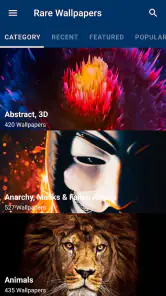
The app's interface is as slick as the wallpapers it offers. Navigating through the categories is a breeze, and the search function is robust enough to find exactly what you’re looking for in no time. I appreciate how intuitive it is — even for those who aren’t particularly tech-savvy. It’s simple, effective, and doesn’t bombard you with unnecessary features.
More From Our News Desk

Weather by Xiaomi Review: Clear at a Glance, Less Clear Up Close

X Under Pressure: Can It Recover When Posting Goes Wrong?

Clash of Clans Is Won Between the Battles

Android Auto Makes the Case for Quieter Car Software

MobiOffice: Transforming Mobile Productivity with Seamless Integration

EA SPORTS FC™ Mobile Soccer: Redefining Mobile Sports Gaming
For someone deciding between this and the wallpaper options already built into a phone, the difference is mainly the dedicated browsing experience and the breadth of styles to explore. Built-in choices can be quicker when I only need a basic background and prefer not to install another app. This one makes more sense when I want to search across different looks rather than settle for the small set already on my device.
Compared with searching the web for individual images, a dedicated wallpaper collection gives me a more direct path from discovery to a background I can use. The trade-off is that a broad catalog is not the same as a carefully selected gallery from a particular photographer or visual style. If I have a precise reference in mind, I may get a better result from a specialist source; when I only know the mood or subject I want, categories and search are more convenient.
A useful search habit is to begin with a broad subject and then narrow the choice by the feeling or visual treatment I want, rather than trying many unrelated terms. I compare only a handful of results at a time and pay attention to empty space as well as the subject. That negative space can be more valuable than extra detail when the image will sit beneath rows of icons.
Cropping, favorites, and screen layout
One of my favorite features is the customization options. You can easily adjust and crop wallpapers to fit your screen perfectly, ensuring that no detail is lost. Plus, there’s a handy feature that allows you to save your favorite wallpapers for quick access later. This really adds a personal touch, making the app feel like it’s truly yours.
My practical tip is to crop with the home screen in mind and keep the focal point clear of the areas where icons gather. A visually busy image can look great on the lock screen but make labels harder to read once the home screen is full. Saving a few favorites also gives me a short list to revisit, instead of repeating the same broad search whenever I want a change.
I also treat the crop as a composition choice, not merely a fit-to-screen step. If a picture has a bright subject near the edge, shifting the crop can keep it from competing with the clock or a widget. When the preview looks good but the applied result feels off, I revisit the placement before rejecting the image; a small adjustment can matter more than finding a completely different picture.
Additionally, the app frequently updates its collection, so there’s always something new and exciting to discover. I found myself checking back often just to see the latest additions. It’s a great way to keep your device feeling fresh and new without much effort.
That steady flow of new choices is most useful when I give myself a reason to return, such as looking for a seasonal color or a background that fits a new case or theme. I would not make checking the collection a daily chore. A quick, occasional browse keeps the app enjoyable, while a saved shortlist means I can change the screen without having to start from scratch each time.
Settings and sensible habits
Wallpapers HD is a free personalization app from TarrySoft, with optional in-app purchases ranging from $0.99 to $99.99 per item. It is rated for Everyone, and its current version is 3.17.6, with Android 6.0 as the minimum operating system. The app has a 4.8 average from around 369,000 ratings and over 50 million installs, so it is clearly widely used, though popularity alone cannot tell me whether its style will suit you.
I’d check the phone’s own wallpaper and display settings after choosing an image, since the final crop and placement can depend on how the device applies backgrounds. If you are careful about storage or prefer not to keep image files you no longer use, make a habit of reviewing saved items and downloads rather than collecting every appealing option. The app is less compelling if you want a very specific artist’s catalog, a tightly curated editorial selection, or complete control over every aspect of a launcher’s appearance; a specialist source or your phone’s built-in settings may be a better fit.
Because it is free to start, I would browse and try the basic workflow before deciding whether any optional purchase is worthwhile for me. The listed in-app purchase range is broad, so I would check the item and its price in the app before confirming anything, rather than assuming every part of the experience costs the same. If I only want an occasional background, I can simply use the free option and judge whether the collection meets that need.
The main trade-off is that a large collection can still take time to browse. Search and categories help, but they work best when I have a clear idea of what I want. I also wouldn’t assume that a high-resolution label automatically means every image will look equally good on every screen: composition, contrast, and the space taken up by icons matter just as much as sharpness.
Speed without rushing the choice
No one likes an app that lags or crashes, and thankfully, Wallpapers HD - Backgrounds 4K runs smoothly without any hiccups. The downloads are fast, and applying a new wallpaper happens in a snap. It’s optimized well, ensuring a pleasant user experience without any frustration.
In everyday use, I’d keep the process simple: browse when I have a spare moment, save only a few promising designs, then apply one after checking its crop. That routine is better than repeatedly changing the background on impulse, especially if I rely on familiar icon placement or want a consistent look. People who enjoy refreshing their screens and comparing visual styles are likely to appreciate this app most; anyone satisfied with one static background may find little reason to return to it often.
For an experienced user, the quickest approach is to make the decision in two stages: discover and shortlist first, then apply when I can check the result properly. That avoids downloading or saving every image that catches my eye during a brief break. I also keep the phone’s own wallpaper controls in mind, because the app helps me find and prepare a background, while the device remains where I verify how it sits alongside the rest of the interface.
Who will get the most from it
In summary, if you’re on the hunt for an app that offers high-quality wallpapers with a seamless experience, this one is definitely worth a try. It’s perfect for those who want to personalize their device with minimal hassle. So go ahead, give it a whirl and let your screen do the talking!
My recommendation is strongest for people who like to fine-tune their phone’s look but do not want to edit images elsewhere before setting them. I’d skip it if you dislike browsing collections or need a highly controlled, curated source. For everyone else, the combination of search, categories, cropping, and saved favorites makes it a convenient place to build a small rotation of backgrounds—provided you choose images for how they work with your screen, not just how they look on their own.
I would especially recommend it to someone who enjoys small visual changes but wants the process to stay easy: choose a subject, compare a few compositions, save a short list, and check the crop on the actual phone. It is a less natural fit for anyone who already has a single image they love, wants a narrowly defined artist’s portfolio, or would rather avoid another browsing app altogether. In those cases, the phone’s built-in options or a more focused source can be the simpler answer.
My final test is whether the background still feels comfortable after the novelty wears off. If the clock is easy to read, icons remain legible, and the image suits the way I use the phone, the choice has worked. That is the practical strength of this app: it gives me room to explore without requiring a complicated editing routine. I would use it as a convenient place to find and rotate backgrounds, while keeping my expectations realistic about the time a large collection can take and the importance of checking each image on my own screen.
Wallpapers HD - Backgrounds 4K Frequently Asked Questions
Does Wallpapers HD - Backgrounds 4K work on iPhones or iPads?
Wallpapers HD - Backgrounds 4K is described as an Android personalization app, with support for devices running Android 6.0 or later. If you are choosing a wallpaper app for an iPhone or iPad, make sure you select a version intended for your Apple device rather than assuming this Android app will install there. On a compatible Android phone, it is designed to help you personalize the screen with HD and 4K backgrounds.
Who makes Wallpapers HD - Backgrounds 4K, and when was it released?
Wallpapers HD - Backgrounds 4K is developed by TarrySoft and was released on October 25, 2019. It is a personalization app focused on wallpapers, with the aim of making it easy to change the appearance of a phone’s screen. Its current version is 3.17.6, so users can check that version information when deciding whether the app is a suitable fit for their device and preferences.
Can Wallpapers HD - Backgrounds 4K work on my Android phone?
Wallpapers HD - Backgrounds 4K is an Android personalization app that supports devices running Android 6.0 or later. Before downloading, check your phone’s operating system version to make sure it meets that requirement. The app is developed by TarrySoft and is designed to help users personalize their device with HD and 4K backgrounds.
Is Wallpapers HD - Backgrounds 4K suitable for children?
The app is rated Everyone, so its content rating is intended to be suitable for users of all ages. It focuses on browsing and choosing wallpapers to personalize a device. As with any app, parents can decide whether its features and the images available are appropriate for a child, and can review its use alongside their usual device settings.
What features does Wallpapers HD - Backgrounds 4K offer?
Wallpapers HD - Backgrounds 4K offers an extensive collection of high-definition wallpapers, including 4K and ultra HD images. Users can browse through various categories, such as nature, abstract, animals, and more, to find the perfect background for their devices. The app also provides daily updates, ensuring fresh content every day. Moreover, it includes features like favorites, downloading for offline access, and easy sharing options.
Pros
- Stunning 4K wallpapers enhance device aesthetics.
- Regular updates with fresh
- trending wallpapers.
- User-friendly interface with easy navigation.
- Offers a wide variety of categories and themes.
- High-quality images without affecting performance.
Cons
- Contains ads which can be disruptive.
- Limited features available in the free version.
- Some wallpapers require in-app purchases.
- Occasional crashes reported by some users.
- Requires internet connection for updates.
- Category
- Personalization
- Version
- 3.17.6













