Transparent Wallpaper
- 2.01K
- 4.6
- Installs
- 10.00M
- Price
- Free
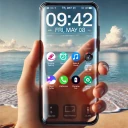
Screenshots
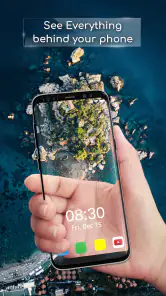
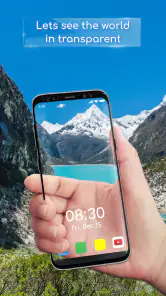
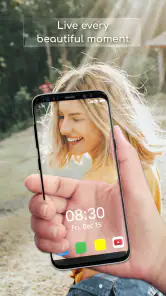
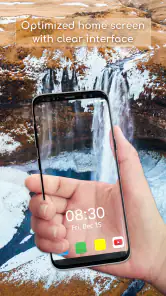
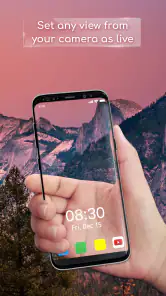
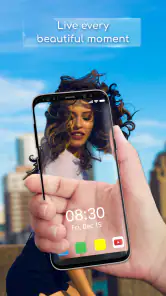
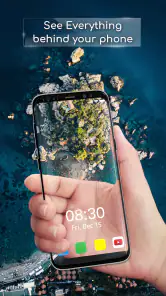
Analysis by Reviewed
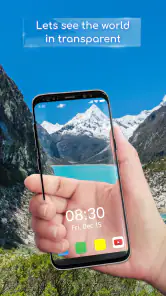
I like trying unusual phone backgrounds, but a live camera view changes the trade-off: your wallpaper becomes a small window onto whatever is in front of the device. That is the idea behind Transparent Wallpaper, a personalization app from Firehawk. Its appeal is immediate, though the experience depends less on a picture collection and more on how the camera view fits into your everyday phone use.
When the live view depends on your setup
Because the background comes from the camera, the result changes with your surroundings. A bright, uncluttered area can make the effect easier to appreciate, while a dim or visually busy scene may leave icons harder to pick out. I would try a few transparency levels in the places where I actually use my phone, rather than judging the look from one ideal setting.
This is a different kind of choice from selecting a static image or a wallpaper pack. Those options give you a predictable design; a camera-based background is more immediate, but what appears behind the icons depends on what the device is pointed toward. If you want a carefully composed picture that always looks the same, a conventional wallpaper is the better fit.
How to judge the effect before committing to it
I would test the wallpaper in the exact situations where I check my phone most: at a desk, in a bright room, and under the lighting I have in the evening. The result can feel striking in one spot and distracting in another, so the useful question is not simply whether the effect looks clever. It is whether the changing image leaves the parts of the screen I need easy to recognize.
One detail that is easy to overlook is the relationship between the camera’s view and the phone’s orientation. A background that looks interesting while I hold the device upright may become a jumble when I tilt it or put it down. I would check the screen both in my hand and on a table, especially if I use the phone as a clock or glance at notifications while it rests nearby.
There is also a personal-space consideration. A camera-backed screen can show more of the immediate surroundings than a still wallpaper, which may be awkward in a meeting, on public transport, or around people who do not expect to appear in the view. I would keep a static wallpaper ready for those settings rather than treating transparency as an all-day default.
Getting Started with Transparent Wallpaper
First things first, downloading and installing Transparent Wallpaper is a breeze. It's available on both Android and iOS, and you can find it on the Google Play Store or the Apple App Store. Once installed, you simply need to grant it access to your camera and voila, just like that, your screen becomes a window to the world around you!
More From Our News Desk

Weather by Xiaomi Review: Clear at a Glance, Less Clear Up Close

X Under Pressure: Can It Recover When Posting Goes Wrong?

Clash of Clans Is Won Between the Battles

Android Auto Makes the Case for Quieter Car Software

MobiOffice: Transforming Mobile Productivity with Seamless Integration

EA SPORTS FC™ Mobile Soccer: Redefining Mobile Sports Gaming
Playing with the Settings
The app offers a few neat settings to tinker with. You can adjust the transparency level to your liking. Whether you want a subtle hint of the real world behind your icons or a full-blown live camera feed, the choice is yours. I personally like keeping it semi-transparent, so I can still see my apps clearly while getting a glimpse of what's behind my phone. It's like multitasking for your eyes!
Rather than settling on the strongest effect straight away, I would begin with a restrained setting and use the phone normally for a while. That makes it easier to notice whether app labels, widgets, or notification text become harder to read. If visibility suffers, dialing the effect back is a more practical response than trying to reorganize the entire home screen around a moving background.
It is worth remembering that transparency is a visual compromise, not a separate layer of information. The camera view does not make the screen see-through in a literal sense; it gives the display a live-looking background. I would not rely on it to check what is behind the phone, and I would avoid interpreting the visual novelty as a tool for navigation or awareness.
Making the effect work in real life
One practical use is walking through a familiar place while glancing at the screen, but I would treat the effect as a visual novelty, not a safety aid. Looking through a phone can still distract you, and a camera view is not a substitute for putting the device away when you need your full attention. At home, the same feature can be more relaxed: I might use it briefly while waiting for a message, then switch back to a still background when I want a cleaner screen.
A useful small test is to place the phone on a desk and check whether the camera is aimed at something you actually want visible. The angle that works in your hand may show a ceiling, a sleeve, or a messy work surface when the phone is set down. That simple check helps decide whether the effect suits your routine, rather than just looking interesting during setup.
For example, imagine checking a message while waiting for a drink at a familiar café. The live view can make the phone feel less like a plain slab, and a lower transparency setting may still leave the screen readable. But if the device is pointed toward another customer or the lighting is poor, the same effect becomes less appealing. I would choose a static background in a crowded place and save the transparent look for a private, well-lit setting.
At home, a short trial can answer more than a long session of tweaking. I would set the effect, open the apps I use most, and check whether their icons remain distinct against the changing scene. If the screen is attractive but I keep pausing to find familiar apps, that is a sign the novelty is costing more attention than it gives back.
Practical or Just Plain Fun?
Now, you might be wondering, "Is this really practical?" Well, yes and no. It's not an app that's going to revolutionize your productivity, but it's definitely a fun way to give your device a fresh look. Plus, it can be a great conversation starter. Imagine pulling out your phone at a party and having people see through to the other side. It's like having a magic trick up your sleeve!
However, it's important to note that using the camera for extended periods might drain your battery faster than usual. So, if you're planning to use it all day, make sure you have a charger handy.
That battery trade-off changes how I would use it. I would treat the live background as something to switch on when I want the effect, not necessarily the setting I leave running through a full day of calls, messages, and navigation. If I am travelling, working away from an outlet, or already trying to stretch a charge, a still wallpaper is the sensible choice. The visual change is fun, but it is not worth keeping active when battery life is the higher priority.
The app also asks for a different kind of comfort than a downloaded wallpaper does. A static image is already on the screen as a finished design; here, the camera is central to the look. If camera access makes you uneasy, or if you keep your phone locked down to avoid unnecessary permissions, there is no need to talk yourself into using it. Personalization should feel comfortable, and a standard background can be just as expressive without that camera-based element.
Connectivity, permissions, and getting back to normal
The central effect is a camera view rather than a downloaded scenic image, so network access is not the interesting part of the experience; the camera permission is. I would grant that access only if I am comfortable with a live view being used for the wallpaper, and I would remove it or stop using the effect if that no longer feels right. If the display does not behave as expected, checking the camera permission and reopening the app are sensible first steps. For a quick return to a predictable look, switching back to a regular wallpaper is the simplest fallback.
For data-conscious users, the more useful question is how often they want the camera-driven effect active, not how much content they plan to download. I would avoid assuming that connectivity is required or that the app works in every network condition; the live visual idea itself is what defines the experience. If you are choosing a background for a commute or a long day away from a charger, a still image is the lower-friction option.
If the live background suddenly stops appearing as expected, I would troubleshoot in a simple order instead of changing several settings at once. First, check whether camera access is still allowed. Then reopen the app and see whether the effect returns. If it does, try the screen in a well-lit place and with the phone held at a familiar angle. Those checks help separate a permission issue from a visual situation where the camera simply has little useful detail to show.
When the app does not suit the moment, recovery should be straightforward in principle: stop using the camera-backed look and restore a regular wallpaper. I would do this before spending time trying to make a poor setting work in a dark room or a crowded setting. A live camera background is inherently dependent on what is in view, so there will be times when no adjustment can make it as calm and legible as a fixed image.
Connectivity is therefore not the main reason I would recommend or avoid the app. I would not choose it expecting a library of online wallpapers or a network feature; the defining trade-off is between a changing camera image and a stable background. For people watching mobile data, the practical habit is to use the effect selectively and avoid assuming anything about its network behavior. That keeps expectations grounded without turning connectivity into the focus of a feature that is really about the screen’s appearance.
One useful routine is to decide on a fallback before trying the effect. If I need to read something quickly, show a screen to someone, or use the phone in a sensitive setting, I would switch to a plain background rather than fiddle with transparency in the moment. That small bit of planning makes the app easier to enjoy because I am not depending on a novelty effect to work in every context.
Who will enjoy it—and who may not
I can see this suiting someone who likes novelty, changes their phone’s appearance often, or wants a quick visual trick to show a friend. It is less convincing for anyone who prioritizes a quiet lock screen, needs maximum icon contrast, or prefers to keep camera access limited. A good compromise is to use the transparent look for a short stretch, then return to a static design when readability or battery life matters more.
Compared with the usual alternatives, this is not trying to compete with a carefully selected photograph, a clean gradient, or a pack of illustrated backgrounds. Those choices are better when you want a consistent mood, a screen that remains legible in different rooms, or a look that does not depend on where the phone is pointed. Transparent Wallpaper is more of a playful switch: it makes the immediate environment part of the display, with all the unpredictability that comes with that.
I would recommend it most to someone who enjoys experimenting with their home screen and is happy to trade consistency for a brief visual surprise. It may also suit someone who wants a distinctive look without choosing another image from a gallery. On the other hand, people who arrange widgets precisely, use small labels, or depend on quick recognition may find that a moving or changing background competes with the layout they have already built.
There is a useful middle ground for anyone who is curious but cautious: try the effect during a relaxed period at home, then decide whether it earns a place in everyday use. Check it with the screen brightness and icon arrangement you normally use, not just during the initial setup. If it feels distracting after the first few glances, there is little reason to keep it active simply because the idea is unusual.
Transparent Wallpaper is free to download, rated for Everyone, and has a 4.6 average from around 321,000 ratings, with over 10 million installs. Firehawk’s app was released on October 3, 2018, and version 2.2.2 supports Android 5.0 and up. Optional in-app purchases range from $0.99 to $99.99 per item, so I would check the purchase details before paying for anything; the basic appeal is the camera-backed personalization itself.
For someone deciding whether to try it, the practical expectation is simple: the core idea is a camera-based change to the phone’s appearance, while optional purchases should be considered separately from that basic appeal. I would not pay for extras without first checking what each item offers and deciding whether it addresses something I actually want. The best reason to install it is curiosity about the live look, not an assumption that buying something will make the screen more useful.
My Final Thoughts
In conclusion, Transparent Wallpaper is one of those apps that's more about fun than functionality. It's perfect for those who love personalizing their phones and trying out quirky features. While it might not be an everyday essential, it's definitely worth a try if you're looking to shake things up a bit and add a little charm to your daily device usage.
So, go ahead, give it a whirl and let your phone show you a different perspective on the world!
Transparent Wallpaper Frequently Asked Questions
What does Transparent Wallpaper change on my phone?
Transparent Wallpaper is a personalization app that gives your home screen a see-through appearance by displaying a live camera view as the wallpaper. It is intended to change how your phone looks rather than add general phone functions. The effect can make the screen feel unusual and playful, especially if you enjoy seeing your surroundings behind your icons.
Can I choose which camera to use for the wallpaper effect?
The app’s camera-based effect is the main part of the experience, and its settings include the option to choose between the front and rear camera. This can help you decide what appears behind your home screen. Since the wallpaper uses a live view, consider your surroundings and your preferred camera before setting it up.
Will Transparent Wallpaper work with my launcher and lock screen?
Transparent Wallpaper is designed to create a live camera effect for your phone’s home screen, but how that effect appears can depend on the device’s wallpaper and launcher features. Before downloading, consider whether you mainly want the effect on your home screen or expect it to appear on every screen. The app is a personalization app, so its main purpose is changing the look of your phone rather than adding general phone functions.
Does Transparent Wallpaper need camera permission, and can I control access?
The transparent effect relies on a live camera feed, so camera access is central to how Transparent Wallpaper works. You can manage camera permissions through your device’s settings, and you may revoke access if you no longer want the app to use the camera. Keep in mind that denying camera access prevents the live view that creates the see-through wallpaper effect.
Is Transparent Wallpaper free to download, and are there in-app purchases?
Transparent Wallpaper is free to download, with in-app purchases available. The listed purchase range is from $0.99 to $99.99 per item, so check the purchase details before confirming anything in the app. If you only want to try the basic transparent wallpaper experience, review the app’s options and your device’s purchase controls so you know what is included before spending money.
Pros
- Unique personalization feature
- Easy to use interface
- Lightweight app
- No noticeable battery drain
- Supports most devices
Cons
- Limited customization options
- May reduce screen visibility
- Ads in free version
- Occasional lag on older devices
- No offline functionality
- Category
- Personalization
- Version
- 2.2.2













