My Secret Diary with Lock
- 2.66K
- 4.8
- Installs
- 10.00M
- Price
- Free

Screenshots


Analysis by Reviewed
I like the idea of a diary best when it fits into the small gaps of an ordinary day: a few lines after work, a thought worth saving on the bus, or a note to myself before I forget what happened. My Secret Diary with Lock is a lifestyle app from Firehawk built around that private writing habit. It is free to install, rated for Everyone, and has a 4.8 average from around 272,000 ratings, with over 10 million installs. That popularity makes it an easy app to consider, though what matters most is whether its simple diary approach suits the way you want to write.
A private place to begin
For a first entry, I would keep the bar low: write down what happened today, how it felt, or one detail I might otherwise lose. A diary is more useful when it feels approachable than when every entry has to be polished. The app’s straightforward, personal focus makes it a natural fit for someone starting a journaling habit or anyone who wants a dedicated space rather than another note buried among shopping lists and reminders.
In a realistic routine, I might open it after dinner and record a difficult conversation while the details are fresh. Later, I could return to the entry when I have a calmer view of it. That small pause between recording and rereading is one of journaling’s practical strengths: the app keeps the writing together, while the reflection comes from how I use it.
Making the writing habit your own
My useful tip is to choose a theme and font that are comfortable for longer sessions, not just attractive at first glance. Emojis and stickers can add personality, but I would use them selectively if I wanted to find a serious entry quickly by reading it later. A consistent routine also helps: a short evening entry is easier to sustain than waiting for a perfect, unusually meaningful day.
The calendar view gives that routine a second purpose. If I write about a recurring worry or a project, revisiting entries can help me notice what changed and when. I would treat it as a personal record, not a structured mood tracker or task manager; those tools are better when I need charts, reminders, or organized action items rather than open-ended writing.
Your Personal Sanctuary
First off, the interface of My Secret Diary with Lock is super user-friendly. You don't have to be a tech wizard to navigate through it. The app opens up to a clean, minimalist design that instantly gives you that warm, cozy feeling of a private corner where you can spill your heart out. Trust me, once you start typing, you’ll feel like you’re having a heart-to-heart chat with your best friend.
Lock and Key
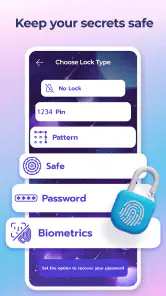
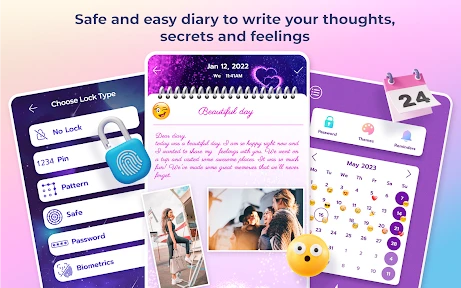
Now, let’s talk security, because what’s a diary without its trusty lock? The app offers multiple locking methods, from passwords to fingerprint ID, ensuring your secrets stay exactly where you left them - safe and sound. It’s like having your own little Fort Knox right in your pocket. So, if you're the kind of person who likes to keep their thoughts under wraps, this feature alone might seal the deal for you.
More From Our News Desk

Weather by Xiaomi Review: Clear at a Glance, Less Clear Up Close

X Under Pressure: Can It Recover When Posting Goes Wrong?

Clash of Clans Is Won Between the Battles

Android Auto Makes the Case for Quieter Car Software

MobiOffice: Transforming Mobile Productivity with Seamless Integration

EA SPORTS FC™ Mobile Soccer: Redefining Mobile Sports Gaming
A lock can make a diary more comfortable to use, but I would still be sensible about what I put in it, especially if my phone is shared or often left unattended. If quick access matters, fingerprint unlocking may feel more convenient than entering a password; if I prefer not to rely on a fingerprint, a password-based method is the alternative described here. Either way, a lock protects access to the app, not the broader habit of keeping personal information on a device.
Customization Galore
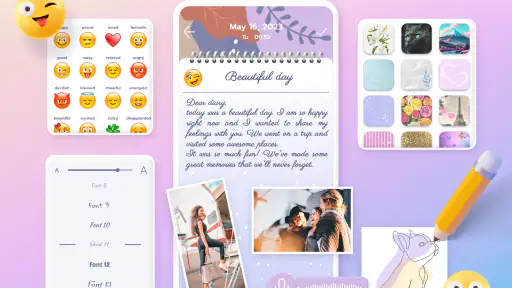
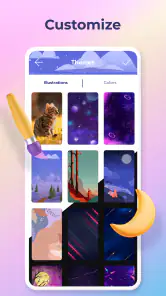
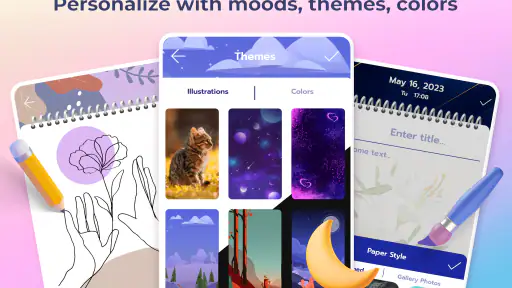
One of the coolest aspects of this app is its customization options. You can pick from a slew of themes and fonts to make the diary truly yours. Whether you’re feeling a bit funky or in a more serene mood, there’s something in there to match your vibe. Plus, adding little emojis and stickers to your entries makes the whole experience a tad more fun and personal.
This is where I would decide how much decoration helps rather than distracts. If I mostly write short personal notes, playful styling can make opening the diary feel inviting. If I expect to reread long entries, a calmer look may be easier on the eyes. Compared with a basic notes app, the diary feels more like a space intended for personal expression; compared with a full-featured journal service, its appeal is the uncomplicated, individual writing experience.
Reflect and Relive
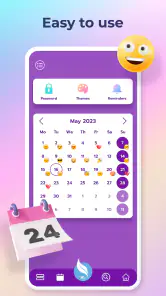
What’s a diary if you can’t look back and reflect on past entries? The app has a neat calendar view where you can easily scroll through your past entries. This feature is not just about reminiscing; it’s about seeing your growth and sometimes even having a good laugh at what seemed like the end of the world back then. It’s like having a time machine, only without the sci-fi fuss.
The handoff from writing to reflection is simple: record an event while it is fresh, then use the calendar when you want to revisit a particular day. I would not try to turn every entry into a complete account of my life. A sentence or two about what stood out can make a later reread more useful than a long entry written only because I felt I should fill a page.
Turning scattered moments into a useful record
One workflow I find especially practical is to use the diary as a landing place for thoughts that would otherwise remain in my head. I might jot down a reaction after a meeting, then add a brief note later about what I decided to do. The entry does not need to become a formal plan; it simply preserves the context so I can understand the decision when I look back. That distinction matters: this is a place to capture personal experience, not a substitute for a calendar or project tracker.
For recurring topics, I would make the wording consistent enough to recognize later. If I am keeping notes about a new habit, for example, I could mention the same plain-language cue in each entry rather than relying on decorative details to jog my memory. The calendar then becomes more useful because I can revisit the dates and read the entries in sequence. This is a small discipline rather than a special feature, but it makes a simple diary easier to use as a record.
There is also a useful boundary between writing for myself and writing something I intend to share. I would keep private reflection here, then move any finished message, appointment detail, or task into the tool where it belongs. That handoff prevents a diary from becoming an unreliable inbox. It also keeps entries focused on what I thought and felt, rather than turning every page into a list of things I might forget to do.
Who will feel at home here
I think the app suits someone who wants a low-pressure writing space, enjoys personal touches such as themes and stickers, and values having a lock at the point of entry. It can also work well for a teenager or adult who wants to establish a private journaling routine without first learning a complicated system. Its Everyone content rating makes the intended age range broad, though I would still make sure the person using it understands ordinary device privacy and keeps their unlock method private.
It is less compelling for someone who wants a guided mental-health program, automatic prompts, searchable research notes, or an organized archive with extensive labels and project tools. A person who writes across several devices should choose a journal service built around that workflow instead of assuming a diary on one phone will cover it. And if writing by hand is part of the appeal, a paper notebook may feel more satisfying and avoids screen time altogether. The best choice depends less on which option has more features and more on what helps you actually return to your thoughts.
For a busy day, I would use it in two small passes. On the commute home, I could capture a sentence about the moment I want to remember; after dinner, I could add a little context while it is still clear. If I do not have time for that second pass, the short note is still a record rather than a failed attempt at a perfect entry. This approach makes the diary fit around life instead of asking life to stop for a long writing session.
Where the flow can break
The same simplicity that makes the app approachable also sets limits. A calendar is helpful for revisiting dates, but it is not the same as a system for sorting many topics, tracking progress, or turning reflections into reminders. As entries accumulate, I would not expect a diary-first layout to replace the organization of a dedicated notes app. If I need to retrieve exact details quickly, I would keep those in a tool designed for that job and use this one for the story behind them.
Privacy needs a similarly realistic view. A password or fingerprint lock can discourage casual access, but I would not treat that alone as a promise that every sensitive detail is protected in every situation. I would avoid putting information in any phone diary that could cause serious harm if someone gained access to the device, and I would be especially careful on a shared phone. That does not make the lock useless; it means its value is practical access control, not a reason to stop thinking about device security.
There can also be a small habit hurdle: an inviting interface cannot make me write when I am tired or distracted. I would keep entries short and attach them to an existing routine, such as winding down after dinner, rather than expecting the app to create consistency for me. If I regularly forget to journal unless a tool nudges me, a reminder-led alternative may be a better fit. Here, the useful test is whether opening the diary feels easy enough that I choose to do it without a prompt.
Before settling into a long-term routine, I would try a few different entry styles: a short daily recap, a note about one specific event, and a longer reflection when I genuinely have something to unpack. That trial helps show whether the calendar and writing flow match my needs without making every day feel like homework. I would also decide early whether I prefer a quiet visual theme or a more expressive one, since the right presentation can make the difference between a diary I return to and one I leave unopened.
There are trade-offs to keep in mind. Someone who needs reliable syncing between devices, collaboration, or detailed organization may be better served by a different journaling or notes option. Likewise, if I know I will not remember to open a diary without prompts, a habit-focused tool with reminders may fit better. My Secret Diary with Lock is most appealing when I want an easy, personal place to write and browse entries, rather than a system that manages the whole process for me.
The app is free, while in-app purchases range from $0.99 to $99.99 per item, so I would check what an offered purchase includes before deciding it is worthwhile. It is currently version 1.1.1 and requires Android 7.0 or later. With around 2,700 written reviews alongside its ratings, it has clearly drawn a substantial audience, but I would still judge it by whether the writing flow feels comfortable on my own phone.
All in all, My Secret Diary with Lock is a nifty little app for anyone who loves to jot down notes, thoughts, or even just random musings. It’s secure, customizable, and incredibly easy to use. Whether you’re a seasoned diary keeper or a newbie looking to start, this app has got you covered. So, go ahead, give it a whirl and unlock a new world of personal expression!
My Secret Diary with Lock Frequently Asked Questions
What does the app’s age rating mean for families?
My Secret Diary with Lock is rated Everyone, making its content suitable for a broad audience. It is a lifestyle app centered on keeping a personal diary, so it may appeal to anyone who wants a place to write about daily experiences or thoughts. Parents can still review the app’s purchase options and features with younger users before downloading.
How popular is My Secret Diary with Lock?
The app has been installed more than 10 million times and has an average rating of 4.8 from around 272,000 ratings, with roughly 2,700 written reviews. That level of reach makes it a widely used journaling option, although ratings reflect a range of personal experiences. Reading recent user feedback can help you decide whether its approach suits your needs.
Is My Secret Diary with Lock free to download?
My Secret Diary with Lock is free to download, so you can try its private journaling features without an upfront purchase. The app also offers in-app purchases, with prices ranging from $0.99 to $99.99 per item, so review any purchase options shown in the app before choosing them. Its listed age rating is Everyone.
Which devices can run My Secret Diary with Lock?
My Secret Diary with Lock is available for Android devices running version 7.0 or later. Before downloading, check your device’s operating system version and make sure you have enough available storage for the app. The app is a lifestyle journaling option for people who want to keep personal thoughts and daily experiences in a digital diary.
Who makes My Secret Diary with Lock, and is it widely used?
My Secret Diary with Lock is developed by Firehawk. It has more than 10 million installs and an average rating of 4.8 from around 272,000 ratings, alongside approximately 2,700 written reviews. Those figures suggest that many people have tried the app, though individual experiences can differ depending on which features matter most to each user.
Pros
- User-friendly interface.
- Strong password protection.
- Customizable themes.
- Daily reminders feature.
- Backup and restore options.
Cons
- Ads in free version.
- Limited free features.
- Sync issues occasionally.
- No biometric unlock.
- Not optimized for tablets.
- Category
- Lifestyle
- Version
- 1.1.1













