

Video Voice Editor + Effects
- 632.00
- 4.5
- Installs
- 10.00M
- Price
- Free

Screenshots
Analysis by Reviewed
I tend to trust a voice-effects app more when I treat it as a playful editing tool rather than something that needs access to every part of my digital life. Video Voice Changer + Effects is a free music-and-audio app from Firehawk, and its focus is straightforward: changing how a video sounds. It has a 4.6 average from around 49,000 ratings, with over 10 million installs, so it has clearly found an audience for quick, lighthearted edits. Those figures are useful context, but I’d still judge it by whether its workflow suits the clips I actually want to make.
Why I start with trust and context
With a voice editor, I think about the recording as much as the effect. A clip can include a child’s voice, a private conversation, or the inside of someone’s home; changing the sound does not make those details anonymous. I would treat the finished video like any other personal recording and decide carefully who should see it. The app is rated for Everyone, but that content rating is not a substitute for a parent deciding whether a particular recording or purchase is appropriate for a child.
The popularity is reassuring only in a limited way. A large audience suggests that people find a use for the app, but it doesn’t tell me how a particular recording is handled or whether an effect will suit my voice. I use that context as a reason to explore, not as proof of privacy or quality. The practical test is whether I can make the kind of clip I want while staying comfortable with the permissions and choices shown on my phone.
What I would check before recording
Before filming anything personal, I’d pause to review the permission prompts shown on my device and allow only what makes sense for the task. Camera and microphone access are relevant to recording video with altered audio; access to existing clips may be needed when editing them. I would avoid granting broader access than necessary, and I’d check the phone’s app settings later if I wanted to change a choice. Those are practical habits, not a claim about this app’s specific data handling.
That distinction matters because a funny voice does not make a private clip less sensitive. A family recording, a child’s voice, or a video captured at home can reveal more than the joke itself. I’d try an ordinary, non-sensitive clip first, listen to the result, and decide what I’m comfortable sharing. If a video includes someone else, I’d get their okay before posting it.
Getting Started with the Fun
Getting started with Video Voice Changer + Effects is as easy as pie. Once you download the app, you'll be greeted with a user-friendly interface that's intuitive and easy to navigate. It’s perfect for anyone, whether you're tech-savvy or just a casual user looking to have some fun.
Making the first test useful
I wouldn’t begin with the best clip on my phone. I’d record a short, throwaway line in a quiet spot, then listen with headphones and through the phone speaker if possible. The two checks answer different questions: headphones make it easier to notice rough or distracting audio, while the speaker gives a more realistic sense of how a friend may hear a casual share. If the source voice is difficult to understand before applying an effect, a novelty filter is unlikely to fix that.
More From Our News Desk

 Weather - By Xiaomi
Weather by Xiaomi Review: Clear at a Glance, Less Clear Up Close
Xiaomi’s weather app makes everyday forecasts quick to scan, but its calm surface can leave useful details and recovery paths harder to find than they should be.

 X
XX Under Pressure: Can It Recover When Posting Goes Wrong?
A resilience-focused review of X, examining setup, mistaken posts, interruptions, weak connections, and the gaps that matter when recovery needs to be dependable.

 Clash of Clans
Clash of Clans Is Won Between the Battles
Its raids are quick; its community is a long-term project of coordination, teaching, rivalry, and shared responsibility—with all the friction that entails.

 Android Auto
Android Auto Makes the Case for Quieter Car Software
The car interface is no longer judged by how much it can do, but by how quietly it helps. Android Auto shows what drivers now expect—and what still gets in the way.

 MobiOffice: Word, Sheets, PDF
MobiOffice: Transforming Mobile Productivity with Seamless Integration
MobiOffice: Word, Sheets, PDF is redefining mobile productivity with a surprising blend of functionality and innovation.

 EA SPORTS FC Soccer Mobile 26
EA SPORTS FC™ Mobile Soccer: Redefining Mobile Sports Gaming
Dive into EA SPORTS FC™ Mobile Soccer, where immersive gameplay and strategic depth transform mobile sports gaming.
Latest News



It also helps to say a complete sentence rather than a single word. A brief phrase reveals whether the altered sound remains understandable across different syllables, and whether the comic quality holds up beyond the first surprise. That little test can save time when making a longer clip and helps me choose an effect based on the actual recording rather than its name alone.
Features that Stand Out
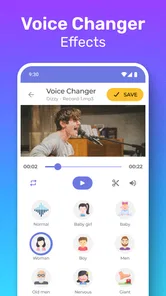
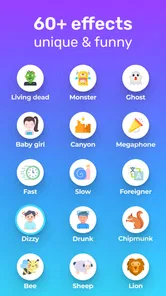
The app offers a variety of voice effects that are just a tap away. Ever wanted to sound like a robot, a chipmunk, or even a superhero? This app has got you covered. With its extensive library of effects, you can change your voice in real-time while recording videos. The possibilities are endless, and the creativity it sparks is truly limitless.
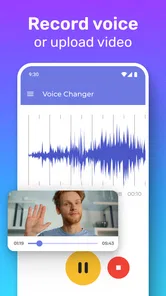
One of the features I found particularly amusing is the app's ability to apply effects to existing videos. This means you can take your favorite clips and give them a new life with a completely different sound. It's a fantastic way to revisit your old memories with a twist.
Choosing a workflow that fits the clip
For a quick joke, recording inside the app sounds like the simplest route: choose an effect, capture a short moment, then review it before sharing. For a clip I care about, I’d work on a copy of the original video where possible. That gives me a clean fallback if the altered voice sounds muddy or the timing feels wrong. A useful small test is to record a few seconds of speech in the same room as the planned video; the effect may be entertaining, but clear source audio still matters.
Editing an existing clip is handy for giving an old video a comic angle, but it also creates a choice: the new voice can change the mood more than expected. I’d preview the whole clip rather than just the opening, especially if the speaker’s expression or gestures no longer match the sound. That mismatch can be the punchline for a skit, yet distracting in a memory meant to feel sincere.
For a practical everyday example, imagine I’ve filmed a friend telling a short story at a kitchen table and want to make a playful version for a group chat. I’d first check that everyone in the clip is happy for me to edit and share it, then work from a copy so the original stays intact. I’d try the effect on a short section, listen for whether the words remain clear, and watch the full result to catch any awkward mismatch between voice and expression. If the joke works only when the sound is hard to understand, I’d choose a different effect or keep the original audio.
What it does well compared with other editing options
Compared with opening a full video editor, this app’s appeal is the direct route from a video to a changed voice. That can be a real advantage when the goal is one amusing clip rather than a carefully assembled production. A general-purpose editor is usually the more sensible choice when I need precise timing, layered sound, transitions, or a finished piece with a consistent style. The trade-off is simple: convenience for a narrow creative task versus control over a broader project.
A voice recorder is another reasonable alternative, but it makes more sense when I only need altered speech and do not need to capture or work with video. For a short social clip, keeping voice and picture together may be the point; for a podcast-style experiment or clean audio asset, a dedicated audio tool is a better starting place. I wouldn’t choose this app just because it has effects if the video part adds no value to what I’m making.
Who will enjoy it, and who may want another tool
I can see this working best for casual creators, families making a silly group video, or anyone who wants a quick voice gag without learning a full editing suite. Picture a rainy afternoon when friends are trading short clips: each person records one line with a different effect, then the group picks the funniest take. The app’s simple approach is a plus there, because the activity matters more than precise post-production.
If you’re making a polished short film, need detailed control over audio levels, or want to edit several tracks independently, a conventional video editor with dedicated audio tools is likely a better fit. A standalone voice recorder may also be more suitable when the sound itself is the project and video is unnecessary. This app’s appeal is its video-first, playful use, not the depth of a professional editing workflow.
I’d also skip it if I mainly want a reliable archive of original family videos and have no interest in altering their sound. In that case, a standard camera app keeps the task simpler, and I can add an edit later with a tool designed around the kind of change I actually need. Likewise, if I need a voice effect to remain consistent across many clips, I’d compare more specialized editors before committing to a workflow built for quick experiments.
Using effects with a bit of restraint
One small creative trade-off is that the most extreme effect is not always the funniest. If the altered voice obscures the words, the viewer has to work harder to follow the joke. I’d match the effect to the clip: a short exclamation can tolerate a more exaggerated sound, while dialogue that carries a story needs intelligibility. Keeping the clip brief can also help an effect feel like a deliberate punchline rather than a distraction that wears out its welcome.
Another useful habit is to decide what the video is for before editing. A private joke among friends can be rough around the edges, while a clip intended for a broader audience benefits from a quick check for names, background conversations, and other details the speaker might not want shared. That review is not an editing feature; it is simply a sensible step when turning a personal recording into something others will watch.
Why You’ll Love It
What I love about this app is how it brings people together. Imagine a family gathering where everyone takes turns creating funny videos with silly voices. It's a guaranteed way to get everyone laughing and having a great time. Plus, sharing these videos on social media is a breeze, making it easy to spread the joy.
Another highlight is the app’s simplicity. You don’t need to be an expert editor to figure it out. The app does most of the heavy lifting for you, allowing you to focus on having fun and unleashing your creativity.
Choices that deserve a second look
My sense of control comes from the choices I make around a recording: what I allow on the device, which clip I select, whether I preserve the original, and whether I share the finished version. I would look at each permission prompt rather than approving everything by habit, and revisit the phone’s settings if I want to change an app permission later. Those steps help me make an informed choice without assuming anything about the app’s internal data practices.
Before sharing, I’d play the result from beginning to end and consider the people and place in the frame as well as the altered voice. A silly filter can make a clip feel harmless, but it does not remove identifying details or replace consent. If I’m uncertain whether a recording should leave my phone, keeping it for private viewing is the safer choice.
Practical expectations before installing
The app is free to download, rated for Everyone, and lists optional in-app purchases ranging from $0.99 to $99.99 per item. I’d check the purchase screen carefully before confirming anything, particularly if a child is using the device; a free download does not mean every available item is free. It was released on January 28, 2022, and version 1.5.2 requires Android 6.0 or later, so compatibility is worth checking on an older phone.
A natural question is whether I can use it with a video I already have: yes, applying effects to existing clips is part of its stated use, which makes it more flexible than a recorder that only captures new audio. Another is whether it suits serious voice work; for careful sound design, I’d choose a more specialized editor. And if I’m unsure about sharing, I’d save the result for private viewing first and make a deliberate decision afterward rather than treating a quick export as automatically suitable for social media.
Another question I’d ask is whether installing it commits me to buying anything. The app can be downloaded for free, while optional purchases are available, so I’d read any purchase prompt and check the device’s purchase controls before handing the phone to a child. If the available choices do not fit my budget or needs, I can simply avoid confirming a transaction and decide whether the free experience is enough for my purpose.
A cautious recommendation
In a world where apps come and go, Video Voice Changer + Effects stands out as a unique and entertaining option. It’s not just an app; it’s a tool for making memories and sharing laughs. Whether you're looking to impress your friends, entertain your family, or just pass the time, this app is definitely worth a try. So go ahead, give it a download, and let your imagination run wild!
My recommendation is a cautious one: try it with a short, harmless clip, pay attention to permissions and purchase prompts, and see whether the effects match your sense of humor. If the goal is an easy laugh, its focused approach is appealing. If privacy control details, advanced audio editing, or a more formal production workflow are central to your decision, take time to review the choices on your device and consider a tool built for that specific need.
Video Voice Editor + Effects Frequently Asked Questions
What is Video Voice Changer + Effects designed to do?
Video Voice Changer + Effects is a video voice editor for creating custom voice effects. It is listed in the Music & Audio category, and its central appeal is changing how voices sound in video clips. If you want an app focused on playful audio transformations rather than a general-purpose video editor, its stated purpose gives you a clear idea of what to expect.
Who develops the app, and what do its popularity figures suggest?
Video Voice Changer + Effects is developed by Firehawk. It has an average rating of 4.6 from around 49,000 ratings and has been installed over 10 million times. Those figures suggest that many people have tried it, although popularity alone cannot tell you whether its effects and editing approach will suit your own needs. Its listed release date is January 28, 2022.
Will Video Voice Changer + Effects work on my phone?
The app requires Android 6.0 or later, so it is worth checking your phone’s Android version before downloading. It is an Android app, and its listed minimum operating-system requirement is a useful first compatibility check. Video editing can also take up device resources, so having enough available storage and a phone that handles video tasks comfortably can help make the experience smoother.
Does Video Voice Changer + Effects let me edit an existing video or only record a new one?
Video Voice Changer + Effects is designed around changing voices in videos, so it can be useful when you want to create a playful edited clip rather than leave the audio untouched. Its central purpose is applying voice effects to video. Whether you are starting with a new recording or working with a video already on your device, the editing process is intended to keep the focus on transforming the voice.
What features does Video Voice Changer + Effects offer?
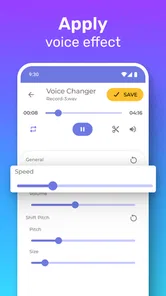
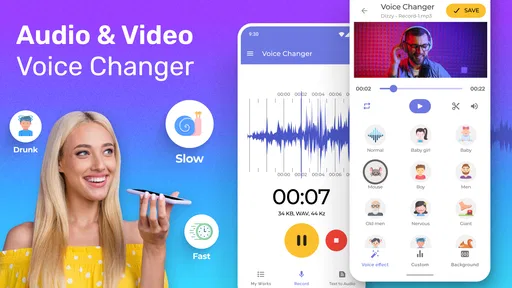
Video Voice Changer + Effects offers a variety of features that allow users to modify their voice in videos. The app includes numerous voice effects, such as helium, robot, and monster. Users can also adjust pitch, speed, and add background sounds. The app's intuitive interface makes it easy to apply effects and share the altered videos on social media.
Pros
- Wide range of voice effects available.
- Easy to use interface for quick editing.
- Real-time voice modulation capabilities.
- Supports sharing on social media platforms.
- Lightweight app with fast performance.
Cons
- Limited free effect options available.
- Contains ads that may disrupt usage.
- Requires in-app purchases for full features.
- Occasional glitches in real-time mode.
- Not available offline; needs internet.













