Themepack - App Icons, Widgets
- 42.13K
- 4.7
- Installs
- 50.00M
- Price
- Free

Screenshots


Analysis by Reviewed
I often treat my home screen as a small workspace: the apps I reach for most should be easy to spot, and the overall layout should feel comfortable rather than cluttered. Themepack - App Icons, Widgets is a personalization app from YoloTech that lets me change that visual feel with themed icons and widgets. It suits anyone who enjoys refreshing a phone’s appearance without building every element from scratch, though the appeal depends on how much you value looks alongside everyday convenience.
What free access does—and doesn’t—tell me
The app is free to install, with in-app purchases listed from $0.99 to $39.99 per item. That makes trying it out a low-commitment decision, but it does not tell me which designs are included at no cost or what a particular purchase unlocks. I’d browse the available choices first and decide whether a specific theme is worth paying for, rather than assuming the whole catalog is free or that a purchase is necessary.
Its reach is substantial: Themepack has more than 50 million installs and a 4.7 average from around 1.1 million ratings. That popularity can make it reassuring to consider, but it is not a guarantee that every theme will match your taste or that setup will feel identical on every phone. The app is rated Teen, runs on Android 7.0 or later, and its current version is 1.0.0.3572.
Customize Your World
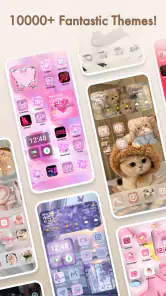
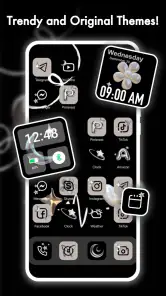
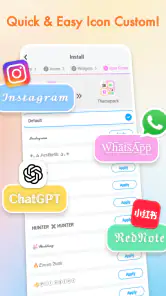
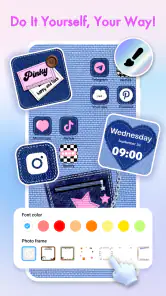
One of the standout features of Themepack is its incredible variety of app icons and widgets. Whether you’re into minimalism, vibrant colors, or something more themed like retro or futuristic, this app has got your back. It's like having a wardrobe for your phone – you can switch up the look anytime you want. And trust me, it's super satisfying to see your phone transform right before your eyes!
Easy Peasy Setup
Now, I’m not exactly a tech wizard, but setting up Themepack was a breeze. The user interface is intuitive, guiding you step by step through the customization process. Just pick the icons and widgets you love, apply them, and voila! Your phone is now a reflection of your personal taste. Plus, if you ever want to switch things up, the app makes it easy to revert to the original icons or try something new.
In practice, I’d change one part of the screen at a time instead of applying a complete look immediately. That makes it easier to spot which icons are harder to recognize or which visual choices make the home screen feel busy. Before settling on a theme, check the apps you use most: a cohesive set is only useful if the icons you need are represented and remain easy to identify. This small test is especially worthwhile if you rely on muscle memory to open apps quickly.
Widgets Galore
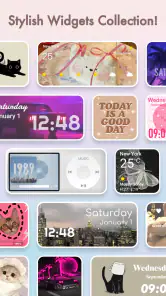
Let’s talk widgets. We all love them for the convenience they bring, and Themepack doesn’t disappoint. From weather updates to calendar widgets, there’s a wide array of options that not only look good but also add functionality to your home screen. Imagine having all your essential info at a glance, wrapped in a design that suits your style. It’s both practical and aesthetically pleasing.
More From Our News Desk

Weather by Xiaomi Review: Clear at a Glance, Less Clear Up Close

X Under Pressure: Can It Recover When Posting Goes Wrong?

Clash of Clans Is Won Between the Battles

Android Auto Makes the Case for Quieter Car Software

MobiOffice: Transforming Mobile Productivity with Seamless Integration

EA SPORTS FC™ Mobile Soccer: Redefining Mobile Sports Gaming
A useful way to judge a widget is to ask whether it saves you a step, not just whether it matches the wallpaper. For example, a calendar view can earn its space if you check upcoming plans often; if you rarely glance at it, a smaller or simpler layout may leave more room for the apps you actually open. I’d keep the first screen focused on daily tasks and put decorative choices elsewhere, so the customization improves navigation instead of competing with it.
And here’s a little tidbit: the app updates its library frequently, so there’s always something new to try. Whether it’s seasonal themes or trending styles, you’ll never run out of options to play with. It’s like having a new phone every time you change the theme!
Making a theme work in daily routines
The best way I’ve found to judge a visual makeover is to use it during an ordinary day, not just admire it immediately after setup. Imagine checking your phone while heading out: you need to find maps, messages, and a calendar quickly, perhaps with one hand and little attention to the screen. If the new icons are distinctive enough to recognize at a glance and the widget gives you information you actually consult, the redesign is doing useful work. If you have to pause to decode familiar apps, the coordinated appearance is costing more than it gives back.
I’d also think about how the screen is used at different times. A decorative arrangement that feels calming in the evening may be less practical when you are rushing between tasks. Keep the most frequently opened apps in familiar positions while experimenting with the surrounding design; preserving their locations can make a theme feel fresh without requiring you to relearn your whole layout. This is a small but valuable compromise for anyone who likes visual change yet depends on quick access.
Before choosing a style, it helps to look at the wallpaper and icon contrast together. Pale symbols can disappear against a light background, while a busy image can make both icons and widget text harder to scan. I’d test the combination on the actual home screen and adjust one element if it feels crowded. The goal is not to make every part match perfectly; it is to create enough visual consistency without sacrificing legibility.
Where the trade-offs show
Themepack is most appealing when you want a coordinated look and enjoy choosing among ready-made visual options. Compared with changing a wallpaper alone, working with icons and widgets can make more of the home screen feel consistent. The trade-off is that a ready-made style may not cover every app or fit the layout you already use. If your priority is maximum control over each detail, or you prefer the default icons because they are instantly familiar, your phone’s built-in personalization tools may be the better fit.
There is also a practical balance between novelty and recognition. Changing several familiar symbols at once can slow you down until your eyes learn the new design. I’d start with a theme that keeps clear differences between icons, then change only a few at a time if the screen feels less usable. If a widget looks good but makes important information harder to scan, I’d remove it; a home screen should serve its owner, not just look polished in a screenshot.
How it compares with other ways to personalize
The simplest alternative is to change only the wallpaper using the phone’s built-in settings. That route is quicker and preserves familiar app symbols, so it is better for someone who wants a subtle refresh with almost no adjustment. Themepack makes more sense when the icons and widgets are part of the look you want to change together. In return for that broader makeover, you spend more time choosing and checking whether the new elements suit the way you use the screen.
Another option is to build a highly customized home screen using separate tools or individually chosen assets. That can suit someone who enjoys fine control over every detail, but it asks for more planning and patience. I see Themepack’s appeal in the middle: it offers themed choices for people who want a coherent result without starting every design decision from a blank page. The trade-off is that a ready-made style may leave less room for the exact arrangement or look you have in mind.
For a practical comparison, ask yourself whether you want a quick color change, a coordinated visual refresh, or detailed control. A wallpaper alone is usually enough for the first; this app is aimed at the second; a more manual approach may suit the third. None is automatically better. The right choice depends on whether you enjoy browsing and arranging elements, and whether a new look improves the experience of finding the apps you need.
Who is likely to enjoy it?
I’d recommend trying it if you like seasonal refreshes, want your icons and widgets to share a visual style, or enjoy making a phone feel more personal without designing every asset yourself. A realistic use case is refreshing your home screen on a quiet evening: choose a theme, keep the apps you use for work or errands easy to find, and add a calendar view only if it helps you check plans at a glance. That gives the makeover a purpose beyond decoration.
It may be especially satisfying if you get bored with the same screen but do not want to spend an entire evening creating icons individually. I’d approach it as a small, reversible project: try a few choices, keep the layout that feels clear, and return to the familiar appearance if the novelty starts getting in the way. For someone who enjoys changing styles now and then, that makes the app more useful than a one-time download that is only opened once.
On the other hand, people who prize speed and consistency above appearance may be happier leaving their home screen alone. The same goes for anyone who rarely looks at widgets or feels overwhelmed by comparing visual options. If the default layout already works well, there is no need to add a customization routine just because it is available. The value here comes from enjoying the process and the result, not from fixing a problem every phone owner has.
If you are happy with your current screen, rarely use widgets, or dislike spending time comparing designs, you may get little value from it. It is also not the best choice for someone who expects every aesthetic option to be included free; the app is free to download, while individual in-app items have listed prices. I’d treat purchases as optional decisions tied to a particular design you genuinely want, rather than part of the basic decision to try the app.
What I’d check before committing to a look
A useful first question is whether the style you like covers the apps you open most. I would inspect the most-used part of my screen before settling on a theme, because a matching set that leaves important shortcuts visually out of place can make the result feel unfinished. If some symbols are less obvious than their originals, keeping those apps unchanged or using a more restrained selection can be a better choice than forcing the entire screen into one style.
I’d also treat widgets as choices with a job to do. A calendar is useful if it helps me check plans; a weather display matters if I consult it before leaving. If a widget is there only to fill space, it can crowd out shortcuts and information I care about. This gives a simple test for whether a design is worth keeping: after using it for a normal day, can I find what I need just as easily, and does the widget save me a glance or a step?
Finally, I’d make the purchase decision only after identifying a particular item I want. The free download lets me explore the app, while the listed in-app prices span from $0.99 to $39.99 per item; those figures alone do not establish what any given item includes. I would check the individual choice in the app and decide based on its appeal to me, rather than treating the most expensive option as automatically better or assuming a paid design is essential.
Final Thoughts
In a world where we’re constantly looking at our screens, why not make it a pleasant experience? Themepack - App Icons, Widgets offers a fun and easy way to breathe new life into your smartphone. With its user-friendly interface and vast selection of icons and widgets, it’s a must-have for anyone looking to personalize their device. So, if you’re ready to say goodbye to boring screens, give Themepack a try. It’s a game-changer, and your phone will thank you for it!
My verdict is to try it if you are curious about a coordinated home screen and are comfortable deciding for yourself whether any optional purchase is worthwhile. I would skip it if you want a completely hands-off setup, need every familiar icon to stay unchanged, or are already satisfied with a wallpaper-only refresh. The free entry point makes experimentation approachable, but the lasting value comes down to a simple test: does your chosen look make the phone nicer to use, not merely nicer to glance at?
Themepack - App Icons, Widgets Frequently Asked Questions
Can I use Themepack without changing my entire home screen at once?
You can explore the available themes, icons, and widgets and choose a design that suits the look you want for your phone. Themepack is intended for home-screen decoration, so you can decide which customization options to apply rather than treating it as a single fixed look. Browse the designs before making changes, and remember that you can restore your original icons and widgets later.
Does Themepack include wallpapers as well as icons and widgets?
Yes. Themepack brings together themes, wallpapers, app icons, and widgets for phone decoration. This can help you create a more coordinated home-screen appearance instead of choosing each visual element separately. You can browse the available designs and select a style you like, then follow the app’s on-screen instructions to apply it. Some content may be available through in-app purchases.
What devices can I use Themepack - App Icons, Widgets on?
Themepack is a personalization app for Android devices, with a minimum operating system requirement of Android 7.0. If you are considering installing it on an iPhone or iPad, check that the app is available for your device in its app store before downloading. The app is free to install, and its Teen content rating is worth noting for younger users and families.
Who develops Themepack, and is it a well-established app?
Themepack is developed by YoloTech and is intended for people who want to decorate their phone’s home screen. It has more than 50 million installs and a 4.7 average rating from around 1.1 million ratings, giving prospective users a sense of its broad reach. Its stated release date is March 10, 2022, and the current version is 1.0.0.3572.
What is Themepack - App Icons, Widgets?
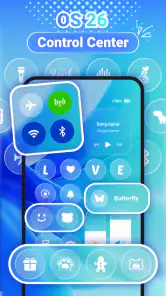
Themepack - App Icons, Widgets is a customization app designed for Android and iOS devices. It allows users to personalize their smartphone experience by providing a wide range of themes, app icons, and widgets. With an intuitive interface, users can easily browse and apply various aesthetic designs to their home screens, making it a popular choice for those who love to customize their devices. Its focus is phone decoration, bringing themes, wallpapers, and widgets together for a more coordinated look.
Pros
- Customizable home screen
- Wide range of icons
- Easy to use interface
- Regular updates
- High-quality widgets
Cons
- Limited free features
- May drain battery
- Requires iOS 14+
- In-app purchases necessary
- Occasional bugs
- Category
- Personalization
- Version
- 1.0.0.3572











