OfficeSuite Pro + PDF
- 7.97K
- 4.5
- Installs
- 1.00M
- Price
- $29.99

Screenshots



Analysis by Reviewed
I tend to judge a mobile office app by what happens when I’m in a hurry: can I find the right file, make a small change, and hand it off without turning a quick task into a troubleshooting session? OfficeSuite Pro + PDF aims to bring document, spreadsheet, presentation, and PDF work together on a phone. In my experience, that breadth is useful, but it works best when I treat mobile editing as a practical extension of a larger workflow rather than expecting a phone to replace a full desktop setup.
Your Mobile Office
First off, let's talk about the basics. OfficeSuite Pro + PDF is like having a mini office right in your pocket. It's available on both Android and iOS, so no one gets left out. The app offers a range of functionalities that are essential for any professional - from creating and editing documents to managing spreadsheets and even working with PDFs. The interface is clean and intuitive, which is great because nobody wants to spend hours figuring out how to format a document on their phone.
Where Workflows Can Get Stuck
A phone is useful for quick corrections, but it is still a cramped place to handle a long report or a complicated spreadsheet. I would treat this as a companion for finishing work between appointments, not a full replacement for a laptop when layout precision matters. Before editing a shared file, make a separate copy if the original is important; that simple habit gives you a safe way back if a mobile change affects formatting you wanted to preserve.
OfficeSuite Pro is a paid business app from MobiSystems. It costs $29.99, is rated for Everyone, and has a 4.5 average from around 87,000 ratings. It has passed one million installs, and its current version is 14.4.51693. Those figures make it a widely used option, but they do not guarantee that every file will look identical across devices. In-app purchases range from $2.99 to $49.99 per item, so I would check the purchase screen carefully before adding anything beyond the main app.
Setup Checks Before Editing
When a document will not open or a change seems missing, I start with the basics rather than assuming the file is damaged: confirm I have selected the intended copy, close and reopen it, and check whether I am looking at a local file or one reached through a connected cloud account. A reliable connection matters when the workflow depends on a cloud-stored document. For an important handoff, I save a fresh copy in the format the recipient expects and reopen it once to check the result.
The app is best suited to people who move among Word, Excel, PowerPoint, and PDF files and want one place to handle ordinary edits. A freelancer could review a proposal on a commute, correct a figure in a spreadsheet, then share a finished PDF after reaching a stable connection. For extensive spreadsheet modeling, detailed slide design, or careful page layout, I would still switch to a desktop office suite; the larger screen and more precise input are real advantages, not shortcomings unique to this app.
Document Editing Made Easy
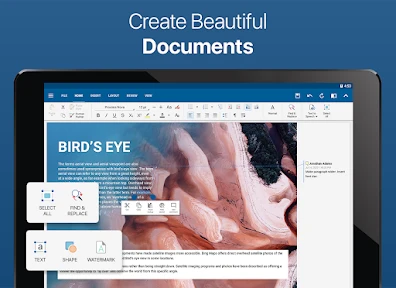
One of the standout features, in my opinion, is the document editing capabilities. You can create, view, and edit Word documents with ease. The app supports various file formats which means you won’t have to worry about compatibility issues when sharing files with your colleagues or friends. Plus, the editing tools are robust enough that you can format your documents just the way you like them.
You May Like

Clash of Clans Is Won Between the Battles

Android Auto Makes the Case for Quieter Car Software

MobiOffice: Transforming Mobile Productivity with Seamless Integration

EA SPORTS FC™ Mobile Soccer: Redefining Mobile Sports Gaming

How Microsoft OneDrive Became a Mobile Productivity Giant

How Google Translate Breaks Language Barriers Effortlessly
For a practical check, I would pay attention to the parts most likely to shift during a handoff: tables, page breaks, and unusual fonts. If a file is going to a client or colleague, export or save a copy and inspect that version before sending it. That is more dependable than judging the document only by how it appears while editing on a small screen.
Spreadsheet Management
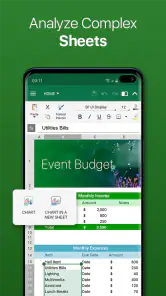
Now, if you’re anything like me, spreadsheets are a necessary evil in the world of work. But with this app, managing spreadsheets becomes a whole lot easier. The app supports Excel files and provides a bunch of functions and formulas to make data handling a breeze. It's super helpful for keeping track of expenses or managing data on the go.
I find mobile spreadsheets most useful for checking totals, updating a straightforward expense log, or correcting a single entry while away from my desk. For a sheet with many linked calculations, I would avoid making broad structural changes on a phone: it is harder to see relationships across tabs and catch an accidental edit. A quick review is a strength; a complex rebuild is a better job for a larger workspace.
PDF Wizardry
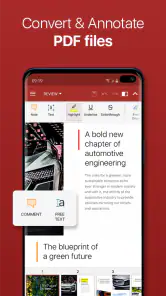
Another feature worth mentioning is its PDF capabilities. The app allows you to view, annotate, and convert PDFs effortlessly. This is particularly handy if you’re someone who constantly deals with contracts or reports. Plus, being able to convert files into PDFs means you can ensure your documents are viewed exactly as you intended.
For a document that needs a quick review, annotations can help me mark a question or flag a passage before I return to the full file later. I would still inspect a converted PDF before sharing it, especially when the original contains dense tables or precise spacing. A PDF is a useful delivery copy, but conversion is not a substitute for checking that the final pages communicate clearly.
Cloud Integration
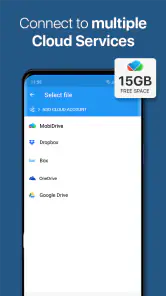
In today's world, cloud storage is a must, and the app has got you covered. The app integrates seamlessly with popular cloud services like Google Drive, Dropbox, and OneDrive. This means you can access your files from anywhere and never have to worry about losing important documents.
If a file appears outdated, I would first check which copy I opened and whether the cloud connection has had time to catch up, then reopen the document before editing again. That basic sequence can prevent two versions from drifting apart. I would not rely on a cloud workflow as the only safeguard for a critical file; keeping a clearly named working copy makes it easier to recover from a mistaken edit or an unexpected sync result.
Recovering a Work Session
When a change seems to vanish, I avoid repeating the edit straight away. First I look for the file I actually changed, then compare its name and location with the version I meant to use. With multiple copies, a suffix such as “final” can be misleading, so a clearer working name tied to the task is more useful than relying on memory. Once I have the intended copy open, I make one small change and confirm that it remains after closing and reopening the file.
If the problem is a formatting shift rather than a missing edit, I narrow it down before changing more. I check a page break, table, or other affected area in the saved output, then decide whether the file needs a small correction or a desktop review. This keeps a minor mobile adjustment from turning into a chain of edits that makes the original problem harder to diagnose.
When the App Is Not the Cause
Not every failed handoff points to the editor. A recipient may be opening a different copy, a cloud-stored file may not yet reflect the latest change, or the document itself may rely on formatting that does not travel neatly between devices. I find it helpful to separate those possibilities: check the saved copy first, then verify which version is being shared, and only then decide whether to edit again. That approach is especially worthwhile when the document is important and several people are passing it around.
For sensitive or time-critical work, I would also keep the original untouched until the recipient confirms the new file is usable. A separate output copy makes it easier to compare versions and recover if the exported page layout is not right. This is not a special trick limited to OfficeSuite; it is a sensible safeguard whenever a mobile app is part of a document workflow.
Who Should Choose It
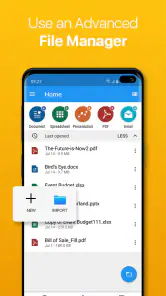
Compared with using separate document, spreadsheet, presentation, and PDF apps, having those formats together can reduce the small interruptions of switching tools. The trade-off is that someone who only needs occasional PDF reading may find a dedicated PDF app simpler, while people committed to a particular office ecosystem may prefer its own mobile apps for familiar workflows. I would choose this suite when file variety and quick edits matter more than doing every task with the deepest desktop controls.
It is also worth thinking about the purchase before settling into a workflow. The app was released on July 5, 2010, and the minimum OS requirement is 7.0. If you are comparing options, weigh the $29.99 price against how often you will edit office files rather than only view them, and remember that optional in-app purchases can add to the cost. I would skip it if my work rarely goes beyond opening documents or if I need advanced formatting all day.
A Day-to-Day Fit
Imagine finishing a client visit and noticing one number in an expense sheet needs correcting before the day’s notes go out. I would open the working copy, make that focused change, check the total, and then move to the report or PDF that needs a quick review. The convenience is not that every task becomes effortless; it is that I can handle several kinds of small office jobs without switching between separate apps. If the spreadsheet turns out to have complicated formulas or the report needs careful pagination, I would save the mobile work and finish the detailed pass on a computer.
That distinction helps set expectations. OfficeSuite Pro suits people who are often away from a desk but still need to read, revise, and pass along familiar office files. It is less compelling for someone whose work is almost entirely long-form editing, advanced spreadsheet analysis, or presentation design, where precise controls and a large screen make a bigger difference than having several formats in one place.
Overall, I’d say this is a solid choice for anyone needing a comprehensive office suite on the go. It’s packed with features that cater to a wide range of professional needs, and its user-friendly interface makes it accessible for everyone. So, if you’re on the hunt for a reliable app to handle your office tasks, this one might just be worth a try.
My practical recommendation is to decide based on the work you actually do from your phone, not on the number of file types an app can open. If you regularly make short edits across documents, spreadsheets, presentations, and PDFs, the all-in-one approach can justify the cost and reduce friction. If you mainly read files, or if every change must preserve intricate formatting, a simpler viewer or your usual desktop suite may suit you better. I would start with a non-critical file, learn how its saved copies behave in my workflow, and then trust it with more important handoffs.
OfficeSuite Pro + PDF Frequently Asked Questions
Who develops OfficeSuite Pro + PDF, and what is it designed for?
OfficeSuite Pro + PDF is developed by MobiSystems and is a business app for handling office documents on mobile. Its summary describes Word, Excel, PowerPoint, and PDF tools at your fingertips, making it relevant for people who want to manage several common document types in one app. Consider whether that combination fits the work you do on your phone or tablet.
Is OfficeSuite Pro + PDF suitable for younger users?
OfficeSuite Pro + PDF has an Everyone content rating, so it is considered suitable for a broad audience. That rating addresses the app’s content, not whether its editing tools or purchase options are appropriate for every user. If a child will use it, it is sensible for an adult to review the available purchases and decide which document tasks are suitable.
Can I use OfficeSuite Pro + PDF on my device?
OfficeSuite Pro + PDF is an Android business app, and its minimum operating system requirement is Android 7.0. Before downloading, check that your device meets this requirement. The app is designed to bring common office document tasks together on mobile, so it may suit users who want to work with documents, spreadsheets, presentations, and PDFs from their phone or tablet.
What does OfficeSuite Pro + PDF cost, and are there additional purchases?
OfficeSuite Pro + PDF is listed at $29.99, and in-app purchases range from $2.99 to $49.99 per item. Consider which tools you expect to use and review the purchase options shown in the app before committing. The app’s age rating is Everyone, so its content is suitable for a broad audience, although purchase decisions should still be made with care.
What are the main features of OfficeSuite Pro + PDF?
OfficeSuite Pro + PDF offers a comprehensive suite of tools for document creation, editing, and management. It includes a word processor, spreadsheet editor, presentation creator, and PDF viewer/editor. The app supports a wide range of file formats and provides cloud storage integration, ensuring seamless access to your documents from anywhere. Additionally, it includes advanced security features to protect sensitive information.
Pros
- Comprehensive editing tools for documents.
- Seamless integration with cloud services.
- User-friendly interface and design.
- Supports a wide range of file formats.
- Includes PDF editing capabilities.
Cons
- Requires subscription for full features.
- Large app size consumes device storage.
- Occasional lag in document loading.
- Limited free version capabilities.
- Interface may feel cluttered for some.

- Category
- Business
- Version
- 14.4.51693













