Talk & Translate - Translator
- 667.00
- 4.3
- Installs
- 5.00M
- Price
- Free

Screenshots
Analysis by Reviewed
When I need to make myself understood in another language, the hard part is rarely translating one perfect sentence. It is choosing the right way to enter the words, getting the result to the other person, and dealing with the moment when the conversation takes an unexpected turn. Talk & Translate - Translator brings voice, text, and photo translation together, which makes it useful when I want to switch methods instead of reaching for a separate tool each time.
Choosing the right starting point
I’d reach for voice translation when I’m asking a quick question or speaking with someone face to face. For a name, address, or sentence I want to check carefully, typing gives me more control over what goes into the translation. Photo translation is a different kind of shortcut: it can help with text on a menu or sign when copying it by hand would be slow or error-prone.
That choice matters in a real travel situation. If I’m trying to find a bus stop, I can speak a short question; if I’m looking at a timetable, a photo is more practical. I’d keep the phrase simple either way. Short, specific sentences are easier to review and less likely to become confusing when a source phrase has several possible meanings.
A small routine for more reliable results
Before I start, I’d make sure I know which language I’m translating from and which one I need. That sounds obvious, but it is an easy detail to overlook when switching between two people or several destinations. For a spoken request, I’d decide on the key information first—where I want to go, what I need, or what I’m asking—and leave out side comments. This gives me a clearer result to show or say aloud.
I’d also treat the first translation as a draft when the wording matters. If I can, I’d check the translated text before passing the phone across, especially for a street name, meeting time, or dietary request. A second look is a useful pause, not needless fuss: it gives me a chance to catch a source phrase that was too vague before someone acts on it.
Smooth Conversations Across Languages
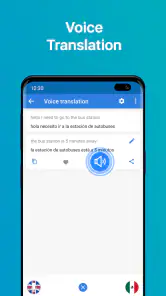
First things first, let’s talk about how Talk & Translate - Translator makes language barriers feel like a thing of the past. I’ve tried a few translators in my time, but this app stands out due to its seamless real-time translation. Imagine this: you’re at a bustling market in Spain, trying to haggle over the price of a vibrant tapestry. You speak into the app, and voilà, the magic happens. The translation is quick and surprisingly accurate, letting you focus on getting the best deal.
User-Friendly Interface
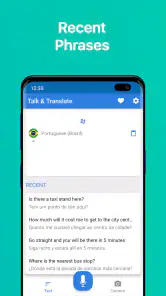
One of the first things I noticed about the app is its clean and intuitive interface. You don’t have to be a tech wizard to navigate through it. It’s all neatly laid out, and finding the right settings or language pairs is a breeze. There’s a little microphone button that lets you speak your phrases, and it’s almost like having your personal interpreter in your pocket.
More From Our News Desk

Weather by Xiaomi Review: Clear at a Glance, Less Clear Up Close

X Under Pressure: Can It Recover When Posting Goes Wrong?

Clash of Clans Is Won Between the Battles

Android Auto Makes the Case for Quieter Car Software

MobiOffice: Transforming Mobile Productivity with Seamless Integration

EA SPORTS FC™ Mobile Soccer: Redefining Mobile Sports Gaming
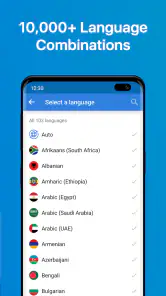
What’s really cool is that it supports a plethora of languages. I gave it a whirl with some lesser-known languages, and it didn’t disappoint. You can switch between languages effortlessly, which is perfect for globetrotters or anyone keen on picking up a new lingo.
Getting from translation to conversation
A useful way to handle a two-person exchange is to treat the app as a shared handoff rather than a device that talks for you. I’d let the other person see or hear the translated result, then pause so they can respond in their own language. In a noisy place, taking turns with short phrases is more practical than trying to capture a long back-and-forth in one go.
For a message that needs precision, I’d type it first and check the wording before showing it. For spoken exchanges, I’d say one thought at a time and keep names, numbers, and directions especially clear. These small habits make a translator easier to use, but they do not make it an interpreter: humor, local expressions, and ambiguous requests can still come out oddly.
When another person needs to take over
Translation is only one part of the exchange; the handoff matters too. I’d turn the screen so the other person can read the result rather than asking them to trust a voice they may not recognize. Then I’d give them room to respond, instead of immediately starting another phrase. That brief pause makes it easier to notice whether they understood, and it avoids turning a practical question into a rushed sequence of disconnected translations.
For directions, I’d confirm the destination by repeating a place name or checking it against a sign or map. For a purchase, I’d make sure the amount is understood before paying. Those checks are useful even when the translation sounds fluent: a polished sentence can still carry the wrong detail if the original request was unclear. The app can help me bridge a language gap, but I still need to pay attention to the person and the situation.
Offline Mode – A Lifesaver
Traveling often means encountering sketchy Wi-Fi or no internet at all, right? Well, Talk & Translate - Translator has got your back with its offline mode. Before heading out, you can download the necessary language packs. This feature is a real lifesaver when you’re off the grid but still need to ask for directions or order your favorite dish.
The practical catch is preparation. I’d choose the languages I expect to need and download their packs before leaving reliable internet, then try a basic phrase while I still have time to adjust. Offline access is most reassuring for routine exchanges; I would not rely on a translation alone for a medical emergency, legal matter, or any instruction where a misunderstanding could have serious consequences.
Planning for an offline day
For a full day out, I’d prepare around the moments when connectivity is most likely to become inconvenient: finding a station, reading a menu, or asking where to meet someone. I’d install the relevant language packs in advance and keep a few likely phrases simple enough to type or say without improvising a long explanation. This is not a replacement for checking the result, but it reduces the chance that I’ll be trying to set things up while standing in a queue or looking for a platform.
Offline use is most useful as a backup for basic communication, not as a reason to stop thinking about context. If a sign has unusual formatting or the sentence depends on local slang, I’d be cautious about treating the result as definitive. A printed address, a map, or asking someone to point to the right place can be a better companion to the translation than repeatedly trying to rephrase the same unclear request.
Additional Features Worth Mentioning
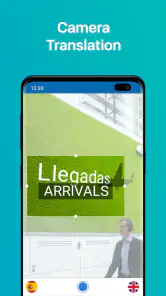
Besides the core translation capabilities, the app offers some neat extras. There’s a dictionary feature that provides word definitions and synonyms, which is super handy for deepening your understanding of a language. And for those who love to learn through visuals, the app supports image translation. Just snap a photo of a sign or menu, and the app deciphers it for you.
The dictionary is especially useful when a translation feels technically correct but not quite right for the sentence. I’d use the definitions and synonyms to explore a word, then check it in context rather than choosing a synonym just because it looks familiar. With photos, framing is worth a moment: capture the whole line clearly and avoid glare where possible, since cropped or hard-to-read text gives the translation less to work with.
Also, if you’re in a pinch and need a conversation translated, the app’s conversation mode is a gem. It lets two people speak their languages into the app, and it translates back and forth, making dialogue smooth and natural.
Making photo translation useful
For a menu, I’d take a picture that includes the full item and any nearby description, rather than cropping down to one unfamiliar word. A single term can have several meanings, while the surrounding words often make the intended sense clearer. If the first image is difficult to read, moving closer or changing the angle is a better next step than assuming the translation is wrong. This is a small but practical workflow for signs, labels, and printed notices.
Photo translation is less convenient when text is handwritten, tiny, partly covered, or arranged in a complicated layout. In those cases, I’d switch to typing the key words or ask a person nearby if the detail is important. The useful strength here is having another input option ready; it is not a guarantee that every image will turn into a clean, complete translation.
Who will get the most from it
I can see this being a good fit for travelers who want several ways to handle everyday language problems, and for learners who like moving between translations and dictionary definitions. Its voice, text, and image options make it more flexible than a basic phrasebook, while offline packs can help when connectivity is unreliable. It is also free to start, with in-app purchases ranging from $3.99 to $39.99 per item, so I’d check what is included before buying anything.
On the other hand, someone who only needs to translate an occasional sentence may find a simple web translator quicker, especially if they are already using one. A phrasebook can be a better choice for rehearsed travel essentials, and a qualified human translator is the safer option for sensitive or high-stakes material. I would not choose this app as a substitute for language study either: it helps me get through a task, but it cannot teach all the context behind a phrase.
Where it fits beside familiar alternatives
Compared with a phrasebook, this app is more adaptable when the exact question changes, since I can enter a fresh sentence or use a photo rather than searching for a memorized line. A phrasebook still has an advantage when I want a dependable set of prepared basics without composing anything on the spot. A web translator can be quicker for a one-off text when I already have a connection and do not need voice or image input. I’d choose based on the task, not assume one tool is best for every language problem.
For someone learning vocabulary, the dictionary adds a useful step beyond simply accepting a translated sentence. I’d use it to explore a word after the immediate conversation, then make a note of the phrase in context if I want to remember it. But if the goal is structured lessons, practice, or a deeper explanation of grammar, a dedicated learning resource is a better fit. This app is strongest as a practical helper, not a complete course.
A realistic day of use
Imagine arriving in a town where I don’t speak the local language well. I might photograph a station notice to understand which direction to go, type the name of my accommodation to avoid mangling it aloud, then use a short spoken question to check where the entrance is. If I later stop for lunch, I can use an image for the menu and switch to typed text if I need to explain a specific request. Each method solves a different part of the same day, and I can choose the one that gives me the clearest input.
The point is not to keep the phone between me and everyone I meet. I’d use it to open the exchange, then look up and listen for the response. If the answer changes the plan or includes an important detail, I’d confirm it in a second way—by showing a place name, checking a sign, or asking for a point on a map. That approach feels more natural and less brittle than expecting one translation to carry the whole interaction.
What to expect from the app
Talk & Translate is a Books & Reference app from MobiSystems. It is free to download, rated for Everyone, and currently at version 12.13.772; it requires Android 8.0 or later. Its 4.3 average from around 11,000 ratings and more than five million installs suggest that many people have found a place for it in their toolkit, though those figures are not a promise that every translation will suit every situation.
It is built around practical language help rather than a single input method, and that is the main reason I’d keep it available while traveling. If you are deciding whether to install it, the useful question is whether you’ll actually use voice, text, photos, or offline packs—not just whether you occasionally need a translated word. I’d set up likely languages in advance, use brief phrases, and treat uncertain results as a prompt to clarify rather than an unquestionable answer.
Who may prefer a different tool
I’d skip it if I only needed an occasional phrase and already had a translator I trust, or if I wanted a fixed set of travel sentences that I could read without composing anything. It is also the wrong tool for a contract, medical instructions, or a sensitive conversation where a small wording mistake could matter; that is when I’d seek qualified human help. For casual travel, its range of input methods is useful, but convenience should not be confused with certainty.
If I were installing it for a trip, I’d first check that my phone meets the Android requirement, choose the languages I am likely to need, and prepare offline access before leaving a dependable connection. The app is free to download, while some purchases are available in the app, so I’d look carefully at the purchase details before deciding whether any paid option is worthwhile for my use. That makes it easier to judge the tool on the tasks I actually expect to do.
Final Thoughts
All in all, Talk & Translate - Translator is a solid companion for anyone needing a reliable translation tool. Whether you’re traveling, studying a new language, or just curious about other cultures, this app opens up a world of possibilities. It’s like having a universal translator from sci-fi movies, right in your pocket.
So, why not give it a go? Your next adventure could be just a few words away!
Talk & Translate - Translator Frequently Asked Questions
Is Talk & Translate - Translator free to download, and are there in-app purchases?
Talk & Translate - Translator is free to download, so you can try the app without paying upfront. It also offers in-app purchases, priced from $3.99 to $39.99 per item. If you are considering a paid option, check the purchase details in the app before confirming so you know what is included and whether it suits your needs.
What is Talk & Translate - Translator and how does it work?
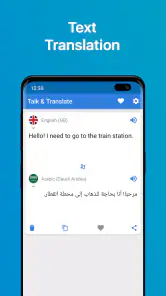
Talk & Translate - Translator is a mobile application designed to facilitate communication across different languages. The app functions by allowing users to either type or speak into their device, and it will instantly translate the input into the desired language. It supports multiple languages and is ideal for travelers, business professionals, or anyone needing quick translations on the go.
Which languages are supported by Talk & Translate - Translator?
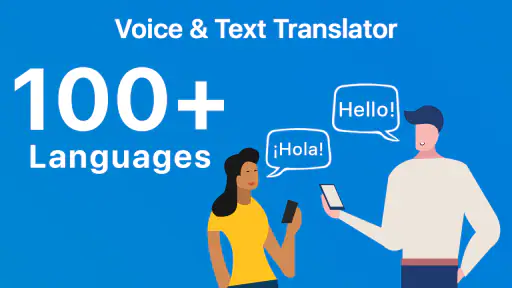
Talk & Translate - Translator supports a wide range of languages, making it a versatile tool for users worldwide. The app includes popular languages such as Spanish, French, Chinese, German, and many others, ensuring that users can communicate effectively regardless of their location or the language they encounter. Its summary highlights translation in over 100 languages, including voice, text, and photos, with offline use described as an option.
Can Talk & Translate - Translator translate voice, text, and photos?
Yes. Talk & Translate - Translator is presented as an AI translator for voice, text, and photos, giving you several ways to handle everyday translation needs. You can speak or enter text, and photo translation can help when the words you need are printed rather than spoken or typed. The app is intended to make quick language assistance convenient across these formats.
Is an internet connection required to use Talk & Translate - Translator?
Yes, an internet connection is generally required to use Talk & Translate - Translator effectively. The app relies on online databases to provide accurate and up-to-date translations. However, some features, like offline translation for certain languages, might be available, but users should check the app settings for offline capabilities.
Pros
- Supports multiple languages.
- Voice and text translation.
- User-friendly interface.
- Offline mode available.
- Fast and accurate translations.
Cons
- Some languages lack dialect support.
- Requires in-app purchases for full features.
- Occasional bugs in voice recognition.
- Ads can be intrusive.
- Limited offline language packs.
- Category
- Books & Reference
- Version
- 12.13.772