Oxford Dictionary & Thesaurus
- 8.76K
- 4.3
- Installs
- 50.00M
- Price
- Free

Screenshots
Analysis by Reviewed
My first test for a phone dictionary is simple: can I resolve a question about a word and return to what I was doing without turning the lookup into a separate project? Oxford Dictionary & Thesaurus is designed for that kind of everyday reference. Developed by MobiSystems, it brings dictionary entries and thesaurus suggestions together in a Books & Reference app, which is useful when I want to check meaning and wording in the same place.
Quick checks and the pace of a lookup
For short searches, the experience is built around getting from a word to useful information with little fuss. Predictive search can help when I know only part of a spelling, and detailed definitions are more useful than a bare one-line gloss when I need to understand how a word works in context. I wouldn’t treat any dictionary app as a substitute for careful reading, but this one suits the quick pauses that come up while drafting, studying, or reading.
A practical habit is to look up the whole phrase or sentence around an unfamiliar word after checking its definition. That helps me avoid choosing a synonym that is technically related but wrong for the tone or meaning I need. The thesaurus is most valuable as a prompt for options, not as an automatic replacement tool: I still check each suggestion against the sentence before using it.
When study or writing gets intensive
The app becomes more useful when a task involves several lookups in a row. A student revising an essay, for example, can check a word’s meaning, compare alternatives, and listen to a pronunciation without opening a separate dictionary and thesaurus. Personalized word lists offer a way to gather terms for later review, which is more practical than relying on memory when reading material with lots of unfamiliar vocabulary.
There is a trade-off, though. A large reference collection can encourage rabbit holes: one definition leads to a synonym, then to another word, and suddenly the writing session has stalled. I find it works best to save a useful word and return to the draft, rather than treating every lookup as an invitation to browse indefinitely. For deep language study, a course or a focused learning tool may provide more structure than a reference app alone.
Reliability, offline use, and device fit
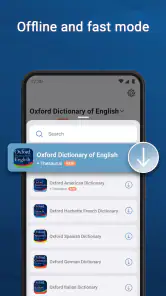
Offline access is a meaningful advantage when I’m travelling, working somewhere with patchy reception, or trying to avoid interruptions. It makes the app a dependable option for basic reference on the move. Audio pronunciations can add another layer when I’m unsure how a word sounds, while the British and American options are helpful when the variety matters to a class, a presentation, or a piece of writing.
The app is free to download and rated for Everyone. Its current version is 15.9.1144, and it requires Android 8.0 or later. In-app purchases range from $0.99 to $39.99 per item, so I’d check what is included before paying for anything. It has a 4.3 average from around 534,000 ratings and more than 50 million installs, which suggests a broad audience, though popularity alone can’t tell me whether a particular workflow will suit me.
More From Our News Desk

Weather by Xiaomi Review: Clear at a Glance, Less Clear Up Close

X Under Pressure: Can It Recover When Posting Goes Wrong?

Clash of Clans Is Won Between the Battles

Android Auto Makes the Case for Quieter Car Software

MobiOffice: Transforming Mobile Productivity with Seamless Integration

EA SPORTS FC™ Mobile Soccer: Redefining Mobile Sports Gaming
All-in-One Language Tool
The Oxford Dictionary & Thesaurus app combines two essential tools into one slick interface. It's like having a language guru in your pocket! You get comprehensive definitions, synonyms, and antonyms, making it easier than ever to find the right word. The definitions are detailed and give context, so you not only learn what the word means but how to use it effectively in a sentence. It's a real game-changer for writing essays or crafting the perfect email.
Intuitive Design
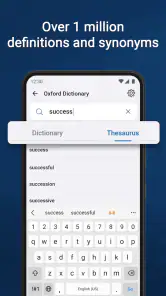
One of the first things you'll notice is the app's user-friendly design. The search function is incredibly intuitive. You start typing, and it predicts what you're looking for with eerie accuracy. It's a bit like magic! Plus, the app works offline, so you can continue your word exploration even when you’re in airplane mode or in a remote area without internet access.
Extra Features Galore
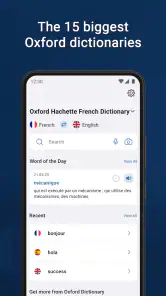
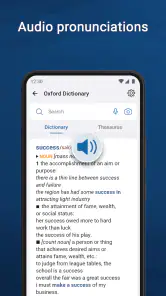
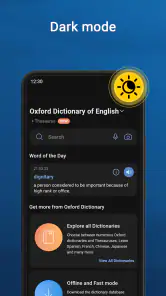
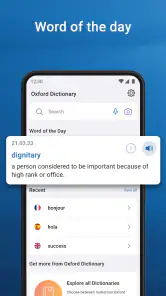
Beyond the basics, the app offers a wealth of additional features that are worth exploring. For instance, it includes audio pronunciations for both British and American English. This is perfect for anyone trying to nail that accent or simply wanting to hear how a word is supposed to sound. There’s also a handy "Word of the Day" feature which is a fun way to learn new vocabulary daily. Plus, for those who love keeping track of their learning, the app allows you to create personalized word lists.
Why You’ll Love It
What really makes this app stand out is its reliability and credibility. We’re talking about Oxford, after all! It’s a name synonymous with quality and trust in the world of language. The app brings that same level of excellence to your smartphone, ensuring you have access to one of the most respected language resources out there. Whether you’re prepping for an exam or just trying to impress your friends with some fancy words, this app has got your back.
In conclusion, the Oxford Dictionary & Thesaurus app is more than just a tool; it’s a dynamic companion in your journey to mastering the English language. With its robust features, ease of use, and the backing of the prestigious Oxford name, it's an invaluable resource for anyone looking to enhance their vocabulary and language skills. So, why not give it a try? You might just find yourself falling in love with words all over again.
Choosing it over a browser or another reference app
Compared with searching the web for each word, a purpose-built dictionary is less distracting: I can stay with the definition, check a synonym, and get back to my page instead of sorting through unrelated results. A free general dictionary may be enough if I only need occasional meanings, while this app makes more sense when I regularly want a thesaurus alongside definitions. The choice is less compelling if I need specialist terminology or translations between languages; those are different jobs from improving English vocabulary and grammar.
A small routine that makes the features useful
In an ordinary evening study session, I might meet an unfamiliar word while reading, check its definition, listen to its pronunciation, then save it to a personal list if I expect to meet it again. Later, I can revisit the list rather than searching for the same term from scratch. That sequence turns the app’s reference features into a lightweight study routine, without pretending that a saved list by itself replaces practice or a structured course.
The Word of the Day can also serve as a low-pressure starting point when I have a spare minute, but I wouldn’t use it as a complete vocabulary plan. If a new word is relevant, I try writing a sentence with it or noting it beside a passage where it appeared. That extra step helps separate a word I can recognize from one I can use confidently.
Who will get the most from it
I’d recommend it most to English-language students, frequent readers, and anyone who edits their own writing and wants a definition and alternatives in one place. It is also handy for checking pronunciation before saying an unfamiliar word aloud. Someone who only looks up a word now and then may be perfectly happy with a basic free reference source, and a learner who needs lessons, translation, or detailed grammar instruction should pair this with a more focused resource.
On performance, I judge it by the short lookup workflow rather than by claims about speed or battery use: the useful questions are whether search gets me to an entry and whether I can continue when offline. Like any sizable reference app, it may take up more room than a simple web shortcut, so storage-conscious users should consider that trade-off. If it feels slow or stops responding, closing and reopening it is a sensible first step; I would also check that the installed version is current before troubleshooting further.
Final verdict for everyday reference
Oxford Dictionary & Thesaurus is a strong fit when I want English definitions, synonyms, pronunciation help, and a way to collect words for later. Its offline usefulness and combined dictionary-thesaurus approach are the practical reasons I’d keep it available. I’d skip it if my priority is translation, specialist research, or a guided language course, and I’d review in-app purchase options before spending. For routine reading and writing, though, it offers a convenient reference companion rather than a full language-learning system.
Using it while reading and writing in real time
A realistic use is editing a message just before sending it. If I hesitate over a word, I can check its definition first, then use the thesaurus to compare alternatives and listen to pronunciation if I’ll later say the same point aloud. I would still reread the full sentence: a replacement may be accurate in isolation but sound too formal, too strong, or simply unnatural in that particular message. This quick context check is what makes the tool useful, rather than accepting the first suggestion.
For reading, I’d avoid interrupting every page to collect unfamiliar terms. I mark only words that block the meaning or recur often enough to matter, then add the useful ones to a personal list. That keeps a list manageable and gives later review a purpose. If the word is a one-off name or specialist term, saving it may add clutter without helping me remember vocabulary I’ll actually use.
Making word lists work for you
A word list is most effective when I give each saved entry a reason to stay there. I might keep terms for an upcoming class together in my mind, or collect vocabulary from a book I’m reading; either way, I can revisit words in a meaningful group instead of treating the list as an unfiltered archive. When reviewing, I try to recall the meaning before opening the entry, then make my own example sentence. That small effort is more likely to reveal whether I understand the word than rereading a definition passively.
There is a useful distinction between reference and learning here. The app can help me investigate a word and keep track of selections, but the habit of recalling and using those words is still mine. If I need a planned syllabus, exercises, or feedback on my writing, I would use a dedicated learning resource alongside it rather than expecting a dictionary to provide that structure.
What to expect from a focused reference app
Compared with a web search, the advantage is a more contained workflow: definitions, alternatives, and pronunciation support sit together, which reduces the temptation to open unrelated pages. Compared with a lightweight dictionary that only answers basic meaning questions, the extra thesaurus and word-list tools matter most to someone who writes or studies regularly. The trade-off is that a broad reference app can feel like more than a casual user needs, especially if all they want is an occasional spelling check.
It is not the right solution for every language task. I would choose a translation tool for moving between languages, a specialist reference for technical vocabulary, and a structured course for lessons and practice. Oxford’s strengths are narrower and clearer: English word meanings, alternatives, and pronunciation in a portable reference. Knowing that boundary helps avoid expecting it to solve problems it was not built for.
Practical expectations on a phone
For a few searches between tasks, I’d expect the app’s value to come from its focused design rather than from any promise of exceptional speed. When I’m doing many lookups, I keep the original sentence visible in my notes or book and search one term at a time, so I can compare entries without losing the context that matters. This also makes it easier to stop once I have enough information instead of browsing synonyms indefinitely.
Offline access is particularly useful when a commute or a quiet study spot has unreliable reception, but I would check that the reference material I need is available before depending on it for an important session. On a phone with limited storage, a web dictionary may be the simpler choice; on an older or constrained device, keeping other apps closed while studying is a straightforward way to reduce friction. I would not assume that a dictionary app needs to run continuously in the background for occasional lookups.
Who may prefer another option
I’d steer a very occasional user toward whichever basic dictionary already fits their routine, rather than asking them to maintain word lists they won’t revisit. Writers who need specialist terms should verify them in a subject-specific source, because a general English reference is not a substitute for technical guidance. And learners who want a teacher-like sequence of lessons may find this app too open-ended: it answers questions well, but it does not turn every lookup into a complete study plan.
For someone who reads widely, drafts often, or wants to speak with more confidence, the balance is better. The British and American pronunciation choices can help when preparing to read aloud, while a saved list can turn incidental discoveries into material for later practice. I’d start with those concrete needs rather than trying to use every feature at once.
My performance verdict
My overall view is that Oxford Dictionary & Thesaurus earns its place through practical access to several kinds of English reference, not through a claim that it will transform a phone or replace a language course. Its most convincing workflow is a quick meaning check followed by a careful synonym choice, with offline access and saved words supporting longer reading or study sessions. The free download makes it easy to try, while the in-app purchase range is a reason to review the available options before committing to anything paid.
With an average rating of 4.3 and around 8,800 written reviews, it has attracted substantial user attention, but I’d still judge it by whether its dictionary-and-thesaurus combination matches my habits. If I need translations, technical definitions, or a guided curriculum, I’d choose another tool. If I want a handy English reference for reading, writing, and pronunciation checks, this is a sensible companion to keep within reach.
Oxford Dictionary & Thesaurus Frequently Asked Questions
Can I use Oxford Dictionary & Thesaurus to check a word while reading or writing?
Yes. The app is designed as a handy reference for looking up English words, checking meanings, and exploring synonyms. You can use it when an unfamiliar word interrupts your reading or when you want a more suitable word while writing. Its definitions, example sentences, and thesaurus tools can help clarify meaning and give you context for choosing how to use a word.
Is Oxford Dictionary & Thesaurus free to download, and are purchases optional?
The app is free to download, and it also offers in-app purchases ranging from $0.99 to $39.99 per item. You can install it without paying upfront, then review any purchase options in the app store before buying. This setup may suit people who want to try the reference tools first, while users considering paid options should check the details of each item.
Is Oxford Dictionary & Thesaurus suitable for students and everyday readers?
Yes. Oxford Dictionary & Thesaurus is a Books & Reference app for anyone who wants help understanding English words, checking synonyms, or building vocabulary. Its dictionary and thesaurus tools can be useful for study, writing, and everyday reading. The app is rated for Everyone, making it suitable for a broad audience, though younger users may still benefit from guidance when exploring unfamiliar words.
What features does the Oxford Dictionary & Thesaurus app offer?
The Oxford Dictionary & Thesaurus app provides users with comprehensive definitions and synonyms of English words. It includes over 350,000 words, phrases, and meanings, along with audio pronunciations, example sentences, and word origins. The app also features offline access, allowing users to search for words without an internet connection, and offers a daily word feature to expand your vocabulary.
Is the Oxford Dictionary & Thesaurus app available for both Android and iOS devices?
Yes, the Oxford Dictionary & Thesaurus app is available for download on both Android and iOS platforms. Users can find the app on the Google Play Store for Android devices and the Apple App Store for iOS devices. It is designed to be compatible with most modern smartphones and tablets, ensuring a smooth and user-friendly experience across different devices.
Pros
- Extensive word database for comprehensive search
- User-friendly interface with easy navigation
- Offline access to dictionary and thesaurus features
- Regular updates keep definitions and usage current
- Audio pronunciations for accurate learning
Cons
- Requires significant storage space on device
- Some features are locked behind a paywall
- Occasional slow loading times
- Limited language support beyond English
- Ads can be intrusive in free version
- Category
- Books & Reference
- Version
- 15.9.1144