Microsoft PowerPoint
- 18.57K
- 4.8
- Installs
- 1.00B
- Price
- Free

Screenshots


Analysis by Reviewed
I tend to judge a presentation app by what happens when a plan changes at the last minute: can I fix a slide on a phone, share it without confusion, and still trust what I’m sending? Microsoft PowerPoint is a familiar option for that kind of work, especially if your school, workplace, or collaborators already use Microsoft files. Microsoft Corporation makes it, and it sits in the productivity category. It is free to install, rated for Everyone, and has an average rating of 4.8 from around 3.7 million ratings, with more than a billion installs. Those figures suggest broad use, but what matters to me is whether the mobile experience suits the job in front of you.
Using PowerPoint on a phone
I find that the phone version is most useful when I treat it as a focused companion to a larger-screen workflow, rather than a miniature desktop replacement. In this section, I’ll look at how to choose mobile tasks that are quick to check and easy to undo, while keeping more demanding layout decisions for later. That distinction also helps explain where the app’s familiar workspace is genuinely convenient.
A familiar workspace, with a smaller canvas
First things first, downloading Microsoft PowerPoint on your phone is a breeze. Whether you're an Android aficionado or an iOS devotee, you'll find it in your respective app store. It’s free to download, which is a sweet deal, though some features require a Microsoft 365 subscription.
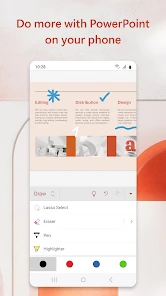
Let’s talk about the interface. It’s clean, intuitive, and feels a lot like its desktop counterpart, which is great if you're already familiar with it. You know how sometimes apps try to reinvent the wheel for mobile and end up complicating things? Not here. You’ve got your usual tabs like Home, Insert, Design, and Slide Show, all nestled neatly at the bottom of the screen for easy access.
The app is pretty snappy too! Switching between slides and editing text is smooth, and there’s minimal lag, which is a relief. Nobody likes lag, right? It’s like trying to swim through molasses.
The trade-off is the screen itself. A phone works well for correcting a typo, changing a heading, or moving through a deck, but detailed layout work is harder when several objects compete for a small editing area. I use mobile edits for targeted fixes and leave intricate alignment or a full visual redesign for a larger screen. That division of labor helps avoid the false confidence of thinking a slide is polished simply because it looks tidy on a phone.
Practical editing and presenting
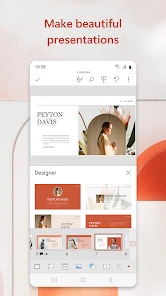
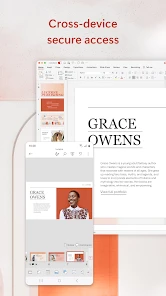
Microsoft PowerPoint on mobile doesn’t skimp on features. You can create new presentations or edit existing ones with almost the same flexibility you’d expect on a PC. It supports a variety of file formats, and you can sync your work with OneDrive to seamlessly switch between devices.
More From Our News Desk

Weather by Xiaomi Review: Clear at a Glance, Less Clear Up Close

X Under Pressure: Can It Recover When Posting Goes Wrong?

Clash of Clans Is Won Between the Battles

Android Auto Makes the Case for Quieter Car Software

MobiOffice: Transforming Mobile Productivity with Seamless Integration

EA SPORTS FC™ Mobile Soccer: Redefining Mobile Sports Gaming
A useful workflow is to draft the story and slide order on a computer, then use the phone for small changes while commuting or waiting for a meeting. When I need to revise a figure, I check the slide title and surrounding text too; a quick number change can leave the explanation out of date. Syncing through OneDrive can make switching devices convenient, but I still make sure the latest edit has saved before closing the app or moving to another device.
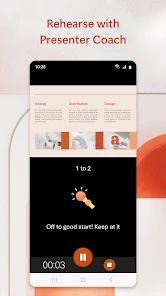
One feature that stands out is the ability to present directly from your phone. Yep, you heard that right! You can cast your presentation to a larger screen using Chromecast or similar devices. It’s perfect for those impromptu meetings or when you need to impress on the fly.
For a real-world example, imagine a colleague asks for one final change just before a room presentation. I can update a short line on the phone and use it to show the deck, rather than reopening a laptop just for that correction. I would still test the screen connection and advance through the slides before everyone arrives: casting is handy, but it adds a device and connection step that a direct computer presentation may avoid.
Sharing, access, and collaboration
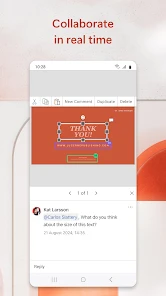
In today’s world, collaboration is key, and PowerPoint delivers on this front too. You can easily share your presentations with colleagues or friends and even work on them simultaneously. The real-time collaboration feature is a game-changer, especially when you’re racing against the clock to meet a deadline.
There’s also an option to leave comments and feedback directly on slides. It’s like having a virtual brainstorming session without the hassle of coordinating schedules. Just drop a note, and your team can respond when they’re able.
When a deck contains work material, personal details, or draft figures, I treat sharing as a decision to make deliberately rather than a routine tap. I check which presentation I have open and who I intend to share it with before sending anything. Comments are useful for discussion, but they can also make a slide feel crowded if a team uses them as a substitute for a clear final edit. I find it helpful to resolve feedback and review the slides again before presenting.
PowerPoint’s fit also depends on the group. If teammates already exchange PowerPoint files and use Microsoft tools, it is a natural choice. Google Slides can be more convenient when a team mainly works in Google’s ecosystem, while a lightweight design-focused presentation tool may suit someone who wants ready-made visual layouts more than familiar slide editing. Switching tools solely for a quick mobile correction is rarely worth it; for ongoing group work, matching the team’s habits can matter more than any one feature.
Trust, account choices, and careful sharing
For me, trust in a presentation app is less about a reassuring slogan and more about whether I can make sensible choices at the moments that matter. Here, the useful visible decisions are practical ones: which deck I open, whether I edit or share it, and who I intend to involve. I avoid treating a file as harmless just because it is only a slide deck. A presentation can contain unpublished plans, class work, names, or figures that are not ready for wider circulation.
When I’m working with material I would not want casually shared, I pause before collaboration and consider whether the people involved actually need access. I also look over the presentation itself before sending it: the opening slide, notes or comments that may remain in view, and any draft content that belongs in a working copy rather than a presentation copy. This is a simple habit, not a substitute for an organization’s rules about handling confidential files.
Account and subscription choices deserve the same care. The app is free to install, but some capabilities require a Microsoft 365 subscription, and in-app purchases range from $0.99 to $129.99 per item. I would not assume that every tool I want is included at no cost. Before relying on a particular feature for a class or work deadline, I would check what is available on my account and device. That avoids discovering a limitation only when I am away from a computer and short on time.
There is a useful distinction between editing locally as part of a quick task and building a shared workflow around cloud syncing and collaboration. OneDrive can help carry changes between devices, but it also means I need to be attentive to which copy is current. My own routine is to finish the edit, check that it has saved, and then reopen or revisit the deck from the device I will use next. That extra check is especially worthwhile when more than one person is changing slides.
Small-screen decisions that save time
Mobile editing is most effective when I decide in advance what kind of change belongs on the phone. Replacing a phrase, correcting a date, or removing an outdated line is a contained task. Reworking a diagram or trying to make several objects line up precisely is a different job; the phone can make each element feel fiddly, and it is easy to spend longer nudging things than the change deserves.
One approach I find useful is to review the presentation in two passes. First, I handle the content: titles, wording, and whether the sequence still makes sense. Then I inspect the slides visually, paying attention to any page where a change may have altered the balance. If the second pass reveals a layout problem that needs careful positioning, I leave that part for a larger screen rather than forcing a rough fix on mobile.
Another small but valuable habit is to read a changed slide in context. A slide may be factually correct after an edit and still contradict the previous or following one. For instance, if I replace a figure, I check its label, nearby explanation, and the next slide that refers to it. This is not a PowerPoint-specific magic trick; it is a way to use a short mobile editing session without mistaking a single corrected text box for a fully reviewed deck.
For presenting, I treat the phone as both a remote work device and a possible route to the big screen, not as a guarantee that every room setup will be effortless. If I plan to cast, I make time to confirm that the display connection works and that the deck opens at the right place. If there is no time to test, I prefer a presentation method I already know will work in that room. The app’s flexibility is most helpful when I leave a little room for those practical checks.
Who will get the most from it?
I’d recommend the app to students who need to review class decks, workers who make occasional edits while away from a desk, and presenters who want a familiar way to carry and show slides. It is less appealing if your main task is building complex, highly designed presentations entirely on a phone, or if your collaborators do not use PowerPoint files. In those cases, a computer-based editor or a tool already shared by your group may save time.
It can also be a good fit for someone who receives PowerPoint files regularly and wants to make a quick correction without converting the deck into another format. That convenience is less important if you rarely encounter those files or your group already keeps everything in a different presentation service. The best choice is often the one that reduces handoffs: a familiar app can save friction when everyone uses it, while a different platform can be easier when it is already where the team collaborates.
If your goal is to make a polished visual pitch from scratch, I would think about the work involved before choosing a phone as the main workspace. PowerPoint can handle creation and editing, but the compact screen makes repeated formatting decisions slower. A larger display or a design-oriented tool may be a better starting point for someone whose priority is visual composition rather than compatibility with an existing deck.
For a student, a practical routine might be to open a lecture presentation on the phone, add a short correction after class, and leave more substantial reorganization until a computer is available. For a colleague preparing a meeting, the phone can be a useful safety net for a last-minute wording fix. In both cases, the app works best when the user knows what the task is and does not expect mobile editing to replace every part of desktop work.
The app is free to download, but some capabilities may depend on a Microsoft 365 subscription, and it offers in-app purchases ranging from $0.99 to $129.99 per item. I would check whether the tools I need are available to me before planning a workflow around them. The app was released on January 6, 2015, and its long history makes it a familiar choice, but familiarity does not remove the need to check that a particular feature suits your device and task.
A measured verdict
All in all, Microsoft PowerPoint for mobile is a robust, reliable app that lives up to its desktop counterpart. Whether you’re crafting a college project, pitching a new idea, or just playing around with slides for fun, this app has got your back. It’s versatile, easy to use, and packed with features that make presentation creation a breeze.
So, if you're looking to take your presentation game on the road, give PowerPoint a shot. You might just find it’s the perfect tool you’ve been missing in your app arsenal. Happy presenting!
My cautious recommendation is to use it as a companion to your wider presentation workflow, not to assume a phone can replace a full editing setup. Its familiar interface, sharing tools, and ability to present from a mobile device are real conveniences; the small canvas and subscription-dependent features are worth keeping in mind. If those trade-offs match how you work, it is an easy app to try. If they do not, choosing the tool your team already uses—or doing detailed slide work on a computer—is the more sensible call.
Microsoft PowerPoint Frequently Asked Questions
Can I create presentations on my phone, or is PowerPoint mainly for viewing files?
PowerPoint is a productivity app for creating, editing, and viewing presentations, so it can be useful even if you are starting a deck on your phone or tablet. Mobile tools include templates, themes, and design options, though a smaller screen may make detailed slide work less comfortable than on a computer. You can also review a presentation before sharing or presenting it.
Which devices can I download Microsoft PowerPoint on?
Microsoft PowerPoint is available as a mobile app for Android and iOS devices. The experience is intended for phones and tablets, letting you work with presentations while away from a computer. Before downloading, check that your device’s operating system and available storage are compatible with the app. PowerPoint is in the productivity category and is rated for Everyone.
Can I collaborate with other people on the same presentation?
PowerPoint supports collaboration, including working on a presentation with other people. Signing in with a Microsoft account can help you access files stored with OneDrive and collaborate, while an internet connection is needed for cloud syncing and online collaboration features. If you plan to work with others, make sure the presentation is available through a shared cloud location and that your account has access to the features you need.
Can I use PowerPoint presentations created on a computer in the mobile app?
Yes. Microsoft PowerPoint is designed to let you work with presentations across devices, so you can open a presentation on a phone or tablet and continue viewing or editing it. OneDrive integration helps keep files accessible across devices, while offline access lets you work on presentations already available on your device. An internet connection is needed for cloud syncing.
What should I know about signing in and accessing my presentations?
PowerPoint is a Microsoft productivity app for creating, editing, and viewing presentations. Signing in with a Microsoft account can help you access files stored with OneDrive and collaborate with others. You can also work offline with presentations available on your device. Your ability to use specific features may depend on the account and subscription you have, so check access to the tools you need before relying on them.
Pros
- Wide range of templates available
- User-friendly interface
- Seamless integration with Office Suite
- Collaborative features for teams
- Offline access to presentations
Cons
- Requires Microsoft account
- Some features need subscription
- Can be resource-intensive
- Limited design customization
- Occasional compatibility issues
- Category
- Productivity
- Version
- Varies with device