WPS Office-PDF,Word,Sheet,PPT
- 60.61K
- 4.5
- Installs
- 500.00M
- Price
- Free

Screenshots

Analysis by Reviewed
When an office file lands on my phone, WPS Office-PDF, Word, Sheet, PPT gives me a practical place to open it, make a modest change, and keep moving. Its appeal is easy to see in the first week, but I think the better question is whether those small moments of usefulness happen often enough to justify keeping another broad app around.
A useful first week, especially on a phone
My practical test would be a busy day with a document arriving by email, a spreadsheet that needs a small correction, and a PDF I want to check before a meeting. WPS Office can handle that mix in one mobile workspace. I can make a quick change while waiting for a bus, then return to the file later rather than leaving the task until I’m back at a desk. That is a more convincing benefit than simply having many tools gathered under one icon.
It is a free productivity app from WPS SOFTWARE PTE. LTD., and its broad reach is reflected in over 500 million installs and a 4.5 average from around 5.8 million ratings. The audience rating is Everyone. I’d still treat “free” as the starting point rather than a promise that every option costs nothing: in-app purchases range from a small charge to higher-priced items, so I would check the specific feature or purchase screen before committing.
For a realistic first-week routine, I would use it as a handoff point: open a document someone sends, check the important text, fix a typo or number, and save a clearly named working copy. If the file is headed to a client, teacher, or meeting, I would then reopen that copy and check it rather than assuming the mobile preview is identical to the final version everywhere. That extra minute is a sensible safeguard, not a reason to avoid mobile editing.
Where repeat use earns its place
After the first week, the strongest reason to keep it is a recurring need to work across file types. A student can annotate or review class material, adjust a table, and prepare slides without juggling separate mobile apps. Someone who mainly receives Word, Excel, or PowerPoint files can use it as a convenient companion to a desktop workflow. Its compatibility is useful, but I would still inspect complicated formatting before sending an edited file onward; a document that looks fine on a phone can deserve a final check on the device or software where it will be presented.
One handy habit is to treat the phone version as a place for focused, limited edits rather than a substitute for every desktop task. I might correct a figure, rewrite a paragraph, or check a slide’s wording on the way home, then do detailed layout work later if precision matters. That boundary keeps mobile editing genuinely helpful instead of turning a small screen into an uncomfortable workstation.
A less obvious benefit of a single suite is that it can reduce the friction of switching contexts, but only if I keep my own workflow simple. I would use a consistent naming pattern for drafts—such as adding “review” to a copy I am checking—and avoid editing two similarly named versions in different places. The app does not remove the human problem of knowing which file is authoritative; a tidy naming habit does more to prevent confusion than collecting extra tools.
More From Our News Desk

Weather by Xiaomi Review: Clear at a Glance, Less Clear Up Close

X Under Pressure: Can It Recover When Posting Goes Wrong?

Clash of Clans Is Won Between the Battles

Android Auto Makes the Case for Quieter Car Software

MobiOffice: Transforming Mobile Productivity with Seamless Integration

EA SPORTS FC™ Mobile Soccer: Redefining Mobile Sports Gaming
For occasional office work, WPS Office can also serve as a fallback when the app I normally use is not installed on a borrowed or secondary device. I would not assume every advanced feature behaves exactly like its desktop counterpart, though. Before depending on a particular conversion or layout-sensitive operation, I’d test it on a noncritical copy and inspect the result. That is especially useful for forms, complex tables, or slides whose spacing matters.
Maintenance, limits, and long-term fit
Keeping an office app useful is less about constant tinkering than knowing where the files are and which copy is current. Cloud integration with services such as Google Drive and Dropbox can help when I already use them, while offline access is handy when a connection drops. I would make a deliberate choice about where a document lives and confirm that changes have synced before relying on another device. That small check is especially worthwhile for shared or time-sensitive work.
In practice, I would decide on one main storage location before making this part of a regular routine. If I open a file from one service, edit it, and later save another copy elsewhere, the convenience of a single office app can turn into a version-control nuisance. For a document that needs to travel between devices, I’d check the saved location and reopen the latest copy on the destination device when possible. That simple habit helps answer a common concern: yes, a phone can be a useful work surface, but it should not be the only check on whether a change is safely available elsewhere.
The maintenance burden is otherwise modest for someone who already handles documents regularly: keep the app available, keep file locations understandable, and make a quick sync check when the work matters. If I only read an occasional PDF, that routine may be more overhead than value. A dedicated reader can feel quicker and less crowded for that narrow job, while a person who edits spreadsheets all day may prefer a specialist tool or desktop environment with more room and control.
The trade-off is breadth. A combined office suite is convenient, but it can feel busier than opening a dedicated reader for a quick PDF or a focused spreadsheet app for extensive number work. On a phone, precise formatting and long, detailed editing are also less comfortable than on a larger screen. If most of my work depends on advanced layout, specialist spreadsheet workflows, or careful presentation design, I would use a desktop tool as the main workspace and keep WPS Office for reviewing and modest changes.
Does it stay useful after the novelty?
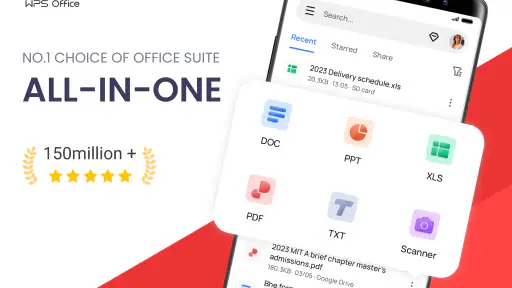
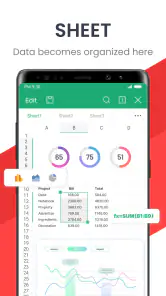
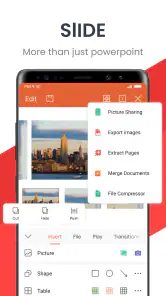
WPS Office first impressed me with its range. It’s not just about editing Word documents. Oh no, this app packs a punch by offering PDF tools, spreadsheets, and presentation capabilities. It's like carrying a full suite of office applications without the bulk. Imagine editing your presentations while sipping coffee at your favorite café or reviewing a PDF on the bus. The convenience is unmatched!
User Experience and Interface
Let's talk about user experience because, hey, no one likes a clunky app. The interface of WPS Office is sleek and intuitive. Navigating through the app is a breeze, even for someone who's not so tech-savvy. I found all the essential features right at my fingertips, making document editing as simple as pie. Plus, the app loads quickly, so you're not stuck staring at a loading screen for ages.
That first impression is useful, but it is not the same as a lasting habit. I would judge the interface by how easily I can return to an unfinished task and identify the right file, not just by how quickly I can find a tool once. A tidy file routine matters here: keep working copies named clearly, and do not assume that a recent-looking file is the version you meant to share.
Features That Stand Out
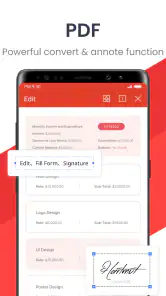
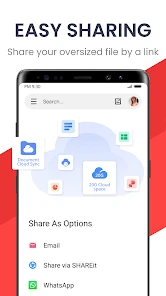
One of the standout features is the PDF conversion tool. Seriously, converting documents to and from PDF without losing formatting is a game-changer. Then there’s the cloud integration. You can sync your documents with services like Google Drive and Dropbox, which means accessing your files from any device is a piece of cake.
For those who are always on the move, the app’s offline functionality is a lifesaver. Work on your documents without an internet connection and sync them later. Talk about flexibility!
These conveniences are most valuable when the task is bounded. I would download or make available the files I expect to need before travelling, then use offline time to read or make a contained edit. Once connected again, I would confirm that the updated version reached the intended location before relying on it from another device. This is a small but important distinction: offline work is useful, while assuming that later synchronization happened without checking can create avoidable uncertainty.
Why You Should Consider It
So why should you consider downloading WPS Office? Well, apart from its vast array of features, it offers a high level of compatibility with Microsoft Office products. This means you can open and edit documents created in Microsoft Word, Excel, and PowerPoint without a hitch. It’s perfect for students, professionals, or anyone who needs to handle documents regularly.
I would recommend it most to people who routinely receive a mix of office files and want one familiar mobile place for reviewing, light editing, and PDF work. The current version is 18.22.1, and the app has been available since July 21, 2011; its long presence and large audience make it an established option, though neither popularity nor age guarantees that every workflow will suit it. The minimum operating-system requirement is Android 7.0, so compatibility is worth checking before installing on an older device.
Someone who only needs to read PDFs may be happier with a simpler reader, and anyone preparing a polished presentation or building a complicated spreadsheet should choose a larger-screen tool as their primary workspace. I would also be cautious about treating “compatible” as “visually identical” when a document has intricate formatting. Open the final file in the environment where it will be used whenever appearance is important.
There is also a useful distinction between a companion and a replacement. Compared with installing separate mobile apps for documents, spreadsheets, slides, and PDFs, a combined suite saves switching and keeps common tasks close together. Compared with dedicated alternatives, that breadth can mean a busier experience and less comfort for specialist work. I see its strongest role as the everyday bridge between receiving a file and completing a small task—not as a promise that a phone can replace a full office setup.
A routine that makes the suite easier to trust
For a concrete workflow, imagine I receive a spreadsheet before leaving work and need to check one figure during the commute. I would open the file, verify the nearby row and column labels rather than changing a number in isolation, and save a clearly identified copy. If the figure affects a report, I would compare the edited copy with the source before sharing it. This extra context check helps prevent a quick mobile correction from becoming a quiet data mistake.
For students, the same principle applies to notes and handouts: use the phone to review the material or make a small correction, but keep the original intact when the document matters. A separate working copy is particularly useful when a teacher or teammate has shared a file that others may still be using. WPS Office is most helpful when it makes a task easier without making file ownership or revision history harder to understand.
One question I would ask before relying on it is whether I need to collaborate in real time or simply exchange files. The strengths described here suit opening, editing, and moving documents through a personal workflow; if several people need to coordinate detailed changes at once, a collaboration-focused service may be a better center of the process. I would choose the tool around how the work is shared, not just around which formats it can open.
Who benefits from keeping it installed
I see the clearest fit for people whose phones regularly receive mixed office files: students handling readings and assignments, professionals reviewing a draft away from a desk, or anyone who needs to consult a PDF and occasionally adjust a document. It also makes sense as a companion for someone who already has a desktop setup but wants a practical way to handle small interruptions between work sessions. The point is not to do everything on mobile; it is to avoid postponing every minor task.
If your routine is almost entirely reading, a dedicated PDF reader is likely to be calmer and more direct. If your work depends on advanced spreadsheet analysis, intricate page layout, or presentation design that must look exact, I would use a specialist desktop app and treat the phone suite as a review tool. And if you rarely open office files at all, installing a broad suite may simply add another app to maintain without solving a recurring problem.
In conclusion, if you’re in the market for a reliable, feature-packed office app, WPS Office is worth checking out. It’s efficient, user-friendly, and surprisingly powerful for a mobile app. Whether you're drafting a report, preparing a presentation, or simply reading a PDF, this app has got you covered. Give it a try and see for yourself how it can transform your mobile productivity.
My longer-term verdict is more measured: I would keep it installed if documents cross my phone regularly and I make use of more than one part of the suite. The recurring value comes from reducing small interruptions—checking a file on the move, fixing a sentence, or consulting a table—not from replacing every specialist tool I own. If those moments are rare, a narrower app is likely to feel cleaner. If they happen throughout the month, WPS Office can earn its space through habit rather than novelty.
WPS Office-PDF,Word,Sheet,PPT Frequently Asked Questions
What languages and document workflows can I use WPS Office for?
WPS Office brings together PDF, Word, Sheet, PowerPoint, form, and note tools, so it can suit a range of everyday document workflows. You might use it to review a PDF, make changes to a document, or prepare a presentation from a mobile device. The app is intended for general productivity, while the best fit depends on the files and tasks you handle most often.
Is WPS Office suitable for students and teachers?
WPS Office can be useful for school-related tasks such as reading PDFs, working on written assignments, handling spreadsheets, and preparing presentations. Forms and notes are also included among the app’s tools, which may help with other everyday study tasks. Whether it meets a particular school’s requirements depends on the formats and features needed, so it is worth checking a sample file before relying on it for important work.
Can WPS Office handle forms and notes as well as office documents?
The app’s summary includes forms and notes alongside its PDF, Word, Sheet, and PowerPoint tools. That makes WPS Office relevant to people who want to handle more than conventional office documents in one place. The tools you need may differ from one task to another, so it is useful to explore the available options in the app.
Can WPS Office work with files stored on my phone?
WPS Office is designed for mobile document tasks, and you can work with files that are available on your device. Files you create, open, or save can take up storage, so it is sensible to keep track of your available space. If you plan to edit an important file, open it and review its layout before making changes, and consider keeping a separate copy of the original.
Can I use WPS Office for long or detailed editing sessions?
WPS Office brings document, spreadsheet, presentation, and PDF tools to mobile devices, which can be convenient for reviewing files or making quick changes away from a computer. Longer or more detailed work may feel different on a phone than on a larger screen, and comfort depends on the device and document. Trying a typical task in the app can help you decide whether its mobile workflow suits you.
Pros
- Comprehensive suite for productivity tasks.
- Supports various file formats effectively.
- User-friendly interface and design.
- Offers cloud storage integration.
- Provides offline access to documents.
Cons
- Contains ads in the free version.
- Some features require a premium upgrade.
- Occasional syncing issues with cloud.
- Limited customer support options.
- Large app size may affect device storage.
- Category
- Productivity
- Version
- 18.22.1











