Microsoft Launcher
- 66.01K
- 4.7
- Installs
- 50.00M
- Price
- Free

Screenshots
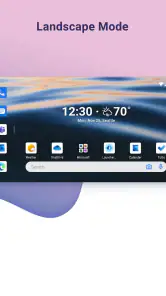
Analysis by Reviewed
I judge a launcher less by the excitement of a fresh home screen than by whether I still appreciate it after the layout becomes familiar. Microsoft Launcher makes a strong first impression because it combines visual control with a practical, search-led way to reach things. Its lasting value depends on a more personal question: do those tools fit the way I already use my phone, or am I maintaining a new setup just for the pleasure of changing it?
First Impressions
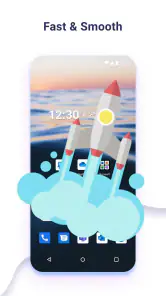
When I first installed Microsoft Launcher, I was greeted with a sleek and clean interface. The setup was straightforward, and within minutes, my home screen was transformed into a hub of functionality. What struck me first was how light and fast it felt. Unlike some launchers that can bog down your system, this one runs like a dream. The app drawer is intuitive, and swiping through screens is buttery smooth. Plus, it’s packed with features that make your day-to-day mobile experience more efficient.
Making the Home Screen Earn Its Space
The first-week appeal is easy to understand: changing a wallpaper or arranging icons gives an immediate sense of ownership. The more useful test comes later, when I stop adjusting the look and ask whether the home screen still saves effort. I’d keep the calendar, search, and frequently used apps within easy reach, then resist filling every space with shortcuts. A launcher works best when its layout reflects what I actually do, not how many settings it offers.
For example, on a workday I might search for a person or an app instead of paging through folders, then glance at the information I use regularly before heading out. That small routine is more valuable than endlessly swapping themes. If you already rely on Microsoft services across devices, the connection can make the phone feel like part of the same working setup; if your files and habits live elsewhere, that advantage may be modest.
Customization Galore
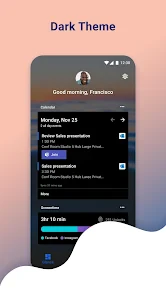
One of the standout aspects of Microsoft Launcher is the level of customization it offers. Whether you're into aesthetic wallpapers, personalized icons, or unique themes, this launcher has got you covered. I spent a good hour tinkering with the various customization options, from changing icon shapes to experimenting with different themes. You can really make your phone reflect your personality, which is a huge win if you're like me and love to stand out from the crowd.
My practical tip is to make one deliberate pass through the appearance settings, choose a readable setup, and live with it for a while. An attractive screen can still be inconvenient if icons become hard to spot or the layout makes familiar taps less automatic. The trade-off is that customization invites more tweaking: if you enjoy tuning a phone, that is part of the fun; if you want a settled screen with no decisions, the default launcher may suit you better.
Productivity and Features
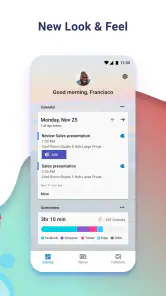
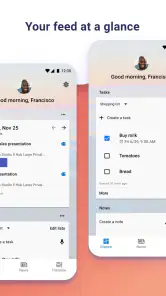
Now, let's talk about productivity—because, let's face it, who doesn't want to get things done faster? The launcher seamlessly integrates with other Microsoft services, making accessing your calendar, documents, and notes a breeze. The timeline feature is particularly handy as it allows you to pick up tasks where you left off, whether on your phone or PC. I also found the universal search bar incredibly useful. Just type in what you're looking for, be it a contact, app, or document, and boom, it’s right there.
More From Our News Desk

Weather by Xiaomi Review: Clear at a Glance, Less Clear Up Close

X Under Pressure: Can It Recover When Posting Goes Wrong?

Clash of Clans Is Won Between the Battles

Android Auto Makes the Case for Quieter Car Software

MobiOffice: Transforming Mobile Productivity with Seamless Integration

EA SPORTS FC™ Mobile Soccer: Redefining Mobile Sports Gaming
Search is most helpful when I treat it as a shortcut rather than a promise that every item will always be one tap away. A quick query can beat navigating a crowded app drawer, but it does not remove the need to know which Microsoft services I want to use. Before switching, I’d check whether the launcher’s connected workflow matches my existing habits; otherwise, a launcher focused on a different ecosystem, or the phone maker’s built-in option, may feel more natural.
There is also a useful distinction between changing the launcher and changing the apps themselves. A launcher reshapes the way I reach apps and information; it does not automatically make every service work identically across phone and computer. I would start with the home-screen layout and search, then add more of the Microsoft-oriented workflow only if I find myself using it. That gradual approach makes it easier to tell which parts are genuinely helpful rather than merely new.
Family Safety
For those of you with kids, the family safety features are a nice touch. You can monitor your child’s screen time, set app limits, and even track their location. It’s all about peace of mind, and in today's digital age, that's priceless. I tested these features with my nephew's phone, and the setup was surprisingly easy. It’s a great way to ensure they're not spending too much time on games when they should be doing homework!
For a parent considering this, I’d think of those tools as part of a family routine rather than a substitute for a conversation about device use. The launcher is a better fit when the adults and child are comfortable using the connected family features together. If you only want a plain visual refresh, or prefer not to build your phone habits around Microsoft’s ecosystem, those controls may not be a reason to switch.
Everyday Workflows Beyond the Novelty
The most convincing test for me is a busy day when I’m moving between small tasks rather than sitting down for a long session. I might open the phone to check what is next, search for a contact, and then jump into an app without pausing to remember where I filed its icon. That is where the launcher’s mix of glanceable information and search can feel useful: it reduces the little decisions that build up over a day. The benefit is modest each time, but recurring convenience is exactly what can justify keeping a different launcher.
There is a trade-off in relying on search, though. It works best when I have a rough idea what I want and can name it; it is less satisfying if I prefer to browse visually or if I have carefully organized every app into a familiar grid. I would avoid hiding every regular destination behind a search box. Keeping a few high-frequency apps visible while using search for less common items gives me both quick taps and a way out of app-drawer clutter.
For someone who handles work and personal tasks on the same device, a restrained layout can also make context switching easier. I’d put only the tools I genuinely use each day in prominent positions and let the rest remain accessible through the drawer or search. This is not a magic organization system, and it will not decide which task deserves attention. Its value is in making the route to familiar tools more consistent, especially when I have only a moment between errands or meetings.
What It Takes to Keep Using It
Month to month, the strongest reason to keep a launcher is that it quietly supports habits you already have. Once the layout is set, maintenance should mostly mean adjusting a shortcut when your routine changes, not redesigning the screen every weekend. The common friction is the transition itself: muscle memory from the previous home screen takes time to replace, and a heavily customized layout can make that adjustment harder. I’d keep the first setup simple, then change only what repeatedly slows me down.
Microsoft Launcher is a free personalization app from Microsoft Corporation, rated for Everyone, and its current version is 6.250701.0.1169580. It has a 4.7 average from around 1.7 million ratings, with over 50 million installs. That reach suggests many people have tried it, but the useful question for me is whether its particular mix of customization and Microsoft-connected tools suits my daily routine. It was released on October 28, 2015, and supports Android 7.0 and later.
In practical terms, I’d treat the switch as reversible rather than a commitment to rebuild my entire phone. I would first note which parts of the existing home screen I rely on without thinking, then reproduce those before experimenting with new arrangements. That preserves the muscle memory I value and makes it easier to spot whether the new search and information flow actually improves anything. If I cannot name a recurring task that feels easier after the change, the extra setup probably is not earning its space.
Comparing It With the Usual Choices
The natural alternative is the launcher already supplied with the phone. That option is usually the least disruptive choice: its layout is familiar, and it may already do everything I need. Microsoft Launcher makes more sense when I specifically want a different level of home-screen control or expect to use its Microsoft-oriented workflow. I would not switch simply because customization sounds appealing; I’d switch when I can point to a repeated frustration the new layout could solve.
Compared with launchers chosen mainly for visual experimentation, this one’s appeal is less about turning the phone into a design project and more about joining personalization to everyday access. That distinction matters if I enjoy trying new icon arrangements but do not want to spend time constantly refining them. A visually focused alternative may be a better fit for someone whose main goal is a dramatic aesthetic change. If I care more about finding apps and picking up familiar Microsoft-related tasks, this approach feels more purposeful.
It also is not a replacement for choosing the right productivity apps. A launcher can put a calendar or document workflow closer to hand, but I still need the services and routines behind it to make sense for me. Before moving over, I’d ask whether I already use Microsoft tools often enough for their presence on the home screen to matter. If not, a simple built-in launcher—or one designed around the services I do use—could be the cleaner choice.
Who Is Likely to Stick With It?
I’d recommend trying it if you want more control over Android’s home screen and already use Microsoft tools enough to benefit from reaching them in one place. It can also suit someone who wants to search for apps and information instead of keeping a carefully sorted grid. On the other hand, if your current launcher already feels quick and uncluttered, or you prefer another ecosystem’s services, switching may add adjustment without giving you much back. For a phone that is shared or managed around family routines, consider whether everyone involved will actually use the family features rather than treating their presence as an automatic benefit.
A commuter who checks a schedule, replies to a message, and opens a work document in short bursts is a good example of someone who may appreciate the arrangement. The launcher can make the home screen a practical starting point for those repeated actions instead of a page of decorative icons. By contrast, someone who uses a phone mainly for a few fixed apps and rarely looks beyond the first screen may notice little improvement. In that case, the existing setup may already be doing its job.
Parents should make a separate decision about the family tools rather than assuming that installing a launcher creates a complete family-safety plan. Those features are most relevant when the household is willing to use the connected controls as part of an agreed routine. For an adult choosing a personal home screen, they may be beside the point. I would evaluate the launcher first on the daily experience I want, and only then decide whether the family side has a role in my setup.
Is it difficult to set up? The initial change is approachable, but choosing a layout that remains useful takes a little thought. Do I have to customize everything? No: I’d begin with a few familiar shortcuts and leave the rest alone. Is it worth keeping after the novelty fades? For me, yes, if search and the Microsoft workflow become part of ordinary phone use; otherwise, the built-in launcher is a sensible alternative. If I wanted a dramatic visual overhaul above all, I’d compare launchers with that priority in mind rather than assuming productivity features would matter to me.
One more question I would ask before switching is whether I want to spend any attention maintaining a different home screen at all. The routine upkeep can be light once the layout settles, but there is still an adjustment period, and changing icon positions can unsettle habits. I would make a small number of changes, give them time to become automatic, and only revisit the layout when a real need appears. That keeps the launcher from becoming another hobby I have to manage.
In conclusion, if you're in the market for a launcher that not only enhances your phone's look but also boosts productivity, Microsoft Launcher might just be your new best friend. It’s fast, feature-rich, and aesthetically pleasing. Whether you're a customization junkie or a productivity fiend, there's something here for everyone. Give it a try and let your phone reflect the best version of you!
Keeping It After the First Month
After the initial pleasure of setting up a new screen fades, I would judge it by repetition: do I reach the tools I need with less searching, and does the layout still make sense on an ordinary day? That is a more useful measure than how many appearance choices I explored during setup. A launcher earns a lasting place when the benefits become part of a routine and no longer require deliberate attention.
My lasting recommendation is therefore conditional, not universal. If Microsoft services already belong in your day and you like shaping Android around your habits, this is a worthwhile option to test. If you prefer the phone maker’s defaults, use another ecosystem, or dislike adjusting familiar controls, staying put may be the better decision. I would keep it only if its small daily conveniences continue to outweigh the effort of changing how I use the home screen.
Microsoft Launcher Frequently Asked Questions
Can Microsoft Launcher change my phone’s home screen without deleting my apps or files?
Microsoft Launcher is a home-screen app, so installing it changes how you arrange and access your Android phone’s home screen rather than replacing the phone’s operating system. Your apps and personal files remain part of the device, while the launcher gives you a different way to organize and navigate them. You can decide whether its layout and tools suit your routine.
Do I have to use a Microsoft account to use Microsoft Launcher?
You can use Microsoft Launcher without a Microsoft account, so trying its home-screen features does not require signing in. An account can be useful if you want closer connections with Microsoft services, such as the calendar, files, or tasks described in the app’s integration features. Consider which services you already use and review the account and sync choices during setup.
Is Microsoft Launcher available for iPhone, or is it only for Android?
Microsoft Launcher is an Android app in the Personalization category, so it is intended for Android phones rather than iPhones. If you use Android, it replaces or customizes the home-screen experience; it is not a general Microsoft productivity app that installs across both mobile platforms. Check your device’s Android version before downloading, as compatibility starts with Android 7.0.
Is Microsoft Launcher free, and what should I know before installing it?
Microsoft Launcher is free to download and is rated Everyone. It is developed by Microsoft Corporation and is designed to help you personalize your phone and stay organized on the go. Before installing, consider whether you want to change your Android home screen and use Microsoft services as part of your mobile routine. You can also review the launcher’s requested permissions during setup.
What is Microsoft Launcher and how does it enhance my Android experience?
Microsoft Launcher is a customizable and feature-rich launcher for Android devices. It enhances your Android experience by offering a seamless integration with Microsoft services, allowing you to personalize your phone with wallpapers, themes, and gestures. It also provides a unified view of your calendar, to-do lists, and notes, ensuring you stay organized and productive. The launcher aims to streamline your mobile experience by connecting your phone with your Windows PC, enabling easy access to files and documents across devices.
Pros
- Highly customizable interface
- Seamless integration with Microsoft services
- Smooth and fast performance
- Efficient battery usage
- Regular updates with new features
Cons
- Limited widget options
- Lacks deep customization for some users
- Occasional minor bugs
- Features can be overwhelming
- Some features require Microsoft account
- Category
- Personalization
- Version
- 6.250701.0.1169580













