Microsoft Family Safety
- 2.23K
- 3.9
- Installs
- 5.00M
- Price
- Free

Screenshots

Analysis by Reviewed
I would judge Microsoft Family Safety less by how many controls it offers and more by whether those controls make a family’s daily routines calmer. A screen-time rule can help with a recurring argument, and location sharing can make a pickup easier to coordinate, but neither is useful if everyone is unclear about what is being monitored or why. For me, the app works best as a shared framework for expectations, not as a silent way to police a child’s phone.
Free to try, with setup as the real investment
There is no purchase price to weigh up: Microsoft Family Safety is free. That makes it easy to try as a parenting tool without committing money first, though free access by itself does not tell you whether it fits your household. It comes from Microsoft Corporation, is rated for Everyone, and has a 3.9 average from around 45,000 ratings. More than 5 million installs show that many families have tried it, while the current version is 2.0.4.1083 and it requires Android 9 or later.
The practical cost is attention rather than money. Someone needs to connect the family setup, agree on rules, and check that the settings make sense for each person’s devices. If you are already managing family accounts and devices through Microsoft, that may feel like a natural extension of what you do. If you are not, the extra coordination can make a supposedly simple timer feel like a larger project than the problem called for.
I would approach setup as a family agreement, not just a phone setting. Decide together what screen-time limits are for, which websites should be filtered, and when location sharing is useful. That conversation matters: a child who understands why a limit exists is less likely to experience the app as a surprise punishment. If your household uses a mix of phones and computers, check that each family member is using the relevant Microsoft account and device settings before relying on reports or limits.
Keeping boundaries useful rather than punitive
The most helpful way to introduce a control is to connect it to a specific routine. A bedtime boundary, a protected homework block, and a general daily limit are different goals; treating them as interchangeable can create rules that feel arbitrary. I would begin with the point of friction that is easiest to describe, then explain what the setting is intended to change. That gives a child a fair chance to understand the rule and gives the parent a clear way to decide later whether it is working.
A less obvious benefit of having requests for more time is that they can turn a hard stop into a small conversation. A child can explain why an exception matters, and a parent can respond consistently instead of making a rushed decision in the middle of another task. The trade-off is that requests still require a parent’s attention. If your household needs a rule that works without ongoing discussion, a simple device-level limit may be less demanding.
Keeping Your Family Safe Online
Let’s face it, the digital world can be a bit like the Wild West, especially for kids. Thankfully, Microsoft Family Safety is here to be your trusty sheriff. This app lets you set boundaries on screen time, block inappropriate content, and even track locations. It’s like having a digital babysitter that doesn’t eat all your snacks.
More From Our News Desk

Weather by Xiaomi Review: Clear at a Glance, Less Clear Up Close

X Under Pressure: Can It Recover When Posting Goes Wrong?

Clash of Clans Is Won Between the Battles

Android Auto Makes the Case for Quieter Car Software

MobiOffice: Transforming Mobile Productivity with Seamless Integration

EA SPORTS FC™ Mobile Soccer: Redefining Mobile Sports Gaming
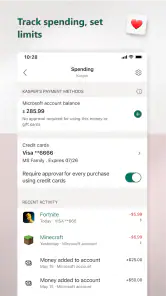
One of the coolest features of this app is the ability to set screen time limits for apps and games. I mean, who hasn’t lost track of time scrolling through endless TikToks or got sucked into a gaming vortex? With Microsoft Family Safety, you can set daily limits and even receive requests for more time. It’s like being the boss of the house, but without all the paperwork.
Making limits work in everyday life
A practical way to use app limits is to start with the routine that causes the most friction rather than trying to control every minute. For example, if homework regularly stretches into the evening because a game keeps pulling your child back in, agree on a limit that protects that study window and explain how requests for extra time will be handled. I would also review the schedule after a few days: a limit that is too strict can turn every evening into a negotiation, while a reasonable boundary gives everyone a clear point to discuss.
That kind of adjustment is one advantage over relying on a household rule alone: the app can help make a boundary visible and consistent. The trade-off is that it cannot replace a conversation about why the rule exists. If your main goal is simply to keep a younger child occupied for a short stretch, a device’s built-in timer may be quicker. Family Safety makes more sense when you want a parent to manage several parts of a family’s digital routine together.
A realistic weeknight routine
Picture a parent trying to get dinner ready while a child is finishing homework and asking to return to a game. A limit agreed on earlier can make the boundary predictable, while a request for extra time gives the child a way to explain that a school task is still underway or that a game session has a natural stopping point. The parent can respond without inventing a new rule on the spot. That is a modest but useful workflow: decide the principle when everyone is calm, then use the app to make the agreed limit easier to follow.
I would avoid changing limits in response to every difficult evening. If a child repeatedly needs an exception for the same reasonable activity, that may be a sign the routine needs adjusting, not that the child is trying to defeat the rule. Looking for that pattern makes the tool more useful than simply tightening restrictions. It also keeps the parent in the role of setting context and judgment rather than leaving the app to decide what counts as a good use of time.
Location Sharing & Tracking
Ever wished you had a magic crystal ball to know where your loved ones are? Well, this app is pretty close. The location sharing feature allows you to see where your family members are in real time. It’s perfect for peace of mind, especially if you have teenagers venturing out into the world. Plus, it’s a great way to make sure no one is sneaking off to late-night parties without you knowing. Just kidding… kind of.
Additionally, the app includes a driving safety feature, which provides insights into your family’s driving habits. You can receive reports on things like top speed and phone usage while driving. It’s like having a co-pilot who never falls asleep on long road trips.
Using location and driving tools thoughtfully
Location sharing is most useful when it answers a specific everyday question, such as whether a teenager arrived after an activity or whether everyone is on the way to a planned pickup. I would agree on when the family expects it to be used, rather than checking it constantly; that keeps the feature practical without making trust feel like surveillance. For a one-off meetup, a phone’s built-in location sharing may be enough, but Family Safety is more relevant when location sits alongside the family’s other digital boundaries.
The driving reports can prompt a useful conversation about phone habits behind the wheel, but I would treat them as a discussion aid rather than a complete assessment of someone’s driving. They do not take the place of safe choices or direct communication. If no one in the household drives, this part of the app may have little day-to-day value, and the screen-time and content tools are likely to matter more.
Content tools and the limits of reports
Filtering and activity reporting are most helpful when parents use them to guide a conversation, not to make assumptions. If a filter blocks a page a child needs for school, for example, the useful next step is to understand the context and adjust the family’s approach where appropriate. A parent who checks activity only to catch mistakes may create pressure without teaching a child how to navigate difficult material. I would set expectations in advance about what is visible and what the family will do with that information.
Another practical point is to test the rules on the devices the child actually uses before treating them as dependable. A family may have a phone, a computer, or both in regular use, and the experience can depend on the account and device settings being in place. A short check together after setup is better than discovering a mismatch when a limit matters. That small bit of preparation is especially worthwhile in a household where schoolwork and entertainment happen on different devices.
Fostering Healthy Digital Habits
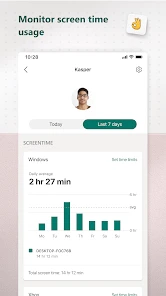
In our tech-savvy world, creating healthy digital habits is more important than ever. This is where the app truly shines. You can set up content filters to block inappropriate websites and ensure your kids are spending their online time wisely. Plus, with activity reporting, you can see what your family is up to online. It’s like having eyes in the back of your head, without the creepiness.
With an easy-to-use interface, setting up and managing these features is a breeze. And the best part? It’s all synced across devices, so whether you’re on a PC or a smartphone, you’ve got access to these handy tools.
Where it fits among family controls
Compared with using only the controls built into each phone or computer, Family Safety offers a more joined-up approach for parents who already manage family life through Microsoft accounts and devices. Built-in controls can be a better fit if you only need to set a basic limit on one device, or if your household does not want another account-based tool to manage. The app’s broader mix of screen-time boundaries, content filtering, activity visibility, location, and driving insights is useful when those needs overlap, but no family needs every feature.
One detail worth keeping in mind is that a report is not the same as a complete picture of a child’s online life. Use activity information to ask better questions, not to assume you know the context behind every visit or session. Likewise, filters are a layer of guidance, not a substitute for teaching children how to respond when they encounter something uncomfortable online. I find the app most valuable when it supports those conversations rather than trying to have them for you.
Who is likely to get value?
I would recommend trying it if you are a parent who wants a shared place to manage screen-time rules and online boundaries, especially when the family uses Microsoft services across more than one kind of device. It may also suit a household that wants location sharing for practical coordination and driving reports as a prompt for safer habits. The free price lowers the barrier to trying it, and its broad set of tools gives families room to focus on the ones they actually need.
I would skip it, or rely on simpler device controls, if you only need one basic timer, do not want to coordinate family settings through Microsoft accounts, or would rather handle every boundary through direct conversation. It is also not a substitute for personal supervision, trust, or a family’s own rules about privacy. Before depending on any restriction, test the setup together and make sure it behaves as expected on the devices your family uses.
Questions worth settling before relying on it
Will it suit a family that does not use Microsoft services much? It can still be considered, but account setup and coordination may feel like extra work compared with controls already built into your devices. Is it enough to keep a child safe online by itself? No: filters and reports can help parents set boundaries, but they do not replace supervision, digital literacy, or a child knowing how to ask for help. These are the kinds of expectations I would settle before enabling controls.
Does every family member need every feature? I would say no. A family without a teen driver may get no benefit from driving insights, while another household may mainly care about screen limits or location for pickups. Can a built-in tool be better? Absolutely, if one basic restriction is all you need. The value of this app lies in bringing several kinds of family management together, not in making every tool essential for every home.
Final Thoughts
In a nutshell, Microsoft Family Safety is a robust app for anyone looking to manage their family’s digital footprint effectively. It’s packed with features that promote safety and responsibility online, making it a must-have for modern families. Whether you’re a tech-savvy parent or just want some peace of mind, this app has got your back. So go ahead, give it a whirl, and keep your family safe in this digital age!
My verdict is to try it if you need several family-management tools and are comfortable setting expectations with your children about how they will be used. Since it is free, you can judge its usefulness in your own routine without a purchase decision; the real cost is the time spent setting up accounts, rules, and family expectations. If a single built-in control already solves your problem, that simpler option may be enough. For families who need a broader routine, this is a practical place to start, as long as its tools support—not replace—trust and conversation.
Microsoft Family Safety Frequently Asked Questions
Is Microsoft Family Safety available for Android and iPhone?
Microsoft Family Safety is a parenting app from Microsoft Corporation. The Android version requires Android 9 or later, so check your device’s operating system before downloading. Families can use Microsoft’s family tools across supported devices, but the controls available can vary depending on the device and the account being managed. The app is free to download.
Is Microsoft Family Safety suitable for young children?
The app is intended for parents and families who want to help manage children’s digital habits. Its content rating is Everyone, and its tools are designed to help adults oversee screen time and encourage healthier use of devices. Families should consider a child’s age, needs, and the devices they use when deciding which controls are appropriate.
What devices and operating systems can I use Microsoft Family Safety on?
Microsoft Family Safety is a parenting app from Microsoft Corporation, and its current version is 2.0.4.1083. Before downloading, check that your device runs Android 9 or later. Families can use Microsoft’s family tools across supported devices, but the available controls may depend on the device and the account being managed.
Who is Microsoft Family Safety designed for, and what does it help families do?
Microsoft Family Safety is intended for parents and families who want to monitor screen time and encourage healthier digital habits. It brings family safety tools together in an app, helping adults manage children’s device use and stay connected. The app is free to download, and its content rating is Everyone.
What is Microsoft Family Safety and how does it work?
Microsoft Family Safety is a comprehensive app designed to help families stay connected and protected in the digital world. It allows parents to set screen time limits, filter web content, and track their children's locations in real-time. The app works across multiple platforms, ensuring that families have a unified and safe experience whether they're using Windows, Xbox, or mobile devices.
Pros
- Comprehensive parental controls.
- Location sharing for family members.
- Screen time limits for devices.
- Activity reports for monitoring.
- Cross-platform compatibility.
Cons
- Limited features on iOS compared to Android.
- Requires Microsoft account for all users.
- Complex setup for non-tech users.
- Some features behind paywall.
- Occasional syncing issues.
- Category
- Parenting
- Version
- 2.0.4.1083