MyChart
- 108.19K
- 4.5
- Installs
- 10.00M
- Price
- Free

Screenshots

Analysis by Reviewed
I find MyChart most useful when I want to check a detail before calling a clinic or attending an appointment. It is a medical app from Epic Systems Corporation, and its main appeal is bringing health information and routine tasks together on a phone. That convenience depends on a practical catch: your healthcare provider needs to use MyChart and make the relevant tools available through it. I would check that before expecting it to replace phone calls or a provider’s own process.
Checking access before you depend on it
Before building a routine around the app, I would ask the clinic whether it supports MyChart and which services it enables there. That simple check can prevent a frustrating first login followed by the discovery that the feature you wanted is handled another way. A provider may make some information or tasks available without offering every possible option, so I would judge the app by the specific workflow my clinic uses rather than by what a general patient portal might do elsewhere.
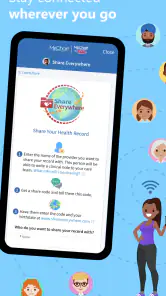
It also helps to think of access as provider-specific rather than as a universal medical filing cabinet. If you receive care from separate organizations, do not assume they will all show up in one place or share the same process. I would keep track of which clinic handles each appointment or request, especially when coordinating follow-ups. For a person who sees several providers, that small habit is more useful than repeatedly searching the app for records that may be managed through another system.
When the app saves effort—and when it cannot
The clearest payoff is reducing small bits of administrative friction: checking a detail before a visit, reviewing information already shared with you, or sending a routine question through the channel your provider offers. Those are useful conveniences, but they are not the same as faster clinical care. If a concern needs an answer today, I would contact the clinic using the route it recommends rather than treating a message as a real-time conversation.
That distinction matters for caregivers, too. A family member helping someone prepare for an appointment may find it useful to have the relevant information at hand, but the patient’s account and the clinic’s own rules determine what can be accessed and handled. I would make sure the person receiving care is comfortable with the arrangement and confirm the clinic’s process before assuming a helper can manage tasks on their behalf.
What to expect from speed
For occasional tasks—looking up a result, checking an appointment, or sending a question—I would expect a focused mobile app to feel more convenient than searching through paper records or calling during office hours. But speed is not just about how quickly a screen opens. The information you need has to be available in your account, and a message still depends on the provider’s response. I would treat the app as a way to reach and organize care, not as a shortcut to immediate medical advice.
Busy days and practical workarounds
A useful everyday routine is to check the appointment details before leaving home, then keep any questions that come to mind in one place so you can send them through secure messaging when appropriate. For a family member helping someone manage care, having records on a phone may make it easier to refer to information during a conversation with the clinic. I would still confirm anything time-sensitive directly with the provider rather than assume an app notification or message is enough.
More From Our News Desk

Clash of Clans Is Won Between the Battles

Android Auto Makes the Case for Quieter Car Software

MobiOffice: Transforming Mobile Productivity with Seamless Integration

EA SPORTS FC™ Mobile Soccer: Redefining Mobile Sports Gaming

How Microsoft OneDrive Became a Mobile Productivity Giant

How Google Translate Breaks Language Barriers Effortlessly
For example, if I notice a question about a planned visit while getting ready in the morning, I can use the app to review what is already available and decide whether the issue can wait for a routine message. If the question affects whether I should attend or needs an immediate answer, I would call the clinic instead. That is a more dependable workflow than sending a message and making plans around an assumed response time.
MyChart has a strong track record as a medical app: it averages 4.5 from around 252,000 ratings, with over 10 million installs. It is free, rated for everyone, and Epic Systems Corporation released it in 2011. Those figures suggest it is widely used, but my recommendation would still depend on whether your own clinic supports the parts you need. It is available as version 11.6.1 for devices running Android 11 or later.
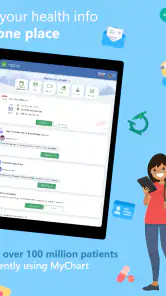
Easy Access to Your Health Information
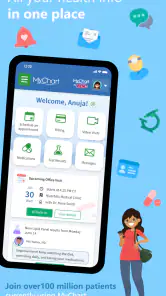
First off, the accessibility this app provides is just phenomenal. With a few taps on my phone, I can access my entire medical history. It's like carrying a mini-hospital in my pocket! Whether you’re waiting in line at the coffee shop or chilling on the couch, you can pull up your lab results, vaccination records, and more.
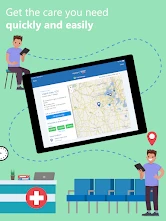
Schedule and Manage Appointments
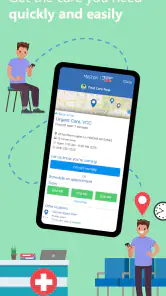
One of my favorite features is the ability to schedule appointments without having to call the clinic. Let's be real—who has time for that? With MyChart, I can see available slots and book them right there and then. Plus, it sends reminders so I won't forget when my next check-up is due. No more sticky notes on the fridge!
I would still review the appointment details carefully after making a change. The app can make scheduling more convenient, but the clinic’s available slots and procedures shape what you can do there. If an appointment is unusual, involves several people, or needs explanation before it is booked, a direct conversation may be easier than trying to resolve every detail on a phone screen.
A practical habit is to check the appointment information again before setting out, rather than relying on memory or an old calendar entry. If a visit is moved or a detail looks different from what you expected, confirm it with the clinic. This is especially sensible when travel or work arrangements depend on the timing: the app is helpful for checking, but your plans should be based on the current details shown by the provider.
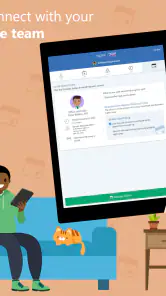
Secure Messaging and Prescription Refills
Ever had a question pop into your head after visiting the doctor? Instead of waiting weeks for the next appointment, you can send a secure message through the app. It's like having a direct line to your healthcare provider. And if you’re anything like me and always forget to refill prescriptions, the app lets you do that with ease. Just a few clicks, and your meds are sorted.
I would use messaging for clear, non-urgent questions that are easier to explain in writing than to remember at the next visit. Keeping a message focused on one issue can make it easier for the clinic to understand what I am asking and respond through its normal process. For symptoms that feel urgent, confusing, or potentially serious, written messaging is the wrong tool; I would use the provider’s recommended phone route or seek appropriate urgent care.
Prescription requests are another place where expectations matter. Being able to submit a request is convenient, but I would not treat sending one as proof that a refill has been approved or is ready. If I am close to running out, I would allow time for the provider’s process and contact the clinic or pharmacy directly if timing becomes critical. The app can reduce the effort of starting a routine request, not remove the need to confirm the outcome.
Engaging and Informative
The layout is clean and user-friendly, making navigation a breeze. I love how the app provides educational resources related to my conditions and treatments. It’s like having a personalized health library at my fingertips. The more informed I am, the better decisions I can make about my health.
I find educational material most useful as preparation for a conversation, not as a replacement for one. If I read something that seems relevant, I would note the question it raises and bring it to the clinician who understands my situation. Health information can be easy to misapply when it is read without context, so I would avoid changing treatment based only on something I found while browsing.
Using it alongside other care tools
Compared with calling a clinic for every small check, a patient portal can be a calmer way to revisit information and handle routine tasks when those options are enabled. Compared with a general health-tracking app, MyChart is more useful for interactions tied to a participating provider than for building a personal log of everything that happens to your health. A browser portal can be preferable when I need a larger screen or want to review information while working at a computer; the phone app suits quick checks away from home.
I would not expect it to replace every tool a person uses. A personal calendar is still handy for combining medical visits with work and family plans, while a phone call is better when a decision depends on an immediate back-and-forth. If someone mainly wants to track symptoms or habits independently, a dedicated tracking tool may fit that goal better. MyChart makes most sense when the aim is to connect with care managed by a clinic that uses it.
Limits, reliability, and choosing the right tool
For a quick look at records or a routine request, I would start with the app rather than a portal in a desktop browser. A browser may be better when you need to review information on a larger screen, while a phone call is still the sensible choice for urgent or complicated matters. MyChart is not a substitute for emergency care, and messaging should not be treated as a live conversation.
My experience of reliability would depend on both the app and the clinic’s workflow: a login does not guarantee that every record or task is available in one place. If something seems missing, I would check that I am in the right account and then ask the provider how that information is shared. I also would not assume that repeated refreshes will make a newly requested result appear sooner.
When information seems incomplete, I would first separate two questions: am I looking at the right provider account, and has that provider made this particular item available? That quick check can save time and avoid mistaking a provider’s workflow for a problem with the phone. If the item is important for an upcoming decision, I would contact the clinic rather than waiting for the app to resolve the uncertainty by itself.
Device constraints and sensible fallbacks
On a device running Android 11 or later, the stated minimum requirement should be workable for many users, but people with older phones will need another way to access care. I can’t infer battery use or storage demands from the app’s basic details, so I would avoid installing it on a device with very little free space without first checking its current requirements. If access is important, keep your clinic’s phone number available as a fallback.
If you share a phone, I would also think carefully about when and where health information appears on its screen. A private moment is better for reviewing personal records than a crowded setting, and a phone passcode is a sensible part of protecting any device used for health tasks. Those are general habits rather than a substitute for the provider’s own account guidance, but they help make mobile access feel more deliberate.
Someone with an older device, limited comfort with phone apps, or a preference for a full keyboard may be better served by the clinic’s browser portal or by calling for help. That is not a failure of the app; it is simply a reminder that access to care should not depend on forcing one interface to suit everyone. I would choose the route that makes it easiest to understand the information and complete the task accurately.
Where I’d draw the line
I would skip relying on MyChart as my only contact method if I need rapid answers, if my provider does not actively use it, or if I regularly need to coordinate care across organizations that handle records separately. I would also avoid treating a displayed record as a complete substitute for asking a clinician about what it means. The app is strongest as a practical companion to care, not as a clinician, emergency channel, or guarantee that every administrative step has been completed.
For a person who sees one participating clinic and wants to check appointments, review available information, or make routine requests from a phone, it can be a useful everyday option. For someone who rarely uses digital services, a telephone conversation may feel more reassuring and can be the better choice for complicated questions. The right decision is less about whether an app is modern and more about whether it fits the way your provider actually works.
In summary, MyChart is a game-changer for anyone looking to take control of their healthcare. It's convenient, informative, and just plain smart. If you haven’t tried it yet, I seriously recommend giving it a go. Your future self will thank you, trust me!
Who I’d recommend it to
I’d recommend it to people whose clinic actively uses MyChart and who want a handy place to check records and handle everyday follow-ups. I would be more cautious if you expect every provider to appear in one account, need instant answers, or prefer managing health information on a computer. Before relying on it for appointments or prescriptions, I’d confirm which services your own provider makes available and keep another contact route for anything time-sensitive.
MyChart Frequently Asked Questions
Is MyChart available for Android and iOS?
MyChart is a medical app for managing health information on a mobile device. The Android version is called MyChart for Android, and the app is developed by Epic Systems Corporation. Before downloading, choose the version listed for your device and check that your operating system meets the app’s requirements. MyChart is free to download and has an Everyone age rating.
Who develops MyChart, and what kind of app is it?
MyChart is a medical app developed by Epic Systems Corporation. It is designed to give patients a mobile way to connect with participating healthcare providers and access health-related services. Its usefulness depends on whether your provider uses MyChart and which features that provider makes available. The app is free, and its broad age rating makes it accessible to a wide range of users.
Which devices can run MyChart, and what should I check before installing it?
MyChart is a medical app from Epic Systems Corporation, and the current version is 11.6.1. Before downloading, check that your device uses a compatible operating system; the minimum requirement is version 11. The app is free and has an Everyone age rating, making it broadly accessible to patients who want to manage health information from a mobile device.
Do I need an account or a participating healthcare provider to use MyChart?
Yes. MyChart is designed to connect patients with their healthcare provider’s system, so you need an account and a provider that participates in MyChart to access personal records and related services. After downloading, you can create an account or sign in with existing credentials. If your provider does not use MyChart, the app may not show your health information.
What is MyChart and how does it work?
MyChart is a secure online platform that allows patients to access their personal health information, manage appointments, and communicate with healthcare providers from their smartphone or computer. After downloading the app, users need to create an account or log in with existing credentials. The app connects with your healthcare provider's system to retrieve and display your medical records, upcoming appointments, and test results.
Pros
- Seamlessly integrates with medical records.
- User-friendly interface for easy navigation.
- Secure login with multiple authentication options.
- Real-time updates on lab results and appointments.
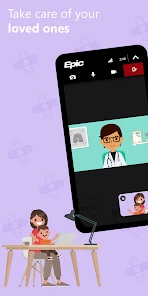
- Supports telemedicine sessions with doctors.
Cons
- Limited to participating healthcare providers.
- Occasional app crashes reported by users.
- Some features require internet connection.
- Setup can be complicated for non-tech users.
- Notifications can be overwhelming if not managed.

- Category
- Medical
- Version
- 11.6.1