Period Tracker and Calendar
- 13.02K
- 4.9
- Installs
- 10.00M
- Price
- Free

Screenshots


Analysis by Reviewed
When I’m unsure whether my period is due soon, I want a record that helps me plan without pretending to explain everything about my health. My Calendar - Period Tracker is built for that everyday job: I enter period dates, note symptoms, and use the calendar’s estimates to plan ahead. It suits someone who wants a simple routine rather than a complicated health dashboard, though I’d treat predictions as planning hints, not medical certainty.
Begin with the information you already know
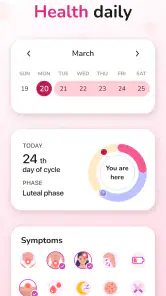
The first useful step is entering the dates you know, then adding notes when something changes. Logging a symptom close to the day it happens is more helpful than trying to reconstruct a whole month later. If you have irregular cycles, the calendar may be less predictable, so consistent entries matter more—and a forecast should not be mistaken for a diagnosis or a dependable way to prevent pregnancy.
For example, if I notice cramps or a mood shift during a busy workweek, I can record it and later look back for a pattern. That makes the app more useful than a paper calendar for comparing symptoms across cycles, while still keeping the habit lightweight. I’d start with only the details I genuinely want to review; recording everything can turn a quick check-in into a chore.
Make logging fit the day you actually have
I wouldn’t wait for a perfect, uninterrupted moment to build a complete history. A small entry made while a symptom is fresh is more practical than trying to remember several details at the end of a hectic week. If I’m unsure whether a feeling is worth noting, I can keep the record simple and focus on details I might want to compare later, such as when it occurred and how it affected my routine.
That approach also helps prevent tracking from becoming its own source of stress. A cycle diary is useful only if its upkeep feels manageable, so I’d treat optional details as optional rather than a checklist to finish. Someone who enjoys detailed logging can use the customization to shape a fuller personal record; someone who wants a quick overview can stick to dates and a few recurring symptoms.
From calendar estimates to everyday decisions
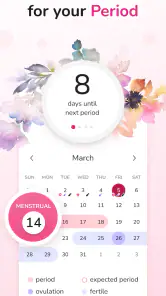
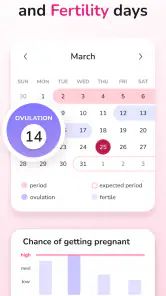
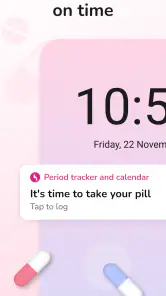
Once dates and symptoms are in, the predicted period, ovulation, and fertile days can help with practical planning: remembering supplies, choosing when to pack medication, or deciding when to leave room in a schedule. The app also lets users customize what they track, including moods and cravings, and set reminders for birth control pills. I’d use reminders as prompts, not as a replacement for instructions from a clinician or the medication packaging.
A realistic example is getting ready for a work trip. I might check the calendar before packing, bring supplies if a period seems near, and then note symptoms afterward rather than relying on memory weeks later. That is a useful handoff from a prediction to a practical choice, but it remains a plan based on estimates—not a promise about the date.
More From Our News Desk

Weather by Xiaomi Review: Clear at a Glance, Less Clear Up Close

X Under Pressure: Can It Recover When Posting Goes Wrong?

Clash of Clans Is Won Between the Battles

Android Auto Makes the Case for Quieter Car Software

MobiOffice: Transforming Mobile Productivity with Seamless Integration

EA SPORTS FC™ Mobile Soccer: Redefining Mobile Sports Gaming
The handoff is the important part: a calendar estimate can help me prepare, but it cannot explain unusual pain or confirm what is happening in my body. If I were discussing symptoms with a healthcare professional, I’d use my notes to describe what I observed and when, rather than presenting the app’s forecast as a clinical finding.
Where it fits—and where it doesn’t
Compared with a basic calendar, this app brings period dates, symptom notes, cycle estimates, and reminders into one place. That is handy if you want those pieces together without building your own system. Someone who already tracks everything in a general health app may not gain much, and anyone looking for medical advice or guaranteed fertility information should choose a more appropriate source.
Compared with a paper diary, the app can make it easier to revisit dates and symptoms across cycles without manually scanning old pages. A plain calendar may still be the better choice for someone who wants to mark only period dates and keep health details off a phone. A broader health app may make more sense if cycle tracking needs to sit alongside other health records. I’d choose based on what I’ll genuinely use, rather than assuming that more tracking is always better.
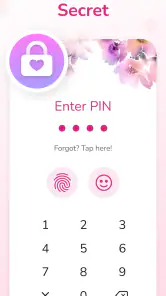
There is also a privacy trade-off worth considering: cycle and symptom notes are personal. Before adding sensitive details or joining a community, I’d think about what I’m comfortable recording and sharing, and check the app’s current settings. The social element may feel reassuring to some people, but it is not a substitute for professional care, and advice from other users should be treated accordingly.
Decide what belongs in a personal record
One useful way to keep the diary focused is to decide in advance what I want it to help me notice. If the goal is to understand whether cramps tend to appear at a particular point in my cycle, I can track that symptom consistently instead of adding a long list of unrelated details. If the goal is simply to prepare for an approaching period, recording dates may be enough. This kind of selective use makes the calendar more actionable and less like homework.
I’d also be cautious about treating a pattern as proof of a cause. Seeing a symptom recur around similar dates can give me a clearer description to discuss with a clinician, but it does not establish why it is happening. The best handoff is a concise history of what I experienced, not a conclusion drawn from an estimate.
A familiar routine, not a medical answer
In everyday use, the app’s strongest role is helping me move from “I think something is coming up” to a few sensible preparations and a record I can revisit. It can support a habit, but it cannot replace attention to the body or medical care when something feels wrong. If I need a tool for diagnosis, treatment decisions, or dependable contraception guidance, I would look beyond a period calendar and speak with a qualified professional.
That distinction matters especially when cycles vary. More consistent entries can make the history more useful, but they cannot make every future date certain. If timing changes or symptoms become concerning, I’d use the record to explain what has changed and seek appropriate advice rather than waiting for the app to settle on a prediction.
Let's talk about the app My Calendar - Period Tracker. This app is like a trusty sidekick for anyone who wants to keep tabs on their menstrual cycle. It's like having a personal assistant that reminds you about your period, ovulation, and even fertile days. Pretty neat, right?
Tracking Made Easy
So, here's the deal. When you first download My Calendar - Period Tracker, the app greets you with a friendly and straightforward interface. No rocket science involved here, just pure simplicity. Once you enter your data, the app starts working its magic. It predicts your next period, tracks your cycle, and even logs symptoms. It's like having a crystal ball that tells you what to expect each month.
Features that Stand Out
One of the coolest things about this app is its customization options. You can tweak it to suit your needs. Want to log your mood swings or cravings? Done. Need reminders for taking birth control pills? You got it. It's like the app knows you better than your best friend.
Another standout feature is the community aspect. You can connect with other users, share experiences, and get advice. It's like being part of a supportive club where everyone gets what you're going through.
User Experience and Design
Design-wise, the app is a breath of fresh air. It's colorful, vibrant, and doesn't feel like a medical chart. Navigating through the app is a breeze, thanks to its intuitive layout. Whether you're tech-savvy or not, you'll find it easy to use.
Plus, the app is packed with useful tips and articles. It's like having a mini library in your pocket. From health tips to lifestyle advice, it's all there to make life a tad bit easier.
Final Thoughts
In conclusion, My Calendar - Period Tracker is more than just a period tracker. It's a comprehensive tool that empowers users to understand their bodies better. Whether you're just starting your menstrual journey or have been on it for years, this app is a game-changer. It's reliable, user-friendly, and incredibly insightful. Give it a try, and you might just find your new favorite app.
Remember, this app is available for both Android and iOS, so no one's left out. Happy tracking!
A practical fit for different routines
I can see this being especially useful for someone who is new to cycle tracking, wants a visual record, or needs a gentle nudge to log symptoms consistently. A realistic routine might be checking the calendar before a trip, packing supplies if a period is approaching, then noting symptoms afterward while the details are fresh. That small loop—check, prepare, record—makes the estimates more useful over time than a one-off glance.
It is less suitable if you need a clinically supervised tool, precise fertility guidance, or a detailed medical record for complex symptoms. In those situations, I’d use a clinician’s advice or a purpose-built health record as the main resource, and keep this app only as a personal diary if that helps. If cycle changes are sudden or symptoms are worrying, an app entry is a starting point for a conversation, not an answer.
What to expect before settling in
Period Tracker and Calendar is a free medical app from SimpleInnovation, with optional in-app purchases ranging from $1.99 to $69.99 per item. It is rated for Everyone, has an average rating of 4.9 from around 537,000 ratings, and has been installed over 10 million times. Its current version is 11.4.0 and it requires Android 7.0 or later. Those figures suggest a well-used option, but popularity does not guarantee that its approach will suit your tracking habits.
If you’re deciding whether to pay, I’d first use the free experience to see whether you actually keep up with logging and whether its layout works for you; there’s no reason to buy extras before that routine proves useful. And if you’re wondering whether estimates stay accurate when cycles vary, I’d keep expectations measured: entered history can inform a forecast, but irregular timing naturally makes calendar predictions harder to rely on.
My take after weighing the workflow
The appeal here is the low-friction combination of a calendar, personal notes, reminders, and optional community interaction. The drawback is that any estimate can look more certain than it is, while a long list of tracking options can become work if you over-customize. I’d keep the entries focused on what I want to learn, use reminders only where they help, and treat shared advice as conversation rather than medical guidance.
For someone who wants an approachable place to build a cycle history, I’d recommend giving it a try and seeing whether the logging habit sticks. If you prefer a bare calendar, need deeper clinical tools, or would rather avoid recording intimate health details in an app, another approach may be a better fit. Its best result is not a perfect prediction; it is a clearer personal record that can help you prepare and explain what you’ve noticed.
Period Tracker and Calendar Frequently Asked Questions
Can My Calendar help me understand PMS patterns over time?
My Calendar is designed for tracking more than period dates: its store summary highlights fertility and PMS symptoms, and the app lets users log symptoms and moods. Keeping those entries alongside cycle information can help you notice patterns and prepare for recurring changes. It is a tracking aid, though, rather than a substitute for professional medical advice.
Can I use My Calendar if my cycle is irregular?
You can use My Calendar to record period dates, symptoms, and other cycle-related details even if your timing varies. These records may help you review your own patterns over time, while predictions and reminders are best treated as estimates rather than guarantees. If irregular cycles are worrying you, consider discussing them with a healthcare professional.
Does My Calendar provide medical advice or diagnose health conditions?
My Calendar is a medical-category tracking app that helps users record cycle information, symptoms, and moods. Its fertility and period estimates can support personal tracking, but they should not be treated as a diagnosis or as a replacement for advice from a qualified healthcare professional. For concerns about symptoms, cycle changes, or treatment, seek appropriate medical guidance.
Can I use My Calendar to track symptoms and moods, not just period dates?
Yes. My Calendar lets users log symptoms, moods, and other cycle-related information, helping make the calendar useful beyond recording period dates. Reviewing those entries alongside cycle details can offer a clearer personal record and may help you recognize recurring patterns. The app is intended for tracking and insights, rather than confirming the cause of a symptom.
Is My Calendar - Period Tracker free to download, and are there optional purchases?
My Calendar - Period Tracker is free to download, so you can try its core period-tracking tools without an upfront purchase. It also offers in-app purchases, which may suit users who want additional options. Before buying anything, check the purchase details shown in your app store and consider whether the features included with the free version meet your needs.
Pros
- User-friendly interface with intuitive navigation.
- Customizable reminders for pill and cycle tracking.
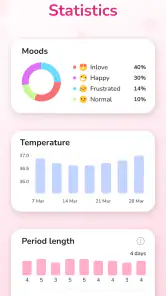
- Offers detailed health insights and predictions.
- Supports multiple languages for wider accessibility.
- Privacy-focused with secure data protection.
Cons
- Contains ads that might disrupt user experience.
- Limited features in the free version.
- Occasional syncing issues with cloud services.
- Some users report in-app purchase glitches.
- Does not include a pregnancy mode feature.
- Category
- Medical
- Version
- 11.4.0