UnitedHealthcare
- 20.35K
- 4.6
- Installs
- 5.00M
- Price
- Free

Screenshots
Analysis by Reviewed
I judge a health insurance app less by its first impressive screen than by whether it still helps when an appointment is coming up, a claim needs decoding, or I can’t remember where I put my insurance card. UnitedHealthcare is built around those recurring chores. It is a free medical app from UNITED HEALTHCARE SERVICES, INC., and its 4.6 average from around 183,000 ratings suggests many people find it useful. For me, its lasting value depends on whether its care-finding and plan information fit the insurance I actually use.
Why it can click in the first week
In the first few days, the appeal is practical rather than flashy: the app brings everyday insurance tasks together. If I’m preparing for a visit, having a digital insurance card on my phone can spare me a last-minute search through my wallet. Claims information can also give me a starting point for understanding what happened after care, rather than leaving me to rely only on a paper notice or a separate call.
The app is aimed at UnitedHealthcare members, so it makes the most sense when your plan and account are ready to use. It is not a general-purpose medical record or a replacement for a clinician. Someone who only needs a provider directory, for example, may prefer using their plan’s website or calling member services, especially if they don’t want another account on their phone.
What to check before relying on the app
If you are deciding whether to install it before an upcoming visit, I would first check whether you can sign in and find the plan information you need. The useful test is not simply whether the app opens; it is whether your member details, card, and coverage context are available when you need them. That quick check can prevent a rushed setup at reception and reveal whether this will be a regular tool or just another icon.
For a household that helps an older relative manage appointments, the app may be useful as one part of the preparation routine, but I would not assume that one person’s login automatically provides appropriate access to another person’s coverage. The safer approach is to use the account and member information intended for the person receiving care, and to confirm any access arrangements directly with UnitedHealthcare. That distinction matters because a shared phone or a family member’s help does not by itself resolve account access or privacy questions.
Getting Started with UnitedHealthcare
First things first, downloading and setting up the UnitedHealthcare app was a breeze. Available on both Android and iOS platforms, I found it with a quick search in the app store. Once installed, the setup process was straightforward. I was prompted to create an account, which required some basic information like my policy number, and voilà, I was in.
Interface and Usability
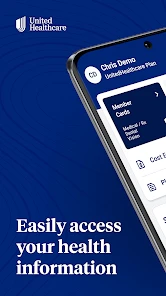
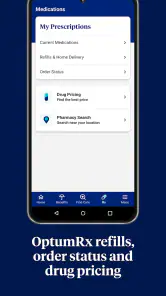
The app's interface is sleek and user-friendly. The homepage is clean, displaying all the essential features like Claims, Benefits, and Find a Doctor. Navigating through the app felt intuitive, and I didn’t experience any glitches or delays. The developers clearly had user experience in mind when designing this app. It’s like having a personal health assistant in your pocket, ready to help at any moment.
More From Our News Desk

Clash of Clans Is Won Between the Battles

Android Auto Makes the Case for Quieter Car Software

MobiOffice: Transforming Mobile Productivity with Seamless Integration

EA SPORTS FC™ Mobile Soccer: Redefining Mobile Sports Gaming

How Microsoft OneDrive Became a Mobile Productivity Giant

How Google Translate Breaks Language Barriers Effortlessly
For me, a helpful way to use a member app is to separate quick lookups from decisions that need confirmation. The screen can orient me before I call a provider or insurer, while a phone conversation can settle details that affect a booking or bill. That keeps the convenience without treating a tidy interface as a guarantee that every complicated coverage question has an equally simple answer.
Features that Stand Out
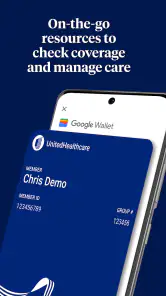
One of the standout features for me was the ease of accessing my insurance card. No more fumbling through wallets or searching for that elusive card when you need it the most. With just one tap, you have your insurance information ready to show at any doctor's office or pharmacy.
A small habit makes the card more useful: check that it is available on your phone before heading out, rather than waiting until the reception desk asks for it. I’d still keep a backup plan for a dead battery or poor signal. The digital card is convenient, but it does not remove the need to have your member details accessible when your phone isn’t.
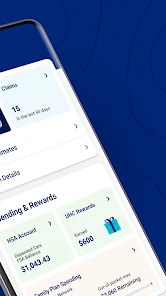
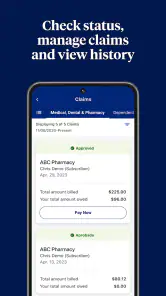
Another handy feature is the ability to track your claims. The app provides detailed information about each claim, what’s covered, and what isn’t. It’s reassuring to have all this information at your fingertips, especially when dealing with the often-complex world of health insurance.
Reading claims without jumping to conclusions
A claim view is most useful to me as a way to spot what needs attention, not as a final explanation of every charge. If something looks unfamiliar, I would compare the entry with the visit or service I remember, note the question, and then contact the insurer or provider for clarification before assuming that a balance is correct. This is a more reliable workflow than trying to interpret a confusing item while distracted by other errands.
It also helps to check claims after care rather than saving every question for months later. A quick review while the appointment is still fresh can make it easier to recognize the service and identify what you want clarified. The trade-off is that keeping up with claims takes a little attention; if you prefer all paperwork handled through calls or mailed explanations, the app may not change that preference.
Making care searches more useful
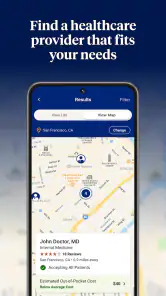
Finding a doctor or specialist can sometimes feel like searching for a needle in a haystack. However, with the UnitedHealthcare app, this process is simplified. The app offers a robust search function, allowing you to filter by location, specialty, and even the type of care you need. I found this particularly useful when looking for a specialist in my area.
When I’m comparing options, I treat a directory result as a shortlist, not a final decision. Before booking, I would confirm directly with the provider that they accept my specific plan and are taking appointments. That extra check matters because a convenient search result alone does not settle whether a particular visit will work for my coverage or schedule.
One practical refinement is to search with the real appointment in mind: the specialty you need, the area you can reasonably travel to, and whether the timing works for you. A long list is not automatically a better list. I would narrow it to a few plausible offices, call to verify plan acceptance and availability, and only then choose. This takes more effort than tapping the first result, but it avoids treating a directory as a live appointment calendar or a promise about costs.
Month-to-month value and the small upkeep
The app earns space on my phone when I return to it for real administrative moments: locating care, checking a claim, or pulling up coverage details before a visit. Those needs recur unevenly, so I wouldn’t expect to open it every day. Its usefulness is more like a well-organized folder than a daily health habit, and that is a sensible role for an insurer’s app.
A realistic use case is planning a specialist appointment after a referral. I can search by specialty and location, compare the available options, then check my plan information and bring up the card when I arrive. If a claim later looks unfamiliar, I can use the claim view as a first step to understand it. I would still contact the insurer or provider when a detail affects a bill or care decision; an app screen is helpful context, not a substitute for resolving a disputed charge.
For an ordinary week, the value may be less dramatic: I might check a benefit before scheduling, then leave the app untouched until a claim appears or another visit is due. That uneven rhythm is not a flaw if I only expect an insurance app to help with insurance tasks. It does mean I would not judge it by daily engagement. The better question is whether it shortens the administrative steps when a real need comes up.
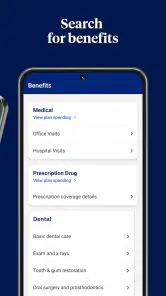
Maintenance is modest but not zero. Account access relies on having the right login details, so I’d sort those out before a time-sensitive appointment rather than at the clinic desk. It is also worth reviewing benefits before choosing care instead of assuming that a familiar provider or service is covered in the same way every time. That extra attention is a trade-off: the app gathers useful information, but the member still has to interpret it and verify consequential details.
When the routine becomes tiring
The likely source of fatigue is not constant activity but the need to keep insurance administration in mind at all. A member who has to sign in only occasionally may forget credentials, while someone who expects the app to answer every question can become frustrated when a complicated issue still needs a call. I would reduce that friction by checking access before appointments and using the app for preparation, not making it the only route to help.
There is also a difference between having information nearby and having a task fully completed. Seeing a provider in a search, viewing a benefit, or noticing a claim entry can point me toward the next step, but it may not book an appointment or resolve a billing disagreement on its own. If you want one app to manage your entire healthcare life, this narrower insurance focus may feel limiting. If you want a convenient starting point for member tasks, the same focus is a strength.
Where it may not be the best fit
Compared with a general maps app or a broad doctor-search service, UnitedHealthcare is more relevant to people whose insurance is with this company because its purpose is tied to member care and plan administration. A general directory may be easier if you are only browsing nearby clinics without needing insurance context. Conversely, if you need to manage another insurer’s coverage, this app is unlikely to become a useful hub for that task.
It may also feel unnecessary if you rarely use your insurance, prefer handling everything by phone, or do not want to manage another online account. The first-week convenience can fade if the app does not match your plan needs or if you only need one occasional piece of information. I’d install it when I expect to use its card, claims, or care search repeatedly, not simply because every insurer has an app.
It is also not the right choice for urgent medical guidance. A directory and plan details can help with administrative planning, but they do not replace a clinician’s assessment or emergency services. For a person looking for symptom diagnosis, a complete medical history, or appointment management across several unrelated providers, a clinical service or the providers’ own tools may be more appropriate. I would keep this app in its lane: useful for UnitedHealthcare-related errands, not a universal healthcare command center.
Long-term verdict
In conclusion, the UnitedHealthcare app is a must-have for anyone looking to streamline their health care management. Its user-friendly interface, comprehensive features, and easy accessibility make it stand out in the crowded field of health insurance apps. While no app is without its challenges, my experience with UnitedHealthcare has been overwhelmingly positive.
Whether you’re tech-savvy or just getting started with digital health management, this app is worth checking out. It’s like having your personal health care assistant right on your smartphone, ensuring you’re never more than a tap away from the information you need.
Its ongoing value is strongest when I use it as a practical companion to my coverage, not as the authority on every care or billing question. The app has reached over 5 million installs, is rated for Everyone, and its current version is 2.95.0, with Android 8.0 or later required. Those details make it broadly accessible, but the more important question is whether you are a UnitedHealthcare member who will return to its tools. If so, I can see it earning a lasting spot; if not, another route will likely serve you better.
The free price removes one barrier to trying it, but I would still be selective about keeping it installed. If your plan is with UnitedHealthcare and you regularly need the card, care search, or claim information, the convenience can justify the space. If your insurance needs are occasional and already handled comfortably through calls or a website, there is no reason to force a new habit. I see it as worthwhile when it removes a recurring bit of friction, not because installing an insurer’s app is an end in itself.
UnitedHealthcare Frequently Asked Questions
Can I use UnitedHealthcare if I am not already a member?
UnitedHealthcare is primarily designed to help people manage their health benefits and find care. You can download the app for free, but many account features depend on having a UnitedHealthcare plan and signing in with the appropriate account information. If you are considering coverage, the app may help you explore care-related options, while plan eligibility and enrollment should be checked through UnitedHealthcare’s official channels.
What can I check in the app before choosing a healthcare provider?
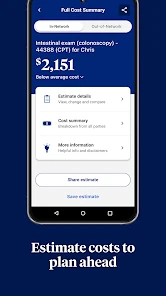
The app’s “Find and Price Care” focus can help you look for healthcare options and consider costs as you manage your benefits. Before choosing a provider or arranging care, review the information shown for your own plan and confirm that the option fits your coverage and needs. Availability and details can vary by plan, so use the app as a practical starting point rather than a substitute for checking your benefits.
Is UnitedHealthcare available for both Android and iPhone users?
The UnitedHealthcare app is available for Android and iOS, so it can be considered by users of either platform. Android users need version 8.0 or later. The app is free to download and is rated Everyone, making its content suitable for a broad audience. Before installing, make sure you select the official app from UNITED HEALTHCARE SERVICES, INC. and that your device is compatible.
Is the UnitedHealthcare app free to download, and what devices does it support?
The UnitedHealthcare app is free to download and is available for Android and iOS. For Android, it requires version 8.0 or later. The app is rated Everyone, so its content is intended for a broad audience. Before downloading, check that your device meets the operating-system requirement and that you are choosing the official app by UNITED HEALTHCARE SERVICES, INC.
What is UnitedHealthcare and what services does it offer?
UnitedHealthcare is a comprehensive health insurance provider offering a wide range of services including medical, dental, vision, and pharmacy plans. It provides coverage options for individuals, families, and employers, along with additional resources such as wellness programs and health management tools, allowing users to manage their health and wellness effectively.
Pros
- Comprehensive health coverage options.
- Easy access to medical records.
- User-friendly interface.
- Wide network of healthcare providers.
- Offers wellness and health tips.
Cons
- Occasional app crashes.
- Some features require internet.
- Limited customer support hours.
- Complex navigation for new users.
- High premium for certain plans.

- Category
- Medical
- Version
- 2.95.0