Leafly: Find Cannabis and CBD
- 17.11K
- 4.7
- Installs
- 5.00M
- Price
- Free

Screenshots

Analysis by Reviewed
I see Leafly as most useful when you want to make sense of cannabis options before choosing where to look next. It brings strain information and dispensary discovery together, so I can move from learning about a product to finding a nearby place without juggling separate tools. That combination is its clearest strength, though it works best as a guide rather than a substitute for careful decisions about health, local rules, or what a shop actually has available.
A practical companion, not a buying shortcut
In everyday use, I’d open Leafly to narrow a broad question, not to treat a strain description as a promise. If I were curious about why two products have different names or reputations, browsing strain profiles and reader feedback would give me useful starting points. I’d then use a dispensary listing to identify places worth checking, and confirm current details with the shop before making a trip. That last step matters: a directory can help with discovery, but it shouldn’t be treated as a live guarantee of inventory or suitability.
This makes the app a better fit for curious adults who want context than for someone who already knows exactly what they want and only needs a quick store address. It can also help a first-time researcher learn the vocabulary before speaking with dispensary staff. I’d keep expectations measured, though: crowd-sourced comments reflect individual experiences, not a reliable prediction of how a product will affect another person.
Where it fits among other options
Compared with a general maps app, Leafly is more focused on cannabis discovery: its appeal is connecting place-finding with strain information and community perspectives. A map may be simpler if all I need is directions, while a dispensary’s own site or phone line is the better check for its current menu and operating details. Leafly sits in the middle, helping me decide what to investigate and where, rather than replacing either source.
That distinction is useful when planning a visit. I’d shortlist a few nearby listings in Leafly, compare what people say, and then confirm the practical details directly before setting out. When traveling, I would also check the rules that apply at my destination instead of assuming a listing means a purchase or use is permitted. The app can make research easier, but local laws and shop policies still shape what is actually possible.
If cannabis is not legal where you are, or you want a neutral medical reference rather than a consumer-oriented cannabis guide, Leafly is probably not the right starting point. For health questions, I’d ask a qualified clinician instead of using strain descriptions or user reviews to make treatment decisions. Those are sensible boundaries, not shortcomings that a discovery app can solve.
Discovering the World of Cannabis
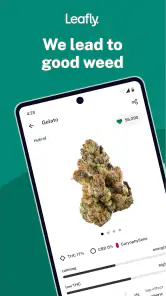
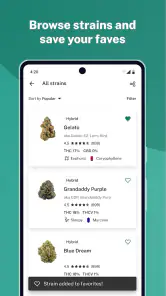
The first thing you’ll notice about Leafly: Find Cannabis and CBD is its comprehensive database of cannabis strains. Whether you’re looking for something to help you relax after a long day or a strain that energizes you for a creative project, Leafly has got you covered. The app allows you to explore thousands of strains, each with detailed descriptions, user reviews, and even photos. It’s like having a cannabis encyclopedia at your fingertips!
More From Our News Desk

Weather by Xiaomi Review: Clear at a Glance, Less Clear Up Close

X Under Pressure: Can It Recover When Posting Goes Wrong?

Clash of Clans Is Won Between the Battles

Android Auto Makes the Case for Quieter Car Software

MobiOffice: Transforming Mobile Productivity with Seamless Integration

EA SPORTS FC™ Mobile Soccer: Redefining Mobile Sports Gaming
One of the standout features for me was the personalized experience Leafly offers. You can filter strains by effects, flavors, and even medical uses, which is super helpful if you’re looking for something specific. Plus, the community reviews add a layer of trust and relatability that you just can’t get from a generic description.
Navigating Dispensaries with Ease
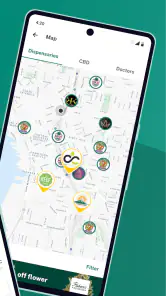
Finding a reputable dispensary can be daunting, especially if you’re new to the cannabis scene. Leafly makes this process incredibly simple. With its intuitive map feature, you can easily locate dispensaries near you, complete with user ratings and reviews. It’s like Yelp, but specifically for cannabis!
And if you’re traveling, no worries! Leafly’s got your back with its detailed dispensary listings across different states and countries. You’ll never have to guess where to go for your cannabis needs again.
Stay Informed with the Latest Cannabis News
In addition to being a great resource for strains and dispensaries, Leafly keeps you updated with the latest in cannabis news. Whether it’s changes in legislation, new product releases, or health studies, you’ll find it all here. The articles are well-written and engaging, making it easy to stay informed about the cannabis world.
I particularly enjoyed the educational aspect of the news section. Leafly doesn’t just tell you what’s happening; it helps you understand the implications of these developments, which is incredibly valuable for anyone looking to become more knowledgeable about cannabis.
The Final Puff
In conclusion, Leafly: Find Cannabis and CBD is an indispensable tool for anyone interested in cannabis, whether you’re a first-timer or a connoisseur. Its user-friendly interface, extensive strain database, and reliable dispensary locator make it stand out in a sea of cannabis apps. Plus, staying informed about the latest industry news has never been easier.
So, if you’re ready to enhance your cannabis journey, download Leafly and let it guide you through the green world with confidence and ease. Trust me, you won’t regret it!
What to expect before installing
Leafly is a free medical-category app from Leafly Holdings, Inc, with a mature 17+ age rating. Its average rating is 4.7 from around 94,000 ratings, and it has over 5 million installs. It first appeared on January 24, 2012; version 8.12.8 requires Android 6.0 or later. Those figures suggest an established product, but they don’t tell me whether its local listings will be useful in every area, so I’d judge that by trying a few searches where I actually live or travel.
One practical way to get more from browsing is to compare several strain profiles rather than latch onto the first promising description. Look for recurring themes across user comments, while remembering that reports are subjective and that effects can vary. Filtering can help turn a vague interest into a manageable shortlist, but I’d use medical-use labels as prompts for further discussion with a clinician, not as diagnoses or treatment advice.
Small checks that make a visit smoother
Before heading to a dispensary, I’d use the map to find options, read a few reviews for context, and then verify the shop’s current details directly. This avoids treating ratings as a guarantee of quality and helps prevent a wasted journey if hours, menus, or availability have changed. For someone comparing places, the most useful signal is often the pattern in several comments, not one glowing or angry review.
The app is aimed at adults, and its subject matter is not suitable for younger users. I’d also be cautious about browsing in situations where privacy matters, especially on a shared device: a search history can reveal personal interests. That is a general consideration for any app tied to a sensitive topic, and a good reason to review device and account settings before making it part of a routine.
Making research more useful
A sensible workflow is to begin with a question rather than a desired outcome. For instance, if two strain names keep appearing in conversation, I’d compare their profiles and note which details are consistent across descriptions and which seem to come mainly from individual reactions. That turns browsing into a way to prepare better questions for a knowledgeable adult or clinician, rather than a search for a guaranteed effect. It also prevents a long scroll through profiles from creating false confidence.
Filters are most helpful when I use them to reduce options, not to make the decision for me. A flavor or effect preference can provide a starting point, but it cannot account for every factor that matters to an individual. I’d keep a short list of candidates and read a mix of comments, including less enthusiastic ones. If the descriptions leave me uncertain, that is a reason to pause and ask for qualified guidance, not to keep filtering until the app produces an answer that sounds certain.
A realistic visit-planning routine
Imagine I’m in an unfamiliar neighborhood and want to learn which dispensaries are worth contacting. I’d use the map to see what is nearby, open a few listings, and look for recurring themes in the reviews rather than choosing the highest score at a glance. Then I’d contact the shop to check the current menu and practical details, and independently confirm the local rules before making plans. This sequence uses Leafly for discovery while leaving time-sensitive facts with the source best placed to confirm them.
That extra confirmation is especially useful when the trip involves travel or a tight schedule. A listing can help me build a shortlist, but it cannot remove the need to check whether a location is open, whether a particular item is available, or whether local restrictions apply. I would not plan around a review that mentions a product as though it were still on the shelf. For simple navigation, a general map is quicker; Leafly earns its place earlier in the process, when I’m comparing cannabis-specific context.
Who gets the most from it
I’d recommend Leafly to adults who are new to cannabis terminology, people comparing strain descriptions, and travelers who want a starting point for finding dispensaries. It is also useful for someone who prefers to gather background before asking questions in person. The combination of profiles, community views, and place discovery can make an unfamiliar subject less scattered, particularly when the user treats each feature as one piece of research rather than a final authority.
It is less suited to someone looking only for turn-by-turn directions, a definitive medical recommendation, or a live guarantee of shop inventory. A dispensary’s own contact details are more appropriate for immediate availability, and a clinician is the right person for health advice. Anyone who is under the app’s mature age rating should not use it. I’d also skip it if cannabis discovery itself is not relevant to your needs; its specialized focus is the point, but that focus will not add value to a general-purpose search.
Privacy is another personal consideration worth deciding before regular use. Cannabis-related searches can be sensitive, so I would think about whether I’m using a shared device and check the settings available on my device and account. That is not a reason to assume the app handles information in a particular way; it is simply a practical habit when using any service to research a private interest.
My recommendation
Leafly is worth considering if you want one place to explore cannabis terminology, compare strain descriptions, read community perspectives, and locate dispensaries. It is less compelling if you only need navigation, want clinical guidance, or expect every listing and review to answer a specific medical or legal question. For me, its strongest role is as a research companion: useful for forming better questions and planning what to check next, while leaving health decisions, legal checks, and final product details to more appropriate sources.
Leafly: Find Cannabis and CBD Frequently Asked Questions
How much storage space should I allow for Leafly?
Before downloading, it is sensible to check that your device has enough free storage for the app and its ongoing use. Leafly is available for Android devices running version 6.0 or later, and it is also offered for iOS. Keeping some room available can help with installing app updates and using the app comfortably alongside your other apps.
Can I use Leafly on both Android and iOS?
Leafly is available for Android and iOS, so you can look for it in the app store that serves your device. Android users should check that their device runs version 6.0 or later before installing. The app’s basic purpose is to help people find cannabis information, including dispensaries and strains, across supported mobile devices.
Who publishes Leafly, and is it a well-established app?
Leafly is published by Leafly Holdings, Inc. and has been available since Jan 24, 2012, giving it a long history as a cannabis information app. It has more than 5 million installs, around 94,000 ratings, and about 17,000 written reviews, with an average rating of 4.7. Those figures offer a sense of its reach and user feedback, though individual experiences can vary.
Is Leafly suitable for someone who is new to cannabis?
Leafly can be useful for beginners because it brings strain information, product details, dispensary listings, reviews, and educational articles together in one app. Its descriptions can help you learn the terminology and compare options at your own pace. Keep in mind that the app is an information resource, not a substitute for professional medical guidance or responsible decision-making.
What should I know about Leafly’s age rating before downloading it?
Leafly is rated Mature 17+, so it is intended for adults rather than younger users. The app discusses cannabis strains, products, dispensaries, and related topics, which makes its content unsuitable for children. If you are downloading it for someone else or managing a device used by a minor, consider the age rating and your device’s parental controls before installing.
Pros
- Extensive strain database.
- User-friendly interface.
- Detailed product reviews.
- Dispensary locator feature.
- Educational cannabis content.
Cons
- Limited to cannabis information.
- Requires internet connection.
- Age-restricted access.
- Regional availability limitations.
- Privacy concerns for user data.
- Category
- Medical
- Version
- 8.12.8