Anatomy Learning - 3D Anatomy
- 3.81K
- 4.5
- Installs
- 10.00M
- Price
- Free

Screenshots

Analysis by Reviewed
I usually know within the first few sessions whether a learning app will become part of my routine or fade after the initial curiosity. Anatomy Learning - 3D Anatomy makes a strong first impression because it gives me a body model I can explore instead of asking me to learn anatomy from a wall of text. That hands-on approach is its clearest strength, though it works best when I bring a question to the screen rather than simply browsing without a goal.
What makes the first week click
For a newcomer, the appeal is immediate: turn the model, zoom in, and look at how structures sit in relation to one another. I find that spatial context useful when a textbook diagram feels too flat or when a name is hard to remember on its own. A practical first session might be to pick one region, inspect it from a few angles, then try to recall what you saw before moving on. That small pause turns exploration into actual study.
This is a medical learning app from 3D Medical OU, and its focus is specifically anatomical visualization. It is free to download, with optional in-app purchases, and is rated for Everyone. The large audience—over ten million installs and an average rating of 4.5 from around 157,000 ratings—suggests broad appeal, but I would still judge it by whether its way of learning suits you. Its current version is 3.1.500, and it has been available since 2014.
Exploring the Human Body in 3D
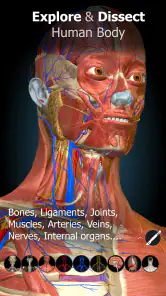
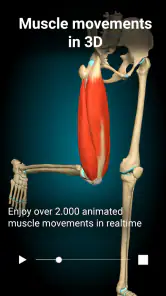
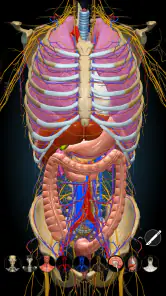
The standout feature of Anatomy Learning - 3D Anatomy is, without a doubt, its stunning 3D visuals. When you first open the app, you’re greeted with a detailed model of the human body that you can rotate, zoom, and dissect with just a swipe of your finger. It feels a bit like being in a sci-fi movie, where you’re the scientist exploring the intricacies of the human form.
Interactive and User-Friendly
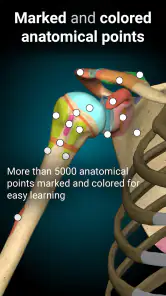
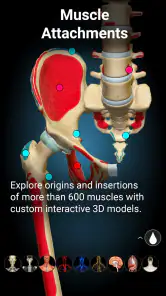
What I love about this app is how interactive it is. Whether you're a med student, a professional, or just a curious soul, navigating through the different layers of the body is a breeze. You can peel away muscles, view skeletal structures, and even peek inside organs, all while the app provides detailed descriptions and information. It's like having a personal anatomy tutor 24/7!
The interface is pretty intuitive too. I didn’t find myself fumbling around wondering what to do next, which is always a bonus. The design is sleek and modern, making the learning process not just informative but also enjoyable. Plus, the app is frequently updated, so you’re always getting the latest in anatomical know-how.
Learning Made Fun
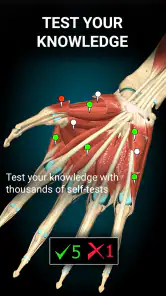
Okay, so learning about the human body might sound a bit dry to some, but this app spices things up. It includes quizzes and challenges that test your knowledge and keep you on your toes. These interactive elements make it more engaging, especially for those who prefer a hands-on learning approach. It’s like turning your study session into a game night!
More From Our News Desk

Weather by Xiaomi Review: Clear at a Glance, Less Clear Up Close

X Under Pressure: Can It Recover When Posting Goes Wrong?

Clash of Clans Is Won Between the Battles

Android Auto Makes the Case for Quieter Car Software

MobiOffice: Transforming Mobile Productivity with Seamless Integration

EA SPORTS FC™ Mobile Soccer: Redefining Mobile Sports Gaming
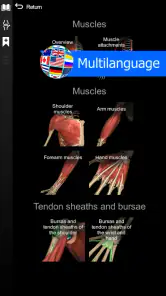
Moreover, the app supports multiple languages, which is a huge plus if English isn’t your first language. This makes it accessible to a global audience, breaking down language barriers and spreading knowledge far and wide.
From novelty to a useful habit
The part that determines whether I would keep using it is how easily an exploration can become a repeatable routine. I would use the 3D view to prepare for a class, revisit a body region after reading about it, or test myself with a quiz before moving on. A useful trick is to focus on relationships—what lies beside or beneath a structure—rather than trying to memorize every label in one sitting. The model is most valuable as a way to build a mental map, not as a replacement for a complete course.
For example, if I had a short study break before a lesson on the shoulder, I could inspect the area, rotate the view to check its layout, and then use a quiz to see what stuck. That is more purposeful than opening the app and tapping through unrelated parts. Short, targeted visits also make it easier to return the next day without needing to restart a sprawling study session.
Where it fits among anatomy resources
Compared with a printed atlas or a typical reference page, this app’s advantage is the ability to change the viewing angle and explore layers directly. A textbook can be better for a carefully organized explanation, and a lecture or instructor is better when I need context, correction, or clinical interpretation. I would use the app alongside those resources: first to understand spatial relationships, then to check terminology and explanations in course material. That division of labor keeps the 3D experience useful without asking it to do every job.
It is a good fit for students who benefit from visual repetition, teachers looking for a way to demonstrate structures, and curious learners who want to understand how parts of the body are arranged. It is less suitable as a stand-alone medical reference or for someone seeking advice about symptoms. A visual model can support learning, but it cannot assess a person or replace professional guidance.
Keeping the routine manageable
The main maintenance burden is not a complicated setup; it is deciding what to study and resisting the temptation to wander. I would keep a small list of topics from class or reading, choose one each time, and stop after a focused review. The quizzes can provide a quick check, but I would not treat a strong result as proof of mastery: revisit the same structures later and see whether I can identify them without relying on immediate visual cues.
There are trade-offs. Rotating and peeling through layers can make anatomy feel memorable, but a detailed model may also encourage passive looking. Some learners will find that visual exploration takes longer than a labeled diagram, especially when they only need a quick definition. Optional purchases are another consideration: the app is free to start, while individual in-app items range from $0.99 to $59.99, so I would explore the free experience before deciding whether any purchase is worthwhile for my needs.
Making each session answer a question
One way I would prevent aimless browsing is to turn a topic into a small prompt before opening the model: what sits behind this structure, what changes when I view it from the side, or which layer covers it? Those questions give the session a finish line. They also make the app more useful for people who already have notes or a lesson plan, since the model can help resolve a specific spatial confusion rather than compete with the rest of their study materials.
For a beginner, I would avoid trying to learn a whole body region at once. I would choose a handful of related structures, inspect their position, and then close the view and name what I remember. The same approach works for a teacher preparing a quick demonstration: use the model to show how parts relate, then return to the class’s preferred terminology and explanation. That keeps a striking visual aid from becoming the lesson by itself.
When a different tool is faster
Not every anatomy question calls for a 3D model. If I need one spelling, a short definition, or a fast reminder while reading, a glossary or a labeled diagram is usually quicker. If I need a systematic account of a topic, a textbook or course material gives me a clearer sequence and more surrounding explanation. The app earns its place when depth, angle, and spatial relationships matter; its advantage shrinks when the task is simply to look up a fact.
That distinction also helps set expectations about accuracy and use. I would treat the model as a learning aid, then verify important course details with the resources my instructor recommends. It is especially valuable for visualizing how structures fit together, but it is not a diagnostic tool and should not be used to interpret pain, symptoms, or treatment decisions. Curiosity about the body is a good reason to explore; concern about a health problem is a reason to seek qualified advice.
Who is likely to keep it installed
I can see it staying useful for a student who encounters anatomy repeatedly, a teacher who wants a visual way to orient a group, or a self-directed learner who enjoys returning to the same structures until their layout feels familiar. It is less compelling for someone who studies anatomy only once in a while or who prefers reading over manipulating a model. In those cases, an atlas or concise reference may be easier to reach for and less likely to turn a quick question into a longer browsing session.
Before spending money, I would first identify what I actually need from the app and try the free experience against that need. Optional purchases can make sense if a particular item supports a recurring study goal, but I would not buy simply because the model is engaging. A sensible test is whether I return to the same topics and use the visuals to answer questions that my existing materials leave unclear. If not, the free version may be enough, or another resource may suit the job better.
Conclusion: A Must-Have for Curious Minds
In a nutshell, Anatomy Learning - 3D Anatomy is a must-have app for anyone interested in the human body, whether for educational purposes or pure curiosity. Its 3D models are not only educational but also visually captivating, making the learning process both effective and fun. So why not give it a try? You might just find yourself fascinated by all the amazing things happening inside you!
My longer-term verdict is a little more measured: I would keep it around if anatomy comes up regularly in my studies or teaching, because revisiting a model from different angles offers value beyond the first look. If I only needed an occasional fact, a book or concise reference would be faster. The app has 3.8K reviews, and its steady usefulness, in my view, depends less on novelty than on returning with a specific question and using the model to answer it.
Anatomy Learning - 3D Anatomy Frequently Asked Questions
Is Anatomy Learning - 3D Anatomy suitable for casual exploration as well as structured study?
Yes. Anatomy Learning - 3D Anatomy can be useful whether you are browsing out of curiosity or working through anatomy as part of a course. Its three-dimensional atlas gives you a visual way to examine body structures, while its educational focus also suits more purposeful review. Casual users can explore at their own pace, and students or educators can use the models to support learning and teaching.
What is the app’s age rating, and who might find its material useful?
Anatomy Learning - 3D Anatomy is rated Everyone, and its subject is human anatomy. It may interest a broad range of users, including people curious about the body, students, and educators. The material is educational rather than a substitute for professional guidance, and some anatomical topics may be more useful to learners who are ready to engage with detailed study.
Who develops Anatomy Learning - 3D Anatomy, and what kind of app is it?
Anatomy Learning - 3D Anatomy is a medical education app developed by 3D Medical OU. Its focus is exploring human anatomy through a three-dimensional atlas, making it relevant to learners who want a visual way to study body structures. The app is listed for Everyone, so its intended audience is broad, although the depth of the material may be most useful to students, educators, and people with an interest in anatomy.
What is Anatomy Learning - 3D Anatomy app used for?
Anatomy Learning - 3D Anatomy is an educational application designed to help students, medical professionals, and anyone interested in human anatomy. It offers a detailed three-dimensional model of the human body that allows users to explore various systems and structures interactively. This app is particularly useful for medical students and educators who require a comprehensive and engaging tool for learning and teaching anatomy.
Is Anatomy Learning - 3D Anatomy free to use?
Anatomy Learning - 3D Anatomy is free to download, with in-app purchases for additional content or features. The listed purchase range runs from $0.99 to $59.99 per item, so check the available options in the app before paying. This gives users a chance to try the app before deciding whether they want to buy anything, and the free experience may not include every available feature or model.
Pros
- Interactive 3D models enhance learning
- User-friendly interface for easy navigation
- Regular updates with new features
- Detailed anatomical information
- Supports multiple languages for global users
Cons
- Requires a stable internet connection
- Some features are behind a paywall
- Limited offline access
- Ads can be intrusive
- Occasional performance lags on older devices
- Category
- Medical
- Version
- 3.1.500