WebMD: Symptom Checker
- 10.64K
- 4.1
- Installs
- 10.00M
- Price
- Free

Screenshots
Analysis by Reviewed
Ever found yourself Googling symptoms at 2 AM and spiraling down the rabbit hole of self-diagnosis? That's where WebMD: Symptom Checker comes into play. It's like having a mini doctor in your pocket, ready to tell you whether that headache is just a headache or something more sinister. Let me walk you through my thoughts after spending some quality time with this app.
A sensible first pass when something feels off
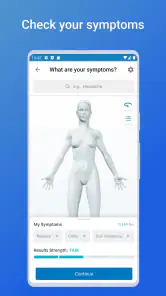
I find the most useful way to approach WebMD is to treat it as a first pass, not a verdict. Start with the body area that feels wrong, choose the symptoms that genuinely fit, then read the possible explanations without jumping straight to the most frightening one. A body map helps when I know where the discomfort is but not the right medical word. That can make the first step less intimidating than typing a vague search into a browser and sorting through unrelated pages.
For example, if a new ache appears during a busy day, I can pause long enough to describe its location and other symptoms, then use the result to decide what questions I want to ask a clinician. That is a better goal than trying to diagnose myself. If symptoms feel severe, are getting worse, or seem urgent, I would skip the app and seek appropriate medical help rather than waiting for a screen to reassure me.
First Impressions: Navigating the World of Symptoms
Opening up the WebMD: Symptom Checker, you'll be greeted with a clean, user-friendly interface. The app doesn't waste time with unnecessary graphics or flashy animations. Instead, it gets straight to business, asking you where it hurts. You can select the part of your body that's bothering you from a virtual body map, which I found super handy. This feature is especially useful if you're not quite sure what medical term to use.
Diving Deeper: Exploring Features
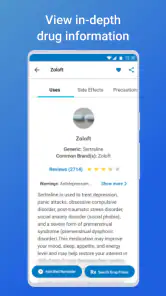
Once you've pinpointed the area of concern, the app lists potential symptoms and conditions. It’s pretty comprehensive, covering everything from minor issues to serious conditions. The app even provides a brief overview of each condition, which I appreciated as it saves a trip to the doctor for minor concerns. However, I must emphasize that it’s not a substitute for professional medical advice.
Another feature worth mentioning is the ability to save your searches. This is great for tracking symptoms over time or remembering what the app suggested last time you had a similar issue. Plus, it integrates with other WebMD resources, providing a wealth of information at your fingertips.
Make saved searches useful, not alarming
I’d use saved searches as a memory aid rather than as a home diagnostic chart. If I were checking a recurring problem, I would note what changed since the last time—when it began, whether it is improving, and what else I noticed—then bring that concise history to a healthcare professional if needed. Repeating a search with slightly different answers can produce a different set of possibilities, so the comparison is not proof that a condition has appeared or disappeared.
More From Our News Desk

Weather by Xiaomi Review: Clear at a Glance, Less Clear Up Close

X Under Pressure: Can It Recover When Posting Goes Wrong?

Clash of Clans Is Won Between the Battles

Android Auto Makes the Case for Quieter Car Software

MobiOffice: Transforming Mobile Productivity with Seamless Integration

EA SPORTS FC™ Mobile Soccer: Redefining Mobile Sports Gaming
One practical habit is to decide in advance what I need from a session: a plain-language explanation, a reminder of what details to observe, or help preparing for a medical conversation. That keeps browsing focused. The condition summaries can orient me, but they are not a reason to delay care when symptoms are concerning or persistent.
Build a useful record without turning it into a diagnosis
When a symptom comes and goes, the most valuable detail may be the pattern, not the app's list of possible causes. I would use a saved search as a prompt to record observations in ordinary language: where the discomfort is, when I first noticed it, whether it is changing, and what else is happening at the same time. I would avoid treating two searches as a controlled comparison; symptom selection is subjective, and a small difference in answers can change the possibilities shown.
This approach is especially useful before a routine appointment. Rather than trying to remember everything in the waiting room, I can use the app to organize the concern and then describe what I actually experienced. The result is a clearer conversation, not a stronger diagnosis. If I am worried enough to keep reopening the same search, that is a sign to stop browsing and ask a qualified person for help.
Real-Life Usability: Is It Worth It?
One of the things I loved about this app is its accessibility. Whether you're tech-savvy or not, navigating through it is a breeze. The app's simplicity doesn’t compromise on depth, offering detailed information without overwhelming the user. However, it requires an internet connection to function, which might be a bummer if you're in a low-connectivity area.
I also noticed that the symptom checker sometimes lists every possible condition under the sun, which might be overwhelming for some users. It’s crucial to approach it with a clear mind and remember that not every headache is a brain tumor!
Where it fits beside search engines and clinician care
Compared with a general web search, WebMD gives me a more guided route: I can begin with a body area and move through symptoms instead of opening a pile of pages with different levels of reliability. That structure is helpful when I do not know the terminology. But a search engine may be quicker for a narrow question, while a clinician is the right choice for assessment, treatment decisions, or symptoms that need prompt attention. The app sits between those options; it helps me organize a concern, not settle it.
It is a particularly good fit for adults who want health information in familiar language and can stay calm around a broad list of possibilities. I would be cautious about using it while anxious, checking repeatedly for reassurance, or trying to interpret symptoms for someone who cannot clearly describe them. In those situations, a trusted person or healthcare professional is more useful than another round of symptom matching.
Choose the right tool for the question
The advantage over an ordinary search is not that the app can know more about me; it is that the body-area route gives me a deliberate starting point. For a specific, factual question—such as the meaning of a medical term—a targeted search may be faster. For a personal decision about whether symptoms need examination, an appointment or an appropriate medical service is the better route. I would not use a symptom checker to choose a treatment or to rule out a serious problem.
It also helps to think about who is entering the symptoms. I can describe my own experience directly, but a child, an older relative, or anyone who has difficulty communicating may not be able to provide precise answers. In those cases, guessing through prompts can create a misleading result. I would use the app only as a way to collect questions for a clinician, and I would prioritize direct professional advice when the person seems significantly unwell.
Settings and repeatable habits that help
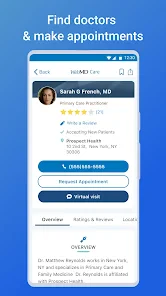
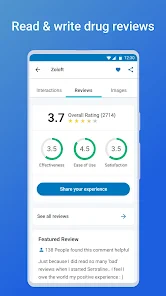
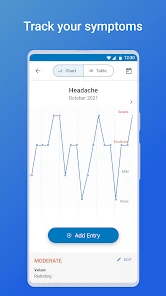
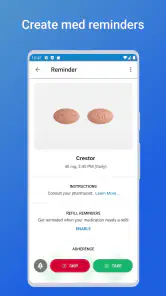
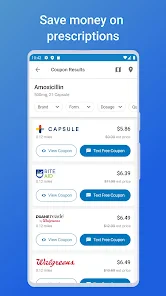
I would check the app’s available settings and keep the experience aligned with how I actually use it, rather than assuming reminders or tracking will work a particular way. The store summary highlights medication reminders and finding a doctor, so those may be useful parts of the wider app for someone who also needs help staying organized or locating care. A simple routine—record the concern, review the information once, and decide on a sensible next step—can be more helpful than repeatedly changing answers to see whether the result becomes more comforting.
For a realistic everyday example, imagine noticing a rash after work. I could use the checker to describe where it is and what else I feel, read the possible explanations, and save the search if I want to remember the details. If it spreads or I feel significantly unwell, I would not use a saved result as a reason to wait; I would contact a healthcare professional. If it remains mild, the information may help me explain the situation clearly if I later seek advice.
Make a quick session count
Experienced use is less about finding a secret shortcut and more about making the same calm choices each time. I would begin with the body map when I cannot name a symptom, select only details I can honestly identify, and read the result once with a specific question in mind. If I am checking because I need to explain a concern later, saving the search can help me recall what I reviewed; if I only want a definition, a focused information search may be simpler.
The medication-reminder and doctor-finder options mentioned for the wider app point to two different jobs: remembering a routine and locating care. They should not be confused with the symptom checker's assessment. A reminder can support consistency, but it cannot determine whether a medicine is appropriate for a new symptom. Likewise, finding a doctor is a practical next step, not a clinical conclusion. Keeping those purposes separate makes the app easier to use sensibly.
What to expect from the wider app
WebMD, LLC develops this free medical app. It has a 4.1 average from around 65,000 ratings, and over 10 million installs. It is rated for Everyone, with version 11.28 listed for devices running Android 9 or later. Those details make it accessible to a broad audience, though a rating cannot tell me whether its guidance will fit my own situation. I would also keep the practical limitation in mind: because the symptom checker needs an internet connection, it is less useful when I cannot get online.
The app makes the most sense if I want a structured starting point and can treat health information with perspective. Someone looking for a definitive diagnosis, personal treatment plan, or a replacement for an appointment should choose professional care instead. The same goes for anyone whose worry tends to intensify after reading lists of possible conditions; in that case, it may be better to ask a clinician directly rather than browse further.
Who benefits, and who should leave it closed
I see the strongest case for this app in someone who wants to turn a vague concern into a more organized description before deciding what to do next. It can be helpful when I am unsure which body area or symptom term to begin with, or when I want to prepare for a conversation instead of relying on memory. Its guided format is also a reasonable alternative to jumping between search results that may vary in quality and tone.
I would skip it during a medical emergency, when symptoms are severe or rapidly worsening, or when using health information tends to fuel anxiety. It is also not the right tool for a person who expects a definitive answer or a personalized treatment plan. In those cases, contacting a healthcare professional directly is more useful than spending time refining symptom selections. The free price removes a financial barrier to trying it, but it does not change what a symptom checker can safely decide.
Final Thoughts: A Handy Tool in Your Health Arsenal
In conclusion, WebMD: Symptom Checker is an invaluable tool for those who want a quick insight into their symptoms without rushing to the doctor for every little thing. It’s like having a health encyclopedia in your pocket, ready to provide you with information and peace of mind. Just remember, while it's a helpful guide, always consult a healthcare professional for serious concerns. So, next time you're awake at 2 AM, wondering about that sudden rash, you know where to look!
My verdict is that I would keep it for orientation, not certainty. Its body-map entry, symptom lists, saved searches, and connected WebMD resources can help turn a vague concern into a clearer account of what is happening. The trade-off is that broad possibilities can unsettle rather than reassure, and no app can examine you or judge the full context. Used once with a clear purpose, it can help me prepare; used as a substitute for care or as a loop of repeated checking, it is the wrong tool.
A practical decision before you open it
Before starting, I would ask myself what I want to leave with. If the answer is “a clearer way to describe this” or “a few sensible questions for a clinician,” the checker has a useful role. If I am hoping it will tell me that nothing is wrong, or settle a decision that needs examination, I would choose a different next step. That small distinction helps keep the app in its proper lane and avoids giving an algorithmic list more authority than it deserves.
WebMD is a free medical app from WebMD, LLC, released on May 6, 2011, and its current version is 11.28. The 4.1 average across around 65,000 ratings and more than 10 million installs suggest that many people have tried it, but popularity is not a measure of personal accuracy. For me, its value comes from the guided entry, the ability to save a search, and the broader resources—not from any promise that it can replace a clinician. I would keep it as a calm first step, use it with a clear purpose, and stop when the next sensible action is to seek human medical advice.
WebMD: Symptom Checker Frequently Asked Questions
Is WebMD: Symptom Checker suitable for children and families?
WebMD: Symptom Checker is rated for Everyone, so its content rating is broadly accessible. It is a medical app, however, and the symptom information is best treated as a starting point for understanding health concerns—not as a diagnosis or a replacement for professional care. Families should involve a qualified healthcare professional when a child has symptoms or needs medical advice.
What devices can I use WebMD: Symptom Checker on?
WebMD: Symptom Checker is a medical app from WebMD, LLC for Android and iOS. Its current version is 11.28, and it requires Android or iOS version 9 or later, so check your device’s operating system before downloading. The app is rated for Everyone, making it broadly accessible, though its health information is intended as a resource rather than a substitute for professional care.
Who makes WebMD: Symptom Checker, and is it widely used?
The app is developed by WebMD, LLC and has been available since May 6, 2011. It has an average rating of 4.1 from around 65,000 ratings, with about 11,000 written reviews and over 10 million installs. Those figures give you a sense of its reach, but your experience may depend on your device and how you use its health tools.
What is WebMD: Symptom Checker and how can it help me?
WebMD: Symptom Checker is a mobile application designed to help users identify potential health issues based on their symptoms. By entering your symptoms into the app, it provides a list of possible conditions and related health information. It's a useful tool for gaining insights into your health before consulting a healthcare professional, though it should not replace professional medical advice.
Is WebMD: Symptom Checker free to use?
Yes, WebMD: Symptom Checker is free to download and use. The app provides a range of features at no cost, including symptom checking, access to health-related articles, and medication reminders. However, certain features may require an internet connection, and there might be in-app advertisements or optional premium content available for purchase.
Pros
- Comprehensive symptom database.
- User-friendly interface.
- Personalized health insights.
- Regularly updated content.
- Access to wellness articles.
Cons
- Requires internet connection.
- Contains ads.
- Limited offline functionality.
- May cause unnecessary worry.
- Lacks live doctor chat.
- Category
- Medical
- Version
- 11.28