GoodRx: Prescription Coupons
- 159.84K
- 4.8
- Installs
- 10.00M
- Price
- Free

Screenshots




Analysis by Reviewed
When a prescription is ready for pickup, the price can be as important as the trip to the pharmacy. I’d use GoodRx: Prescription Coupons as a way to check options before heading out, rather than assuming the first price I see is the only one. It is a free medical app from GoodRx, and its focus is straightforward: help people look up prescription prices and use coupons where they are accepted.
What to expect before you search
The first useful thing to know is that this is a comparison tool, not a replacement for a prescriber, pharmacist, or insurance plan. A lower listed price can be worth checking, but the final amount depends on the particular prescription and pharmacy. I’d treat the app as a starting point for a price conversation, not as a promise that every pharmacy will charge the same amount shown on screen.
That distinction matters if you normally use insurance. A coupon price and an insurance price may be different ways of paying, so compare the options before deciding which to use. If you’re unsure how a coupon applies, ask the pharmacy to check it before the transaction is completed. The practical win is having another option ready, especially when the usual cost feels unexpectedly high.
Why GoodRx Stands Out
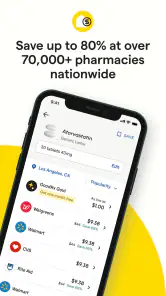
GoodRx is a game-changer when it comes to finding discounts on your meds. The app scours the internet for the best prices at pharmacies near you. You know how sometimes you feel like you’re paying way too much for your prescriptions? Well, this app is like your personal detective, rooting out the best deals.
Getting Started with GoodRx
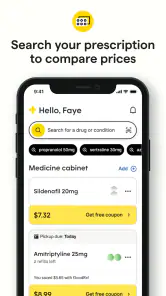
Setting up GoodRx: Prescription Coupons is a breeze. You just download the app from your store, and boom, you’re ready to start saving. No complicated sign-up process or lengthy forms – just straightforward and user-friendly. You just search for the medication you need, and it lists prices from different pharmacies. Easy peasy!
For a first search, I’d have the medication name and the prescription details available, then check the result carefully before making plans. A useful workflow is to compare a few nearby pharmacy options, note the one that looks promising, and call ahead if anything about the displayed price or coupon instructions is unclear. That small check can prevent a wasted trip and makes the app more useful than simply glancing at a number while you’re in a hurry.
Features You’ll Love
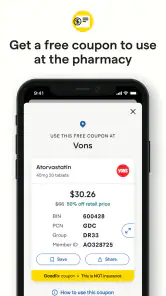
One of the coolest features is the ability to compare prices. You can see what your medication costs at various pharmacies, and even better, the app provides coupons that can be applied directly at checkout. It’s like having a pocket-sized pharmacist giving you the lowdown on where to snag the best deals.
More From Our News Desk

Weather by Xiaomi Review: Clear at a Glance, Less Clear Up Close

X Under Pressure: Can It Recover When Posting Goes Wrong?

Clash of Clans Is Won Between the Battles

Android Auto Makes the Case for Quieter Car Software

MobiOffice: Transforming Mobile Productivity with Seamless Integration

EA SPORTS FC™ Mobile Soccer: Redefining Mobile Sports Gaming
Another neat feature is the pill identifier. Ever found a stray tablet and wondered what it was? The app lets you identify pills based on appearance – super handy, especially if you’re managing multiple medications.
I’d use pill identification as a prompt to investigate, not as a final answer about a tablet’s safety or suitability. If a pill is loose, unfamiliar, or could belong to someone else, don’t take it based only on a visual match; ask a pharmacist or another qualified professional. For regular prescriptions, price comparison is the more direct everyday use: checking before pickup can help you decide whether to contact a different pharmacy or ask about the coupon.
How It Helps You Save
The app is free, which is already a win in my book. A coupon price can be useful, but the amount you pay depends on the prescription and pharmacy, so I wouldn’t assume every search will produce a dramatic discount. The real value is having a second option to check when the usual amount surprises you, not treating a coupon as a guarantee of savings.
The app has an average rating of 4.8 from around 330,000 ratings, and it has been installed over 10 million times. Those figures suggest that many people find it useful, though they can’t tell you whether a specific medication will be cheaper at your local pharmacy. I’d judge it by a real comparison for a prescription you actually need, rather than by popularity alone.
Picture a familiar situation: your refill is due, but the price at your regular pharmacy is more than you expected. I’d search the medication, compare nearby choices, and check the coupon details before choosing where to pick it up. If a different location appears cheaper, confirm the price and that the prescription can be filled there; convenience, travel, and timing can matter as much as the displayed cost. For a medicine you take regularly, repeating that check at refill time is a sensible habit, but there’s no need to switch pharmacies over a tiny difference that costs you time or creates confusion.
Compared with relying only on a pharmacy’s posted price or asking one counter for a quote, GoodRx gives you a broader comparison to consider in one place. That is its clearest advantage. The trade-off is that comparing prices still takes a little judgment: the cheapest result may not be the easiest location, and a coupon does not make the app a source of medical advice. If you already have a reliable insurance arrangement and are happy with what you pay, you may not need to check every refill. It is most useful when you want another price to compare, are paying out of pocket, or need to investigate a sudden cost change.
Making the comparison work in real life
For a first-time user, I’d keep the first search simple: look up one prescription you already know, rather than trying to compare an entire medicine cabinet at once. That gives you a familiar reference point and makes it easier to spot whether the result is relevant. If the medicine has several strengths or forms, make sure the entry matches the prescription in hand. A price for a different strength or formulation is not a useful substitute, even if the name looks nearly identical.
It also helps to separate the price question from the pharmacy decision. A lower figure at a farther location may not be a real saving once you account for the extra trip, your schedule, and whether that pharmacy can fill the prescription when you need it. I’d compare the likely total inconvenience, not just the number on the screen. For someone already passing several pharmacies during a normal commute, a different pickup point may be easy; for someone dependent on a ride, staying with a familiar pharmacy may be worth more than a small price difference.
If you are comparing several prescriptions, write down or otherwise keep track of which coupon and pharmacy go with each one. Mixing up details can turn a useful check into a confusing counter conversation. I’d also avoid waiting until I’m standing at the pharmacy to investigate a surprising result: looking beforehand gives me time to clarify a mismatch and decide whether the alternative is practical.
Questions to settle before pickup
A common first question is whether the coupon automatically replaces insurance. I would not assume that it does. Treat the coupon and your usual insurance price as separate options to ask about, and let the pharmacy explain which can be used for the specific purchase. If one route is unclear, pause before completing the transaction rather than guessing. The app can help you find a possible price, but the pharmacy is where you can confirm how that price applies.
Another reasonable question is whether a result means the medicine is in stock or ready to collect. A price comparison is not the same thing as a confirmed fill, so call the chosen pharmacy if timing matters, particularly before making a special trip. You may also want to confirm that the prescription information on file is current. These checks are ordinary, but they are the difference between a promising search result and a successful pickup.
People often wonder whether they should switch pharmacies whenever the app shows a lower amount. My answer is no: compare the difference with the practical costs of changing locations and the value of continuity with a pharmacy that knows your routine. If you have questions about interactions, dosage, or whether a medicine is appropriate, use a prescriber or pharmacist, not a coupon search. GoodRx is at its best when the question is what a prescribed medicine might cost, not what treatment you should choose.
Where it fits among other options
Compared with calling pharmacies one by one, a price comparison app can make the initial search less tedious and help you identify which locations are worth contacting. Compared with checking only your insurance portal or asking your usual pharmacy, it gives you another angle on out-of-pocket pricing. Neither comparison replaces the other: your plan and pharmacy can explain your established options, while GoodRx can help you notice an alternative worth asking about.
That makes the app especially useful for people without coverage, people facing a sudden cost increase, and caregivers who need to compare pickup choices for someone else. It is less compelling if you have a stable, affordable arrangement and rarely need to question it. It may also be the wrong tool if your priority is medical guidance, prescription management, or certainty about immediate stock. In those situations, a clinician, pharmacist, or the pharmacy’s own service is the better next step.
GoodRx is a medical app, and its current version is 8.83.0. It is rated for Everyone and requires Android 8.0 or later. It has been available since December 12, 2012, and is free to download. Those basics make it approachable for a first-time user, but the decision that matters is still whether its search and coupon options help with your own prescription and pickup routine.
One practical tip is to check the exact medication entry rather than relying on a similar-looking name, then review the pharmacy and coupon information before leaving home. If the result does not match what your clinician prescribed, don’t substitute a different medicine to chase a lower price; ask the prescriber or pharmacist. That keeps the app in its proper lane: helping you compare payment options for the medicine you were actually told to take.
Building a routine without overchecking
I wouldn’t turn every refill into a long hunt for the absolute lowest number. A quick comparison is most worthwhile when the price changes, you are starting a new prescription, or you are paying more than expected. If the same pharmacy remains convenient and the cost is acceptable, that may be the best choice for you. The app’s value is not that it must change your decision each time; sometimes it simply reassures you that you have checked a reasonable alternative.
For a family member, the most helpful approach is to compare together and keep the final decision with the person filling the prescription and their care team. Ask what matters most: a nearby pickup, a familiar pharmacy, or checking whether a lower coupon price is available. That small conversation prevents a price search from becoming pressure to change medicines or routines. It also gives the person a clear question to take to the pharmacist if the displayed result and the amount at the counter do not line up.
It also sends you alerts if there are price drops on your meds, which is fantastic because who doesn’t love a good deal? It’s like having a personal assistant who’s always on the lookout for savings.
Who will get the most from it
I think this is a particularly practical tool for people without coverage, people whose out-of-pocket costs fluctuate, and anyone helping a family member compare pickup options. It may be less valuable if you rarely fill prescriptions, already have a dependable low-cost arrangement, or prefer to handle every price question directly with your pharmacy. In all cases, the pharmacist remains the best person to resolve a mismatch between a coupon result and the amount due.
The Bottom Line
In a world where healthcare costs can be overwhelming, GoodRx: Prescription Coupons is a breath of fresh air. It’s practical, easy to use, and most importantly, it helps you keep more money in your pocket. Whether you’re uninsured, underinsured, or just looking to save, this app is definitely worth a download. So, go ahead, give it a whirl and see how much you can save. Happy saving!
GoodRx: Prescription Coupons Frequently Asked Questions
Does GoodRx work on both Android and iPhone?
GoodRx is a mobile app for finding prescription prices and coupons. Before downloading, check that your phone’s operating system is supported by the version available in your app store. The Android version requires Android 8.0 or later. Once installed, you can search for medications and review nearby pharmacy prices before deciding where to fill a prescription.
Can I use GoodRx to find coupons before visiting a pharmacy?
Yes. You can search for a prescription medication in GoodRx and review coupon options before heading to a pharmacy. This makes it easier to compare prices and choose a participating location in advance. When you arrive to pick up your prescription, show the coupon to the pharmacy staff so they can apply it to your purchase.
Does GoodRx help me compare prescription prices at nearby pharmacies?
Yes. GoodRx is designed to let you search for a prescription medication and compare prices at pharmacies in your area. You can review the available options, choose a coupon, and show it at the pharmacy when picking up your prescription. Checking the app before you go can help you see which participating pharmacy offers a suitable price for your medication.
What is GoodRx and how does it work?
GoodRx is a mobile application designed to help users find the best prices for prescription medications. By comparing prices across pharmacies in your area, GoodRx provides users with discount coupons that can be used to save money on their prescriptions. Simply search for your medication in the app, find the lowest price, and present the coupon at the pharmacy when picking up your prescription.
Is GoodRx free to use?
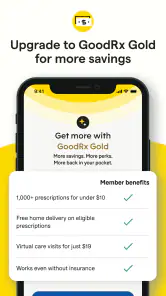
Yes, GoodRx is completely free to use. Users don't need to pay any fees to access the discounts and coupons available through the app. However, there is an optional premium version, GoodRx Gold, which offers additional benefits and discounts for a monthly subscription fee. The standard free version of GoodRx provides ample savings for most users.
Pros
- Easy to use interface.
- Wide range of pharmacies included.
- Significant discounts available.
- No membership required.
- Fast prescription price comparison.
Cons
- Limited to US pharmacies only.
- Prices vary by location.
- May require account signup.
- Discounts not always applicable.
- Ads present in free version.
- Category
- Medical
- Version
- 8.83.0