FollowMyHealth®
- 73.14K
- 4.8
- Installs
- 5.00M
- Price
- Free

Screenshots
Analysis by Reviewed
I find FollowMyHealth® most useful when health information is spread across visits and tasks rather than kept in one folder. It is a medical app from Veradigm LLC, built around access to a Universal Health Record. The practical appeal is straightforward: I can use it to keep track of parts of my care and, when my healthcare provider supports the connection, reach relevant records and services without relying only on paper or memory. It is free, rated for Everyone, and its long-running presence in the health-app category makes it familiar to many patients.
Finding your way through health information
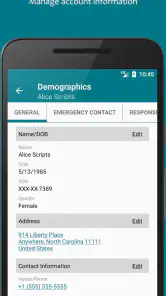
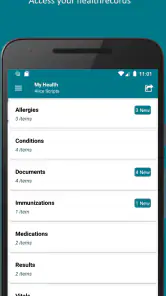
The first thing you'll notice about FollowMyHealth® is how seamless it makes managing your health. The app links directly to your healthcare provider's electronic health record, ensuring that you have all your medical records at your fingertips. This includes lab results, immunizations, medications, and even appointment schedules. No more scrambling to find that elusive lab result from last year; it’s all organized neatly in one place.
That setup also shapes what I would check before making it my main health organizer: whether my provider uses the service and which parts of my record are available after connecting. A health record app is only as complete as the information its connected care team makes available. I would treat it as a convenient window into participating records, not as a guarantee that every clinic, past visit, or outside test will appear in one unified timeline.
Readable information, straightforward navigation
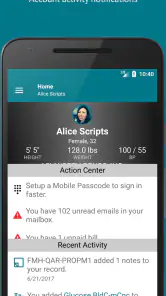
One of the standout features of this app is its user-friendly interface. Even if you're not tech-savvy, navigating through FollowMyHealth® is a breeze. The dashboard is clean and intuitive, with everything you need just a tap away. I especially appreciate the way it lays out information in a straightforward manner, so you don't have to dig through layers of menus to find what you're looking for.
For readability, a simple dashboard matters most when I need one specific detail rather than a broad tour of my history. I would open the relevant record before an appointment, then note questions separately so I can discuss them with a clinician instead of trying to interpret a result in isolation. If a screen feels crowded or small text is difficult to read, using the phone’s own display and text settings may help, though the experience can vary by device and by the information shown.
One useful way to keep a visit focused is to look at a result before the appointment and write down the date, the label, and what I want to ask. That is more reliable than trying to remember a number while a clinician is speaking. I would not treat an unfamiliar result as a diagnosis: a value’s meaning can depend on the rest of my history and the reason the test was ordered. The app is most helpful here as a reference point for a conversation, not as a substitute for one.
Motor and sensory considerations
Medical information is often something I need to consult while distracted, tired, or dealing with discomfort. A straightforward layout can reduce the number of steps involved, but tapping and reading on a phone still takes effort. Someone who finds touchscreens difficult may prefer to review records with a trusted helper or use a larger device when available. I would also avoid relying on a quick glance at sensitive information in a noisy or public setting; reading carefully is more useful than rushing through a result.
More From Our News Desk

Weather by Xiaomi Review: Clear at a Glance, Less Clear Up Close

X Under Pressure: Can It Recover When Posting Goes Wrong?

Clash of Clans Is Won Between the Battles

Android Auto Makes the Case for Quieter Car Software

MobiOffice: Transforming Mobile Productivity with Seamless Integration

EA SPORTS FC™ Mobile Soccer: Redefining Mobile Sports Gaming
A practical habit is to decide in advance what I want to find—such as a medication entry or a past result—rather than browsing aimlessly during a short appointment. That makes navigation more purposeful and can make it easier to explain a concern to a provider. The app can organize information, but it does not replace clinical interpretation or make a medical decision for me.
There is a trade-off for anyone with limited dexterity or low vision: the phone may be convenient to carry, yet its small touch targets and screen can make a task harder than it would be on a larger display. I would set aside a calm moment to learn the route to the sections I use most, rather than expecting to navigate them quickly under pressure. A support person can help with account setup or reading a record, but I would keep personal login details private and agree on what information that person is helping me manage.
Communication and routine requests
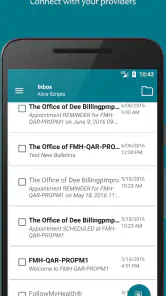
Another gem in the FollowMyHealth® crown is its communication feature. You can easily message your healthcare providers, request prescription refills, or schedule appointments directly through the app. It's like having a direct line to your doctor's office, minus the endless hold music. This feature not only saves time but also keeps all your communications in one place, which is a real win for those who are a bit forgetful like me.
Messaging is best suited to a non-urgent question that can wait for the care team to respond. For example, if I notice before a routine visit that I need to ask about a medication refill, I can send the request rather than trying to remember it later. I would not use a portal message for an emergency or assume that sending one means it has been read immediately; urgent symptoms call for timely medical help through the appropriate route.
Compared with keeping appointment notes in a generic notes app or calling the office for every administrative task, a connected health record can keep communication closer to the care information it concerns. The trade-off is that its usefulness depends on the provider’s participation and how that office handles requests. If my clinic does not use the service, or if I need one place for records from many unrelated providers, I may still need another method to fill the gaps.
For a refill request, I would check the medication details and send the request early enough to allow the office to handle it through its usual process. I would not assume the app itself approves a refill or that a request replaces a conversation about side effects or a change in treatment. The same distinction applies to appointments: a digital request can reduce phone-tag, but I would look for confirmation from the office before planning around a change.
Access in everyday situations
One realistic use is preparing for a follow-up appointment: I can review the information already available, check the appointment details, and send a question to the office beforehand if it is routine. For someone helping a family member manage care, the app may also be useful as part of a shared planning routine, provided the appropriate access has been arranged through the provider. I would confirm access and account setup before depending on it on appointment day, rather than trying to solve login issues in a waiting room.
Imagine I have a follow-up after a test and want to make the limited appointment time count. I can check whether the result is available, write down the date and my main question, then use the appointment to ask what it means for my care. If the record is not there, I still have time to call the office or bring the question another way. That small backup plan matters: a health app should make preparation easier, not leave me stuck when a particular entry is missing.
The app is a stronger fit for people whose providers are connected and who want a convenient place to check records or handle basic communication. It is less suitable as the sole solution for someone who needs a complete archive across disconnected health systems, prefers paper, or needs immediate back-and-forth with a clinician. In those cases, a phone call, a provider’s own process, or a personal record-keeping method may be more dependable.
It may also be a poor match for someone who wants one app to explain every medical result or coordinate care across providers who do not participate. A general notes app can be better for personal reminders that are not part of the medical record, while paper may be simpler for someone who does not want to manage an account on a phone. I see those as complements rather than failures: the right choice depends on whether convenience, a connected record, or hands-on support matters most.
Security, setup, and practical limits
Of course, when it comes to health apps, security is paramount. FollowMyHealth® uses advanced encryption technologies to ensure that your personal health information is kept private and secure. They take HIPAA regulations seriously, so you can rest easy knowing your data is in safe hands.
Even with a security-minded service, I would use ordinary care with a phone that displays medical details: keep its screen protected from casual viewing and sign out or secure the device when other people use it. Those habits are especially sensible when checking records in a shared space. The main limitation I would keep in mind is practical rather than abstract: access to a record does not guarantee that it is complete, current, or easy to understand without a provider’s explanation.
Before making the app part of my routine, I would check that my healthcare provider is available and complete the connection while I have time and a stable internet connection. If I help manage a relative’s care, I would ask the provider how to arrange appropriate access rather than sharing an account informally. These are modest setup steps, but they can prevent a stressful scramble when a result or appointment detail is needed.
The app has been available since 2012, and version 25.7 reflects an actively maintained product rather than a one-off records viewer. It has an average rating of 4.8 from around 185,000 ratings, with over 5 million installs. Those figures suggest broad use, but I would still judge it by whether my own provider connects and whether its workflow suits how I manage care.
That long history and wide adoption make it easier to recognize as an established option, but neither tells me whether a particular clinic’s setup will be smooth. The most useful test is practical: can I reach the records I need, understand where routine requests go, and get into the account when it matters? If not, I would ask the provider what channel it recommends and keep that route available instead of assuming every issue can be solved inside the app.
To sum it up, if you're looking for an app that simplifies the complex task of health management, FollowMyHealth® is a solid choice. Its user-friendly design, comprehensive features, and strong security make it a must-have for anyone wanting to take charge of their health. It's like having a personal health assistant in your pocket. Give it a try, and you might wonder how you ever managed without it!
An inclusive fit, with realistic expectations
My recommendation is more measured: it can be a helpful companion, not a substitute for a provider or a universal medical file. Before relying on it, I would check whether my care team is connected, set up access while I have time, and use messages for routine matters rather than urgent needs. For patients who value convenient access and whose provider supports the connection, that can make everyday health administration feel less scattered. For everyone else, it is worth keeping another route to care and records available.
As a medical app, FollowMyHealth® is free to use and rated for Everyone. I would recommend it most to someone who is comfortable with a phone, has a participating provider, and wants a practical way to review connected information or manage routine communication. Its 4.8 average rating reflects strong reception, but my own decision would rest on the actual records and workflows my provider makes available.
For people who rely on assistive ways of using a device, or who need a family member’s help, I would test the parts of the app they expect to use before making it their only route to care information. A larger screen, device-level accessibility settings, or help from a trusted person may make routine tasks easier, but those workarounds will not suit everyone. If navigating a phone remains tiring or confusing, a provider’s office and a paper summary may be the more comfortable option.
What I like most is the possibility of keeping a useful slice of care information close at hand without pretending that a phone can replace the relationship with a clinician. What I would watch most carefully is the boundary between a connected record and a complete one, and between sending a message and receiving timely care. Used with that distinction in mind, it can make everyday follow-ups less scattered; used as the only source of truth, it can leave important gaps.
FollowMyHealth® Frequently Asked Questions
Do I need an account or a participating healthcare provider to use FollowMyHealth®?
FollowMyHealth® is designed to help users manage healthcare through a Universal Health Record, so its usefulness depends on having access to a health record connected to the app. Before downloading, consider whether your healthcare provider supports FollowMyHealth® and what account or access setup they require. A provider’s participation and the options it enables can shape what you are able to view or manage.
Can I view test results and prescription information in FollowMyHealth®?
FollowMyHealth® is intended to bring personal health information together in one place, and its Universal Health Record can support access to health records such as lab results and prescriptions. What appears in your account depends on the information and services your healthcare provider makes available through the app. If access to particular records is important, check with your provider about how it connects with FollowMyHealth®.
Who is FollowMyHealth® intended for, and is it suitable for managing a family’s care?
FollowMyHealth® is a medical app for people who want to manage their healthcare through a Universal Health Record. It can be useful for keeping personal health information accessible in one place. Whether you can use it to manage another person’s record depends on the access and account arrangements available through their healthcare provider, so check how your provider supports those options before relying on the app for family care.
What is FollowMyHealth® and how does it work?
FollowMyHealth® is a comprehensive health management app that allows users to access their personal health records from anywhere. It synchronizes with various healthcare providers to give users a centralized platform for tracking their medical history, lab results, prescriptions, and appointments. The app also enables communication with healthcare professionals, making it easier to manage health needs efficiently. Its purpose is to help users manage healthcare through the FollowMyHealth® Universal Health Record.
Is FollowMyHealth® secure and how does it protect my health information?
Yes, FollowMyHealth® is designed with robust security measures to protect user information. The app uses encryption technology to secure data and adheres to HIPAA regulations, ensuring that your personal health information remains confidential and secure. Additionally, users can set up multi-factor authentication for an added layer of security. As with any health account, use a strong password and protect access to the device where the app is installed.
Pros
- Intuitive user interface
- Comprehensive health records
- Easy appointment scheduling
- Secure data encryption
- Cross-platform accessibility
Cons
- Occasional sync issues
- Limited customer support
- In-app ads can be intrusive
- Requires internet connection
- Some features need subscription
- Category
- Medical
- Version
- 25.7