Sydney Health
- 7.24K
- 4.7
- Installs
- 1.00M
- Price
- Free

Screenshots


Analysis by Reviewed
I see Sydney Health as most useful when it makes the practical side of using a health plan easier, rather than as a replacement for a doctor or a complete personal health record. It is a free medical app from Elevance Health, Inc., built for Anthem/Wellpoint and other health insurance plans. If your plan is supported, it can give you a more convenient place to handle routine health tasks; if you do not use one of those plans, its appeal is much narrower.
That distinction matters. Health apps often fall into two groups: tools focused on general wellness, and insurer apps that help members navigate care and plan services. This one belongs to the second group, even though its health and wellness resources may also be useful. I would judge it by whether it helps you act on your coverage and care needs, not by whether it can replace every app you use to track health.
Your Health, Simplified
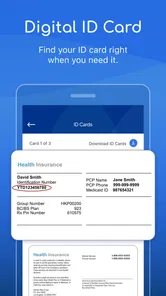
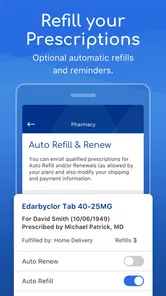
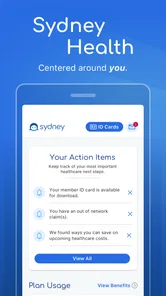
Let’s dive straight into the good stuff. Sydney Health is designed to keep all your health information in one place. Imagine having a personal health assistant right in your pocket! Whether you’re tracking your fitness goals, managing prescriptions, or scheduling appointments, this app has got you covered. I found its user interface to be incredibly intuitive, which is a huge plus for those of us who aren’t exactly tech-savvy.
Features That Stand Out
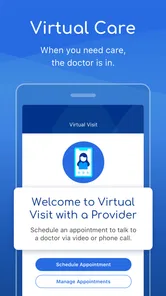
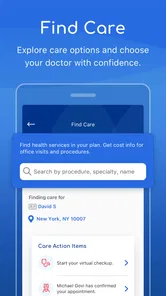
One of the standout features of Sydney Health is its ability to connect you directly with healthcare providers. No more endless phone calls or waiting on hold. You can easily find doctors, schedule appointments, and even access your medical records with just a few taps. The app also provides personalized health tips and resources, tailored to your specific needs, which is a super cool way to stay informed and proactive about your health.
Another feature I absolutely love is the symptom checker. It’s like having a mini doctor right in your phone! If you wake up with a scratchy throat or a pesky cough, you can quickly look up symptoms and get guidance on whether to hit up the doctor or just grab some extra tea and rest.
I treat that symptom guidance as a starting point, not a diagnosis. For something severe, rapidly worsening, or worrying, I would contact a medical professional rather than relying on an app to decide what is happening. That boundary is especially important when symptoms are unusual or involve someone who needs individual clinical advice. The tool is most helpful for organizing your next step when the situation is mild and you are unsure whether to seek care.
Making It Work With Your Plan
A useful first step is to sign in and check that the plan attached to your account is the one you currently use. Insurance details can change, and choosing a doctor or looking for care is only helpful when the information matches your coverage. I would also look up a provider before an appointment rather than waiting until the day you need one; that gives you time to compare the available options and confirm details through the appropriate plan resources.
More From Our News Desk

 Block Blast!
 Makes Every Clear Feel Like One More Turn
A clean little block puzzle becomes a study in space, risk, and self-control. Its best moments come from one satisfying clear; its toughest test is knowing when to stop.

 Super Stylist Fashion Makeover
Super Stylist Turns Dress-Up into a Runway Career
Its makeover-to-client loop turns quick outfit decisions into shareable style theater. The question is whether the closet keeps giving players a reason to return.

 Block Craft 3D:Building Game
Block Craft 3D Under Pressure: How Well Does It Recover When Building Goes Wrong?
A failure-focused look at Block Craft 3D’s forgiving building loop, its uncertain recovery edges, and the moments that demand more than a cheerful village.

 Woodturning
 Trades Creative Freedom for a Satisfying Carving Loop
If your usual creative game is about building, decorating, or styling, Woodturning trades open-ended projects for a tactile, tightly guided carving loop. Here is what that switch really costs.

 PUBG MOBILE
 Shows What Battle Royale Must Get Right
PUBG MOBILE shows how battle royale has matured: bigger systems matter less than meaningful choices, readable fights, and a reason to return after every loss.

 Braindom: Brain Games Test
Braindom’s Social Life Happens Between Puzzles
Braindom turns quick logic traps into a personal ritual, but its community value is more about comparing answers than building together.
Latest News



For example, if I needed to arrange a routine visit during a busy workday, I could use the app to look for a provider and review relevant records before calling or booking. Having those details ready can make a conversation with a clinic more focused. It does not guarantee that every provider or appointment will be available through the app, so I would still confirm directly when timing or coverage is important.
Keeping Track of It All
If you’re anything like me, keeping track of all your health-related data can be a real headache. Fortunately, Sydney Health makes it super easy to monitor your health records. You can track your medications, view your medical history, and even set reminders for taking your meds or attending appointments. It’s like having a personal assistant that’s solely focused on your well-being.
Reminders are most valuable when they support a routine you already want to keep. I would use them for a medication schedule or a planned appointment, then review them whenever the plan changes so an old alert does not become noise. For a complicated medication regimen, I would still follow the instructions from a clinician or pharmacist and use the app as a prompt, not as the authority on dosage or treatment.
The records can also help when switching between routine care tasks: checking what you have already noted before a visit, then keeping relevant details close at hand afterward. Still, an insurer app is not necessarily the same as a universal health-record service. If you see providers outside your plan or want one consolidated history across different systems, you may need to keep using those providers’ own portals as well.
Using It Around Real Appointments
The strongest everyday workflow is preparation, not replacing the appointment itself. Before a routine visit, I would check the plan and provider information, gather the details I want to discuss, and use the app’s records as a reference. Afterward, I could return to the relevant information or set a reminder for a follow-up task. That small sequence can reduce the familiar scramble of searching through messages or trying to remember what needs attention.
For a parent or someone helping a relative, the practical question is whether the person whose plan is involved can sign in and use the account appropriately. I would not assume that one person’s access automatically covers another family member’s information. When care involves another adult, privacy and account access matter as much as convenience, so I would check the plan’s own process before relying on the app to coordinate their details.
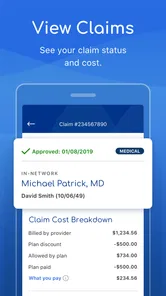
It is also worth separating tasks that are easy to start digitally from tasks that still call for a human conversation. Looking up a provider or reviewing plan information may be a useful first step, while questions about a disputed claim, a special coverage situation, or an urgent appointment may need direct confirmation. I find that expectation makes the app more helpful: use it to get organized, then contact the right person when a decision depends on details.
Where It Fits Among Health Apps
Compared with a general fitness tracker, Sydney Health is less about building a picture of daily activity and more about making health coverage and care easier to navigate. A dedicated wellness app is usually the better choice if your main goal is logging workouts, watching activity trends, or setting personal training targets. The insurer app’s distinctive value is that it connects routine care questions with the plan you use, rather than treating health as only a set of habits or measurements.
Compared with a clinic or hospital portal, it can be a useful broader starting point for plan-related tasks, but it should not be mistaken for a single record of every interaction with every clinician. A provider portal may offer details tied closely to that practice, while Sydney Health is oriented toward participating insurance plans and their services. I would keep both when each serves a different purpose instead of expecting one app to replace the other.
That division also helps avoid duplicate effort. If a provider’s portal is where appointment messages and visit-specific instructions live, I would continue checking it for those items. I would use Sydney Health for the plan-facing side and for the information it makes available there. Having a clear role for each app is more realistic than trying to force all health information into one place.
Who Gets the Most From It
I would recommend it first to people enrolled in a supported Anthem/Wellpoint or other participating health plan who want a single starting point for everyday member and care tasks. It may be particularly handy for someone coordinating appointments, prescriptions, and records while balancing work or family responsibilities. The app is free, rated for Everyone, and its current version is 9.7.0; it has a 4.6 average from around 79,000 ratings and more than a million installs.
By contrast, if your main goal is step counts, workout plans, or broad lifestyle tracking, a dedicated fitness or wellness app may suit you better. And if your insurance is not supported, the plan-specific parts may not justify adding another app. On iPhone, the stated minimum operating-system requirement is version 12, so it is also worth checking compatibility before relying on it for day-to-day access.
It is also a better fit for people willing to verify important details rather than treating an app screen as the final word on coverage. If you are switching plans, arranging care on a tight timeline, or comparing providers for a specific need, I would use the app to narrow down the next step and then confirm the relevant information before committing. That habit is useful with insurer tools generally, and it matters most when the consequences of a misunderstanding would be inconvenient.
Someone who rarely uses digital services may find the app less valuable than a direct call, especially if they only need help with an occasional insurance question. Likewise, if you already have a reliable workflow through your insurer’s website and provider portals, installing another tool may add little. I would try it when there are recurring tasks to manage, not simply because having another health app sounds reassuring.
Limits Worth Keeping in Mind
The main trade-off is that convenience depends on the relationship between your account, your plan, and the care you are trying to arrange. An insurer app cannot make every provider available, settle every coverage question instantly, or guarantee an appointment that fits your schedule. I would avoid leaving an important task until the last minute on the assumption that a few taps will resolve everything.
There is also a difference between keeping information accessible and maintaining a complete medical history. Records shown in an insurance-focused app may not include everything from care outside the plan’s connected services. If you move between providers or need a full timeline for a clinician, keep using the relevant provider records and your own notes where needed. The app can be a convenient reference, but I would not make it my only archive.
Finally, health tips and symptom guidance are most useful when they help you frame a question or decide what kind of help to seek. They are not a substitute for clinical judgment. I would not use a symptom checker to delay urgent care, and I would not change medication based on a reminder or general resource alone. That is not a flaw unique to this app; it is the sensible boundary for any consumer health tool.
Why You’ll Love It
So why should you give Sydney Health a shot? Well, if you’re looking for a way to simplify your healthcare experience, this app is a game-changer. It offers a seamless way to manage your health, all while keeping everything digital and accessible. Plus, the peace of mind that comes with knowing you have all your health info right at your fingertips is priceless.
I would soften the word “seamless”: health insurance workflows can involve details that still need a phone call or confirmation, and a digital shortcut cannot remove every administrative hurdle. The app’s value is more practical than magical. It can make common tasks easier to start and help keep useful information together, while the actual care decisions remain between you and your healthcare professionals.
I’d say Sydney Health is a must-have for anyone who wants to take control of their health without the usual stress and hassle. Whether you’re a busy parent, a working professional, or just someone who wants to stay on top of their health, this app is worth checking out.
In conclusion, Sydney Health not only makes managing your health easier but also turns the whole process into something you might actually enjoy. So go ahead, download the app, and start taking charge of your health today!
Sydney Health Frequently Asked Questions
What kind of app is Sydney Health, and who develops it?
Sydney Health is a medical app developed by Elevance Health, Inc. It is intended for people who want to manage health-related information and services through an app, particularly members of Anthem, Wellpoint, and other health insurance plans. The app’s insurance tools and available services may depend on your plan, so it is worth checking whether it fits the coverage you use before downloading.
What age group is Sydney Health rated for?
Sydney Health has an Everyone content rating, making it suitable for a general audience. However, many of its insurance and health-management features are most relevant to people who have a supported plan. If you are setting it up for someone else, keep in mind that access to specific information and services may depend on that person’s plan and account.
How much does Sydney Health cost, and what operating system does it require?
Sydney Health is free to download. Its current version is 9.7.0, and Apple devices need iOS 12 or later to run it. The app is available for Android and iOS, so check that your device’s operating system meets the relevant requirements before installing. The developer is Elevance Health, Inc., and the app is rated for Everyone.
Who is Sydney Health intended for, and which insurance plans does it support?
Sydney Health is designed for people who want to manage health-related information and services through an app. It is associated with Anthem, Wellpoint, and other health insurance plans, so the features available to you may depend on the plan you have. Before downloading, consider whether your insurance plan is among those you use, since the app’s insurance tools are most relevant to members.
Is Sydney Health free to download, and what devices can run it?
Sydney Health is free to download and is available for Android and iOS devices. The current release is version 9.7.0, and it requires iOS 12 or later on Apple devices. You can check your device’s operating system before installing to make sure it meets that requirement. The app is developed by Elevance Health, Inc. and is rated for Everyone.
Pros
- Intuitive user interface
- Comprehensive health tracking
- Easy appointment scheduling
- Access to virtual consultations
- Customizable health goals
Cons
- Limited offline functionality
- Requires stable internet connection
- Some features behind paywall
- Occasional app crashes
- Limited language support