Portable WiFi - Mobile Hotspot
- 2.44K
- 4.4
- Installs
- 10.00M
- Price
- Free
Screenshots
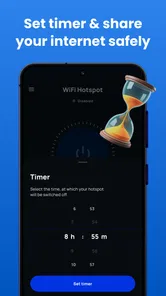
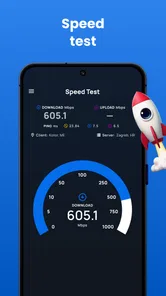
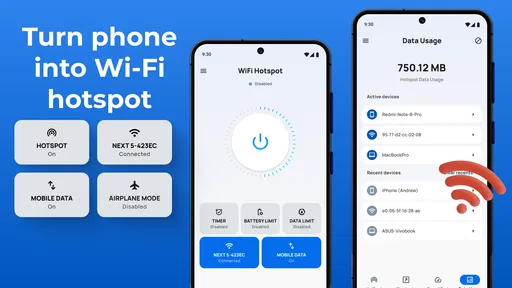
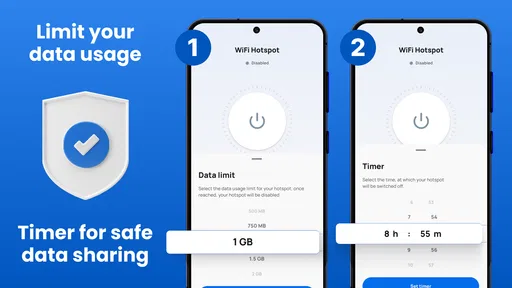
Analysis by Reviewed
I’d treat Portable WiFi - Mobile Hotspot as a practical way to share a phone’s connection, rather than as a replacement for a home router or a separate mobile plan. That distinction matters: a hotspot can help when a laptop needs to get online away from home, but its usefulness still depends on your phone’s connection, carrier terms, battery, and the people you allow onto the network.
Trust starts with what you can check
For a communication app that helps make a connection available to nearby devices, I think trust is about being deliberate, not assuming that a reassuring label answers every privacy question. Before using it, I would look at the permissions requested on my device and consider whether each one makes sense for the task. I would also check the app’s current privacy information and the choices shown on my own screen, rather than treating any app as automatically private because it creates a password-protected hotspot.
The app is free to install, with optional in-app purchases listed from $0.99 to $99.99 per item. That makes it worth checking purchase prompts carefully, especially if someone else uses your phone. It is marked for Everyone, but that age label is not a substitute for an adult reviewing purchase and device settings for a child.
Make sharing a conscious choice
My practical routine would be to choose a network name that does not identify me, set a password that I have not reused elsewhere, and share it only with the person who needs access. When that person is done, I would stop sharing and review the hotspot settings before the next use. A password is useful, but it does not remove the need to decide who should connect or how long the connection should remain available.
That care matters most in data-sensitive moments: a work call, a travel booking, or a message opened on a borrowed laptop. I would avoid treating an unfamiliar device as trusted just because I am the one providing the connection. If a connection involves confidential work, sensitive accounts, or a device I do not control, using a trusted network or the phone’s built-in hotspot options may be the more sensible choice.
Portable WiFi - Mobile Hotspot is a communication app from DOSA Apps. It has an average rating of 4.4 from around 81,000 ratings, and has been installed over 5 million times. Those figures suggest it has found an audience, but they cannot tell me whether it will work well with my particular phone, carrier, or local network. I would test it with a non-urgent task before depending on it while traveling or working.
Setting Up the Hotspot
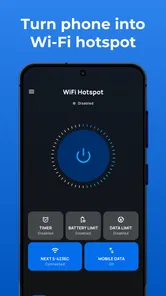
Getting started with Portable WiFi - Mobile Hotspot is as easy as pie. Once you download the app, which is available for both Android and iOS, you’ll be greeted with a simple and intuitive interface. No complicated settings or tech jargon to wade through—just straightforward options that let you set up your hotspot in seconds. You simply tap on the ‘Create Hotspot’ button, set your network name and password, and you’re good to go. Honestly, it feels like magic when it just works without any fuss.
More From Our News Desk

 Remini - AI Photo Enhancer
Remini Is Our App of the Week for Bringing Old Photos Back to Life
A quick AI restoration tool earns its place by making faded portraits and soft, older photos feel vivid again—provided you know where its polish ends.

 PayPal - Pay, Send, Save
PayPal Reviewed: Who Benefits from Its Reach, and Who Should Skip It
PayPal is most useful when its reach and familiar checkout solve a real payment problem. These reader-by-reader recommendations show where it earns a place—and where friction wins.

 Millionaire 2026 Quiz & Trivia
 Makes Every Answer Count
A familiar quiz-show format succeeds or falters on tiny design decisions: how clearly the game guides a first answer, handles hesitation, and invites one more round.

 Decor Life - Home Design Game
Decor Life Turns Short Breaks Into Bite-Sized Decorating Jobs
A room-by-room decorating game built for quick sessions gains from modern phone habits, but its gentle pace still depends on patience, repetition, and a steady stream of design jobs.

 Sniper 3D:Gun Shooting Games
Sniper 3D’s Quick-Shot Appeal Faces the Upgrade Treadmill
The appeal is immediate: line up a target, steady your aim, and fire. The harder question is whether Sniper 3D can keep players returning after the first rush.

 Blockudoku®: Block Puzzle Game
Blockudoku vs. the Puzzle Pack: A Quick Puzzle With a Repetitive Edge
Blockudoku turns a clean grid into a quiet test of foresight. Against match-three polish and head-to-head simplicity, its lasting appeal is also its biggest limitation.
Latest News



For a realistic use case, imagine arriving at a place where the public WiFi is unreliable and needing to send a document from a laptop. I would first check that mobile data is available, then connect only the laptop, send the file, and turn sharing off afterward. That short, purposeful session is usually a better fit than leaving a hotspot running for the afternoon. It also gives me a chance to notice whether the phone gets warm or the connection drops before a more important task depends on it.
Performance and Reliability
Now, let’s talk about performance. I’ve tried a few hotspot apps before, and they’ve always been a bit hit-or-miss. However, with this app, the connection was surprisingly stable. Whether I was sharing my connection with a laptop, a tablet, or even a friend’s phone, the network held up pretty well. Streaming videos and browsing the web was smooth, with minimal buffering. Of course, the performance can vary depending on your carrier and location, but overall, this app does a commendable job.
There is an important trade-off behind that convenience: the phone providing the connection is also doing the work. I would keep an eye on its battery and mobile-data use, particularly if another device is downloading updates or playing video in the background. A useful habit is to connect one device first and check that the task works before inviting others; fewer connected devices make it easier to spot whether a slowdown comes from the signal, the phone, or heavy activity on a connected device.
User Experience
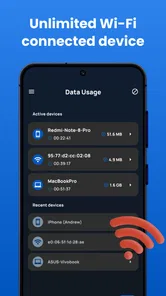
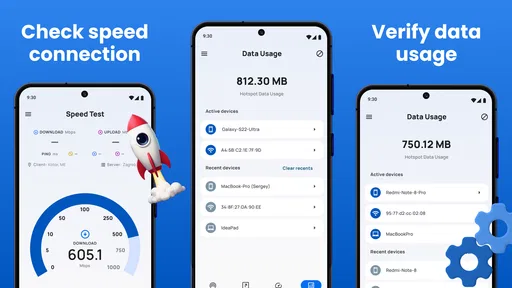
The user experience is where this app truly shines. The developers have clearly put a lot of thought into the design and functionality. The app doesn’t bombard you with ads or unnecessary pop-ups, which is a huge plus in my book. Plus, the handy data usage tracker lets you keep tabs on how much data you’re sharing, so you don’t accidentally blow through your monthly allowance. It’s little touches like these that make the app a pleasure to use.
The tracker is most useful as a prompt to check your habits, not as a reason to assume a particular amount of data is harmless. Video calls, streaming, and large downloads can use a connection differently from a quick email or map search. If you are close to a mobile-data limit, I would avoid letting a connected laptop perform background syncing until the urgent task is finished. This is also where the app’s optional purchases deserve attention: it is free to start, but I would read each purchase screen and make sure any paid option is genuinely useful to me before confirming it.
Compared with relying on café or hotel WiFi, sharing from your own phone can be more convenient when you want to avoid joining an unfamiliar public network. Compared with a phone’s built-in hotspot, a separate app is only worthwhile if its workflow and controls suit you better; it cannot improve a weak carrier signal or remove your data plan’s limits. For occasional sharing, this app may be a straightforward choice. If you regularly connect several devices for long stretches, a dedicated hotspot or a suitable plan may be a better fit.
Security Features
Security is always a concern when sharing your internet connection, and thankfully, this app’s got you covered. You can set a secure password for your hotspot, ensuring that only the people you want to have access can connect. Additionally, the app supports WPA2 encryption, which is pretty much the gold standard for WiFi security. So you can share your connection with peace of mind.
I would still separate hotspot protection from privacy on the connected device. A password helps control who joins the network; it does not tell me what information an app or website on that device collects. If a friend borrows the connection, they remain responsible for their own account security, and I would not use the hotspot as a reason to sign into sensitive services on someone else’s machine. For my own laptop, I would keep its usual security habits in place.
Who will get the most from it
I can see this being handy for someone who occasionally needs to get a tablet or laptop online while away from a dependable WiFi network, and who is comfortable monitoring mobile-data use. It is less appealing for anyone who needs guaranteed coverage, wants to share a connection for hours, or has a tightly limited data allowance. In those cases, checking the phone’s built-in hotspot first—or choosing a more dependable connection—may save frustration.
The app’s current version is 3.9.2 and it requires Android 7.0 or later. I would check compatibility on the device I plan to use, then try a simple browsing task before relying on it for a meeting, upload, or trip. That small test is more useful than assuming that an app that works on one phone will behave identically on another.
In conclusion, Portable WiFi - Mobile Hotspot is a nifty little tool that can save the day when you need a reliable internet connection on the go. It’s easy to use, performs well, and comes with solid security features. Whether you’re traveling, at a coffee shop, or anywhere else without WiFi, this app is definitely worth having on your phone. Give it a try and see how it can simplify your life!
My recommendation is conditional rather than universal: it makes sense when you need occasional, controlled sharing and can keep an eye on data and battery use. I would not choose it as my only internet plan or assume that a protected hotspot makes every connected activity private. Used for a specific task, with a password and a quick check of the app’s visible settings, it can be a useful backup to keep available.
A smoother routine for short connections
I find hotspot sharing works best when I decide in advance what needs to get done. For example, if I am waiting between appointments and need to submit a form from a laptop, I would connect that one device, finish the form, confirm it has gone through, and disconnect. That is a better routine than leaving the connection open while I move on to unrelated browsing, because it keeps the session focused and makes data use easier to understand.
For a small group, I would also agree on a simple rule before sharing: use the connection for the immediate task rather than starting a large download or streaming video. This is not a technical control; it is just a practical way to avoid an unexpected drain on the phone’s data or battery. If the group needs continuous access, I would compare the cost and convenience of a dedicated connection instead of expecting a phone-based setup to serve as a mini office network.
What to check when something goes wrong
If a connected device cannot get online, I would troubleshoot in a sensible order rather than repeatedly tapping the hotspot control. First I would check whether the phone itself can load a page using mobile data. Then I would confirm that the other device has joined the intended network and is using the password I set. If the phone has a weak signal or no mobile service, changing the hotspot name will not solve the underlying problem; moving to a better coverage spot or waiting for service is the meaningful fix.
When the connection works but feels slow, I would pause background tasks on the laptop and test a lightweight page before trying a video call or file upload. This helps distinguish an overloaded connected device from a generally weak mobile connection. It also makes the app easier to judge fairly: a hotspot utility can organize sharing, but it cannot create network capacity where the phone has little or none.
Choosing between app, built-in sharing, and public WiFi
The practical question is not whether a separate hotspot app is always better, but whether it makes the task simpler on your particular phone. The built-in sharing option is worth comparing first because it is already part of the device’s settings and may be enough for occasional use. If you prefer the app’s setup flow or want its data-usage view, that convenience may justify keeping it installed. If the two approaches do the same job for you, there is little reason to add another step to a routine that already works.
Public WiFi has the advantage of not using your mobile allowance, but it can be inconvenient, crowded, or unsuitable for a task where you would rather avoid joining an unfamiliar network. A phone hotspot shifts the trade-off: you use your own mobile connection and control who receives the password, while accepting the limits of your signal, plan, and phone battery. I would choose based on the job at hand, not on a blanket belief that one option is safest or fastest in every setting.
Portable WiFi - Mobile Hotspot is therefore most convincing as an occasional tool for a person who wants a simple way to get a second device online and is willing to pay attention while doing it. It is not the right choice for someone who needs uninterrupted access all day, expects a stronger signal than their phone receives, or cannot afford additional mobile-data use. In those situations, a dependable WiFi network, a suitable mobile plan, or dedicated equipment is the more realistic answer.
My cautious verdict
Before a trip or workday, I would check the phone’s mobile connection, make sure I understand my data allowance, and test a brief session with the device I intend to connect. I would keep the password private, watch for purchase prompts, and switch sharing off when the task is complete. Those small decisions matter more than treating the app as a set-and-forget internet service.
There is a useful balance here: a dedicated app can make occasional sharing feel approachable, while the actual experience still depends on the phone, the carrier, and the choices made by the person using it. For a quick document upload, a map check on a tablet, or a short period of laptop access, I can see the appeal. For sensitive work on an unfamiliar computer or a long session with several devices, I would slow down and consider another connection.
With an average rating of 4.4 and around 2,000 written reviews, it has earned plenty of attention among communication apps, but popularity is only one part of my decision. I would treat it as a handy option to test on my own device, not a guarantee that every carrier, location, or phone will behave the same way. If your needs are occasional and your expectations are realistic, it is worth considering; if reliability above all else is essential, choose a connection designed for that level of use.
Portable WiFi - Mobile Hotspot Frequently Asked Questions
Can I use Portable WiFi - Mobile Hotspot when I’m away from home or a public WiFi network?
The app is intended to help create a hotspot on the go, so it can be useful when you need to share your phone’s mobile connection away from home. The connection comes from your mobile service, rather than from a nearby WiFi network. Before relying on it while travelling, make sure your phone has mobile service and consider how hotspot use fits your cellular plan.
What Android version does Portable WiFi - Mobile Hotspot require?
Portable WiFi - Mobile Hotspot requires Android 7.0 or later. Checking your phone’s Android version before downloading can help you avoid compatibility issues. The app is free to download, but availability and hotspot behavior can also depend on your device and mobile service, so it is worth considering those alongside the operating-system requirement.
What devices can connect to a hotspot created with Portable WiFi - Mobile Hotspot?
A hotspot is useful when you want to connect another internet-capable device to your phone’s mobile connection. The existing description names laptops, tablets, and smartphones as examples of compatible devices. Whether a particular device can connect also depends on its own WiFi capabilities and settings, so it is sensible to check that it can join a wireless network before relying on it while travelling.
Is Portable WiFi - Mobile Hotspot free to download, and are there other costs?
Portable WiFi - Mobile Hotspot is free to download, though it offers in-app purchases ranging from $0.99 to $99.99 per item. Sharing your connection also uses mobile data, which may have a cost under your cellular plan, especially if you exceed its allowance. Before using the hotspot regularly, consider both the app’s optional purchases and the terms of your mobile service.
What is Portable WiFi - Mobile Hotspot and how does it work?
Portable WiFi - Mobile Hotspot is an app that allows you to share your mobile device's internet connection with other devices, effectively turning your phone into a WiFi hotspot. Once installed, it uses your mobile data to broadcast a WiFi signal, which can be accessed by other compatible devices such as laptops, tablets, and smartphones. This app is particularly useful when you need to provide internet access on the go.
Pros
- Easy to set up and use.
- Supports multiple devices simultaneously.
- Offers strong and stable connection.
- Compatible with most smartphones.
- Energy-efficient and saves battery.
Cons
- May not work in all regions.
- Requires data plan for internet.
- Limited range for hotspot.
- Potential security risks.
- User interface could be improved.