Kawaii Aesthetic Wallpaper
- 899.00
- 4.8
- Installs
- 5.00M
- Price
- Free
Screenshots
Analysis by Reviewed
Hey there! If you're into personalizing your smartphone's look, you've probably spent hours hunting for the perfect wallpaper, right? Well, let me introduce you to Kawaii Aesthetic Wallpaper, the app that's making waves in the customization world. Whether you’re a fan of cute, pastel-colored designs or simply want to change the vibe of your home screen, this app could be your new best friend.
Choosing a wallpaper app that fits your taste
I’d start with a simple question: do you want your screen to feel consistently cute, or are you mainly looking for one particular image? This is a free personalization app from Galaxy studio apps, aimed at people who enjoy the kawaii look rather than a broad mix of photographic, minimalist, and abstract styles. Its 4.8 average from around 86,000 ratings and more than 5 million installs suggest that plenty of users have found it worth trying, but the right fit still depends on your taste.
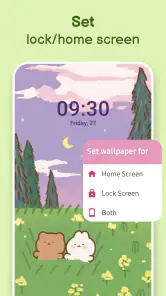
The app is rated for Everyone, and it runs on Android 5.0 or later. It was released on October 1, 2022, and its current version is 3.1.1. There are in-app purchases, with items ranging from $0.99 to $99.99, so I’d treat the free download as a chance to explore rather than assume every possible option is included at no cost. I’d also decide in advance whether you want a wallpaper for the home screen, lock screen, or both; seeing an image in a gallery is not the same as checking how it works behind your icons.
First Impressions and User Interface
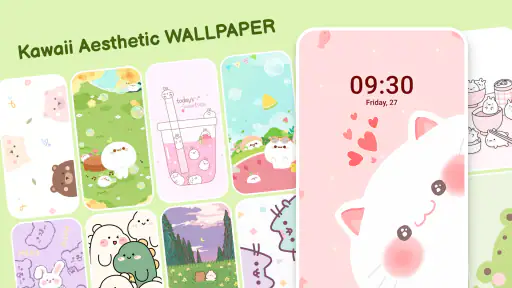
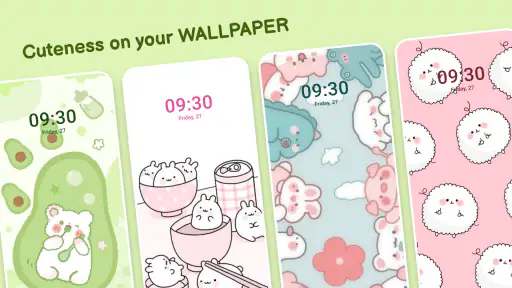
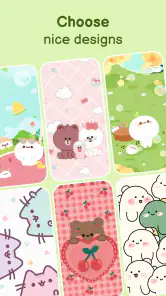
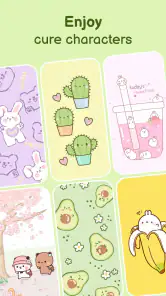
Upon launching the app, the first thing that strikes you is its user-friendly interface. The developers have done a stellar job of keeping things simple yet visually appealing. Navigating through the app is a breeze, even for someone who's not tech-savvy. The main screen greets you with a variety of categories that range from cute animals to dreamy landscapes, all tailored to fit the aesthetic vibe.
Browsing and Selection
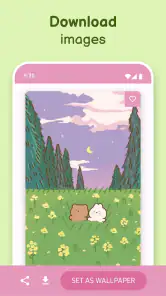
Scrolling through the collection, you’ll find that each wallpaper is a piece of art in its own right. The app doesn't just dump a load of random images on you; instead, it curates content that aligns perfectly with the kawaii aesthetic. You can easily browse through categories or search for specific themes. And if you find something you love, applying it to your home or lock screen is just a tap away.
Making a choice that works on your screen
One practical tip is to judge a design in the context where you’ll actually use it. A busy illustration can look charming on its own but compete with app icons and widgets on a home screen. I’d try a more detailed image on the lock screen, then choose a calmer composition for the home screen if readability matters to me. That small split-screen approach makes the same aesthetic easier to live with, rather than turning every glance at the phone into a wall of detail.
For a real everyday use, imagine changing your wallpaper before a new school term, a trip, or simply a week when you want a softer-looking phone. Browse by mood or subject, save a candidate, and check whether the important parts remain visible after setting it. If an image crops awkwardly, I’d move on to another design instead of forcing it; a wallpaper that looks good in the preview can lose its focal point when fitted to a particular display.
More From Our News Desk

Weather by Xiaomi Review: Clear at a Glance, Less Clear Up Close

X Under Pressure: Can It Recover When Posting Goes Wrong?

Clash of Clans Is Won Between the Battles

Android Auto Makes the Case for Quieter Car Software

MobiOffice: Transforming Mobile Productivity with Seamless Integration

EA SPORTS FC™ Mobile Soccer: Redefining Mobile Sports Gaming
Customization Features
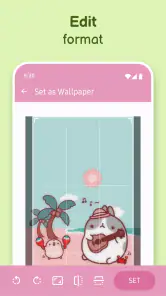
What sets this app apart from others is the level of customization it offers. Not only can you select wallpapers, but you can also tweak them to your liking. Want to adjust the brightness or add a cute sticker? No problem! The app provides a few editing tools that let you personalize the wallpaper even further, making it truly yours.
Small adjustments, useful trade-offs
Brightness and stickers are worth using with restraint. A slight brightness change can help icons stand out, while too much editing may take away the original palette that drew you to the picture. I’d keep an untouched version in mind before making several changes, especially if I’m choosing an image for both screens. This is a useful distinction from a general wallpaper gallery: the appeal here is not only finding a cute image, but having a few ways to make that image feel more suited to your phone.
If you usually build a whole theme around matching icons, widgets, and backgrounds, this app may cover only the wallpaper part of that project. A dedicated theme or icon-customization tool could be a better fit when coordinated controls are your priority. On the other hand, if you simply want a kawaii background without setting up a complete visual system, the focused selection is likely more convenient than searching a broad wallpaper catalog full of styles you do not want.
Performance and Usability
Performance-wise, the app runs smoothly with minimal lag, even on older devices. It’s optimized to ensure that high-quality images don’t end up slowing down your phone. Plus, the wallpapers are designed to fit various screen sizes, so you won’t have to worry about awkward cropping or stretching.
Usability is another area where this app shines. It doesn’t bombard you with ads, which is a relief, and downloading a wallpaper doesn’t require jumping through hoops. Just a couple of taps, and voila, your phone's got a fresh new look.
Where another option may suit you better
The main limitation is also the point of the app: its kawaii focus will not suit everyone. If your preference changes often between dark abstract art, landscapes, and restrained monochrome designs, a general wallpaper app may offer a more useful range. Likewise, anyone who wants to create an image from scratch or carefully control every layout detail may prefer a dedicated editor. I’d choose this app for a quick, themed refresh, not as a replacement for every kind of personalization tool.
Switching is low-effort if you are only testing a background: choose one, apply it, and change it again later if it does not work with your icons. Before replacing a wallpaper you already like, keep track of the image or save a copy if your device’s usual options allow it; otherwise, finding the exact same choice again may take another browse. I’d also check the final crop on both screens rather than judging only from the selection view.
Getting more from a focused wallpaper collection
I’d use the browsing tools with a small goal in mind instead of endlessly scrolling. Searching for a particular subject or starting with a category helps narrow the choice, but I’d still compare several candidates at actual screen size. A thumbnail can make a fine line or small character look clearer than it will appear behind icons. Looking at the image after applying it is the final check, not an unnecessary extra step.
There is also a useful distinction between a wallpaper you admire and one you want to see all day. A highly detailed design may be fun for a short themed stretch, while a softer background can be easier to keep for longer because it leaves visual space around widgets. I’d treat those as two different jobs: choose a playful lock-screen image for personality, then a quieter home-screen option for daily navigation. That way the app’s cute style does not have to come at the expense of usability.
If you tend to change your look with seasons, hobbies, or school and work routines, a focused collection can make those small resets feel quick. I might choose a pastel design for a busy week when I want a calmer screen, then switch to a character-led image when I have time to enjoy the detail. The key is not to assume that one wallpaper must work forever. Trying a candidate for a day gives a better sense of whether its colors and composition suit your regular use than choosing only by first impression.
Who will appreciate it most
This is an especially natural fit for someone who already likes cute illustrations and wants a phone that reflects that taste without assembling a full theme. It also suits people who enjoy browsing visual options but do not want to edit every detail themselves. The app’s narrow identity is a benefit here: instead of having to filter out unrelated styles in a huge general catalog, the browsing experience stays centered on the look the user came for.
I’d be less likely to recommend it to someone who wants a restrained business-style screen, a photographic landscape collection, or a tool for designing custom artwork from scratch. Those needs call for a broader wallpaper library or a more capable image editor. It may also be a poor match if your main goal is to coordinate icons, widgets, and other interface elements as one complete theme. A wallpaper app can refresh the background, but that is not the same as rebuilding the phone’s whole appearance.
Comparing the usual alternatives
Compared with a broad wallpaper catalog, this app trades variety across styles for a more consistent kawaii mood. That can save time when the style is exactly what you want, but it may feel limiting if your taste shifts from cute art to photography or minimalist patterns. The decision is less about which kind of app is universally better and more about whether you value a focused selection or a large mix that asks you to do more filtering yourself.
A phone’s built-in wallpaper picker is another reasonable alternative if you only need to set an image already stored on your device. It can be the simpler route for someone who has a picture ready and does not need a themed browsing experience. A dedicated customization suite is more suitable if matching icons and widgets matters more than finding a background. I’d choose this app between those extremes: it is for discovering a particular visual style and making a modest wallpaper-level adjustment, not for controlling every part of the interface.
One trade-off worth considering is how often you actually change backgrounds. If you keep the same image for months, the appeal of a large themed selection may matter less than the quality of the one design you choose. If you enjoy refreshing your phone regularly, browsing a focused collection can be more rewarding. Either way, I would not pay for anything simply because it appears while exploring; I’d first see whether the free experience includes a wallpaper that I genuinely want to keep.
Cost, expectations, and switching back
The app is free to install, but in-app purchases are available. I’d approach those as optional spending rather than part of the basic decision: first explore the wallpapers and see whether the free choices match your taste. The listed purchase range extends from $0.99 to $99.99 per item, so it is sensible to check the item and amount carefully before confirming anything. A person who only wants an occasional background change may have no reason to spend at all.
Trying a new wallpaper is easy to reverse, which makes experimentation relatively low-risk. Still, switching back can take a little thought if you do not remember the original image or where you found it. Before applying a new choice over a background you want to preserve, make a note of it or keep a copy through your phone’s normal options. If the image has been altered, also remember which adjustments you made; otherwise, recreating the look later may take another round of trial and error.
When a wallpaper does not sit well with the interface, I’d check three things before giving up on the whole style: whether the subject is hidden by icons, whether the background is too bright behind text, and whether the crop has cut off the detail that made the image appealing. A different composition may solve the problem without more editing. If every candidate feels cluttered or difficult to read, that is a good sign that a simpler or less decorative alternative will serve you better.
Final Thoughts
So, would I recommend Kawaii Aesthetic Wallpaper? Absolutely! It’s got a great selection, offers customization, and performs well across different devices. Whether you're a long-time fan of the kawaii aesthetic or a newcomer looking to add a splash of cuteness to your phone, this app is definitely worth a download. Give it a try and let your screen reflect your personality!
My recommendation is strongest for someone who already knows they enjoy cute, pastel-leaning visuals and wants a straightforward way to browse them. If you are undecided, start with one wallpaper and live with it for a day: notice whether it keeps the home screen readable and still feels pleasant after repeated use. That is a more useful test than picking the most eye-catching preview. If you want a wide-ranging catalog or a complete icon-and-widget makeover, look elsewhere; if a focused kawaii refresh is what you want, this is an easy place to begin.
Kawaii Aesthetic Wallpaper Frequently Asked Questions
Does Kawaii Aesthetic Wallpaper take up much storage space?
The app is intended for personalizing a phone with kawaii-style backgrounds, so storage use may depend on how many wallpapers you save or download. If your device is nearly full, it is sensible to check available space before installing and to remove saved images you no longer want. Keeping only your favorites can help leave more room for other apps and files.
Can I choose a wallpaper that fits my phone’s screen?
Kawaii Aesthetic Wallpaper provides cute, aesthetic backgrounds for mobile devices, and you can browse its collection to find a design you like. Before setting one, preview how it looks on your screen and adjust its position if your device offers that option. A wallpaper’s appearance can vary with screen size and layout, so checking the result on your own phone is worthwhile.
Is Kawaii Aesthetic Wallpaper suitable for children?
Kawaii Aesthetic Wallpaper is rated Everyone, so its content rating is intended to be suitable for a general audience. It is a personalization app focused on cute, aesthetic wallpapers, which users can browse and choose for their devices. As with any app, parents may want to review its features and any available purchase options with younger users before downloading.
Will the app work on my Android device?
Kawaii Aesthetic Wallpaper supports Android devices running version 5.0 or later. Before downloading, check your device’s Android version in its settings to make sure it meets that requirement. The app is designed for personalizing a phone with kawaii-style backgrounds, so compatibility is worth checking first if you use an older device or have limited storage.
Who develops Kawaii Aesthetic Wallpaper, and how popular is it?
Kawaii Aesthetic Wallpaper is developed by Galaxy studio apps. It has a 4.8 average from around 86,000 ratings, with over 5 million installs. Those figures suggest it has attracted a sizable audience among people looking for cute wallpaper designs, though your own experience will depend on whether its style and available choices match what you want.
Pros
- High-quality
- vibrant wallpapers
- User-friendly interface
- Regular updates with new content
- Extensive category variety
- Minimal ads for free version
Cons
- Limited customization options
- Some wallpapers require purchase
- No offline access
- Occasional app crashes
- Limited search functionality
- Category
- Personalization
- Version
- 3.1.1













