Invitation Maker-Card Creator
- 45.00
- 4.8
- Installs
- 1.00M
- Price
- Free

Screenshots
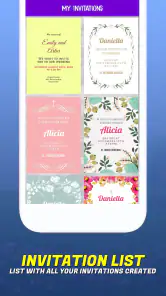
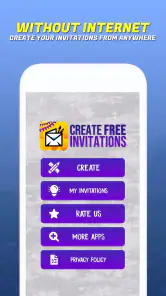
Analysis by Reviewed
Choosing an invitation app is less about finding the most elaborate design tool and more about deciding how much control you need. If I’m inviting a small group and want a card that feels more personal than a plain message, a quick editor is useful; if I’m preparing a formal event with exact print requirements, I’d want to check the finished layout carefully before relying on it. Invitation Maker-Card Creator sits on the convenient, approachable side of that choice: it is an events app from Battery Stats Saver, built around making invitations rather than managing the event itself.
Decide what the invitation needs to do
I’d consider this app when the invitation is the main thing I need to create and share. It suits birthdays, seasonal gatherings, weddings and other occasions where a visual card can carry the date, tone and personal details in one place. The app is free to install, is rated for Everyone, and has an average rating of 4.8 from around 9,400 ratings, with over a million installs. Those figures suggest broad appeal, but they don’t tell me whether a particular design will suit my event; that still comes down to choosing and checking the card itself.
A practical test is to write the essential wording before opening the editor: who is hosting, what the occasion is, when and where it happens, and how guests should respond. That makes it easier to judge whether a template has enough room for the information. It also avoids spending time decorating a card only to find that the important details feel crowded.
I’d also decide early whether the invitation is mainly for a phone screen or something I hope to print. A card intended for messaging can prioritize a clear title and easily read details; a printed version deserves an extra check of spacing, edges and legibility at its eventual size. The app’s appeal is strongest when I know that goal before I start, because it keeps me from polishing visual flourishes that do not help guests understand the plan.
Designing Made Easy
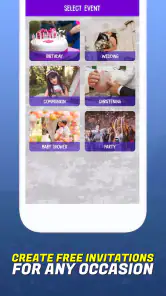
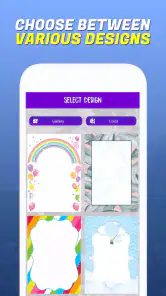
The first thing I noticed about Invitation Maker-Card Creator is how user-friendly it is. As soon as you open the app, you’re greeted with a sleek interface that makes navigation a breeze. The app offers a wide variety of templates for any occasion you can think of – birthdays, weddings, baby showers, you name it! I found myself scrolling through beautifully designed templates that made me feel like a professional designer, even though I’m far from it.
Where a focused invitation maker helps
The main advantage of a purpose-built invitation app is the shorter path from idea to shareable card. In a general design editor, I may need to begin with a blank canvas or decide what kind of document to make. Here, the invitation itself is the starting point, which is useful when I already know the occasion and just want a presentable way to communicate it. That focus is particularly helpful for a one-off event: I can spend my attention on the wording and look rather than building a whole visual system.
It also fits situations where the host wants a little personality without turning the invitation into a design project. A child’s birthday, a holiday dinner, or a casual engagement celebration can benefit from a card that feels chosen for the occasion. I would keep the visual treatment aligned with the event, though. A playful layout may suit a family gathering, while a formal wedding deserves careful attention to tone and readability rather than a template chosen only because it looks elaborate.
You May Like

Clash of Clans Is Won Between the Battles

Android Auto Makes the Case for Quieter Car Software

MobiOffice: Transforming Mobile Productivity with Seamless Integration

EA SPORTS FC™ Mobile Soccer: Redefining Mobile Sports Gaming

How Microsoft OneDrive Became a Mobile Productivity Giant

How Google Translate Breaks Language Barriers Effortlessly
Customization Options
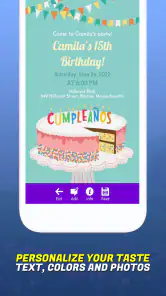
What’s really cool is the level of customization the app provides. You can tweak almost everything. Want to change the background color or add personal photos? No problem. You can even play around with different fonts and text sizes to make your invitation stand out. I spent a good amount of time experimenting with these features, and it was honestly a lot of fun.
One useful trade-off with this kind of editing is that more choice can mean more fiddling. I’d settle on a clear template first, then adjust the wording and one or two visual details rather than changing everything at once. For a family birthday, for example, a familiar photo and readable text may feel warmer than a heavily decorated card. Before sharing, I’d also zoom in and check names, dates and spelling; a design can look polished while still carrying a small but costly typo.
A less obvious editing tip is to treat the invitation as a piece of practical communication, not just a picture. I’d make the event name and date the most prominent details, then check that the location and response instructions do not disappear into decorative text. If a chosen photo competes with the wording, I’d simplify the surrounding design rather than shrink all the text. The best-looking card is not useful if guests have to ask me when or where to arrive.
Sharing and Saving
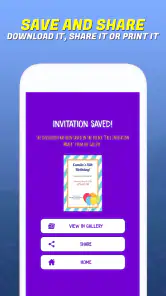
Once you’ve crafted your perfect invitation, the app makes it super easy to share it. You can send your invites directly from the app via email, social media, or even save them to print later. I found this feature incredibly handy when I needed to send out last-minute wedding invites!
Another thing worth mentioning is the app's ability to save your designs. You can come back to your projects anytime and make adjustments if needed. It’s like your personal invitation archive.
That saved-project workflow is especially handy when a plan changes after the first batch goes out. I’d keep a version with the original details, then make a revised copy or edit only after checking what guests have already received; otherwise, it is easy to end up circulating two cards with different times or locations. For a casual gathering, sending the image through the channel your guests already use may be simpler than asking everyone to learn a new service.
For a mixed group of guests, I’d think about the route each person will actually use before sharing. A relative who prefers email and friends who check social media may not all see the same message at the same time, so I would use the card as the visual centerpiece and make sure the essential details are also easy to find in the accompanying message. If the plan changes, sending a clear correction through the same channel is safer than assuming everyone will reopen an earlier image.
When another approach makes more sense
Compared with a plain text message, a designed invitation gives the occasion more personality and makes the key details easier to scan. Compared with a general-purpose design editor, a focused invitation maker can feel less intimidating when all I want is a card, not a broader project. The trade-off is that people who need precise print preparation, extensive brand control or a coordinated set of event materials may prefer a more flexible design tool. For a small gathering, a message or shared calendar event can also be more practical than making a card at all.
I’d choose a general design tool instead if the invitation must match several other pieces, such as signs or menus, or if exact control over the final printed layout matters more than speed. A calendar event is a better fit when guests mainly need a time, place and reminder, while a group message is often enough for an informal plan that may still change. Those options are not failures of invitation design; they solve different problems. This app makes most sense when the card itself adds value and I do not need the invitation to handle the rest of the event.
There is also a practical distinction between making a card and organizing attendees. I would not treat a designed invitation as a substitute for keeping track of replies or communicating later changes. For a small group, I can manage those details in the conversation where I share the card. For a large guest list, a separate planning method may be easier to maintain. The right choice depends less on how attractive the graphic is and more on whether the whole workflow stays clear for both host and guests.
The app’s current version is 2.1.1 and it runs on Android 5.0 or later. That makes it an option for some older Android devices, although I’d still check that the app works comfortably on the phone I plan to use. It is free to download, with in-app purchases ranging from $0.99 to $99.99 per item, so I’d explore the free experience before paying. If a premium template or feature is offered, I’d check what it unlocks and whether I’ll use it more than once rather than treating an upgrade as essential.
For someone deciding whether to spend anything, I’d first make one complete invitation using what is available without a purchase. That reveals whether the editing style, template choices and sharing workflow suit the job before money enters the decision. If an item is presented as a paid option, I’d read its description carefully and ask whether it solves a specific need I have, such as a particular look, rather than assuming that paying automatically makes the card more suitable. A one-time event and a recurring habit call for different standards of value.
Who will get the most from it
I think this is a good fit for people who want a visual invitation but do not want to learn a broad design program. It should appeal to hosts making occasional cards for family celebrations, seasonal events or informal get-togethers, especially when they can choose a template and personalize the details. Someone who enjoys trying colors, photos and fonts may also find the creative part pleasant rather than a chore.
I would be more cautious if I were preparing a highly formal event with strict print specifications, managing a large guest list, or creating a coordinated identity across multiple materials. In those cases, I’d compare the finished output with the actual requirements and consider a more flexible tool or a separate event-management process. I’d also skip a designed card when speed and clarity matter more than presentation: a short message can be kinder to guests if plans are still unsettled.
One everyday scenario shows the distinction. Suppose I decide after work to invite a few friends to a birthday dinner. I can draft the date, venue and response request first, select a suitable design, add a personal photo if it improves the card, and then share it in the group conversation. If the restaurant changes, the saved design gives me a place to make a corrected version, but I still need to tell everyone plainly that the details have changed. The app helps make the invitation; my choice of communication keeps the group informed.
Is It Worth It?
Now, let’s talk about whether it’s worth downloading. If you’re someone who loves organizing events or just wants to add a personal touch to your invitations, this app is definitely worth trying. The free version comes with plenty of features, but if you’re looking for something extra special, there's a premium option that unlocks even more templates and features.
For a realistic last-minute use, imagine arranging a birthday get-together after work: I’d choose a suitable design, add the practical details, use a photo or color to make it feel like the person being celebrated, then save and share it with the group. That is the kind of straightforward job where an invitation app earns its place. If I were coordinating a large formal event, I’d take more time to proofread and test the final card, and I might choose a tool that gives me finer control over print output or guest management.
My recommendation is to try it when a card will make an occasion feel more personal and when a ready-made invitation workflow sounds easier than starting from a blank page. I would not make it my default for every plan: a quick message is more efficient for spontaneous meetups, and a specialized design or planning tool may be the better choice when precision and coordination are central. For the middle ground—an attractive, personalized invitation that I can prepare and share without turning the task into a major project—it is an appealing option.
In conclusion, Invitation Maker-Card Creator has made creating invitations not only easy but also enjoyable. Whether you're an event planner or just someone who appreciates a good invite, this app has something for everyone. So, if you're ever in need of creating a stunning invitation on the fly, give this app a shot. It might just become your go-to tool for all things invitations!
Invitation Maker-Card Creator Frequently Asked Questions
Who develops Invitation Maker-Card Creator, and what kind of app is it?
Invitation Maker-Card Creator is an Events app developed by Battery Stats Saver. It is made for creating invitation cards for occasions such as birthdays, weddings, Christmas, and more. If you are looking for a dedicated way to put an event invitation together, its focus is on creating cards rather than managing every part of an event.
What is Invitation Maker-Card Creator?
Invitation Maker-Card Creator is a versatile app designed to help users effortlessly create stunning invitations for any occasion. Whether you're organizing a birthday party, wedding, or corporate event, this app provides a wide range of customizable templates, fonts, and design elements to suit your needs and make your invitations stand out.
Is Invitation Maker-Card Creator free to use?
Invitation Maker-Card Creator offers both free and premium features. The free version includes basic templates and design tools, allowing users to create simple invitations. However, for more advanced designs and access to a broader range of templates and features, users can opt for in-app purchases or a subscription plan, which unlocks premium content. In-app purchases range from $0.99 to $99.99 per item, so check the available options in the app before purchasing.
What features does Invitation Maker-Card Creator offer?
The app is packed with a variety of features including customizable templates, different font styles, stickers, and backgrounds. Users can add personal photos, adjust text alignment, and change colors to match their event theme. Additionally, it supports high-resolution exports, ensuring that your invitations look professional both digitally and in print.
Can I share my invitations directly from the app?
Yes, Invitation Maker-Card Creator allows users to share their creations directly from the app. Once your invitation is complete, you can easily send it via email, social media, or messaging apps. This feature ensures that you can quickly reach your guests without needing to download and manually attach the invitation files.
Pros
- Easy-to-use interface for beginners.
- Wide variety of customizable templates.
- High-quality graphics and designs.
- Supports multiple languages.
- Quick sharing options via social media.
Cons
- Limited free features available.
- Some templates require in-app purchases.
- Occasional app crashes reported.
- Ads can be intrusive at times.
- No offline functionality available.

- Category
- Events
- Version
- 2.1.1