Invitation Maker & Event RSVP
- 733.00
- 4.9
- Installs
- 1.00M
- Price
- Free

Screenshots



Analysis by Reviewed
Hey there! If you’ve ever been tasked with organizing an event, you know how chaotic it can get. From figuring out the guest list to managing RSVPs, it can feel like you’re spinning plates. That’s where Invitation Maker & Event RSVP swoops in to save the day. I took this app for a spin, and let me tell you, it’s a game-changer for anyone looking to plan an event with ease.
In everyday use, the biggest value is having the invitation and the guest response process in one place. I’d reach for it when a birthday, family gathering, or casual get-together needs a polished invite without turning the planning into a design project. For a small event, getting the essential details settled early—date, location, and how guests should respond—also makes it easier to avoid a string of follow-up messages later.
A practical rhythm for planning
A useful habit is to settle the wording before spending time on visual choices. I’d write the event details first, then choose a template and adjust the design around the information guests actually need. That order helps keep an attractive invitation readable; it’s easy to get absorbed in colors and images and then discover that the key details feel crowded.
For a realistic example, imagine organizing a weekend birthday lunch. I’d create the invitation once the time and place are firm, send it through the channel most guests already use, and check responses before making final plans. If details change, an update can be more useful than sending a completely new invitation, because it keeps the group focused on the current plan.
Choosing the right level of detail
For a casual gathering, I’d keep the invitation focused on what guests need to decide: when to arrive, where to go, and how to respond. Extra wording can be useful for parking, a dress expectation, or a contribution to a shared meal, but crowding the design with every planning note makes the essential details harder to scan. I’d put the must-know information first and reserve secondary details for a follow-up message.
This is also where the app is most useful to someone who is not a designer. A template gives the invite a finished look without requiring me to build a layout from a blank canvas. I would still check contrast and text size on a phone screen before sending; a design that looks balanced while editing may be less readable when viewed in a message preview.
Getting Started with Invitation Maker
First off, downloading the app is a breeze. Available on both Android and iOS, it’s easy to find and install. Once you open it up, you’re greeted with a user-friendly interface that’s intuitive to navigate. I was impressed with how quickly I could dive into creating my first invitation.
More From Our News Desk

Clash of Clans Is Won Between the Battles

Android Auto Makes the Case for Quieter Car Software

MobiOffice: Transforming Mobile Productivity with Seamless Integration

EA SPORTS FC™ Mobile Soccer: Redefining Mobile Sports Gaming

How Microsoft OneDrive Became a Mobile Productivity Giant

How Google Translate Breaks Language Barriers Effortlessly
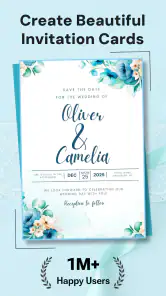
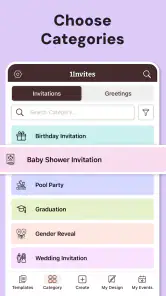
The app offers a plethora of templates to choose from. Whether you’re planning a birthday bash, a wedding, or even a corporate event, there’s something for everyone. The variety is vast, and I found myself scrolling through beautifully designed options. It's like having a graphic designer in your pocket!
Creating the Perfect Invitation
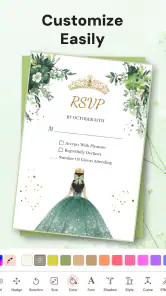
What I love most about Invitation Maker & Event RSVP is the customization. You can tweak every little detail to fit your event’s theme. Fonts, colors, images – you name it, you can change it. I spent a good hour just playing around with different designs, and it was so much fun!
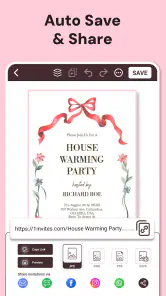
Once you’ve perfected your invitation, sending it out is just a tap away. The app allows you to share invites via email, social media, or even text. I opted to send mine through email, and it worked seamlessly. The recipients loved the professional look of the invite, and I got compliments galore.
Managing RSVPs Like a Pro
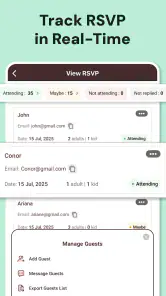
Here’s where the app really shines: managing RSVPs. It’s a breeze to keep track of who’s coming and who isn’t. You get real-time updates, and the app even sends reminders to those who haven’t responded yet. No more chasing people down – it’s like having a personal assistant!
The app’s dashboard is clean and organized, making it easy to see at a glance how many have responded. I appreciated the feature that allowed me to export the guest list into a spreadsheet. It made planning seating arrangements a heck of a lot easier.
Settings and habits that save time
Before sending, I’d check the invitation details as carefully as the design. A quick proofread of the date, address, and response instructions can prevent the most common event-planning mix-up: guests having a lovely-looking invite but not knowing exactly where to go or how to reply. I’d also send a test to myself when choosing a new sharing method, so I can see how the invitation appears on the receiving end.
For recurring gatherings, a repeatable process is more useful than trying to reinvent the invitation each time. I’d keep a simple checklist of details to confirm—event time, location, guest list, and any change guests need to know—then adapt a suitable design rather than browsing indefinitely. This is a practical workflow, not a claim that the app saves custom templates or automates planning.
The spreadsheet export is particularly handy when RSVP information needs to inform decisions outside the app. I’d use it as a working guest list for tasks like checking meal preferences or organizing tables, while treating it as a snapshot that may need updating as replies change. That distinction matters: an exported sheet can make planning easier, but it should not replace checking the current response view before making a final headcount.
Extra Features Worth Mentioning
Beyond the basics, Invitation Maker & Event RSVP packs in some nifty features. The app includes a built-in calendar to help you keep track of important dates. Plus, there’s a notes section where you can jot down ideas or special instructions for the event.
One feature I found particularly useful was the ability to send out updates or changes to all invitees. If the venue changes or you need to send a last-minute reminder, it’s all manageable with a few taps.
Faster patterns for repeat events
For a monthly club meet-up, a family holiday meal, or a recurring neighborhood get-together, I’d make the process predictable even if the invitation itself changes. I’d settle the date and venue first, draft the wording, choose a fitting design, and then send the invite only after checking that the response route is clear. The benefit is not a special automation; it is reducing the number of choices I have to make under time pressure.
I’d also use RSVP reminders with a little judgment. They’re useful when a headcount affects food or seating, but not every unanswered invitation needs an immediate nudge. I’d give guests a reasonable chance to respond, then follow up with the people whose answers actually affect the plan. That keeps reminders helpful rather than making a relaxed gathering feel like a formal registration process.
Where it fits—and where it doesn’t
Compared with making an invitation from scratch in a general-purpose design app, this event-focused approach is more convenient when the goal is to invite people and keep tabs on their replies. A design tool may offer more room for elaborate visual work, but it can leave you managing responses separately. On the other hand, if your event needs detailed ticketing, complex registration, or a highly controlled guest-management process, I’d look for a dedicated event platform rather than assuming an invitation app will cover those needs.
The app is published by Photo Studio & Picture Editor Lab and sits in the events category. It’s free to download, rated for Everyone, and the current version is 142.0, with Android 8.0 as the minimum operating-system requirement. In-app purchases range from $3.99 to $249.99 per item, so I’d review any purchase choices carefully and stick to the free workflow unless a paid option clearly suits the way I plan events. Its 4.9 average from around 122,000 ratings and more than one million installs suggest it has found a broad audience, though those figures can’t tell you whether its particular workflow suits your event.
For a simple gathering, I’d use the RSVP view to keep the response check from becoming a separate chore, then export the list only when I need to work through practical arrangements. For a large or formal occasion, I’d be more cautious: confirm that the invitation and response process meets the organizer’s needs before relying on it as the sole source of guest information. People who prefer plain text messages and have only a few guests may find that their usual group chat is faster and less effort.
Limits to keep in mind
An invitation and RSVP tool can simplify coordination, but it does not make every event simple. If the guest list is large, changes frequently, or involves several organizers who need different levels of access, I would first decide how the group will keep one reliable version of the plan. For a smaller gathering, checking the response view and exporting a list may be enough; for a complicated occasion, separate planning needs can quickly exceed what I want from an invitation-focused app.
I’d also be deliberate about the way I share an invite. Email, social media, and text each reach people differently, so the best option depends on how the guests normally communicate. Before sending to a large group, I’d confirm that the invitation is going to the intended recipients and that its wording makes the next step obvious. A polished design cannot compensate for an unclear audience or a response instruction that gets overlooked.
One practical question is whether I need to pay to make a useful invitation. I’d begin with the free download and see whether the available choices suit the event before considering any in-app purchase. The listed purchase range is broad, so I would not treat every paid option as necessary or assume that a purchase improves the RSVP process I actually need. My advice is to decide what is missing from the free workflow first, rather than browsing paid choices without a specific reason.
Another question is whether it replaces a group chat. For a handful of close friends who already coordinate in one conversation, probably not; a direct message may be faster and more familiar. The app makes more sense when the visual invite matters or when keeping responses together is worth the extra setup. For a formal event, I’d also check whether guests can follow the response process comfortably before making it the only route for communication.
Final Thoughts
Overall, Invitation Maker & Event RSVP is a fantastic tool for anyone looking to streamline the event planning process. It’s packed with features, easy to use, and makes managing RSVPs a breeze. Whether you’re a seasoned event planner or just organizing a small get-together, this app has got you covered.
So, if you’re gearing up for your next event, give this app a shot. It’s like having an event planner in your back pocket. Trust me, once you try it, you’ll wonder how you ever managed without it!
My strongest recommendation is for someone who wants the invitation and replies to feel like one manageable task, rather than a design file followed by a scattered trail of messages. I’d use it for birthdays, informal celebrations, and gatherings where a clear headcount helps with practical decisions. The combination of templates, response tracking, reminders, and a spreadsheet export gives that kind of organizer a sensible routine without requiring a separate design workflow.
I’d skip it when the event depends on ticket sales, intricate registration, or a guest-management process that needs more structure than a simple invitation and response cycle. I’d also stick with a familiar group chat when the guest list is tiny and visual presentation does not matter. For everyone in between, the best approach is to start with one small event, proofread the details, test the sharing route, and see whether the RSVP view genuinely reduces the follow-up work.
Invitation Maker & Event RSVP Frequently Asked Questions
What should I know about Invitation Maker & Event RSVP before downloading?
Invitation Maker & Event RSVP is an events app for making invitations and tracking guest responses. Its store summary highlights creating invitations quickly and managing RSVPs, which makes it worth considering if you want those tasks in one place. The app is free to download, and its content rating is Everyone, so it is aimed at a broad audience.
Is Invitation Maker & Event RSVP available for iPhone and Android?
The app is listed for Android devices, with Android 8.0 or later required. Before downloading, check your device’s operating system version to make sure it meets that requirement. If it does, you can explore the app’s invitation and RSVP tools; if it does not, you will need to update your device’s software or use a compatible device.
How popular is Invitation Maker & Event RSVP?
Invitation Maker & Event RSVP has more than 1 million installs and an average rating of 4.9 from 122,000 ratings. Those figures suggest that many people have tried it and that ratings are generally positive. The app has also received 733 written reviews, which can offer additional perspectives when deciding whether its invitation and event-response tools fit your needs.
Is Invitation Maker & Event RSVP free to download, and are there optional purchases?
Invitation Maker & Event RSVP is free to download, so you can try its invitation-making tools without paying upfront. The app also offers in-app purchases, with prices ranging from $3.99 to $249.99 per item. Check the available options in the app before making a purchase, especially if you want to keep your event-planning costs within a set budget.
What devices can run Invitation Maker & Event RSVP?
The app requires Android 8.0 or later. Before downloading, check your device’s operating system version to make sure it meets that requirement. If it does, you can explore the app’s invitation and RSVP tools; if it does not, you will need to update your device’s software or use a compatible device.
Pros
- User-friendly interface for easy navigation.
- Wide variety of templates to choose from.
- Seamless integration with social media.
- Customizable RSVP tracking features.
- Allows for quick sharing of invitations.
Cons
- Limited options in the free version.
- Occasional ads can be disruptive.
- Some templates may feel outdated.
- In-app purchases can be pricey.
- Requires internet for most features.
- Category
- Events
- Version
- 142.0