

SeatGeek – Tickets to Events
- 11.88K
- 4.5
- Installs
- 5.00M
- Price
- Free

Screenshots
Analysis by Reviewed
I’d approach SeatGeek as a convenient place to start when I want to go out, rather than as a promise that every event or ticket will be the best fit. It’s a free events app from SeatGeek for finding and buying tickets across live entertainment, and it also gives sellers a way to list tickets. If you’re opening it for the first time, the most useful goal is simple: find one event you genuinely want to attend, compare the options, and understand the checkout details before committing.
What to expect when you open it
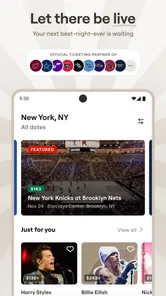
The app brings together sports, concerts, theater, festivals, and comedy, so it can be useful even if you don’t have a particular performer in mind. I like that range for planning with friends: you can start with a type of night out and browse, instead of jumping between separate event apps. The trade-off is that a broad selection can make browsing feel less focused if you only want one venue or a very specific event.
It has been around since 2013, and its current version is 2025.11.201610. The app is rated for Everyone, requires Android 10 or later, and has a 4.1 average from around 41,000 ratings, with over five million installs. Those figures suggest a well-established option, but they can’t tell you whether a particular event has the seats or price you want. I’d still judge it by the listings in my area.
Getting oriented before you search
On a first visit, I’d decide whether I’m browsing for inspiration or looking for a specific event. That small choice makes the app easier to use: broad browsing is better when the plan is “something fun this weekend,” while a direct search is more efficient when a friend has already sent an event name. If you’re comparing options with someone else, agree on the essentials first—date, budget, and whether sitting together matters—so the listings don’t turn into an unfocused scroll.
SeatGeek is free to install, which makes it reasonable to explore before you have a firm plan. I’d treat the first search as a way to learn how the event and seat options are presented, rather than feeling pressure to buy immediately. That gives you a chance to get comfortable with the layout and decide which details you personally need to check before making a purchase.
The User-Friendly Ticket Wonderland
First things first, the SeatGeek app is all about a smooth, user-friendly experience. From the moment you open it, you’re greeted with a clean and intuitive interface. No more fumbling around trying to figure out where to go next. The app’s design is as straightforward as sending a text to your bestie, which means more time focusing on what matters—getting those tickets!
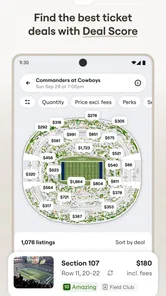
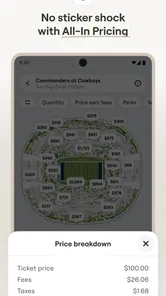
One feature that really stands out is the interactive seating map. I mean, who doesn’t love seeing exactly where they’ll be sitting before they buy? It’s like having a personal concert planner right at your fingertips. You can zoom in and out, check out different sections, and even compare ticket prices all from one screen. Talk about convenience!
More From Our News Desk

 Gmail
GmailGmail in a Busy Inbox: Who Benefits Most?
From first account to crowded workday, Gmail earns its place through dependable search and flexible sorting—but its best fit depends on how much inbox maintenance you can tolerate.

 Prime Video
Switching to Prime Video: What Changes in Your Viewing Routine
Prime Video can make a compelling second home for streaming, but switching means learning a different catalog, rental layer, and route from browsing to playback.

 Universal TV Remote Control
Universal TV Remote Control Works Best as a Reliable Backup
A phone remote earns its place through quick setup and reliable habits. Here is how to get more from Universal TV Remote Control—and where its limits show.

 Weather - By Xiaomi
Weather by Xiaomi Review: Clear at a Glance, Less Clear Up Close
Xiaomi’s weather app makes everyday forecasts quick to scan, but its calm surface can leave useful details and recovery paths harder to find than they should be.

 X
XX Under Pressure: Can It Recover When Posting Goes Wrong?
A resilience-focused review of X, examining setup, mistaken posts, interruptions, weak connections, and the gaps that matter when recovery needs to be dependable.

 Clash of Clans
Clash of Clans Is Won Between the Battles
Its raids are quick; its community is a long-term project of coordination, teaching, rivalry, and shared responsibility—with all the friction that entails.
Latest News



Making the seating map work for you
I wouldn’t use the map only to hunt for the closest seats. First, I’d decide what kind of experience matters: a clear view, being near the action, or keeping the group in one section. Then I’d compare a few areas instead of treating the first appealing listing as the obvious winner. This is a useful way to avoid paying extra for proximity when a different section might fit the night just as well.
For a group, the map can also help turn a vague conversation into a concrete choice. Rather than sending everyone a string of prices, I’d share a couple of section options and ask which trade-off feels right. If staying together is essential, that can quickly rule out choices that look attractive individually but don’t work for the whole group.
Deals and Steals
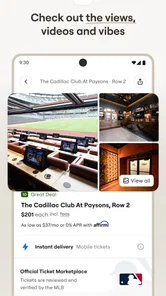
Let’s talk money. We all want the best bang for our buck, right? With SeatGeek, you’ve got a nifty little feature called Deal Score that helps you do just that. This smart tool rates tickets based on value, so you know if you’re getting a sweet deal or if you might want to keep looking. It’s like having a savvy friend who’s always on the lookout for the best offers.
And, if you’re like me and love a good discount, the app often has promo codes that you can use at checkout. Just imagine scoring those front-row seats and still having cash left over for a t-shirt or two!
Making a confident first purchase
For a first-time user, I’d compare a couple of sections before choosing, rather than tapping the first appealing price. The map is useful for judging location, while Deal Score gives another angle on value; neither should replace checking the final total and ticket details at checkout. A lower-looking price is not automatically the right choice if the view or seat location matters more to you.
A realistic use: a friend messages on Friday that there’s a game or show the following week, and you have only a few minutes to decide whether to join. I’d search the event, look at nearby sections on the map, and compare a few options before sending the group a clear choice. That little pause helps avoid buying seats based on price alone, especially when your friends care about sitting together or being near the action.
When browsing helps—and when it doesn’t
The event range makes this a strong fit for people who attend different kinds of live events and want one app to begin their search. It can also help when plans are flexible: if one concert is too expensive, browsing another event type may reveal a better night out. By contrast, if you already know the exact venue and want to buy directly from its official box office, that venue’s own channel may be the more direct route.
Compared with searching through separate venue pages or general ticket marketplaces, SeatGeek’s main advantage is bringing event discovery, seating choices, and value cues together. The limitation is that a marketplace view is not a substitute for checking the exact event and ticket terms. I’d treat recommendations and scores as useful filters, not as a guarantee that a ticket is ideal for my priorities.
Choosing between a marketplace and a direct box office
For a first-time buyer, the practical question is not simply which app has the nicest browsing experience; it’s which route makes the decision easiest to verify. A venue’s own box office can be simpler when you already know where you want to sit and want to buy from that venue directly. SeatGeek is more useful when you want to compare possibilities across events or weigh seat location against value in one browsing flow.
I’d also avoid assuming that a familiar event name means every listing will suit the same needs. If accessibility, a particular entrance, or a group’s seating arrangement is central to the outing, slow down and confirm the relevant details before paying. For a flexible solo plan, a quick comparison may be enough; for a family or a larger group, being precise is worth the extra time.
Common points that can cause hesitation
It’s easy to confuse a promising deal indicator with a final buying decision. I’d use Deal Score to narrow the list, then compare the actual seats and total shown before paying. Promo codes may be useful when available, but I wouldn’t build a budget around an assumed discount; decide what you’re comfortable spending before checkout and proceed only if the displayed terms work for you.
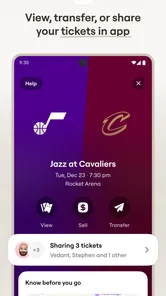
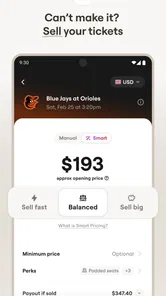
Another question first-time buyers often have is whether the app is only for concerts. It isn’t: sports, theater, festivals, and comedy are part of its scope too. If you’re selling rather than buying, the app supports ticket sales as well, though I’d take time to review the listing information carefully before putting tickets up. Clear details make it easier for a potential buyer to understand what’s being offered.
Planning for the parts outside the purchase
Finding tickets is only one piece of a successful night out. Before buying, I’d check that everyone agrees on the event and the date, and make sure the choice works with the group’s budget. This sounds obvious, but it prevents a common planning snag: one person finds a tempting listing, pays quickly, and only afterward discovers that the others were expecting a different section or a lower spend.
If you’re selling, I’d take the same deliberate approach from the other side. Review the event and seat information as if you were a buyer deciding whether the listing is clear. That habit won’t guarantee a sale, but it helps avoid confusion about what you’re offering and makes the listing easier to assess.
Turning a search into a good night out
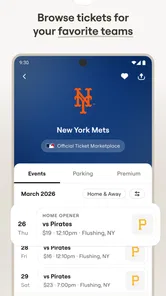
After you find an event, I’d save the key details somewhere easy to check and coordinate with anyone coming along before purchasing multiple seats. That’s especially helpful for groups, where a small difference in section can matter more than a modest price gap. If you’re browsing casually, alerts for favorite acts can help you notice when they’re in town; if notifications aren’t useful to you, you can simply search when you’re ready to make plans.
The app has 11,000 reviews, and its free price makes it easy to try as a discovery tool before you need tickets. Still, buying tickets is a decision where I’d slow down at the final screen: confirm the event, seat choice, and displayed amount, then make sure everyone in the group is ready. That careful last check is more valuable than rushing because a listing looks tempting.
Making discovery useful without letting it take over
Browsing several event types is handy when I’m open to ideas, but it can also make a simple plan feel bigger than it needs to be. I’d set a boundary before searching: choose a date or a maximum spend, then stop when I find an option that meets the group’s needs. That keeps recommendations and extra listings in their proper role—as inspiration, not a reason to keep shopping after the plan is already settled.
For a repeat outing with a favorite performer or team, alerts can make discovery more convenient than remembering to search every so often. For someone who only attends a rare event, though, occasional manual searching may be enough. The best approach depends on how often you want reminders; I’d use them only if they help me act on plans rather than create more noise.
All Your Events in One Place
What’s cool about SeatGeek is that it’s not just for concerts. Whether you’re into sports, theater, or even comedy shows, this app has you covered. It’s like the Swiss Army knife of event apps. You can search for events by category, location, or even by your favorite performer. Plus, the app sends you alerts when your favorite acts are in town, so you’ll never miss a beat.
Another bonus? You can link your SeatGeek account with your favorite music streaming services. This means the app can tailor event recommendations to your music tastes. It’s like it knows you better than you know yourself!
Who will get the most from it
I think the app makes the most sense for people whose plans change from week to week: a sports fan who also catches concerts, a couple looking for a different date night, or the friend who usually coordinates tickets for a group. Having several event types in one place can reduce the work of starting from scratch every time. It is also approachable for someone trying a ticket app for the first time, as long as they’re willing to pause and review the details before buying.
I’d be less enthusiastic about it for someone who only wants one venue’s direct inventory, dislikes comparing marketplace listings, or needs a highly specific arrangement that must be confirmed before purchase. In those cases, contacting the venue or using its official sales channel may provide a clearer path. The useful thing is to choose the route around your needs, rather than assuming one ticket app should be best for every event.
Wrapping It Up
All in all, SeatGeek makes the ticket-buying process as easy as pie. Its user-friendly design, smart money-saving tools, and wide range of events make it a must-have app for anyone who loves live entertainment. So whether you’re a die-hard sports fan or a music lover, SeatGeek is your go-to app for tickets. Just download it, and let the good times roll!
My practical recommendation is to install it when you’re ready to explore an event, not merely because you expect every search to end in a purchase. Start with a specific plan, compare the seating and value cues, and use the final checkout screen as your decision point. For an occasional concertgoer, a sports fan who likes comparing sections, or a group organizer juggling different event ideas, that path feels reassuring and useful. If your priority is a particular venue’s direct inventory or you prefer to avoid marketplace comparisons, another route may suit you better. For everyone else, it’s a sensible first stop for turning “we should go out” into a plan.
SeatGeek – Tickets to Events Frequently Asked Questions
Do I need an account to browse events on SeatGeek?
You can explore SeatGeek’s event listings to see what is available, but buying or selling tickets involves using the app’s transaction features. Browsing first is a practical way to check whether the events you care about appear in the app and compare the options shown. If you decide to proceed, review the listing and checkout details carefully before completing a purchase.
Can I use SeatGeek to find tickets for events near me?
SeatGeek is designed for browsing tickets across sports, concerts, theater, festivals, and comedy events. You can search for events by location, date, or category, which helps narrow the listings to plans that fit your interests. Before choosing a ticket, compare the available event and seating options shown in the app so you can decide whether a listing suits your needs.
What kinds of events can I find on SeatGeek?
SeatGeek is an events app for finding tickets to sports, concerts, theater, festivals, and comedy events. You can browse options based on the kind of event you want to attend, then review ticket listings and seating choices before deciding. Its focus is on helping users explore event tickets and buy or sell them through one mobile platform.
Is SeatGeek free to download, and which devices can run it?
SeatGeek is free to download, so you can install it and explore the app without paying an upfront download charge. It is available for mobile devices running Android or iOS, with a minimum operating system requirement of version 10. The app is intended for everyone, and its developer is SeatGeek. Keep your device’s operating system up to date for the best experience.
What is SeatGeek and how does it work?
SeatGeek is a mobile platform that allows users to buy and sell tickets for various events, including concerts, sports games, and theater shows. It aggregates ticket listings from various sellers, providing a comprehensive comparison of prices and seating options. Users can search for events by date, location, or category, and purchase tickets directly through the app using secure payment methods.
Pros
- User-friendly interface for easy navigation.
- Wide selection of events and tickets available.
- Real-time updates on ticket availability.
- Secure payment options for safe transactions.
- Offers personalized event recommendations.
Cons
- Service fees can increase ticket prices.
- Occasional app crashes or slow loading.
- Limited customer support options.
- Some tickets have restricted view options.
- Refund policies can be strict and complex.











