

Vivid Seats | Event Tickets
- 9.70K
- 4.7
- Installs
- 5.00M
- Price
- Free

Screenshots
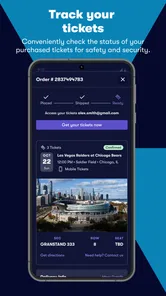
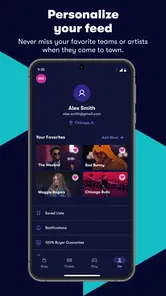

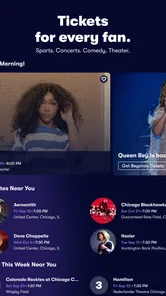
Analysis by Reviewed
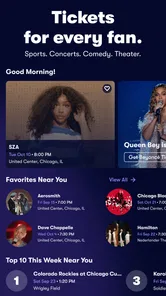
When I’m choosing a live event, the ticket search is often the easy part; the harder part is working out whether the options make sense for my plans, budget, and needs. Vivid Seats brings concert, sports, and theater listings into one mobile place, which can make that early planning less scattered. I find it most useful when I’m still comparing possibilities rather than when I already know exactly which seat I want.
Readable browsing, with a few things to check
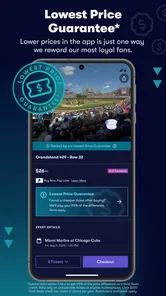
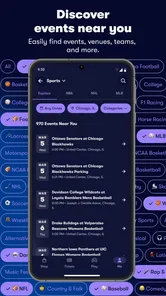
The app’s event categories and filters give me a practical way to narrow a broad search by date, location, or type of event. That matters when I’m planning around a workday or looking for something nearby, rather than scrolling through every listing. Venue seating charts can add useful context before checkout, though I still treat a chart as a guide: I check the displayed section and seat details carefully instead of assuming a map alone tells me everything about the view or the route through a venue.
For a quick weekday search, I might look up a concert in my area, compare a couple of dates, then save the likely option by keeping its details in mind while I check with friends. This is where a ticket marketplace differs from a venue’s own ticket page: a marketplace can be handy for comparing listings across events, while a venue or event organizer is often the more direct place to look if I’m focused on one specific show and want its official information. I’d use the app for discovery and comparison, then slow down at the listing and checkout stage.
Different ways to use it—and where friction can remain
Vivid Seats is an events app from developer Vivid Seats. It is free to install, is rated for Everyone, and has a 4.7 average from around 30,000 ratings; more than 5 million installs suggest it has reached a broad audience. Its current version is 2025.118.0, and it supports operating systems from version 8.0 onward. Those details make it accessible to many people with compatible devices, but they don’t by themselves tell me how comfortable every screen or task will feel.
For motor or sensory needs, the useful question is whether I can complete the steps at my own pace and understand the choices before committing. I can take time to compare dates and seating information, rather than making a rushed decision at a venue entrance. But ticket shopping still involves dense details, small distinctions between listings, and a consequential payment step. If tapping precisely or reading a busy screen is difficult, I’d search in a calmer setting, use the device’s own display or input settings where helpful, and ask a companion to review the final selection with me. I wouldn’t assume the app alone removes those barriers.
It also suits different situations unevenly. Someone arranging a group outing may appreciate being able to compare event options in one place, while a person who needs a particular accessible route, seat arrangement, or venue service should verify those practical details with the venue before buying. The app can help identify a listing, but the venue is the better source for questions about on-site access. If I need the lowest possible total, I’d compare the complete checkout cost with the official seller and other legitimate options, not judge by the first price I see.
Planning around people, time, and uncertainty
A useful way to approach a group purchase is to settle the event and date before debating individual seats. I’d share the event details with everyone first, agree on a realistic spending limit, and only then compare listings in the same part of the venue. That sequence reduces the chance of mixing up dates or assuming that seats shown near one another are together. I would confirm the exact seat information on the selected listing before paying, especially when different members of the group have different budgets or mobility needs.
More From Our News Desk

 Gmail
GmailGmail in a Busy Inbox: Who Benefits Most?
From first account to crowded workday, Gmail earns its place through dependable search and flexible sorting—but its best fit depends on how much inbox maintenance you can tolerate.

 Prime Video
Switching to Prime Video: What Changes in Your Viewing Routine
Prime Video can make a compelling second home for streaming, but switching means learning a different catalog, rental layer, and route from browsing to playback.

 Universal TV Remote Control
Universal TV Remote Control Works Best as a Reliable Backup
A phone remote earns its place through quick setup and reliable habits. Here is how to get more from Universal TV Remote Control—and where its limits show.

 Weather - By Xiaomi
Weather by Xiaomi Review: Clear at a Glance, Less Clear Up Close
Xiaomi’s weather app makes everyday forecasts quick to scan, but its calm surface can leave useful details and recovery paths harder to find than they should be.

 X
XX Under Pressure: Can It Recover When Posting Goes Wrong?
A resilience-focused review of X, examining setup, mistaken posts, interruptions, weak connections, and the gaps that matter when recovery needs to be dependable.

 Clash of Clans
Clash of Clans Is Won Between the Battles
Its raids are quick; its community is a long-term project of coordination, teaching, rivalry, and shared responsibility—with all the friction that entails.
Latest News



For a spontaneous evening, the app can be a convenient place to check what is happening nearby, but convenience should not turn into a rushed checkout. I’d compare the event date, venue, section, and final total in one deliberate pass. If a show is important enough that a particular entrance, accessible seating arrangement, or arrival plan matters, I would contact the venue directly rather than treating a ticket listing as a complete guide to the night. That distinction is easy to miss when browsing quickly on a phone.
Another practical trade-off is breadth versus certainty. A marketplace view can help me discover alternatives when my first choice is unavailable or too expensive, while an official event page is often better for the organizer’s own schedule and venue guidance. I see these as complementary tools, not interchangeable ones: I’d use Vivid Seats to explore and compare, then check the seller and venue details that matter for the specific event before deciding.
The Ticket Treasure Trove
First off, the sheer variety of events available on Vivid Seats is mind-blowing. Whether you’re into concerts, sports, or theater, this app has got you covered. I remember scrolling through and finding everything from big-name concerts to niche theater performances. It feels like a one-stop shop for all your entertainment needs.
What really caught my eye was the user-friendly interface. Navigating through the app is a breeze. You can filter events by date, location, or category, making it super easy to find exactly what you’re looking for. Plus, the app provides a seating chart for most venues. This is a game-changer because you can see exactly where you’ll be sitting before you buy your tickets. Talk about buying with confidence!
Perks and More Perks
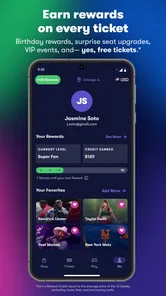
Now, let’s talk about the rewards. Vivid Seats has this fantastic rewards program where you earn credits for every ticket purchase. These credits can then be used for discounts on future purchases. It’s like getting a little extra treat every time you decide to indulge in your love for live events.
And here’s another thing I love – the app’s price alert feature. You can set alerts for specific events, and the app will notify you if ticket prices drop. This means you don’t have to constantly check back to ensure you’re getting the best deal. It’s a real time-saver and helps keep your wallet happy.
Smooth Sailing with Customer Support
Let’s face it, sometimes things don’t go as planned. Maybe you accidentally bought tickets for the wrong date, or perhaps you have questions about seating. The customer service on Vivid Seats is stellar. I had a minor hiccup with one of my orders, and their support team was quick to respond and resolve my issue. It’s reassuring to know that there’s a reliable team ready to assist you anytime you need help.
To sum it up, Vivid Seats offers a comprehensive and user-friendly platform for purchasing event tickets. The combination of a vast selection of events, user-friendly design, and excellent customer service makes it a top choice for any event-goer. Whether you’re planning a night out with friends or looking for a solo adventure, this app has something for everyone.
So, next time you’re planning to catch an event, give Vivid Seats a try. It might just become your go-to app for all your ticketing needs!
When I’d choose it—and when I wouldn’t
I’d recommend this app most to someone who likes live events but hasn’t settled on one exact show yet. Browsing concerts, sports, and theater together can make it easier to turn a vague idea—“something fun this weekend”—into a short list worth discussing. It is also useful for people comparing dates or trying to coordinate a night out without opening a separate app for every kind of event.
On the other hand, I wouldn’t make it my only source when I already know the event and need precise venue guidance. An official venue or organizer page is a better first stop for details such as entry arrangements, event timing, or the venue’s own access information. Likewise, anyone who wants to buy only from the primary seller should begin there and use a marketplace only if it fits their preferences. The right choice depends on whether discovery and comparison matter more than a direct route to one event.
Price alerts can help me avoid repeatedly checking a listing, but I wouldn’t treat an alert as a promise that a ticket will reach a particular price or remain available. I’d use it as a reminder to look again, then compare the current full cost and seat details at that moment. For a popular event or a fixed schedule, waiting for a lower price may be a poor trade if being there matters more than saving money.
Accessibility is partly an app question and partly a venue question
Readable browsing is only one part of an accessible ticket-buying experience. The choice of a seat can affect the whole outing: how far someone needs to travel through a venue, whether a companion can sit nearby, and how manageable arrival and departure will be. A seating chart can help with orientation, but I would not rely on the map alone to answer those questions. Before purchasing, I’d confirm specific arrangements with the venue and make sure the ticket selection matches the answer I receive.
For someone who finds fast scrolling, crowded screens, or precise tapping tiring, I’d make the search easier by narrowing the task. Start with one event type, then a date range and location, rather than browsing everything at once. Take a screenshot or note the event and section details to compare later, and pause before checkout to reread the date and seat selection. These are simple habits, but they can reduce avoidable mistakes when a purchase involves several similar listings.
There is also a social side to access. If a friend is helping with the purchase, I’d agree in advance on who is selecting the tickets and who is checking the details, rather than passing the phone back and forth during payment. That keeps the final decision clearer and gives the person attending a chance to confirm that the event, seats, and plan suit them. The app can support the search, but it cannot decide what arrangements will work for each person.
A calmer checkout is a better checkout
My most useful rule is to separate browsing from buying. I can explore possible events while commuting or during a spare moment, but I prefer to complete a purchase when I have enough time to inspect the listing without distraction. Before confirming, I’d verify the event date and venue, the selected section and seat details, and the total shown at checkout. If anything does not match what I expected, I’d stop and compare again rather than assuming the difference is minor.
This matters especially when several listings look similar. A small difference in date or location can turn an otherwise good choice into the wrong one, and an attractive initial price may not tell the whole story once checkout costs are visible. I’d keep the official event page open as a reference when the schedule or venue details are important. That extra check takes longer, but it is more useful than trying to resolve uncertainty after purchase.
My overall view is that Vivid Seats is strongest as a discovery and comparison tool for people who are flexible about what to see. Its broad event focus, filters, seating-chart context, rewards, and price alerts give me reasons to return when planning future outings. It is less compelling as a substitute for venue information or as a shortcut for people who need a specific access arrangement confirmed before buying.
The app is free, and its Everyone content rating makes it suitable for a broad audience, while its average rating of 4.7 and around 9,400 written reviews indicate that many users have shared feedback. I’d still judge it by whether its browsing and checkout flow work for my own device and needs. Overall, I’d use it to find possibilities and compare options, then take the time to check the details that matter for the actual event. That balance makes it a practical choice, without asking it to solve every part of planning a live outing.
Vivid Seats | Event Tickets Frequently Asked Questions
Can I browse events before creating an account?
Vivid Seats is built around finding tickets for concerts, sports, and theater, so it may be useful to explore the kinds of live events you are interested in before deciding whether to make a purchase. Browsing and buying are different steps: when you are ready to complete a transaction or manage a sale, follow the app’s prompts for any account details it requests.
What kinds of tickets can I look for in the app?
Vivid Seats focuses on tickets for live entertainment, including concerts, sports, and theater. That makes it a general-purpose option if you want to look across several types of events rather than use an app focused on only one. Your experience will depend on the events and tickets available when you search, so check the listings that matter to you before choosing.
Is Vivid Seats free to download, and what devices can run it?
Vivid Seats is free to download and is designed for mobile devices running iOS 8.0 or later. It is an events app for people interested in buying or selling tickets to concerts, sports, and theater. Before installing, check that your device meets the operating-system requirement and that you have enough space for the app.
Who is Vivid Seats intended for, and is it suitable for all ages?
The app is intended for people who want to explore live events and manage ticket purchases or sales from a mobile device. Its content rating is Everyone, so it is classified as suitable for a general audience. Whether it is useful for you depends on your interest in attending concerts, sports, or theater and using an app to handle ticket-related tasks.
What is Vivid Seats and how does it work?
Vivid Seats is a mobile application and online marketplace that allows users to buy and sell tickets to sports events, concerts, theater, and other live entertainment. Users can browse a wide array of events, compare prices, and purchase tickets directly from their smartphone or computer. The app provides a user-friendly interface, secure payment options, and even offers a rewards program for frequent buyers.
Pros
- User-friendly interface for easy ticket browsing
- Wide range of events available nationwide
- Secure transaction process ensures peace of mind
- Mobile app offers convenient ticket management
- Price alerts help find the best deals
Cons
- Service fees can increase final ticket cost
- Limited customer support options
- Occasional delays in ticket delivery
- App may have occasional performance issues
- Refund policy can be restrictive











