

Fever: Events & Tickets
- 4.07K
- 4.7
- Installs
- 10.00M
- Price
- Free

Screenshots



Analysis by Reviewed
When an evening opens up unexpectedly, I like having somewhere to look for ideas beyond the places I already know. Fever: Events & Tickets is an events app from Fever Labs built around discovering things to do and arranging tickets. In my view, it works best as a starting point for a plan: it can help turn “let’s go out” into a few options worth discussing, while leaving the final choice to you.
How quickly can you find a plan?
Fever is built around browsing events and experiences, so it is most useful when you want ideas rather than already knowing exactly where you are going. I’d open it when a free evening appears and I need a shortlist, not when I have a particular venue’s schedule in mind. The event-focused layout makes scanning options feel more direct than searching broadly across maps, social posts, and venue pages.
That convenience still depends on having relevant listings for your location and interests. Fever is associated with cities including New York, Los Angeles, Chicago, Washington, DC, and Miami, among others, so it makes the most sense for people planning outings in places it serves. If you are outside a covered area, a local venue calendar or city events guide may be a more practical starting point.
What the app is good at surfacing
The appeal is the chance to come across an outing that is not already on your mental list. Instead of beginning with a performer, venue, or exact event in mind, you can use Fever to browse possibilities and decide what sounds appealing. That difference matters: it is a discovery tool first, rather than a definitive directory of everything happening in a city.
The range can suit different moods, from wanting a lively night out to looking for a cultural experience or a change from the usual dinner plan. I would treat the recommendations as prompts, not as proof that an event is the best fit. A listing can catch your attention, but you still need to decide whether its timing, location, and format work for the people going.
Discovering the Buzz Around You
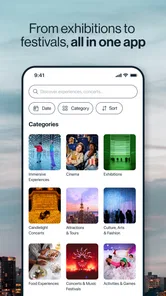
Fever is like having a local insider tucked right into your pocket. The app curates a diverse range of events happening around you, from concerts and theater performances to quirky pop-ups and foodie experiences. The best part? It’s tailored to your tastes. Once you set up your preferences, the app’s intuitive algorithm works its magic, suggesting events that are right up your alley.
Easy Navigation with a Sleek Interface
Navigating through Fever is a breeze, thanks to its user-friendly interface. The app is designed with simplicity in mind, ensuring that even the least tech-savvy among us can explore upcoming events without a hitch. Each event listing is detailed, providing everything from dates and times to venue addresses. Plus, there are handy links to buy tickets directly in-app, making the whole process seamless.
More From Our News Desk

 Gmail
GmailGmail in a Busy Inbox: Who Benefits Most?
From first account to crowded workday, Gmail earns its place through dependable search and flexible sorting—but its best fit depends on how much inbox maintenance you can tolerate.

 Prime Video
Switching to Prime Video: What Changes in Your Viewing Routine
Prime Video can make a compelling second home for streaming, but switching means learning a different catalog, rental layer, and route from browsing to playback.

 Universal TV Remote Control
Universal TV Remote Control Works Best as a Reliable Backup
A phone remote earns its place through quick setup and reliable habits. Here is how to get more from Universal TV Remote Control—and where its limits show.

 Weather - By Xiaomi
Weather by Xiaomi Review: Clear at a Glance, Less Clear Up Close
Xiaomi’s weather app makes everyday forecasts quick to scan, but its calm surface can leave useful details and recovery paths harder to find than they should be.

 X
XX Under Pressure: Can It Recover When Posting Goes Wrong?
A resilience-focused review of X, examining setup, mistaken posts, interruptions, weak connections, and the gaps that matter when recovery needs to be dependable.

 Clash of Clans
Clash of Clans Is Won Between the Battles
Its raids are quick; its community is a long-term project of coordination, teaching, rivalry, and shared responsibility—with all the friction that entails.
Latest News



For a smoother decision, I’d compare the event’s date, location, and practical details before committing, then check that the plan works for everyone in the group. A discovery app can narrow down choices, but it is still worth reading the listing carefully rather than treating a recommendation as a complete itinerary. If you already follow a specific performer or venue, checking its own channel alongside Fever can help you avoid overlooking a preferred option.
Making group plans without overcomplicating them
Imagine a friend group trying to choose something for Saturday after work. One person wants live music, another would rather try a food experience, and nobody wants to spend the evening scrolling through unrelated social posts. Fever can give the group a shared pool of possibilities; I’d send a few promising listings to the chat, agree on a neighborhood and time, and only then settle on tickets. That small order of steps helps avoid picking an exciting event that is awkward for everyone to reach.
The app is especially appealing if you enjoy discovering experiences you would not have searched for by name. It is less compelling if you prefer to plan around one familiar venue, want a comprehensive citywide calendar, or are simply looking for free activities: browsing is free, but the events themselves may have ticket costs, so check the listing before making plans.
Choosing Fever over a general search
Compared with searching the web, checking social feeds, or opening venue calendars one by one, Fever gives discovery a more event-centered shape. That can save effort when you have a broad question such as “What could we do this weekend?” General search is often better when you already know the exact venue or artist, while a venue’s own information is the more direct place to confirm a specific performance. I see Fever as a useful middle ground: it helps generate options, then you can verify the details where appropriate.
There is a trade-off to that focus. An events app can only help with the experiences represented in its listings, and a curated selection should not be mistaken for a complete inventory of a city. If you are comparing several familiar venues, their calendars may be faster to check. If you want inspiration across different kinds of outings, Fever is the more natural first stop.
Why You’ll Love It
One of the standout features is the personalized event recommendations. Whether you’re into live music, foodie festivals, or cultural exhibitions, Fever has something for everyone. The app also offers exclusive access to events you might not find anywhere else, giving you the chance to be in the know about the hottest happenings around town.
Another cool aspect is the social feature, allowing you to see where your friends are going and even plan group outings. It’s like a social network but for event goers, adding a fun twist to your usual planning routine.
When browsing gets busy
During a quick search, I’d focus on one or two interests and a manageable area instead of trying to inspect every category. That keeps discovery useful rather than turning it into another endless feed. For a group outing, decide on a budget and travel range first; those constraints make it easier to compare options and reduce the chance of buying tickets before the group has agreed on the basics.
As with any event marketplace, recommendations are a starting point, not a substitute for checking the details of the specific experience. The app is most helpful when you are open to suggestions and willing to compare listings. If you need a particular accessibility arrangement or have a strict schedule, verify those practical details before purchasing rather than assuming every event suits the same needs.
A practical way to plan an ordinary evening
Say you finish work on a Thursday and want something to do over the weekend, but your friends have not settled on a plan. I would browse with a rough idea of the group’s interests, save the most promising possibilities mentally or share them in the chat, then narrow the shortlist by date and how far people are willing to travel. This is more useful than sending a stream of unrelated suggestions, because it turns browsing into a decision the group can actually make.
Before anyone commits, I would make sure the selected date and location suit the people involved and look over the event information together. If the group is undecided, there is little benefit in rushing from discovery to purchase. Taking a moment to agree on the basics can prevent the common planning snag where one person is excited about the event but the rest of the group cannot make the timing work.
Questions worth settling before checkout
A natural question is whether Fever costs anything to try. The app is free, but that does not mean the outings shown in it are free; I would check the individual listing and make the ticket cost part of the group conversation before deciding. That simple distinction is especially useful when someone suggests an event before the group has agreed on a budget.
Another question is whether it is useful outside major cities. Fever is associated with a number of large urban areas, but the experience depends on relevant local options being available. If browsing your area produces little that suits you, a neighborhood venue calendar, local cultural guide, or general event search may be a better fit. I would not keep scrolling just because the app is installed.
People also wonder whether a recommendation means an event is suitable for their needs. I would not assume that. Read the specific listing for its practical details, and check with the organizer or venue if an important requirement is unclear. That matters for accessibility, timing, age suitability, or any other condition that could change whether the outing works for you.
Who will get the most from it?
I would recommend Fever to someone who lives in or regularly visits a city with a healthy selection of events and likes to keep plans flexible. It is particularly handy for couples or groups who enjoy trying something different but do not always know where to start. The app can also help a visitor build a rough shortlist of experiences, although I would pair it with local research when logistics or a particular neighborhood matter.
On the other hand, it may not be the right choice for a person who already knows exactly what they want to attend, expects a complete list of every local event, or mainly searches for no-cost activities. It is also a weaker fit if you are planning around strict timing or specific access needs and cannot confirm those details from the event information. In those situations, the venue or organizer’s own channel is a sensible companion, or a better primary source.
Reliability, updates, and device fit
Fever is free to download, developed by Fever Labs, and rated for Teen audiences. Its 4.7 average from around 125,000 ratings suggests many people find it useful, while the app’s reach of over 10 million installs makes it a familiar option for event discovery. It was released in 2014 and is currently at version 5.175.0, with support for operating systems from version 7.0 onward.
I would expect a current events app to feel most dependable with a steady connection, particularly when moving from browsing to ticket details. I can’t judge its speed or stability across every device, so I wouldn’t promise instant loading or identical performance for everyone. If something takes a moment, returning to the listing and checking the event details again is a sensible habit before making a purchase. On an older device, keeping the operating system compatible and the app updated is a practical way to avoid preventable friction.
For performance, the main thing I would watch is not a benchmark number but whether the app keeps the outing information easy to revisit while I am deciding. Event browsing can involve comparing several dates and locations, and jumping between too many options can make any planning session feel slower, even when the app itself is behaving normally. I find it helpful to settle on a small shortlist rather than repeatedly restarting the search.
Busy moments are also when I would be deliberate about connectivity and attention. If I am already on the way to an event, I would check the relevant details before leaving rather than wait until I am standing outside the venue and need to make a quick decision. That is not a claim about a special offline mode; it is simply a sensible way to reduce last-minute dependence on loading a page at an inconvenient time.
Keeping the search manageable
One useful habit is to decide what kind of evening you want before opening the app: lively, relaxed, food-focused, or something cultural. That gives the recommendations a purpose and makes it easier to stop browsing once you have a realistic candidate. If you start with no limits at all, an abundance of possibilities can be more distracting than helpful.
I would also separate discovery from commitment. First collect a few options, then check whether the timing, route, and cost fit; only after that would I move toward buying tickets. This is a small workflow, but it prevents a tempting listing from taking over the plan before the group has agreed on the details. It is especially useful when the event is only one part of a longer night out.
On a device that is older or short on free space, I would keep expectations practical. The supported minimum operating system is version 7.0, but compatibility alone does not guarantee the same responsiveness on every phone. Closing other demanding tasks if the device is already struggling, keeping the software current, and avoiding a rushed purchase while the app is slow are ordinary precautions rather than reasons to rule it out.
Final Thoughts
Overall, Fever: Events & Tickets is a game-changer for anyone looking to spice up their social life. It’s not just an app; it’s your personal guide to the city’s vibrant scene, ensuring you never miss out on the action. So go ahead, download the app and let Fever inject some excitement into your everyday routine. With its comprehensive event listings and simple ticket purchasing system, it’s never been easier to dive into the local buzz. Happy exploring!
My performance verdict is straightforward: Fever is worth trying if browsing for city experiences is part of how you make plans, especially when you want fresh ideas for a night out. It is not a replacement for every venue’s own information or for a broad local calendar, and its usefulness depends on the events available where you are. Used as a discovery tool, with a quick check of the details before committing, it can make choosing what to do feel much less like a chore.
Fever: Events & Tickets Frequently Asked Questions
Does Fever: Events & Tickets cover events in my city?
Fever focuses on helping people discover events and experiences in cities such as New York City, Los Angeles, Chicago, Washington, DC, and Miami, along with other locations. What appears in the app depends on where you are looking, so it is useful to browse your area before making plans. Its city-focused listings are most relevant if you enjoy exploring local activities.
What kinds of events can I find on Fever?
Fever is an events and ticketing app for discovering experiences and activities, with listings that can include concerts, theater performances, and other things to do. The selection varies by location, so the options you see depend on the city you are browsing. If you are looking for inspiration as well as tickets, exploring the available listings can help you decide what suits your interests.
What devices can run Fever: Events & Tickets?
Fever: Events & Tickets is available for devices running Android 7.0 or later, and the app is free to download. Check your device’s operating system before installing so you can confirm compatibility. The app is intended for discovering events and experiences, so browsing its listings and deciding whether it suits your plans can help you make the most of it.
Is Fever: Events & Tickets free to download, and do I need to pay to book an event?
The app is free to download and use, but event tickets may cost money, with prices varying by event. Some bookings may also include additional fees, which are shown during checkout so you can review the total before confirming a purchase. You can explore what is available before deciding whether to book, and Fever may offer discounts or promotions from time to time.
What is Fever: Local Events & Tickets?
Fever: Local Events & Tickets is an app designed to help users discover and book tickets for a wide range of events happening in their local area. It features everything from concerts and theater performances to unique experiences and activities. The app curates events based on your interests, making it easier to find something you’ll enjoy.
Pros
- Easy navigation interface
- Wide range of event categories
- Real-time event updates
- Secure ticket purchasing
- Personalized recommendations
Cons
- Limited event coverage in some areas
- Occasional app crashes
- Event details sometimes inaccurate
- High service fees on purchases
- Limited customer support response











