Invitation Maker: Cards & RSVP
- 6.87K
- 4.8
- Installs
- 10.00M
- Price
- Free

Screenshots


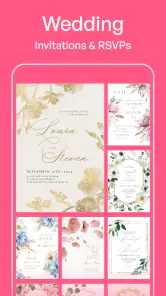
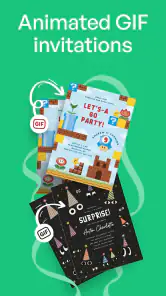




Analysis by Reviewed
When an invitation takes longer to make than the event plan itself, I understand the appeal of a phone-based shortcut. Invitation Maker: Cards & RSVP is an events app from Greetings Island for putting together invitations and cards without starting a design from scratch. It is free to install, rated for Everyone, and has a 4.8 average from around 175,000 ratings. I’d consider it for a birthday, family gathering, or other occasion where a polished digital invite matters more than having complete control over every design detail.
Where the process can snag
The first decision is not which button to tap, but what kind of invitation will suit the event. A template that looks appealing at a glance may not leave enough room for a long venue name or several practical details. I’d check that the design can accommodate the date, time, address, and any note guests need before spending time adjusting its appearance. That small check can save reworking the invitation later.
Editing on a phone also calls for a little patience. Text that seems balanced on a small screen deserves a final read before sharing, especially for names, dates, and directions. I find it useful to draft the event details separately first, then enter them in one pass. That reduces the chance of overlooking a small but important correction while focusing on colors or decoration.
Make a quick setup check
Before sending anything, I’d confirm the event information and decide how guests are most likely to receive the invite. A digital design is convenient when people coordinate through messages or email; a printed copy makes more sense when you need something guests can keep on a table or hand to someone else. The app’s free-to-install model is an easy way to try its invitation-making approach, although in-app purchases range from $0.99 to $23.49 per item, so I’d check any optional purchase carefully before proceeding.
There is also a useful distinction between creating an attractive invitation and managing an event. If your priority is simply a card to send, a design-focused workflow may be enough. If you need a reliable guest list, clear follow-up, or a particular RSVP process, decide how you’ll handle responses before choosing a template. That way, the invitation itself won’t create expectations about organization that your chosen setup cannot meet.
Getting Started with Ease
First things first, when you fire up the Invitation Maker: Cards & RSVP app, you're greeted with a clean, intuitive interface. No need to be a tech wizard or a graphic designer. The app is designed with the user in mind, making navigation a breeze. You can quickly browse through a plethora of templates, each more stunning than the last. Whether you’re going for chic, vintage, or downright quirky, there’s something here for everyone.
Customization at Your Fingertips
Once you’ve chosen your template, the real fun begins. The app offers a wide range of customization options. You can tweak colors, fonts, and layouts until your heart’s content. Want to add a personal touch? No problem. The app lets you upload your own images and even doodle on the invite. It’s like having a mini graphic design studio in your pocket. Plus, the drag-and-drop feature is a lifesaver for those of us who aren’t exactly tech-savvy.
More From Our News Desk

Clash of Clans Is Won Between the Battles

Android Auto Makes the Case for Quieter Car Software

MobiOffice: Transforming Mobile Productivity with Seamless Integration

EA SPORTS FC™ Mobile Soccer: Redefining Mobile Sports Gaming

How Microsoft OneDrive Became a Mobile Productivity Giant

How Google Translate Breaks Language Barriers Effortlessly
For a practical workflow, I’d settle the wording before experimenting with the layout. A short, readable invitation usually serves guests better than squeezing in every detail with tiny text. For a child’s birthday, for example, I’d put the time and location where they’re easy to spot, then use decorative touches to make the card feel personal. If the design is becoming crowded, choosing a simpler template is often a better trade-off than trying to fit everything in.
RSVP Features That Stand Out
What sets this app apart is its robust RSVP feature. Gone are the days of manually tracking RSVPs on a spreadsheet. The app does all the heavy lifting for you. It sends reminders to your guests, tracks responses in real-time, and even lets you message attendees directly. It's like having a personal assistant dedicated to your event. This feature alone makes the app worth its weight in gold.
For a casual gathering, I’d still keep a simple backup note of who has replied if attendance affects food, seating, or supplies. That is not a criticism of the invitation design; it is a sensible habit whenever plans depend on people responding. If a guest says they cannot find an invite or has not replied, I’d first check that I used the intended sharing route and then contact them directly rather than assuming the app or the guest has failed.
Sharing Your Masterpiece
Once your invitation is ready to go, sharing it is a piece of cake. The app provides multiple sharing options, from social media to email, ensuring your invite gets to your guests in no time. And if you’re feeling a bit old-school, you can even print them out. It’s the perfect blend of digital convenience and traditional charm.
For a mixed-age guest list, I’d choose a channel everyone already uses and send a brief accompanying message with the key logistics. That makes the invite easier to act on and gives guests a clear way to ask questions. Printing is a helpful alternative when a digital card would be inconvenient, but anyone who needs frequent edits or precise print preparation may prefer a dedicated design tool or desktop publishing workflow instead.
Who benefits most from the quick workflow
I think this app is especially useful for people who make invitations occasionally and want a finished-looking result without learning a broad design tool. A parent arranging a small birthday, a friend organizing a casual dinner, or a relative preparing a family celebration can start with a ready-made visual direction and spend their time on the details guests actually need. The templates, text adjustments, image options, and doodling give enough room to make a card feel personal without turning the task into a design project.
It is also a reasonable choice when an invitation needs to be prepared between other errands. Imagine arranging a weekend get-together during a lunch break: I’d write the essentials in a note, pick a layout with clear space for them, check the address and start time, then share the card through a channel the group already checks. That sequence is more reliable than browsing designs first and trying to squeeze the logistics in at the end.
On the other hand, I would not choose it for every event. A formal gathering with strict visual guidelines, a business event requiring consistent branding, or a complicated occasion with many schedule details can demand more precision than a phone-first invitation workflow provides. Someone who wants complete control over typography, alignment, and print specifications may be happier in a dedicated design program. For a small event where a plain text message is enough, even this app may add an unnecessary step.
Small choices that make sharing smoother
A useful way to avoid last-minute edits is to separate the invitation into two jobs: the card should make the occasion appealing, while the accompanying message should make the next action unmistakable. I’d keep the design focused on the event and include any extra context in the message, especially if guests need to bring something or follow a particular arrival plan. That keeps the card readable and makes it less likely that a practical instruction disappears among decorative details.
For events with a changing headcount, I’d decide in advance when I need replies and how I’ll handle people who do not respond. Even when RSVP tools help collect answers, a personal follow-up can still be useful for close friends or relatives who rarely check digital invitations. I would also save the final wording somewhere separate before making substantial edits. It is a simple precaution: if I change the design or rewrite a line, I can refer back to the confirmed details rather than relying on memory.
There is a trade-off between customization and speed. Uploading a personal photo or adjusting the layout can make an invite feel more connected to the occasion, but every extra choice creates another chance to spend time polishing something guests may only glance at. I’d use those options when they add meaning, such as a family photo for a reunion, and skip them when a clean template already communicates the event well. The best result is not necessarily the most decorated one.
RSVPs, alternatives, and realistic expectations
The RSVP tools are appealing when several people need to answer and I want fewer scattered replies. Still, I would not treat any digital response setup as a guarantee that every guest will notice the invitation, respond promptly, or understand the plan. For a gathering where the final count affects catering or seating, I’d review the responses myself and follow up with anyone whose answer matters. A quick personal check is often more dependable than assuming a reminder has settled the question.
Compared with a plain group message, a designed invitation gives the event a clearer, more considered feel and can make the key information easier to present neatly. A basic message, however, is quicker to revise when the time or location changes and may be more natural for a small group that already coordinates in chat. Compared with a general-purpose graphic design app, this invitation maker offers a more focused starting point, while a broader editor is usually the better choice for unusual layouts or precise creative control. I’d choose based on the job, not on which option has the longest feature list.
If you are wondering whether you need to print the card, I’d decide based on how guests will use it. Digital sharing is practical for people who already communicate by phone or email; paper can be more helpful for a notice that needs to be displayed or passed along. If printed output matters, I’d check a sample before preparing a large batch, because small-screen text can look different when placed on paper. For a digital invite, a self-check on another screen or a trusted person’s phone can catch cramped wording before the card reaches the whole group.
When another approach fits better
This is a good fit when I want a personal-looking invitation without learning a full design program. It is less suitable if I need exact brand controls, complex layouts, or a highly structured event-planning system; a specialist design app or a dedicated planning service may be a better match in those cases. The app is maintained by Greetings Island, and its current version is 3.6.2, with Android support starting at version 6.0. I’d check that my device meets that requirement before planning around it.
One common source of trouble is not the invitation maker at all: a typo, an outdated venue detail, or a guest overlooking a message can derail an otherwise good plan. I’d proofread the final card, send it to myself or a trusted person for a quick visual check, and keep the event details in the message as well when they are especially important. If editing feels awkward, returning to the wording and simplifying it can be more effective than repeatedly adjusting small decorative elements.
When delivery or editing seems to go wrong
If an invite does not appear to reach someone, I’d start with the ordinary checks before rebuilding the design: confirm the address or recipient, make sure I selected the intended sharing channel, and ask the guest to check the place where that channel normally delivers messages. Sending a short follow-up with the date and location can prevent a delivery hiccup from becoming a planning problem. If the card itself looks wrong, I’d reopen it and verify the text in a fresh preview before sharing again.
When the app feels slow or an editing action does not seem to stick, I’d avoid making several changes at once. I’d pause, check whether the wording and layout are still correct, then retry one small adjustment. If the issue continues, closing and reopening the app or checking for an available update are sensible general troubleshooting steps. I would keep a separate copy of important event details so I can recreate the text without having to reconstruct it from memory.
Sometimes the real issue is the event plan rather than the tool. A venue may change, guests may use different communication channels, or people may be unsure whether they are expected to reply. In those cases, I’d make the invitation clearer and send a direct note explaining what changed or what response is needed. A beautifully designed card cannot resolve ambiguous arrangements on its own; the host still has to make the plan easy to understand.
There is a reassuringly low barrier to trying the app: it is free to install, suitable for Everyone, and has more than 10 million installs. Its current version is 3.6.2, and Android users need version 6.0 or later. Optional in-app purchases are available, so I’d treat paid choices as separate decisions rather than assuming every design step must involve spending. The high 4.8 average across around 175,000 ratings and roughly 6,900 written reviews suggests many people find it useful, but my own choice would still depend on whether its template-led approach matches the event.
My final take is that Invitation Maker: Cards & RSVP works best as a practical shortcut for a good-looking invitation, not as a replacement for thoughtful event planning. I’d use it when a template, a few personal adjustments, and a convenient way to share are enough. I’d choose a plain message for informal plans, or a more powerful design or planning tool when the layout, print requirements, or guest management needs become demanding. With the wording checked and the sharing route chosen deliberately, it can make one small but visible part of organizing an event easier.
Invitation Maker: Cards & RSVP Frequently Asked Questions
Can I use Invitation Maker: Cards & RSVP for different kinds of events?
Yes. Invitation Maker: Cards & RSVP is intended for a range of occasions, so it can be useful for celebrations and gatherings with different themes. Its templates and editing options let you shape an invitation around the event rather than starting with a blank design. Before downloading, consider whether you want a quick, template-based way to prepare event stationery or prefer to create every detail from scratch.
Is the app free to download, and are there optional purchases?
Invitation Maker: Cards & RSVP is free to download, and some templates and tools are available without paying. Other features or content may be offered through in-app purchases, so the free download does not necessarily include every option. If you plan to use a particular design feature, check what is available in the app before relying on it for an event.
Who develops Invitation Maker: Cards & RSVP, and what kind of app is it?
Invitation Maker: Cards & RSVP is an event-focused app from Greetings Island. It is intended for people who want to put together invitations and cards for occasions, then share their designs with guests. Its broad appeal is reflected in its Everyone content rating, so it can be considered by users of different ages who need a simple way to prepare event stationery.
What is the main purpose of Invitation Maker: Cards & RSVP?
Invitation Maker: Cards & RSVP is designed to help users create professional-looking invitations for various events such as weddings, birthdays, anniversaries, and more. The app offers a wide range of customizable templates that cater to different themes and occasions. Whether you are planning a casual gathering or a formal event, this app provides the tools to design unique invitations with ease.
How user-friendly is the app for beginners?
The app is highly user-friendly, making it ideal for beginners who may not have any design experience. It features an intuitive interface with drag-and-drop functionality, allowing users to easily customize templates. Instructions and tips are provided throughout the app, ensuring that even first-time users can create stunning invitations without any hassle.
Pros
- Easy to use with an intuitive interface.
- Wide variety of templates available.
- Customizable design options.
- Supports both digital and printed invites.
- Fast sharing across multiple platforms.
Cons
- Limited free features.
- Some templates require in-app purchases.
- Occasional app crashes reported.
- Heavy on ads for free version.
- No offline mode available.
- Category
- Events
- Version
- 3.6.2