All Invitation Card Maker App
- 4.00
- 4.4
- Installs
- 1.00M
- Price
- Free
Screenshots
Analysis by Reviewed
For a last-minute gathering, I want an invitation that feels personal but doesn’t turn into a design project. All Invitation Card Maker is built around that kind of small, practical job: preparing a card for a birthday, wedding, or other event on a phone, rather than opening a general editor and starting from scratch. It’s an events app from Fast Video Downloader & Story Saver - DevBay, and I’d consider it when speed and a ready-made starting point matter more than precise design control.
Quick designs, with realistic expectations
A template-led workflow can save time, especially when the wording and event details are already settled. I would decide on the essentials first—who the invitation is for, when and where the event is happening, and how guests should respond—then choose a design that leaves those details easy to read. That simple order helps avoid spending time styling a card before discovering that the important information does not fit comfortably.
The app is free to install, though it offers in-app purchases ranging from $0.99 to $34.99 per item. I would start with the options available before paying for anything, and check that a chosen design suits the event and the way I plan to send it. Its average rating is 4.4 from around 1.3 thousand ratings, with over 1 million installs; those figures suggest it has found an audience, but they are not a guarantee that every template or workflow will suit my taste.
Making an Invitation Without Turning It Into a Project
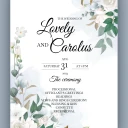
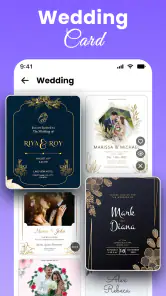
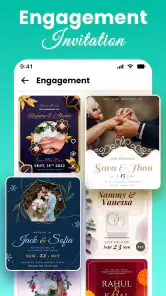
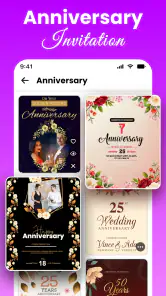
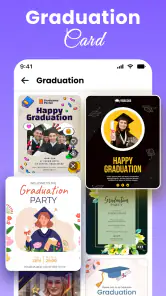
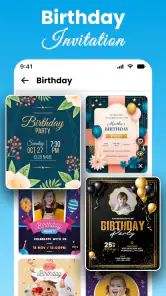
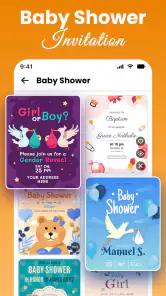
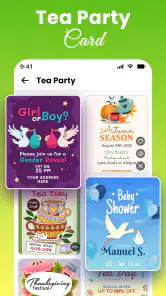
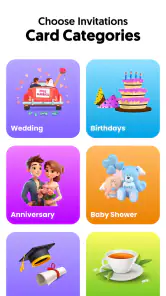
Okay, first things first, the user interface is super intuitive. I mean, even if you're someone like me who usually struggles with design software, All Invitation Card Maker makes it feel like a breeze. You open the app, and voila, you're greeted with an array of templates for every occasion imaginable—birthdays, weddings, baby showers, you name it. Just pick one and start customizing. It's as easy as pie!
Customization Galore
Now, this is where the fun begins! The customization options are endless. You can tweak everything—the fonts, colors, and even add some quirky stickers to give your invitation that extra pop. The app offers a variety of fonts that match different moods and themes. Feeling elegant? Go for the cursive ones. Want something fun and bold? They’ve got you covered there too.
For a family gathering, I would use a restrained approach: one decorative font for a name or short heading, and a simpler style for the practical details. A card can look lively in the editor but become harder to scan on a small screen if every line competes for attention. Before sharing, I would read the design at phone size and make sure the date and location stand out at a glance.
Sharing Made Simple
Once you're done crafting your masterpiece, sharing it is a walk in the park. The app lets you save your creations in high-quality formats, and you can email them directly or share them on social media. I found this feature especially handy when I was in a time crunch and needed to send out invites on the fly. Plus, the recipients loved the personalized touch!
More From Our News Desk

Clash of Clans Is Won Between the Battles

Android Auto Makes the Case for Quieter Car Software

MobiOffice: Transforming Mobile Productivity with Seamless Integration

EA SPORTS FC™ Mobile Soccer: Redefining Mobile Sports Gaming

How Microsoft OneDrive Became a Mobile Productivity Giant

How Google Translate Breaks Language Barriers Effortlessly
That kind of direct sharing suits informal plans and small events particularly well. For example, if I were arranging a birthday dinner after work, I could prepare the design once, check that the time and address are correct, then send it to the group rather than explaining the details in separate messages. I would still keep a plain-text version of the key information handy: guests can refer to it if an image is awkward to read or inconvenient to save.
Speed: What a Template Can and Cannot Save
In a real rush, the fastest part is having a visual starting point; it doesn’t remove the need to proofread. I’d write the wording in a note first, including a clear response instruction if guests need to confirm, then paste or enter it into the card. That small bit of preparation prevents a common time sink: repeatedly changing the layout because the message is longer than expected.
Speed also depends on the choice of design. A card with several decorative elements may take more adjustment than a simple layout, even if both begin from a template. For a quick message to a group, I’d favor a design with open space and a strong text hierarchy over one that looks elaborate in the editor. The aim is not merely to finish quickly, but to send something guests can understand without zooming or asking what a line says.
For a recurring event, such as a monthly club dinner, I would keep a copy of the final wording outside the design process so that the next invitation starts with accurate details. I would not assume that a past card can be reused or edited indefinitely; instead, I’d treat each new event as a fresh proofing task and check names, dates, venue, and any changes before sharing.
Speed and everyday reliability
For a one-off invitation, the short route from template to finished card is the main attraction. Heavy use is a different matter: someone creating several versions for a large event may need to compare designs, revise wording, and check every copy carefully. I would settle the guest-facing text before making variants, so changes do not have to be repeated across multiple cards. I would also save or share a finished version before experimenting further, rather than assuming an in-progress design will be easy to recover.
I can’t infer how quickly it will run on every phone, but a template-based task is a lighter brief than building a full event identity in a desktop design suite. The app is rated for Everyone, has a minimum OS requirement of 7.0, and is currently at version 2.6. If your device meets that requirement, the practical test is whether the editor feels responsive with the design you choose; if it struggles, a simpler layout is a sensible first adjustment.
When an Event Gets Busy
The app’s role is clearest when the invitation itself is the main thing you need to make. A larger celebration brings other jobs with it: tracking replies, keeping dietary notes, updating guests when plans change, and making sure everyone has the latest location. I would use the card to set the tone and share the essential details, but keep the guest list and changing logistics in a separate tool or message thread.
That division is useful even for a small party. If the time changes after invitations have gone out, a newly designed card may not reach everyone as reliably as a direct text. I’d send the correction in plain language as well as updating the visual invite. The card is a neat announcement; it shouldn’t be the only record of information that may change.
When preparing several versions—for example, one with a different time for a smaller group—I’d make the distinction obvious in the wording, not just in color or decoration. Guests may glance quickly or view the image in a busy chat. Clear labels and a final check of each copy matter more than subtle visual variations.
Another cool thing I noticed is how the app doesn’t bombard you with ads every two seconds—something that’s become a rare gem these days. This makes the whole experience smooth and enjoyable.
Reliability Means Checking the Finished Card
For an invitation, reliability is partly about whether the app stays usable and partly about whether the final image communicates the right information. I’d inspect the saved or shared result rather than judging only what I saw while editing. That last check can catch a line that feels cramped, a detail that is easy to miss, or a design that looks different at the size people will actually view it.
I’d also avoid leaving the only copy of event details inside an unfinished design. Keep the address and timing somewhere you can retrieve them, and share the completed card once you’re satisfied with it. This is a cautious workflow, not a claim about a particular recovery feature: it simply reduces the consequences of needing to revise a draft or recreate a card.
For invitations that carry important practical details—such as a venue entrance or a request to reply by a certain day—I’d include those plainly in the text rather than relying on a decorative symbol or an implied meaning. A design can set the mood, but guests should not have to interpret it to know what to do.
Choosing it over a general design tool
Compared with a broad graphics editor, an invitation maker is most useful when you want a ready-made starting point and a quick route to sharing. A general editor is the better choice if you need exact control over layout, brand consistency, or a custom print workflow. This app makes more sense for personal celebrations where a polished-enough card matters more than fine-grained design control. If your main goal is managing guest responses or coordinating an event, I would pair the invitation with a separate planning method rather than expect the card maker to do that job.
It also occupies a different place from simply sending a text. A message is usually the most direct option for a small, informal plan or an update; a designed card adds a sense of occasion and gives the details a visual home. If the event is very casual and guests mainly need a time and place, a short group message may be quicker and easier to revise. If you want the announcement to feel more considered, a card is worth the extra step.
For a highly personal theme, a general design tool may offer more room to build a consistent look from scratch. That flexibility comes with more decisions and a steeper path to a finished result. I’d choose the invitation maker when a suitable template is close enough to the idea in my head, and switch tools when the template itself becomes the obstacle rather than a shortcut.
Device Limits and Practical Fit
The app’s minimum operating-system requirement is Android 7.0, so checking compatibility before planning an invitation around it is sensible. Beyond that threshold, I’d judge fit by the phone I actually use: does the editor feel comfortable to work in, and can I review the finished card at a readable size? A smaller screen can make fine details harder to assess, so I’d preview the result on the device and, when practical, ask someone else to glance at it before sending.
I wouldn’t choose a phone-based template app for work that depends on exact print dimensions, precise alignment, or a coordinated suite of materials. Those tasks are easier to manage in a design environment intended for detailed layout. For a digital invite to friends or family, though, a compact workflow is a reasonable trade-off: less control in exchange for fewer steps between idea and shareable card.
Its Everyone age rating makes the app broadly accessible, but that doesn’t mean every design choice is suitable for every event. I’d still consider the audience: a playful sticker-heavy card might suit a child’s party, while a formal wedding invitation calls for restraint and especially careful proofreading. The available customization is most useful when it supports the tone, not when it encourages adding decoration simply because it is there.
Room for Improvement?
Sure, no app is perfect. While All Invitation Card Maker is pretty awesome, it wouldn’t hurt to have a few more templates added to the mix. But, hey, that's just me being picky. Overall, it does a stellar job at what it promises.
That template limitation matters most when you have a very specific theme in mind, or when you want several invitations that feel closely related without looking identical. I would skip this app if a distinctive, print-ready design is non-negotiable or if I need detailed control over every element; a more capable design tool is a better fit in those cases. For a casual invitation that needs to look thoughtful without becoming a project, the quicker template approach is the point.
There is also a value decision to make before buying anything in the app. Since the basic download is free and individual in-app purchases range from $0.99 to $34.99, I’d first decide whether the available choices already meet the need. If a paid option is tempting, compare it with the actual job: a one-time family dinner may not justify spending, while someone who regularly prepares event cards may weigh that purchase differently. I would avoid paying just to solve a problem that a simpler layout or shorter message can fix.
As an app in the events category, it focuses on one useful slice of planning rather than trying to cover the whole event. That focus is a strength when the job is “make an invitation,” and a limitation when the job is “organize the gathering.” I’d recommend it to someone who wants a quick, customized digital card and is comfortable checking the details themselves. I’d point a user who needs guest tracking, elaborate print production, or highly exact design toward a separate solution.
To wrap it up, if you’re looking to add a personal touch to your invites without the hassle of complex design tools, this app is definitely worth checking out. It’s user-friendly, packed with features, and just plain fun to use. Go ahead, give it a whirl, and unleash your creativity!
All Invitation Card Maker App Frequently Asked Questions
Is All Invitation Card Maker free to download, and are there in-app purchases?
All Invitation Card Maker is free to download, with in-app purchases ranging from $0.99 to $34.99 per item. The app is listed for Everyone and is designed for making and sharing invitations for weddings, birthdays, and parties. Consider whether you are comfortable with optional purchases before downloading, especially if you plan to explore paid design options.
What features does the All Invitation Card Maker App offer?
The All Invitation Card Maker App provides a wide array of features for creating personalized invitation cards. Users can choose from a vast collection of templates, customize text, adjust colors, and even insert images or stickers. The app also allows you to save your designs in high resolution and share them directly through social media or messaging apps.
Is the All Invitation Card Maker App user-friendly for beginners?
Yes, the All Invitation Card Maker App is designed with a user-friendly interface, making it accessible for beginners. The intuitive drag-and-drop functionality, along with step-by-step guides, ensures that even users with no prior design experience can create professional-looking invitation cards with ease.
Does the All Invitation Card Maker App require an internet connection to function?
While an internet connection is needed to download the app and access online templates, the All Invitation Card Maker App offers offline functionality for designing and editing your projects. This means you can work on your invitation cards anytime, anywhere, without worrying about connectivity issues.
Can I print the invitation cards created in the All Invitation Card Maker App?
Absolutely! The All Invitation Card Maker App allows you to save your invitation designs in high-resolution formats that are suitable for printing. You can print your cards at home or send them to a professional printing service directly from the app, ensuring high-quality results every time.
Pros
- Easy-to-use interface for beginners
- Wide variety of templates available
- Customization options are extensive
- Supports high-quality image exports
- No watermarks on final designs
Cons
- Some features require in-app purchases
- Limited font options available
- Ads can be intrusive at times
- Occasional app crashes reported
- Requires internet for full functionality
- Category
- Events
- Version
- 2.6