Gametime - Last Minute Tickets
- 34.50K
- 4.8
- Installs
- 5.00M
- Price
- Free

Screenshots



Analysis by Reviewed
When plans come together at the last minute, finding a ticket can feel like a separate chore: search several sites, compare seats, and work out whether there is still time to get to the venue. Gametime - Last Minute Tickets is built around that spontaneous moment, bringing nearby live events and ticket options into one place. I find its strongest appeal is not simply that it covers different kinds of entertainment, but that it gives you a practical starting point when you have decided what to do before you have decided exactly where to sit.
A quick route from idea to event
Gametime is an events app from developer Gametime. It is free to use, rated for Everyone, and has a 4.8 average from around 84,000 ratings, with over 5 million installs. Its focus is tickets for sports, concerts, festivals, and comedy, so it is useful when you want to browse for something happening nearby rather than manage a long-term calendar of plans. The current version is 2025.30.1, and it runs on Android 8.0 or later.
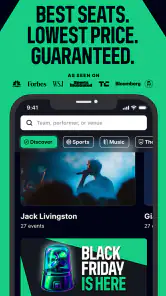
The core idea is to make a late decision easier to act on. You can search by event or date, or browse what is trending, then compare available seats before choosing. That helps answer a common practical question: is there something worth going to tonight, and can I find a ticket that suits me? It does not remove the need to check the event details carefully, but it narrows the hunt to a single app instead of sending you straight into a broad web search.
Snag Those Tickets in a Flash
The magic of Gametime lies in its ability to help you grab tickets even when you think all hope is lost. The app lets you browse and buy tickets for sports, concerts, and theater events happening in your area. It's like having a personal ticket agent in your pocket. And let me tell you, the interface? Slicker than a cat on a hot tin roof. Navigating through the app is a breeze. You can search by event, date, or just see what's trending.
Why Gametime Stands Out
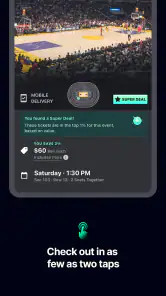
Now, you might be wondering, what makes Gametime different from the other ticket-buying apps out there? For starters, their last-minute deals are hard to beat. I mean, who doesn't love snagging a great deal? Plus, the app offers a view from the seat feature. Yes, that's right! You can actually see what your view will look like before you purchase. Talk about transparency!
Seat previews are especially helpful when the cheapest option is not automatically the best one. I would compare the view with the seat’s location and my own priorities: for a high-energy match, being close to the action may matter more than having a broad view, while at a concert I might prefer a clearer look at the whole stage. A useful habit is to decide your acceptable price and seating range before browsing. That keeps a tempting last-minute listing from turning into a rushed purchase that does not fit the evening.
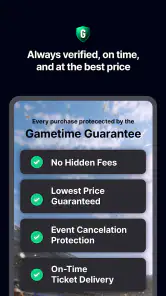
Another thing that caught my attention is the app's commitment to customer satisfaction. If your event gets canceled, you can expect a full refund. It’s these kinds of small touches that make a big difference.
More From Our News Desk

Weather by Xiaomi Review: Clear at a Glance, Less Clear Up Close

X Under Pressure: Can It Recover When Posting Goes Wrong?

Clash of Clans Is Won Between the Battles

Android Auto Makes the Case for Quieter Car Software

MobiOffice: Transforming Mobile Productivity with Seamless Integration

EA SPORTS FC™ Mobile Soccer: Redefining Mobile Sports Gaming
Making a same-day plan work
Imagine finishing work with an unexpectedly free evening. You open the app, check events by date, and spot a game or comedy show that fits the time you have. Before buying, I would confirm the venue and start time, look at the seat preview, and make sure the group agrees on a price ceiling. Those quick checks matter more when a decision is spontaneous: everyone may be ready to go, but travel time and meeting arrangements still need to make sense.
The mobile-ticket approach is convenient for that kind of plan because the ticket is sent to your phone rather than requiring a printout. I would still make sure my phone is charged before leaving and keep the ticket easy to find, especially if I am heading straight from another commitment. For a group, sorting out who is purchasing and how much each person owes before checkout can prevent awkwardness later; the in-app cost-splitting option may help, though friends should agree on the arrangement first.
Planning around the group, not just the listing
For a pair of friends with different tastes, browsing by date can be more useful than starting with a single performer or team. One person may be set on a game while the other is open to comedy or a concert; looking at several event types gives the group a way to compare the whole outing, not just ticket prices. I would agree on the latest acceptable start time and a travel radius before searching. That prevents an appealing seat from winning out when the event is too far away to reach comfortably.
With a larger group, the main question is not only whether tickets remain but whether the available seats work together. I would check the seat map before anyone pays and avoid assuming that several listings near one another are adjacent. If sitting together is essential, flexibility about event choice may not solve the problem; buying earlier or using the venue’s own sales channel can be a better route. Gametime is most persuasive when a group can adapt, rather than when every person needs an exact seat arrangement.
Where the convenience has limits
Last-minute browsing is not the same as guaranteed bargain hunting. A deal depends on the event, the seats left, and what you consider good value, so I would not choose an event purely because a listing looks inexpensive. Popular shows may have limited options, and a seat preview can help you judge a location without telling you whether that view is worth the asking price to you. If you need a particular section, accessible arrangement, or a large block of seats together, checking early through the venue or another established ticket seller may be the safer approach.
Compared with going directly to a venue’s box office, Gametime is more convenient for scanning different events and seat choices in one place; the box office can be preferable when you want to confirm venue-specific details or have a very particular seating need. Compared with general resale marketplaces, the app’s emphasis on near-term plans makes it a natural fit for a spontaneous outing, but I would still compare the final checkout total and ticket terms before committing. The displayed ticket price is only one part of deciding whether the whole evening works for your budget.
That comparison matters most when the outing has extra costs attached. A ticket that seems like a bargain may not feel like one after transportation, parking, food, or a late return are considered. I use the app to shortlist possibilities, then judge each one against the full plan and not just the seat. If an event needs a long trip or a complicated arrival, checking the venue’s own information before purchase is sensible, even when the ticket itself looks straightforward.
Easy Peasy Lemon Squeezy
Purchasing tickets on Gametime is as simple as pie. You just tap on the event you’re interested in, check out the available seats, and with a few swipes and taps, you’ve got your tickets. The tickets are sent straight to your phone, so there’s no need to worry about printing them out. Just show your phone at the gate, and you're in!
Plus, if you’re going with friends, you can even split the cost of tickets within the app. It doesn’t get any easier than that.
One small but useful workflow is to settle the practical decisions before opening checkout: decide who is paying, confirm how the group will divide the amount, and make sure everyone is comfortable with the selected seats. This is particularly helpful when people are browsing on their own phones and reacting to different options. The cost-splitting feature can make payment coordination easier, but a quick agreement in the group chat avoids treating it as a substitute for deciding who is responsible for the purchase.
What to check before tapping buy
I would slow down for one final review even if the app makes the purchase feel quick. Confirm the event identity, date, venue, seat location, and the total shown at checkout. If the event is in an unfamiliar venue, check how the section is situated and whether the entrance or arrival plan suits your group. A seat preview is useful context, not a guarantee that every part of the experience will match your expectations.
For a same-day outing, I would also leave a little time to make sure each person can access their ticket on their own phone or knows whose device will be used at entry. Keeping the ticket accessible before reaching a busy entrance is more reliable than trying to find it while the group is moving. These are ordinary checks, but they matter because the app’s speed can encourage people to focus on securing seats and overlook the rest of the evening’s logistics.
Who gets the most from it
I think this app is best for flexible people who can choose between several events, accept a range of seats, and are comfortable making a plan on short notice. Sports fans, concertgoers, and anyone looking for a nearby comedy night can use the browse-and-compare flow without first committing to a specific venue. It is less suitable if your priority is planning months ahead, securing a tightly grouped set of seats, or verifying every detail directly with a venue before buying. In those cases, an official venue channel or an earlier purchase may be a better fit.
It also suits people who enjoy deciding based on what is available rather than chasing one specific sold-out performance. A flexible couple looking for something to do after dinner, or a solo fan who is happy to choose from a few remaining sections, can make good use of the fast browse-and-compare approach. By contrast, someone buying for a family with fixed arrival needs, a fan who must sit in a particular area, or a group that cannot split up may be better served by planning ahead and purchasing through a channel that directly addresses those requirements.
If you are deciding whether it belongs on your phone, I would think of it as a discovery and purchase tool for spontaneous live plans, not a replacement for every ticketing route. Its strongest use is turning “we could go out tonight” into a focused look at nearby possibilities. For a confirmed date far in the future, a specific seat request, or a purchase that requires detailed venue guidance, the venue’s own box office or an earlier booking process is likely the more comfortable choice.
Wrapping It Up
In the world of last-minute decision-making, Gametime - Last Minute Tickets is a game changer. Whether you're a sports fanatic, a music lover, or someone who enjoys live performances, this app has something for everyone. With its user-friendly interface, fantastic deals, and customer-first approach, it's no wonder people are raving about it. So next time you're in the mood for some spontaneous fun, remember Gametime has got your back.
As an events app released in 2014, it has had time to become familiar to a large audience, with around 34,000 written reviews alongside its ratings. I would treat that popularity as reassurance that it is an established option, not as a substitute for checking the specific event, seat, and checkout details that matter to my plans.
So, what are you waiting for? Dive into the world of last-minute adventures and let Gametime make it happen!
Gametime - Last Minute Tickets Frequently Asked Questions
Can I browse Gametime before deciding whether to buy a ticket?
Yes. Gametime is designed for browsing live-event ticket listings as well as making purchases, so you can look through available options before committing. Compare the events and tickets shown in the app, then decide whether anything suits your plans and budget. Keep in mind that listings can change with location and timing, so an option you see may not remain available.
Is Gametime suitable for someone planning an event outing at the last minute?
Gametime is built around finding live-event ticket deals, including last-minute options for sports, concerts, festivals, and comedy. That makes it worth exploring when you are considering a spontaneous outing. Browse the current listings and check the ticket details before purchasing, since the choices available depend on what is listed for your location and when you search.
Is Gametime free to download, and which devices can run it?
Gametime is free to download and is intended for mobile use, so you can browse event tickets from your phone. It requires iOS 8.0 or later, making it important to check your device’s operating system before installing. The download itself is free; ticket purchases are separate, and the total cost depends on the event and tickets you choose.
What kinds of events can I find through Gametime?
Gametime focuses on live events, including sports, concerts, festivals, and comedy, with tickets aimed at people looking for deals and last-minute options. You can browse what is available and compare listings before deciding whether to buy. The selection depends on events and tickets listed in the app, so availability may vary by location and timing.
What is Gametime and how does it work?
Gametime is a mobile app designed to help users find and purchase last-minute tickets for sports, concerts, and theater events. The app aggregates available tickets from various vendors and provides users with a simple, user-friendly interface to browse, compare prices, and purchase tickets directly from their mobile device. It also offers digital ticket delivery, ensuring a seamless experience for spontaneous event-goers.
Pros
- Easy last-minute ticket booking
- User-friendly interface
- Real-time event updates
- Exclusive discounts and offers
- Secure payment options
Cons
- Limited to certain cities
- Occasional app crashes
- High service fees
- Limited customer support
- No refund on ticket cancellation
- Category
- Events
- Version
- 2025.30.1