TickPick - Live Event Tickets
- 6.60K
- 4.8
- Installs
- 1.00M
- Price
- Free

Screenshots





Analysis by Reviewed
I use TickPick - Live Event Tickets as a way to explore concerts, sports and theater plans in one place, especially when I have an event in mind but have not settled on a date or seat. It is a free events app from TickPick LLC, and its focus is practical: browse upcoming events and compare ticket options. I would treat it as a useful starting point, not a promise that every event or seat will be the right fit.
What free access does—and does not—tell you
There is no charge to download the app, which makes it easy to look around before deciding whether to buy tickets. That is different from saying tickets themselves are free: a purchase is a separate decision, and I would judge its value by the event, seat and final checkout total. The app’s no-fee approach is appealing if the displayed price carries through to checkout, but I still recommend checking the final amount before paying rather than assuming every listing will suit your budget.
A useful way to compare event options
When I am choosing between a few possible plans, having concerts, sports and theater together makes browsing more convenient than starting over in separate places. A ticket marketplace can also be helpful when a popular event has limited availability, though the presence of listings does not mean the cheapest option is necessarily the best seat or the best overall value. I would compare the location and ticket details as carefully as the price, then decide whether the event is worth that particular trade-off.
What Exactly is TickPick?
So, what's the deal with this app? Well, TickPick is a ticket marketplace that lets you buy, sell, and even bid on tickets for a wide range of events. From concerts and sports games to theater shows, this app covers it all. The best part? There are no added fees. Yep, you heard that right! What you see is what you pay, which is a huge relief when you're trying to stick to a budget.
Features You'll Love
One of the standout features for me was the bidding system. It’s like eBay for tickets! You can place a bid on tickets, and if your bid is accepted, you score an awesome deal. Plus, the app's interface is super user-friendly. Navigating through events and finding tickets is a breeze, even when you're in a rush.
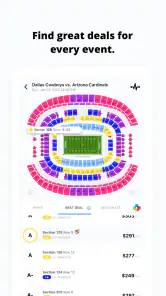
Another cool feature is the “Best Deal” tag. TickPick highlights tickets that provide the best value for your money, saving you the hassle of comparing prices across different sellers. And if you're a sports fanatic, the app's integration with SeatGeek’s Deal Score helps ensure you're getting the most bang for your buck.
Getting more out of a search
For a last-minute concert plan, I would start by searching the event, then compare a few seats rather than choosing the first low price I see. The useful question is not simply “Which ticket costs least?” but “What do I give up for that price?” A seat farther from the stage or court may be a sensible saving if I mainly want to be there; for a theater performance where sightlines matter to me, I might be more selective. This habit makes any value label a prompt to investigate, not a substitute for my own priorities.
More From Our News Desk

Weather by Xiaomi Review: Clear at a Glance, Less Clear Up Close

X Under Pressure: Can It Recover When Posting Goes Wrong?

Clash of Clans Is Won Between the Battles

Android Auto Makes the Case for Quieter Car Software

MobiOffice: Transforming Mobile Productivity with Seamless Integration

EA SPORTS FC™ Mobile Soccer: Redefining Mobile Sports Gaming
Bidding also calls for patience and a clear limit. I would decide what the event is worth to me before placing an offer, and avoid treating an accepted bid as a bargain until I have checked the ticket details and total. If I need certainty quickly, browsing available listings may be a better fit than waiting to see whether a bid succeeds. That distinction matters when coordinating with friends or planning around a fixed evening.
Why Choose TickPick?
Why should you choose TickPick over other ticket apps? First off, the no-fee policy is a game-changer. There’s no shock of hidden fees at checkout, which is a breath of fresh air. Secondly, the app boasts a solid selection of tickets, even for sold-out events. The peace of mind that comes with their BuyerTrust Guarantee, ensuring you’ll get valid tickets or your money back, is also a huge plus.
Where it fits among ticket options
Compared with a venue’s own box office, a marketplace is useful when I want to scan different events and listings in one place, rather than checking each venue separately. The box office may be the simpler choice when I already know the exact event and want to buy directly from its official source. Other ticket apps can also be worth checking: availability and seat choices vary, so I would compare the same event and similar locations before committing. TickPick’s value-focused tools help narrow the search, but they do not remove the need to check the details that matter to me.
A practical scenario: if a friend suggests a game after work, I can browse the event and weigh a lower-priced seat against a better location before we agree on a budget. If we cannot settle on a section or the available options do not feel worthwhile, I would pause instead of buying just because tickets are visible. The app is most helpful when it supports a decision, not when it pressures me into making one.
Making a shortlist before checkout
One useful habit is to keep the group’s priorities separate from the price hunt. If I am organizing a night out, I first ask whether everyone cares most about sitting together, being close to the action, or keeping the spend down. Then I compare listings against that choice instead of sending around a string of low prices with no context. For a concert, a cheaper seat may still be a good pick if the goal is sharing the experience; for a theater outing, I might favor a clear view even if it costs more. That small bit of planning prevents the app’s abundance of options from turning into decision fatigue.
I would also avoid assuming that two listings in the same section are interchangeable. Before choosing, I check the precise seat or area information shown and make sure it matches what the group expects. If the listing leaves me uncertain about the location, I would compare another option or switch to the venue’s own sales channel. A low number alone is not enough reason to accept an unclear trade-off.
When browsing is better than bidding
The bidding option makes most sense when I have flexibility: I am interested in an event, have a firm maximum in mind, and can accept that an offer may not work out. It is less suitable when the event is the centerpiece of a fixed plan or when several people need tickets together. In that situation, I would prioritize a listing that gives me the certainty I need, even if waiting for a bid might seem tempting. Bidding should be a way to pursue a price that fits my limit, not a promise that a ticket will appear at that amount.
For anyone new to ticket marketplaces, I would treat each step as a separate decision: choose the event, compare the seat details, review the complete amount, and only then commit. This keeps the search focused and makes it easier to stop if the available choices do not meet the plan. The app can make comparing options convenient, but the judgment about what is worth buying still belongs to me.
And let's not forget about the customer service. Based on my interactions, the support team is responsive and ready to help resolve any issues, which can be a rarity in the ticket-selling industry.
Who is likely to get value from it?
I can see this working well for people who attend live events, like comparing listings and are comfortable weighing seat details against cost. It is also handy for someone casually browsing upcoming entertainment before choosing a plan. I would be more cautious if I need a particular seat, prefer buying only from a venue, or do not want to compare marketplace listings. In those cases, an official box office or another seller with the exact option I need may be a better match.
The app has a 4.8 average from around 47,000 ratings, with more than a million installs. It is free, rated for Everyone, and version 5.0.54 supports iOS 8.0 and later. TickPick was released on November 6, 2014, and its established presence is reassuring as a sign that people use it, though popularity alone cannot tell me whether a particular listing is right for my plans.
Choosing it for the right kind of night
I would recommend it most to someone who has a broad idea of what they want—perhaps live music this month, a game with friends, or a theater night—and is willing to compare possible dates or seats. That person can benefit from seeing different event types together and using the value cues as a starting point. It is less compelling if the plan is already fixed down to a particular seat, or if the buyer wants to avoid resale listings altogether. In those cases, direct purchasing from the venue can reduce the number of decisions involved.
It also suits the friend who often becomes the group’s unofficial planner. You can use the app to gather a few realistic options, share the important differences in location and cost, and let the group decide before anyone pays. I would not treat a shortlist as a reservation, though: until a purchase is complete, the group should be ready for an option to change. Agreeing on a backup section or a maximum spend beforehand makes that conversation much easier.
What I would check before paying
My final pass is deliberately simple: confirm that the event and date are the ones I intend to attend, check the seat information, and review the total at checkout. I would also make sure the number of tickets and any other details match the group’s plan. If something seems inconsistent, I would stop and inspect the listing rather than hoping it sorts itself out later. This is especially useful when buying in a hurry, when it is easy to focus on a deal label and overlook a detail that matters more.
How should I decide between TickPick and an official box office? If I am still exploring and want to compare event options, I would start here; if I know exactly what I want and value a direct purchase above marketplace comparison, I would check the venue. And should I bid or buy from a listing? I would bid only when I can tolerate uncertainty, and choose an available option when timing or group coordination matters more. Those are practical distinctions, not a claim that one route is always better.
Final Thoughts
In the world of ticket purchasing apps, TickPick - Live Event Tickets stands out with its straightforward pricing, user-friendly interface, and reliable customer service. Whether you're a die-hard concert-goer or just looking for a fun night out, this app makes the process of buying tickets as painless as possible. So next time you're on the hunt for event tickets, give TickPick a try. You might just find your new favorite app for grabbing those must-have tickets.
My verdict is to try it if you want a free way to browse live events and compare ticket choices, while keeping your own budget and seat preferences in view. The strongest reason to use it is the combination of a broad event focus and price-comparison tools; the main reason to skip it is if you want a guaranteed specific seat or prefer a direct venue purchase. I would use it to shortlist options, verify the final details, and buy only when the listing makes sense for the night I have planned.
TickPick - Live Event Tickets Frequently Asked Questions
Can I use TickPick to discover upcoming events near me?
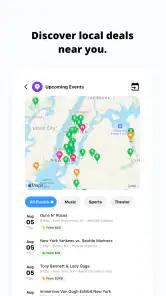
TickPick is designed to help users discover upcoming events as well as explore tickets for concerts, sports, and theater. It can be useful if you have a particular event in mind or want to browse options before deciding what to attend. Once you find an event that interests you, you can review the available ticket choices in the app.
Is TickPick available for both Android and iOS?
TickPick is a mobile app for event ticket browsing and transactions, and it is available for Android and iOS users. On Android, it requires version 8.0 or later, so it is worth checking your device’s operating system before downloading. The app is free to install, making it easy to try its event-discovery and ticket-search features.
Can I browse events in TickPick before creating an account?
TickPick is built around discovering upcoming events as well as finding tickets for concerts, sports, and theater. You can explore the app to get a feel for the events and ticket options that interest you before deciding whether to proceed with a purchase. When you are ready to buy or sell, follow the account and checkout steps shown in the app.
Is TickPick free to download, and which devices can run it?
TickPick is free to download and is intended for event ticket browsing and transactions on mobile devices. The app requires Android 8.0 or later, so check your device’s operating system before installing. Once installed, you can use it to discover upcoming events and explore ticket options for concerts, sports, and theater shows.
What is TickPick and how does it work?
TickPick is a mobile app designed for buying and selling event tickets without any hidden fees. Users can browse a wide range of events, including concerts, sports, and theater shows. The app offers a unique bidding platform, allowing users to place bids on tickets to get the best possible price. With a focus on transparency, TickPick provides a straightforward, user-friendly interface to make ticket purchasing as seamless as possible.
Pros
- No hidden fees on ticket purchases.
- User-friendly interface for easy navigation.
- Wide selection of events available.
- Efficient customer support service.
- Secure and reliable transactions.
Cons
- Limited availability for some events.
- Occasional app crashes reported.
- Higher prices than some competitors.
- No rewards or loyalty program.
- Limited international event options.
- Category
- Events
- Version
- 5.0.54