Compass app - Accurate Compass
- 853.00
- 4.2
- Installs
- 10.00M
- Price
- Free
Screenshots
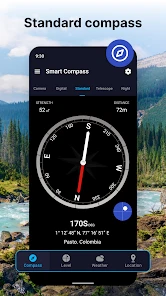
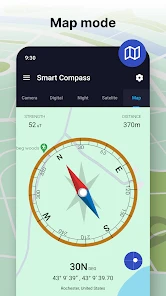
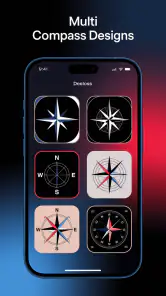
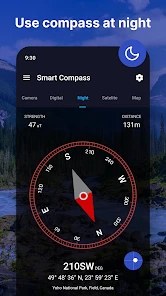
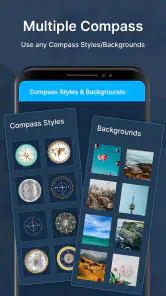


Analysis by Reviewed
I think a compass app earns trust by staying focused and making it clear what you can do with it. Compass app - Accurate Compass is a straightforward Maps & Navigation tool from Battery Stats Saver, with a free basic download and optional in-app purchases. It has a 4.2 average from around 54,000 ratings and over 10 million installs, so it has reached plenty of people, but popularity alone is not a substitute for checking whether it suits your needs.
What I would check before relying on it
A phone compass depends on the device’s magnetic sensor, and readings can be affected by nearby metal or electronics. I’d check the direction outdoors and away from a car, speakers, or other magnetic objects before using it to make a turn. If the needle behaves oddly, moving the phone away from those sources and recalibrating it is a sensible first step; for a serious route, I’d still carry a map or another navigation option rather than trust one phone.
The app is rated Everyone and is free to install, with optional purchases listed from $0.99 to $99.99 per item. That range is broad, so I’d look at the purchase details in the app before confirming anything. It is also worth asking whether you need a compass alone or full turn-by-turn navigation: those are different jobs, and a compass cannot replace route planning or road guidance.
When a simple compass is the right tool
I’d reach for this app when I already know where I’m going but need to orient myself: checking which trail direction matches a paper map, confirming a building’s facing, or getting my bearings after leaving a station in an unfamiliar neighborhood. On a day hike, for example, I could compare the phone’s heading with a map before choosing a path, then put the phone away and recheck at a junction. That is more useful than staring at a screen continuously, and it avoids mistaking a heading for a complete route.
Compared with a physical compass, the phone version is convenient because it is already in your pocket, but it relies on a powered device and can be disturbed by its surroundings. Compared with a map or navigation app, it is quicker for a basic direction check but offers less help with choosing and following a route. I would treat it as a handy orientation aid, not as my only safety tool in remote terrain.
For privacy-minded use, I’d pay attention to any permission prompt and consider whether the feature I’m trying to use needs that access. A map view or location-based function can involve different choices from simply checking a compass heading. I wouldn’t assume what data is collected or how it is handled without reading the app’s current permission and privacy information; the useful habit is to review those choices on the device and grant only what feels necessary for the task.
How I’d use it without over-relying on the screen
A useful habit is to treat the heading as one clue in a small orientation routine, rather than as an instruction by itself. Before setting off, I’d identify a landmark or a direction on a paper map, check the phone away from metal objects, and then compare the two. If they disagree, I would pause and check the environment instead of repeatedly turning until the display looks reassuring. That simple cross-check makes a pocket compass more useful without pretending it can choose a safe route.
You May Like

Clash of Clans Is Won Between the Battles

Android Auto Makes the Case for Quieter Car Software

MobiOffice: Transforming Mobile Productivity with Seamless Integration

EA SPORTS FC™ Mobile Soccer: Redefining Mobile Sports Gaming

How Microsoft OneDrive Became a Mobile Productivity Giant

How Google Translate Breaks Language Barriers Effortlessly
In a city, I can imagine using it after walking out of a station with several streets that look alike. I’d check which way a main road runs, match that with a map or a familiar landmark, and start walking only once I have a sensible reference. The app can help answer “which direction am I facing?”; it cannot answer whether a street is open, whether a path is suitable, or which route is quickest. For those decisions, a map or navigation app remains the better companion.
For hiking, the trade-off is different. A phone compass is convenient for a quick check at a junction, but a phone can run out of power or give an unsettled reading near equipment and vehicles. I’d keep a paper map and a physical compass available on a route where getting lost would matter. For an easy, familiar walk, the app may be enough for casual orientation; for remote terrain, it is better treated as a supplement.
What to expect from the sensor and display
People often ask whether a compass reading should be trusted immediately. I wouldn’t make that assumption on any phone. The sensor’s behavior depends on the handset and its surroundings, so I’d give the display a moment to settle, hold the phone steadily, and repeat the check in a clearer spot if the direction jumps around. A reading that looks stable indoors can still be affected by nearby objects, which is why an outdoor test is a more useful check before a trip.
Another practical question is whether this can replace a navigation app. In my view, no: a compass heading is not a route, and it does not tell you which turn to take or what lies ahead. The appeal here is narrower and sometimes more convenient. When I already have a destination or a map and only need to orient myself, opening a compass can be quicker than entering a route into a full navigation tool.
Getting Started with the App
First things first, it’s super easy to download the Compass app - Accurate Compass from your app store. Once installed, it greets you with a clean and simple interface, which is pretty refreshing. No frills, just straight to the point! The app automatically calibrates when you open it, which is a nice touch. Who wants to mess around with settings when you’re trying to find your way, right?
Functionality and Features
One of the things I found really cool about this app is its accuracy. I tested it against a traditional compass, and it was spot on every time. It uses your phone’s GPS and magnetic sensor to give you precise directions. So, whether you’re hiking in the mountains or just trying to locate North from your living room, it’s got you covered!
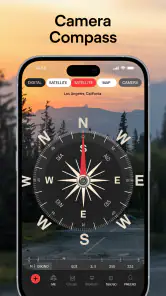
Besides pointing you in the right direction, it also provides other nifty features. For instance, there’s a map view which shows your current location and heading. This feature comes in handy when you’re navigating new areas. I also loved the fact that it shows both magnetic and true north. It’s these little details that make it stand out from the crowd.
Design and User Experience
The design is sleek and minimalistic, focusing more on functionality than flashy graphics. This makes it super user-friendly. The app’s interface is intuitive, so you don’t need a manual to figure things out. Everything is where you expect it to be, which is always a win in my book. Plus, the app doesn’t bombard you with ads, which is a huge relief!
The current version is 3.1.3 and runs on Android 5.0 or later. Since compass sensors vary between phones, I’d check how steadily the heading settles on my own device before planning around it. The app comes from Battery Stats Saver, and I’d keep expectations focused on its core role: helping with orientation rather than replacing a dedicated navigation setup.
Practical Use Cases
So, who is this app for? Honestly, anyone who needs a reliable compass in their pocket. Whether you’re an outdoor enthusiast, traveler, or just curious about directions, this app is a handy tool to have. I’ve used it for hikes, road trips, and even just for fun to figure out which way my apartment faces!
I’d skip it if I needed offline route planning, turn-by-turn directions, or a dependable backup for a long remote trip; a paper map, a physical compass, or a full navigation app is a better fit for those needs. The app was released on March 18, 2020, but what matters more to me is testing the sensor on the phone I actually plan to carry. A quick check before setting out can reveal whether the heading is stable enough for casual orientation.
Who benefits most from keeping it installed
I think this app makes the most sense for someone who occasionally needs a clear bearing and does not want to carry a separate instrument for every small task. A traveler can use it to orient a map after leaving a station; a homeowner can check which way a balcony or window faces; and a casual walker can confirm a general direction at a trail junction. In each case, the benefit is speed and convenience, not a complete navigation system.
It is less appealing for someone who expects an app to guide every step of a journey. If I need spoken instructions, route choices, traffic information, or a saved itinerary, I would use a full navigation app instead. If I need dependable navigation where battery life and signal access matter, I would plan with offline materials and a physical compass. The right choice depends on the task, not on whether one tool can do everything.
Permissions, purchases, and personal choice
Before using the map view, I’d read the permission request on my own device and decide whether location access is needed for what I want to do. I would make that choice deliberately rather than grant access automatically. A basic directional check and a map showing where I am are different use cases, so I’d consider them separately. I’d also revisit the app’s permissions in the phone settings if my needs change.
The free download makes it easy to try the basic experience, while optional in-app purchases mean I’d check the exact item and amount shown before buying anything. I would not treat a purchase prompt as necessary for a simple compass task unless I understood what it covered and wanted it. That is especially sensible when the available purchase amounts span a wide range. Staying with the free use, if it meets my needs, is a reasonable choice.
For a cautious user, the practical approach is straightforward: review the permissions the phone displays, use only the access that fits the feature being used, and check purchase details before confirming. I would not infer a privacy practice from the app’s purpose alone. Trust here is better built through visible choices on the device and a clear understanding of what I’m enabling at the moment I use it.
Overall, the Compass app - Accurate Compass is more than just a tool; it’s a reliable companion for your journey. It’s simple, accurate, and doesn’t try to be anything more than what it is, which I appreciate. Give it a try and see how it points you in the right direction!
Compass app - Accurate Compass Frequently Asked Questions
Is Compass app - Accurate Compass suitable for beginners?
Yes. Compass app - Accurate Compass is described as simple and easy to use, so it should feel approachable if you have not used a digital compass before. Its purpose is to provide directions without requiring a complicated setup. As with any compass app, take a moment to orient yourself and check the reading before relying on it while moving around.
Can I use Compass app - Accurate Compass for hiking or travel?
A compass can be useful for checking direction while hiking or traveling, and this app is designed to provide directional guidance. The published app description also emphasizes straightforward use and accurate directions. For unfamiliar routes, treat the compass as a navigation aid rather than your only source of guidance, and make sure you understand how to read its direction display before setting out.
Who develops Compass app - Accurate Compass, and what age group is it for?
Compass app - Accurate Compass is developed by Battery Stats Saver and has an Everyone content rating, making it suitable for a general audience. It is a Maps & Navigation app focused on compass directions. If you are choosing apps for a family device, the Everyone rating is useful context, while you should still review the app’s permissions and any purchase options.
Which phones can run Compass app - Accurate Compass?
Compass app - Accurate Compass is an app in the Maps & Navigation category, and it requires Android 5.0 or later. Before downloading, check your phone’s operating system version to make sure it meets that requirement. The app is developed by Battery Stats Saver and is rated for Everyone, so it is intended for a general audience.
What features does the Accurate Compass app offer?
Accurate Compass is designed to provide precise directional guidance using your device's sensors. The app features a user-friendly interface, easy calibration, and high accuracy, making it ideal for outdoor activities like hiking or traveling. It also includes a map view, allowing users to see their current location in relation to their desired direction.
Pros
- Highly accurate and reliable compass tool.
- Simple user interface for easy navigation.
- No internet connection required.
- Lightweight app with fast performance.
- Customizable settings for user preference.
Cons
- Lacks advanced features for professionals.
- Ads can be intrusive at times.
- Limited support for offline maps.
- May have compatibility issues on old devices.
- In-app purchases for additional features.
- Category
- Maps & Navigation
- Version
- 3.1.3